Home

Top Web Development Tools for Business Success in 2026

Top Web Development Tools for Business Success in 2026

Join our Newsletter!

Web development tools

In this competitive and evolving digital landscape of 2026, it has become crucial for businesses to stay ahead of the curve to make themselves competitive. Whether you are an established business that wants to scale operations or a startup launching new products, selecting the right web development tools can make or break your digital success.

Modern web app development tools are designed to enhance user experience, streamline workflows, and allow developers to create a perfect website as well as an application. In this blog, you will explore the best web dev tools that can significantly shape your business success in 2026. We will cover everything from front-end frameworks to AI-powered Web development tools and understand their importance in web development.

Looking to implement the latest web development tools to enhance your digital presence? Mindpath’s web development services can help you with professional support and customized solutions.

Importance of Modern Web Development Tools

We all know that the digital experience has become a primary touchpoint between customers and businesses. In 2026, users expect an intuitive interface, lightning-fast performance, and effortless integration. And all these things can be achieved by using the right web development tools. Here are the major benefits of using these tools:

1. Increased Productivity

By efficiently automating multiple repetitive tasks and providing users with features such as code generation, these tools can reduce development time. As a result, developers can focus on problem-solving and innovation.

2. Better Collaboration

Web development tools are designed to facilitate seamless teamwork among designers, developers, clients, and other stakeholders. This helps ensure a coordinated and cohesive web development approach.

3. Enable Scalability

Most web dev tools are designed for cloud integration and modular development. They help businesses to scale their website and apps easily based on growing demands while ensuring a consistent user experience and performance.

4. Quality and Reliability

These tools come equipped with integrated testing and debugging tools. As a result, developers can easily detect and fix errors early, leading to more reliable and stable web applications.

5. Enhanced Security

Tools like frameworks provide businesses with built-in security measures to protect web applications against threats like CSRF, XSS, and SQL injection. For example, the user authentication system of Django and the CSRF token protection feature of Laravel.

6. Cross-Platform and Cross-Browser Compatibility

Modern tools support cross-platform and responsive design features out of the box. This helps ensure a smooth user experience across multiple devices and browsers.

It can be said that web development tools are not just facilitators of design and coding. In fact, these are strategic assets that have the ability to transform how businesses approach web app development.

Now that you understand the benefits, let’s talk about the web app development tools that are the source behind these benefits and are reshaping the development process.

Wondering how to plan your web development process step by step for maximum impact? Check out the web app development roadmap for 2026 to learn how each phase fits into building a successful web application.

Top Web Development Tools to Consider in 2026

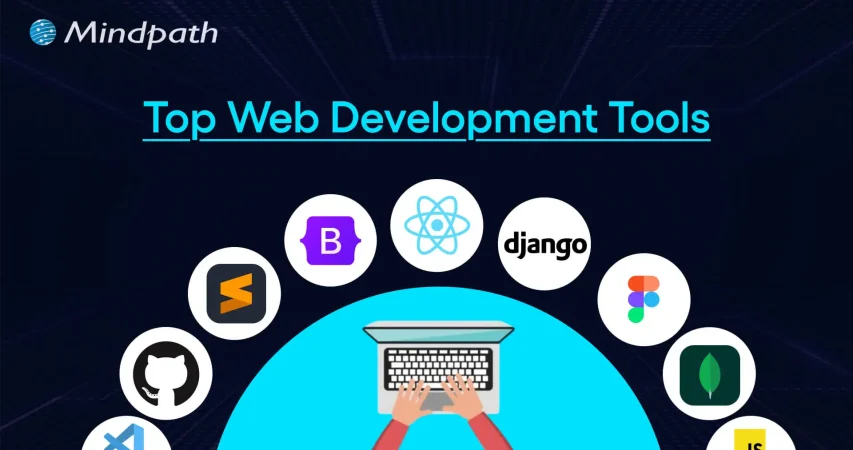
Below is the list of top tools for web development in 2026. All the tools are divided into different categories, spanning IDE, front-end, back-end, and more for an easy understanding. Have a look.

Best Front-End Tools for Web Development

Let’s begin the list with web application development tools that play an important role as they shape what customers see on a website. These tools help furnish and decorate your website with the right elements.

1. React

A product from Facebook, React is an ideal choice among developers to create complex and large-scale applications. It is based on a component-based architecture and facilitates code reusability, which is vital for long-term projects and large teams. React can handle various critical tasks such as static site generation, server-side rendering, APU routes, and more, leading to better SEO and amazing performance.

2. Vue.js

It is one of the best tools for website development and is well-known for its gentle learning curve and progressive adoption. Vue is an ideal option for businesses looking for a smooth integration of a front-end framework into their existing projects. The tool can adapt to your unique project requirements. The speed of Vue.js helps create a smooth user experience during web browsing.

3. AngularJS

Developed by Google, it offers a perfect solution for web development as well as testing. Some attractive features of AngularJS are its support for client-side Model-View-ViewModel and Model-View-Controller architectures. Besides, it also offers two-way data binding, UI with HTML, and more.

4. Svelte

If performance is your priority, then Svelte can be a game-changer for your project. It is an efficient compiler that converts code into efficient and small JavaScript bundles. That means the browser’s workload will be low, resulting in faster load times and a seamless user experience.

5. Tailwind CSS

It helps developers to create custom UI elements without spending time on writing multiple CSS codes. This eliminates issues like breakages caused by CSS code changes. Its classes are optimized for responsiveness, making it easier to develop mobile-friendly layouts.

Thinking about which frameworks or expertise your project really needs? Check out the top reasons to hire ReactJS developers for your next web project to understand why React remains a powerful choice for building responsive web apps.

Best Back-End Tools for Web Development

The back end is like the engine of your website or web apps, managing server logic, user authentication, and data. With the right back-end web development tools and technologies, you can ensure the scalability of your product.

1. Python

It is one of the easiest back-end programming languages to use, offering simple syntax and support for multiple major languages such as Java, C, and more. Besides, it can help with data analytics and visualization. What’s more? It offers robust web frameworks such as Flask and Django.

2. Node.js

For organizations creating real-time applications, microservices, and APIs, this back-end tool remains a top choice. Its non-blocking I/O and event-driven model make Node.js efficient at managing concurrent requests, which is crucial for developing data-intensive and modern web apps.

3. PHP

It can be used with multiple CMSs such as Joomla, WordPress, and more. PHP can be embedded with CSS, HTML, and other front-end systems. It supports integration for various DBs like MS SQL Server, Oracle, and MYSQL. PHP is free to use and scalable.

4. Express.js

It is one of the top-rated web development platforms created with Node.js and powered by Google V8 Engine. Using this, developers can create hybrid, multi-page, and single-page web apps. Express.js is popular for offering faster I/O, managing multiple servers, routes, and handling asynchronous requests smoothly.

Want to build a complete website without coordinating with multiple developers? Explore our post on full-stack development for web projects to discover how a full-stack approach simplifies your workflow and accelerates delivery.

Best Integrated Development Environments

For developers to handle fast development and deployment of web apps and handle large codebases, IDE web development tools and technologies play a major role. Some of the best options are:

1. Visual Studio Code

VS Code is an open-source and widely used IDE that allows developers to run and debug code. Developed by Windows, it supports multiple languages, including Python, PHP, and C++. Besides, it has built-in support for NodeJS, TypeScript, and JavaScript. Furthermore, it comes with IntelliSense to offer intelligent code recommendations.

2. GitHub’s Atom

It is an open-source desktop editor and supports multi-cursor editing, cross-platform development, and offers built-in Git control. Atom is created using HTML, Less, JavaScript, and other web technologies.

3. NetBeans

This is an excellent IDE for HTML5, CSS, PHP, and Java. The platform supports all major operating systems, such as Linux, Windows, Solaris, and Mac. NetBeans has a vast plugin support and facilitates code refactoring. Developers can use the FindBug tool to write clear code.

4. Eclipse

This free IDE for Java development supports Maven and JUnit. Besides, it comes with the necessary tools for web, testing, data, and performance. Additionally, Eclipse supports multiple plugins, languages, code refactoring, and can automate syntax validation.

5. PyCharm

It is an excellent IDE for web development projects based on Python. However, it also supports other major programming languages like Node.js, CSS, HTML, JavaScript, and more. Besides, PyCharm provides developers with out-of-the-box support for PyTorch, Gitm, FastAPI, Flask, Hugging Face, and more. It offers a detailed code analysis, an integrated unit tester, and a graphical debugger, reducing hassle for teams.

6. WebStorm

Developed by JetBrains, it is designed for web development. It can smoothly handle client-side and server-side Node.js development. Apart from JavaScript, it also supports Vue, HTML, React Native, CSS, Angular, and React. The platform offers features like auto-completion, Spy.js tools, smart code insights, and more.

Integrating CI/CD into your development cycle can boost productivity. Explore CI/CD Pipelines to discover tools and techniques for seamless automation.

Best Web App Testing and Debugging Tools

Delivering high-performing and bug-free web apps is crucial. The right testing tools can help ensure speed, quality, and compatibility across browsers and devices. Some of the best testing and debugging tools are:

1. Selenium

Selenium is a top-choice tool for automated browser testing. The tool supports various frameworks and programming languages, helping developers create test scripts for regression testing, continuous integration, and functional validation.

2. Sentry

If you are looking for a tool for real-time error tracking, Sentry would be an ideal option. It helps developers detect and fix bugs before they can affect the user experience. The tool offers real-time alerts and detailed context, reducing the effort and time required to maintain a healthy web app.

3. BrowserStack

It is a cloud-based web and app testing platform that enables teams to carry out cross-browser tests on real devices. It can also be integrated into other tools like Jenkins, Selenium, Firebase, Travis CI, Gitlab, and more. BrowserStack ensures compatibility and consistent performance across screen sizes, browser versions, and operating systems.

4. Katalon Studio

It is an all-in-one testing solution that automates the process. It supports testing of web, desktop, API, and mobile applications. With effortless CI/CD integration, built-in templates, and smart analytics, Katalon Studio simplifies testing while accelerating quality assurance workflows.

5. Lighthouse

It is an open-source website auditing tool by Google that evaluates web performance, SEO, and accessibility. After analyzing the components, it offers actionable insights to optimize site performance quality and user experience.

By integrating these tools into the workflow, you can easily detect issues early and develop trust among users, offering reliable and seamless digital experiences.

Are your web apps providing the best possible experience for users? Discover UI/UX design trends in web application development to learn how modern design trends can enhance usability and engagement.

Website Optimization and Performance Tools

In 2026, performance optimization of web apps is no longer an optional thing; it is a major priority for creating user-friendly, responsive, and fast digital experiences. Here are some tools web developer utilizes to optimize load times, diagnose issues, and optimize overall performance.

1. Google PageSpeed Insights

When talking about the best tools for website development, we can’t ignore this tool. It evaluates the content and structure of a website and offers effective suggestions to increase speed, Core Web Vitals, and mobile usability. It is an ideal tool for developers focused on performance and SEO.

2. Webpack

This is a powerful module bundler that streamlines code optimization and asset management. Webpack supports modern JavaScript frameworks and increases load times by reducing redundant code.

3. GTmetrix

GTmetrix provides developers with in-depth reports on website load behaviour, highlighting issues along with optimization opportunities. With historical tracking, performance scores, and waterfall charts, it helps optimize every layer of web applications.

Choosing the right technologies is crucial for building a high-performing web app. Explore the tech stack for your web app success to discover the best tools and frameworks for your project.

Top-Rated AI Tools For Web Development

As AI is evolving rapidly, it is changing how developers handle web development projects, making them more efficient and productive. Using these, it is possible to leverage AI to build web apps and integrate AI into the web apps.

1. GitHub Copilot

GitHub Copilot is a popular AI-powered coding assistance that provides users with real-time suggestions, code completion, and more. Created in partnership with OpenAI, it comes with a vast codebase that assists developers in writing code faster, increasing their productivity. It also streamlines the coding process.

2. Lovable

This AI-powered platform lets users create web apps and websites utilizing text prompts. That means one can create websites without any coding experience. It can generate a complete code base to create landing pages, tools, authentication systems, and dashboards. However, users with coding experience can edit the generated code to customize features and designs.

3. OpenAI Codex

Developed based on Codex-1, OpenAI Codex is designed specifically to simplify various software engineering tasks. For instance, software developers can use it to generate code or review pull requests. It can apply changes to your coding environment directly through its intelligent automation feature.

4. Wix ADI

Wix Artificial Design Intelligence has revamped the web design process. It can create customized websites automatically and quickly based on the inputs by users. First, it asks some questions to understand users’ preferences, and then, with the help of AI, it creates a fully functional website within a few minutes.

5. Applitools

This tool utilizes visual AI and automates the testing process of web applications, helping developers ensure that apps are functioning properly across different browsers and devices. Its smart mechanism compares the visual elements of an app with the baseline images and detects discrepancies.

These advanced AI-powered web development platforms simplify design, coding, and testing, making web app development smarter, more accessible, and faster.

Looking to build a website that drives engagement and conversions? Explore web design and development services to discover how professional design and development make an impact.

Top Web Development Trends to Watch Out For

Some top web development trends that may change the landscape in the future are:

1. Gesture and voice-based interfaces

2. AI-assisted development and design

3. Integration of real-time personalization systems

4. Blockchain-based user authentication

5. Massive adoption of no-code/low-code platforms

6. Increasing popularity of Headless CMSs

7. More focus on Core Web Vitals and Web performance

Businesses that are ready to embrace these changes will be able to deliver an amazing digital experience, establishing a robust online presence.

Want a web application built to match your workflow perfectly? Discover our custom web development services to learn how we create bespoke digital experiences.

Building Your Path to Digital Success in 2026

In 2026, creating a perfect website is not just about focusing on beautiful UI; it’s also about ensuring scalability, speed, seamless user experience, and selecting the right web development technologies. Whether you are creating a real-time web application or a content-rich website, choosing the right combination of developer-first technologies and front-end frameworks will be the key to success.

When it comes to creating world-class and high-performance websites, Mindpath stands out as a trusted web development company. With years of experience in this field, we combined modern design, long-term strategies, and top web development tools to offer you the solutions that can support your business growth. We have the expertise required to transform your unique digital vision into a reality. Are you planning to revamp your website or create a new one? Mindpath can be your reliable development partner in 2026.


Looking to Build Better Web Experiences?

Let’s help you choose the right tools and build a scalable web solution.

Frequently Asked Questions

The right tools depend on your project, but development environments, frameworks, testing tools, version control, and AI-powered solutions are commonly essential.
They automate repetitive work, simplify collaboration, identify errors earlier, and help developers build reliable websites and applications more efficiently.
Yes, AI-powered tools can speed up coding, testing, debugging, and content creation while allowing developers to spend more time solving complex problems.
Consider your project requirements, technology stack, team expertise, scalability needs, security requirements, integration options, and long-term maintenance before choosing tools.
Yes, the right development and testing tools can identify performance issues, optimize resources, improve loading times, and support better overall user experiences.

Support Is One Click Away

Featured Posts

Related Post

ai product development cost

Funded founders in 2026 face one critical question before everything else. Where exactly does your budget go when building an AI product? Understanding AI product development cost upfront separates smart founders from those who burn runway fast. Getting this right determines whether your product ships or stalls completely.

Key Takeaways

  • 01
    AI product costs are split across build, operations, and long-term ownership phases. 
  • 02
    Hidden costs like model drift and compliance regularly double initial development budgets. 
  • 03
    Data preparation consumes more budget and time than the actual model development. 
  • 04
    Commercial APIs win early stage, while open-source wins at significant scale. 
  • 05
    Talent remains the single largest and most unpredictable line item in AI budgets. 

Every dollar you spend on AI development needs a clear purpose behind it. The real cost to build an AI product depends on decisions made before writing a single line of code. In this blog, we explore real cost breakdowns and provide honest estimates for your budget. So, let’s keep reading further to know more!

Planning to build an AI product within your budget? We offer AI Development Services to develop scalable, cost-effective AI solutions tailored to your business.

Why Are Businesses Investing in AI Products in 2026?

The numbers make it impossible to ignore what is happening right now. Worldwide spending on AI is forecast to reach $2.59 trillion in 2026, a 47% increase year-over-year, according to Gartner. This is not speculative investment in future technology. Businesses are spending real money to solve real problems today.

A McKinsey report states that 88% of organizations now report regular AI use in at least one business function, compared to 78% just a year ago. The shift from experimentation to execution is happening faster than most anticipated. Companies sitting on the sidelines are watching their competitors move ahead quickly.

The reason behind this surge is simple. AI products are delivering real outcomes across every major business function. Here is what businesses are actually gaining:

1. Operational efficiency at scale – Repetitive workflows that once consumed entire teams now run on automation.

2. Faster revenue growth – Marketing, sales, and product development are seeing direct revenue impact from AI integration.

3. Reduced operating costs – AI handles high-volume tasks at a fraction of traditional operational costs.

4. Smarter product development – Teams ship faster, iterate quicker, and reach the market ahead of competition.

5. Better customer experiences – Personalization at scale is no longer limited to companies with massive budgets.

AI Product Development Cost: The Real Numbers in 2026

Every AI product is different, and so is every budget behind it. The type of product you build determines everything from your timeline to your total investment. Here is a realistic AI development cost estimate across every major AI product category.

1. Basic AI / API Integration

Cost: $15,000 – $40,000

Timeline: 4 – 8 Weeks

These are proofs of concept or MVPs that connect into pre-trained models like OpenAI or Anthropic APIs with minimal customization. Best suited for smart search, basic AI chat, or simple task automation.

2. AI Chatbots and Virtual Assistants

Cost: $40,000 – $120,000

Timeline: 2 – 4 Months

These products use RAG (Retrieval-Augmented Generation) so the AI references your specific business data. Includes guardrails, observability dashboards, and multi-channel support.

3. Generative AI Applications

Cost: $100,000 – $250,000+

Timeline: 4 – 10 Months

Custom-trained or heavily fine-tuned models built for domain-specific tasks. Think content generation, legal document analysis, or fully autonomous AI agents.

4. Recommendation Systems and Predictive Analytics

Cost: $80,000 – $250,000

Timeline: 3 – 8 Months

Models that analyze large historical datasets to forecast trends or serve real-time recommendations. Common in e-commerce platforms and financial forecasting products.

5. Computer Vision Solutions

Cost: $100,000 – $300,000+

Timeline: 4 – 9 Months

Covers object detection, OCR, and image classification projects. High costs are driven by massive labeled datasets and heavy GPU training infrastructure requirements.

6. Enterprise AI Platforms

Cost: $250,000 – $1M+

Timeline: 6 – 18+ Months

Complex end-to-end AI systems with on-prem or VPC deployment, MLOps data pipelines, multi-tenant security, and compliance requirements like HIPAA or SOC 2.

Hidden Costs of AI Product Development Nobody Talks About

Most teams budget for development and forget everything that comes after. Understanding these blind spots is what separates a sustainable AI app development cost from one that spirals out of control.

1. Compounding Compute and API Fees

AI has no fixed server cost like traditional software does. Every token, user interaction, and agent loop adds to your monthly bill permanently.

2. The Data Engineering Iceberg

A working model in a notebook is never a finished product. Data cleaning, labeling, and legacy system integrations consume far more budget than most teams anticipate.

3. Model Drift and Continuous Retraining

AI models degrade over time as real-world conditions shift around them. Keeping your model accurate requires a recurring annual budget that most initial plans never account for.

4. The AI-Assisted Coding Trap

Tools like Cursor or GitHub Copilot feel faster but introduce invisible technical debt. Developers spend significant time reviewing logic errors and fixing architectural decay caused by AI-generated code.

5. The Expertise Void

AI absorbs entry-level work and quietly removes junior learning opportunities over time. This creates a long-term dependency on expensive senior engineers to correct AI-generated output.

6. Compliance, Security, and Governance

Every AI system you build expands your security attack surface significantly. The real cost to build an AI product always includes security costs that your initial budget never planned for.

The 5 Core Cost Buckets of AI Product Development

Answering how much does it cost to build an AI product starts with knowing where the money actually goes. Most budgets go wrong because teams treat AI development like traditional software development. It is not the same, and these five buckets prove exactly why.

1. AI Model and API Costs

This is where most teams start, but rarely where most money goes. Choosing between open-source models and commercial APIs directly shapes your monthly spending from day one.

2. Data Acquisition and Preparation

Clean, labeled, and structured data is what separates a working product from an expensive experiment. Poor data quality forces costly rework before a single feature reaches production.

3. Infrastructure and Cloud Compute

Every model you run, every inference you serve, and every user request processed adds to this number. Infrastructure costs grow silently and hit hardest when your product starts scaling.

4. Engineering and AI Talent

Specialized AI engineers, data scientists, and MLOps professionals remain expensive and difficult to hire. Talent consistently becomes the single largest line item on most AI development budgets.

5. Deployment, Maintenance, and Compliance

Shipping the product is not the finish line. Ongoing maintenance, security patching, and compliance requirements in regulated industries add significant costs long after launch.

Full-Spectrum AI Product Development Cost at a Glance

One number never tells the full story in AI development. The AI product development cost splits across three distinct phases that most initial quotes completely ignore. Here is every cost layer mapped clearly across build, operations, and long-term ownership.

Cost Layer Cost Category Estimated Cost (USD)
Build Phase Architecture & Solution Design $10,000 – $50,000
AI Engineering & Development $30,000 – $500,000+
Data Preparation & Labeling $10,000 – $100,000+
Third-Party Integrations $5,000 – $30,000 per integration
Operations Phase Cloud Compute & Model Inference $2,000 – $20,000+/month
MLOps & Monitoring $10,000 – $50,000
Security & Compliance Audits $8,000 – $30,000 per assessment
Regulated Industry Premium +20% – 50% of total project cost
Long-Term Ownership Annual Model Retraining 15% – 25% of initial build cost/year
Maintenance & Support 10% – 25% of initial build cost/year
AI Talent Replacement Cost $80,000 – $200,000 per senior AI hire
Change Management & Training $10,000 – $30,000+

Ready to Build Your AI Product Without Blowing Your Budget?

The real AI development cost goes far beyond what any single quote will show you. Every phase, from build to maintenance, carries weight that compounds over time. Planning each layer correctly from day one is what keeps your product on track.

The true cost to build an AI product becomes predictable when you have the right partner driving every decision. At Mindpath, we deliver end-to-end AI development and SaaS development services that turn your vision into a scalable, production-ready product without surprise costs along the way.

AI Model Risk Management

AI systems can make high-impact decisions at remarkable speed, but their reliability depends on factors that are easy to overlook. Poor training data, hidden bias, model drift, weak validation, or unclear accountability can turn a promising AI system into a business and compliance risk. AI model risk management gives organizations a structured way to identify these weaknesses early, establish appropriate controls, and maintain confidence in model-driven decisions.

Key Takeaways

  1. AI model risks can emerge even when models perform well.
  2. Clear ownership strengthens accountability across the model lifecycle.
  3. Risk classification helps prioritize controls for high-impact models.
  4. Continuous monitoring catches drift and unexpected model behavior.
  5. Responsible AI requires governance, validation, and human oversight.

The challenge is not simply building a model that performs well during development. Teams must also understand how it behaves under changing conditions, who is accountable when something goes wrong, and how its decisions can be reviewed and justified. This makes risk management an ongoing discipline spanning development, deployment, governance, and monitoring. In this blog, we will explore the core practices for building safer, more reliable AI systems.

Looking to build safer and more reliable AI systems? Mindpath provides AI Development Services to help businesses design, develop, and implement AI solutions with reliability and responsible development in mind.

What is AI Model Risk Management?

AI model risk management is the structured process of identifying, assessing, controlling, and monitoring risks associated with an AI model throughout its lifecycle. It covers the decisions made before development, the way a model is trained and validated, how it performs in production, and what happens when its behavior changes or produces an unacceptable outcome. The objective is not to eliminate every possible risk, but to understand the risks well enough to apply controls that match their potential impact.

AI model risk differs from traditional software risk because model behavior is influenced by data and statistical patterns rather than only predefined rules. A conventional application may produce an incorrect result because of a coding defect. An AI model can produce unreliable results even when the underlying code works as intended because its training data is incomplete, biased, outdated, or poorly representative of real-world conditions. Its performance can also shift as users, inputs, or operating environments change.

Teams therefore need to assess several interconnected risk categories, including the following:

1. Data Risk

Inaccurate, incomplete, biased, or poorly governed data can undermine model outcomes. Data quality issues can affect training, validation, and production performance, making strong data controls an essential part of AI model risk management.

2. Performance Risk

A model may perform well in testing but fail under real-world conditions or unfamiliar inputs. Performance should therefore be evaluated across realistic scenarios and monitored after deployment to identify unexpected degradation.

3. Bias and Fairness Risk

Uneven outcomes across user groups can create ethical, legal, and reputational consequences. Organizations should evaluate models for potential bias and assess whether outcomes remain appropriate across relevant populations and use cases.

4. Explainability Risk

Limited visibility into model reasoning can make important decisions difficult to review or challenge. Where AI systems influence high-impact decisions, organizations need appropriate explanations and documentation to support accountability.

5. Security and Robustness Risk

Models may be manipulated, exposed to adversarial inputs, or behave unpredictably under abnormal conditions. Security and robustness controls help organizations reduce the likelihood and impact of these risks.

6. Compliance and Governance Risk

Weak documentation, unclear ownership, or inadequate controls can create regulatory and accountability gaps. Governance requirements should therefore be established throughout the AI model lifecycle.

Building a Governance Framework

Before organizations define individual controls, they need a governance structure that establishes who owns AI risk, how it is assessed, and when a model can move into production. A governance framework creates consistency across AI projects and gives technical, legal, security, and business teams a shared basis for evaluating risk.

The NIST AI Risk Management Framework provides a useful reference for organizing these responsibilities around identifying, assessing, and managing AI risks.

A strong governance structure typically clarifies the following areas:

1. Accountability

Assign clear ownership for each model, including responsibility for approval, monitoring, and responding to incidents.

2. Model Inventory

Maintain a central record of AI models, their intended uses, data sources, owners, versions, and deployment environments.

3. Risk Classification

Group models according to factors such as business impact, decision sensitivity, data exposure, and potential harm.

4. Defined Policies

Establish organizational requirements for development, validation, documentation, security, privacy, and responsible AI practices.

5. Approval Workflows

Set clear review gates before development, deployment, major model changes, or expansion into new use cases.

6. Cross-Functional Review

Bring relevant stakeholders together so technical performance is considered alongside legal, security, operational, and ethical concerns.

7. Documentation Standards

Keep consistent records of model purpose, limitations, testing results, assumptions, decisions, and ownership throughout the lifecycle.

8. Regulatory Alignment

Map internal governance requirements against applicable regulations and recognized frameworks to maintain a defensible approach to AI oversight.

These foundations make AI model risk management an organizational responsibility rather than an isolated task handled by the data science team. They also provide the structure needed to evaluate models consistently as AI adoption expands across different functions and use cases.

Best Practices for AI Model Risk Management

Strong controls should cover the full AI lifecycle, not only model development. The NIST AI Risk Management Framework provides a useful foundation for organizing these practices around trustworthy, accountable, and measurable AI.

1. Establish Clear Risk Ownership

AI model risk management works best when accountability is assigned before a model reaches production.

  • Define who owns the model, data, validation, approval, and ongoing monitoring.
  • Assign escalation paths for incidents, performance degradation, and unexpected outputs.
  • Involve technical, legal, security, compliance, and business teams for high-impact use cases.
  • Set approval authority according to the model’s potential business and user impact.

2. Classify Models by Risk

Not every AI model needs the same level of scrutiny. A risk-based classification helps organizations focus resources where failures could cause the greatest harm.

  • Categorize models using factors such as decision impact, data sensitivity, autonomy, and user exposure.
  • Apply stronger controls to models involved in financial, employment, healthcare, or other high-impact decisions.
  • Define minimum validation and documentation requirements for each risk tier.
  • Reassess the classification when the model, data, or use case changes.

3. Strengthen Data Controls

Model reliability starts with the quality and suitability of its underlying data.

  • Check datasets for missing values, inconsistencies, outdated records, and potential sources of bias.
  • Assess whether training data adequately represents the populations and scenarios the model will encounter.
  • Track data lineage so teams can identify where critical inputs originated.
  • Document important dataset characteristics, limitations, and processing decisions.

4. Validate Before Deployment

A strong validation process should challenge a model beyond its standard accuracy score. These AI safety best practices help identify weaknesses that conventional testing may overlook.

  • Test accuracy, robustness, fairness, and reliability against predefined acceptance criteria.
  • Use edge cases and realistic scenarios to expose failure modes.
  • Conduct independent reviews for high-risk models.
  • Test how the model behaves when inputs are incomplete, unusual, or outside its intended scope.
  • Require documented approval before production deployment.

5. Build Responsible AI Controls

Responsible AI practices should be embedded into model development rather than added after deployment.

  • Evaluate models for discriminatory or disproportionately harmful outcomes.
  • Define clear limitations and situations where human intervention is required.
  • Provide appropriate explanations for decisions that materially affect users.
  • Establish processes for users or affected parties to raise concerns or challenge outcomes.
  • Record ethical considerations alongside technical performance results.

6. Integrate Governance and Ethics

Effective AI governance and ethics connect technical controls with organizational accountability.

  • Create policies covering acceptable AI use, model approval, data handling, monitoring, and incident response.
  • Maintain a centralized inventory of models and their owners.
  • Keep consistent records of assumptions, testing results, known limitations, and approvals.
  • Review governance requirements as regulations, business objectives, and AI capabilities evolve.

7. Monitor Models Continuously

Deployment is the beginning of operational risk management, not the end. AI model risk management should continue through regular monitoring and revalidation.

  • Track performance, data drift, output quality, fairness indicators, and unusual behavior.
  • Establish thresholds that trigger investigation or model review.
  • Capture user feedback and production incidents as evidence for ongoing improvement.
  • Revalidate models after significant changes to data, algorithms, integrations, or business use.
  • Retire or replace models that consistently fall outside approved risk limits.

Is Your Team Ready to Manage AI Model Risk?

Building reliable AI requires more than strong model performance. Effective governance, disciplined data practices, rigorous validation, human oversight, and continuous monitoring help organizations identify risks before they affect customers, operations, or business decisions. A structured approach also makes it easier to respond when models behave unexpectedly and maintain trust as AI systems evolve.

Mindpath’s AI development services help businesses build and strengthen AI systems with risk, reliability, and responsible development in mind. From AI strategy and model development to RAG, fine-tuning, data engineering, and AI governance, our team helps organizations establish practical controls across the AI lifecycle. Partner with Mindpath to build AI systems designed for dependable, responsible, and production-ready performance.

Legacy modernization strategy

The technology environment that you operate in determines the rate at which your firm develops and competes. A clear legacy modernization strategy gives structure to change and turns outdated systems into growth drivers. You might feel like upgrading, but you need to know and understand. So, where do you start and how are you balancing technology objectives and business performance?

Nevertheless, modernization goes beyond updating the system. It must have a dedicated strategy that enhances scalability, security, and performance. Consequently, leaders should reason in the future and be purposeful. Innovative choices now result in robust systems in the future. In this blog, we look at how to make the correct decision that would be helpful in sustainable business growth.

Ready to turn legacy systems into growth enablers? Mindpath’s legacy modernization services guide organizations in choosing and executing strategies that unlock operational efficiency and business value.

What is a Legacy Modernization Strategy?

A legacy modernization strategy is a structured plan to update, transition, or replace outdated software and IT infrastructure, transforming legacy systems into agile, scalable digital platforms. Its core goal is to align foundational technology with current business demands, helping companies minimize technical debt, strengthen security, improve cost efficiency, and boost overall performance. When technology is aligned with business objectives, organizations build a platform that supports innovation, easier integration of advanced technologies like AI and data analytics, and sustained long-term growth.

Legacy system modernization consists of more practical strategies, including rehosting, replacing the platform or refactoring into microservices, or replacing systems with SaaS offerings. All the methods facilitate the adoption of clouds and efficiency. Organizations will be able to modernize with the right direction and remain stable and deliver improved user experiences.

Wondering how legacy upgrades can improve security and system reliability? Explore the benefits of modernizing legacy systems to strengthen your infrastructure.

Key Strategies of Legacy System Transformation

1. Refactoring

Enhance current code to eliminate technical debt to increase the efficiency without altering the experience of users using the system.

2. Replacing

Existing system to replace the old system and install a new SaaS or commercial system.

3. Rehosting

The application can be moved to newer infrastructure such as cloud with minimal or no changes in code.

4. Encapsulation (API-enabled)

Sometimes wrap legacy code with APIs to allow them to interface well with modern applications.

5. Re-architecting

Re-design the system into a new structure, e.g. microservices, to open up new possibilities.

6. Replatforming

Change to a new platform with some slight alterations in order to enhance performance without changing the core code.

7. Rebuilding or Rewriting

Build the system with a new technology but keeping the same business logic.

Looking to improve system flexibility during your modernization journey? Learn from monolith to microservices to enable faster and easier updates.

How to Choose the Right Legacy Modernization Strategy?

To make the appropriate decision, one has to be clear, plan and well aligned with business objectives. The right legacy modernization strategy depends on your system complexity, budget, risk tolerance, and long-term growth plans.

key steps to choose the right legacy modernization strategy

1. Perform a Comprehensive Assessment

Start with an elaborate system, dependency, and technical debt audit. Trace the architecture and locate the performance bottlenecks. Isolate mission critical components and features that are old. This evaluation strengthens your legacy modernization framework and guides smart investment decisions.

2. Define Clear Business Goals

Align your Legacy modernization strategy with measurable business outcomes. Clarify the need of modernization such as cost control, agility, or improved security. Establish targets of performance and scalability. Then choose an Application modernization strategy that directly supports these goals.

3. Evaluate Risk Tolerance

Determine the extent to which your organization can cope. Few risk solutions are API encapsulation or cloud rehosting. High transformation goals may require a bold legacy modernization technique like rearchitecting. Striking a balance between innovation and operational consistency is advisable before taking the final decision.

4. Prioritize Data Integrity and Security

Protect critical and historical data during every transition phase. Create a structured migration plan with validation checkpoints. Embed security controls while modernizing legacy systems. Adopt zero trust practices to reduce exposure to cyber threats.

5. Adopt a Phased Approach

Secure valuable and historical data at all levels of transition. Develop a systematic migration strategy that has checkpoints. Embed security controls while modernizing legacy systems. Employ the concept of zero trust in order to minimize exposure to cyber threats.

6. Assess Internal Capabilities and Partner Support

Analyze the internal knowledge of innovative tools and websites. Identify skill gaps that may delay your Legacy modernization strategy. Arrange training of the plan or external assistance where necessary. Collaborate with skilled professionals offering end to end solutions.

Looking to simplify your modernization process with a proven framework? Learn from the legacy modernization roadmap to move forward with confidence.

Ready to Build a Smarter Future with the Right Strategy?

Choosing the right legacy modernization strategy drives growth, resilience, and long-term performance. Companies that think strategically lower the risk and open other digital opportunities. Clarity, planned implementation, and good governance bring sustainable value. By combining technology with business vision, leaders enhance their agility, security, and scalability and remain competitive in a fast-changing market.

Being a reliable legacy modernization service provider, Mindpath delivers practical and growth-oriented solutions. Our specialists evaluate systems, build customized road maps, and implement contemporary modernization accurately. We assist organizations to minimize technical debt and increase innovation. Mindpath provides sustainable transformation, with immense technical know-how and strategic acumen, to strengthen operations and ensure quantifiable business success.