Home

The Ultimate Web App Development Roadmap for 2026

The Ultimate Web App Development Roadmap for 2026

Join our Newsletter!

Web development roadmap

Producing impactful online experiences begins with a clearly defined web development roadmap. The ultimate goal is to create an application where every click, scroll, and animation feels natural and engaging. You are not simply building webpages; you are creating experiences that resonate with people and enable ideas to be expressed, although it is an endless process that presents incredible skills to learn, tools to manipulate, and decisions that will define how your web applications will perform, appear, and feel.

Every step of this journey adds a new dimension to your skills and perspectives. From planning your layouts, designing usable interactions, creating activities, and optimizing the performance, all are built to produce something fantastic. The web development roadmap acts like a compass, guiding you towards building valuable applications for users that “stand out” in a digital moving landscape.

If you are planning to build an ultimate web app development? Mindpath’s web app development services will bring expertise and deliver digital solutions that enhance your business performance.

Understanding the Basics of Web Development

Web development is the act of developing and maintaining websites and web applications. It involves tasks like coding, design, testing, and maintaining that ensure everything is performing as it should for the user. All of these different platforms allow businesses, educational entities, governments, and other organizations to distribute information, market and sell products, provide services, and communicate with others online. Well-developed websites and web applications improve user experience, improve accessibility to information, and support business objectives, which is why they play a major role in achieving success in presently shared digital and real-world spaces.

Collectively, Business Insight Research has valued the global web development market at USD 70.6 billion in 2024, which is expected to grow to USD 141.49 billion by 2033, with a CAGR of 8.03% between 2025 and 2033. The growth is attributed to the proliferation of the internet, smartphones, and e-commerce. The globalization of business has led organizations to invest in professionals to create websites that are visually appealing, fast, and have a highly navigable experience to stay profitable.

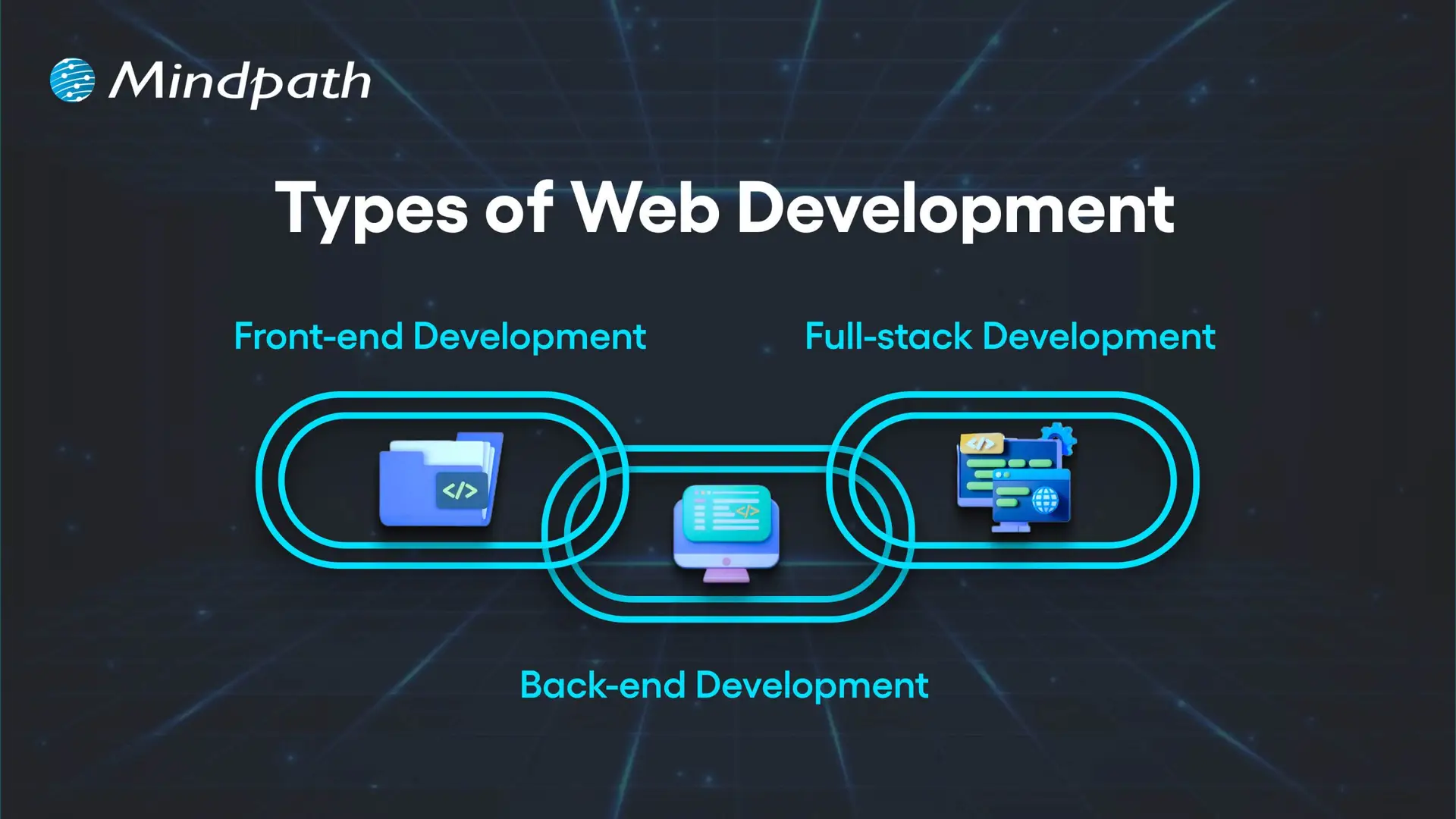
Here are the three types of Web Development
Types of Web Development

1. Front-end Development

Front-end development refers to all the content and elements that appear on the screen in a web browser. Developers using HTML, CSS, and JavaScript create page layouts, decorative elements, and interactive front-end functionality. The purpose of each front-end web page is to be visually appealing, responsive, and usable. Understanding this part is essential in any web development roadmap.

2. Back-end Development

Back-end development refers to everything that happens server-side in order for a website to run properly. Developers will work with data, databases, and user authentication and will largely be responsible for connecting the front-end to the server through application programming interfaces (API). Essentially, back-end development means processing data, executing business logic, and making sure everything is secure.

3. Full-stack Development

Full-stack development encompasses both front-end and back-end development as a way to build fully operating web apps. Developers take on user interface design, server-side, database operation, and everything in between. In this, developers are able to drive every aspect of a project and maximize consistency in integrating the interface visited by a user and the underlying system.

Curious how a web application actually works behind the scenes? Explore the role of frontend and Backend to understand how both layers drive performance and user experience.

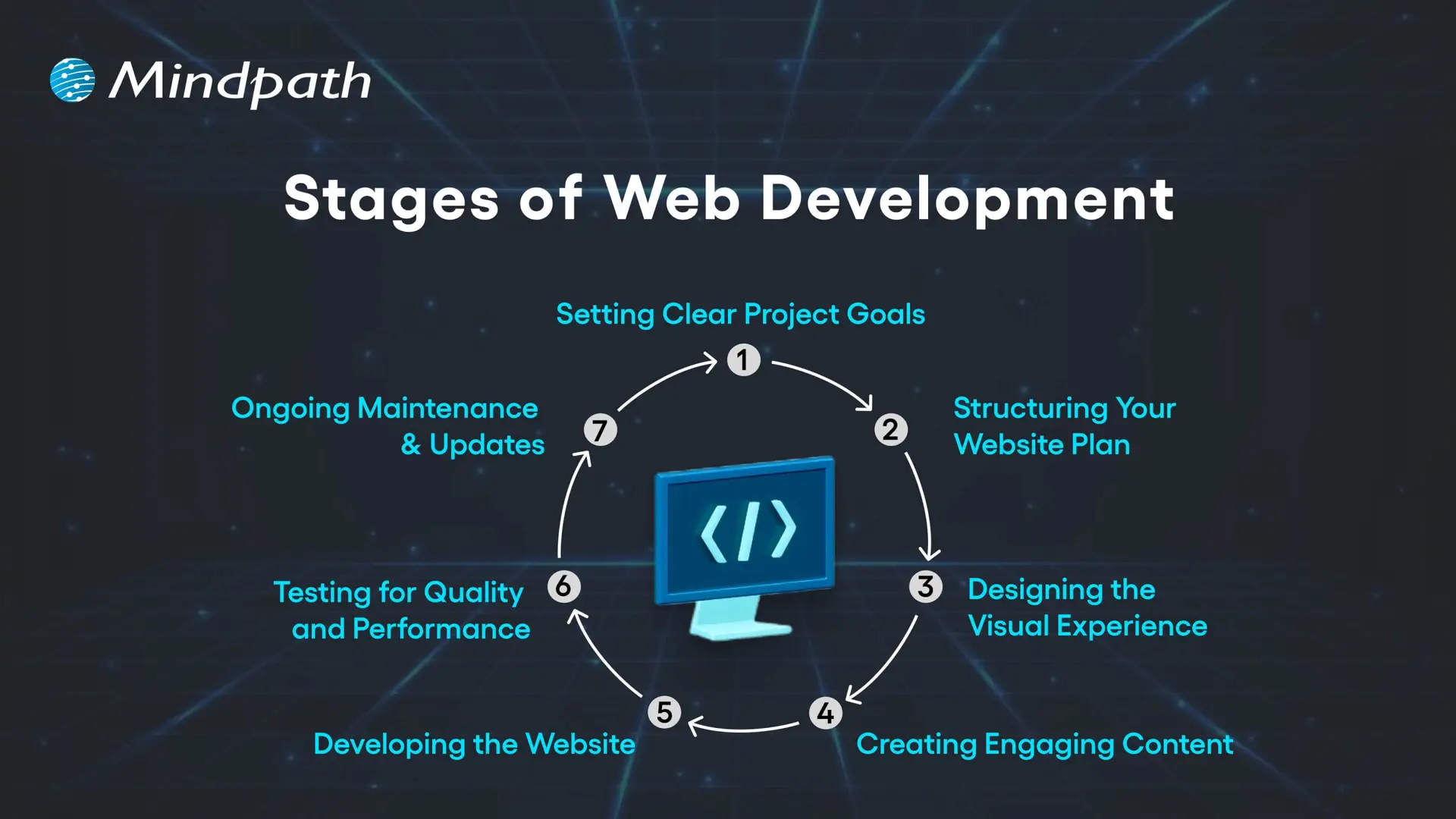
What are the 7 Stages of Web Development?

Web development is a precise discipline as it transforms ideas into interactive digital experiences. In web development, everything is sequenced and implemented purposefully, which culminates in a well-polished, functional product that leaves an impression. Each stage is dependent on the prior stage, which allows web developers to build a website or web application for a target audience. Grasping these stages is an essential step in building a successful web development roadmap.
Stages of Web Development

1. Setting Clear Project Goals

Identifying the purpose of your site is the first step, as well as how it will serve your audience. You need to identify your business goals, unique value proposition, audience preferences, and competitive space. A clear vision is the basis of the whole web development plan.

2. Structuring Your Website Plan

Developing a full model for your website will include solid materials such as sitemaps and wireframes. The sitemap will tell you how pages are linked, while the wireframes provide a visual representation of how you want the major elements of your site structured and what areas they will fill. Getting this correct will help ensure that your website navigation, layout, and the way users will travel around the site are thought out in a solid manner from the start.

3. Designing the Visual Experience

At this stage, we start to think about site aesthetic and brand elements, color, typeface, imagery, and iconography. The design must remain uniform across channels to build brand awareness. User user-friendly and aesthetically pleasing design can draw people in and build trust!

4. Creating Engaging Content

At this stage, you’ll develop content for landing pages, product descriptions, blogs, images, videos, etc., in more detail. Content not only needs to align with the needs and questions of your audience, but content also provides engagement opportunities. Keywords will be employed, and if we do this strategically, we can improve reach and connect with specific traffic that can bring targeted traffic to your site.

5. Developing the Website

Once everything about your design and content has been established, developers will start building the front end (client side) and back end (server side) of your website. Their job is to code your site, code in your required functionalities, and build a technical foundation on which the site can grow as needed. It is essential that you have the technical foundation in place, as having the right technical foundation allows your site to function seamlessly while hopefully supporting businesses in their growth.

6. Testing for Quality and Performance

Everything on your website needs to work correctly before the site launches. Prior to launch, the site must be tested on different devices and different browsers. This testing will include broken link checking, speed optimization, and mobile responsiveness. Testing is considered a crucial step in the process to ensure that the user experience is flawless when the user first experiences the website.

7. Ongoing Maintenance & Updates

Once a website is launched, it must be updated on a regular basis to remain useful, secure, and on trend. Updating a website can mean a lot of things and can include adding content, fixing bugs, adding features or functionality, and backing up. Frequent maintenance will keep you more competitive and help with longer-term success. Mastering these stages plays a vital role in shaping a clear and effective web development roadmap.

Is your web application prepared to handle modern security threats? Explore application security best practices for Web and Mobile Apps to learn how to protect your data, users, and business operations.

Web Development Roadmap 2026: A Step-by-Step Guide

A website development roadmap is a structured plan that outlines the stages, tasks, and goals involved in building and launching a website. This web development roadmap for beginners explains what a website roadmap is by showing how each step connects, helping you create a professional, user-friendly site that meets your goals and performs well in 2026.
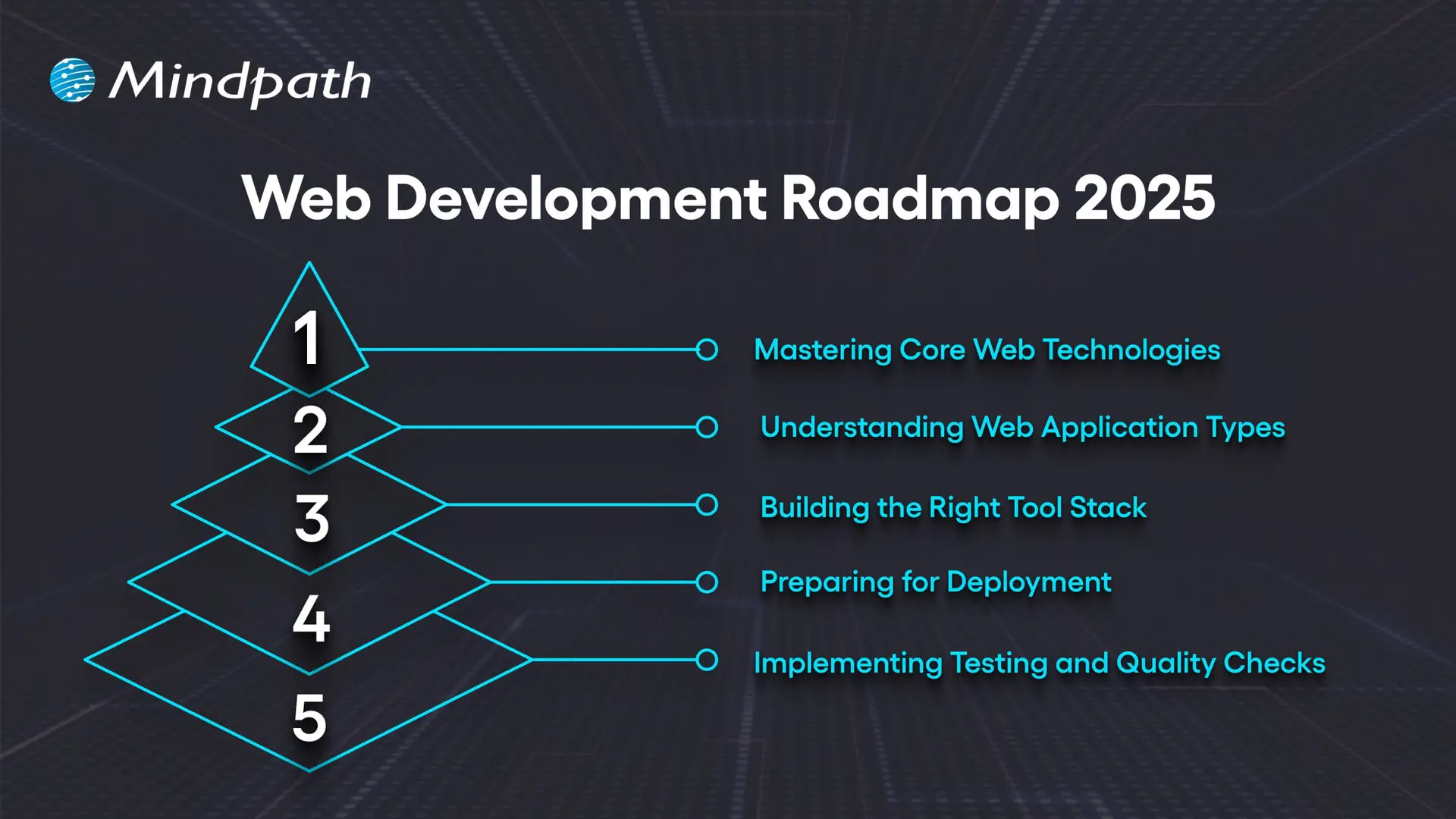
Web Development Roadmap 2025

1. Mastering Core Web Technologies

The important first part of the web development roadmap is getting familiar with the core technologies that underpin the internet. HTML provides the structure, CSS provides the layout, and JavaScript provides interactivity to web pages. Developers should be familiar with some protocols like HTTP/HTTPS, FTP, and TCP/IP that define how data is transferred between the server and the browser. The basics of accessibility, usability, and web semantics are important to know to create accessible, well-structured websites. The fundamentals are the starting point for anyone on the roadmap.

2. Understanding Web Application Types

Before you start building, it’s a good idea to understand the different kinds of web applications and their use cases. Static HTML pages indicate fixed content. Dynamic pages have content that changes based on user interaction. Server-side applications deliver content through languages like PHP, Python, and Java.

Single-page applications provide fast and fluid experiences, with only slight page reloads. Progressive web apps provide offline capabilities and app-like experiences. Hybrid apps combine web and native features. Understanding these types of web applications familiarizes web developers with the appropriate way to develop for each available project.

3. Building the Right Tool Stack

A complete full-stack web development roadmap involves selecting the proper tool set to orchestrate front- and back-end work simultaneously. For the front end, tools like React, Angular, and Vue.js facilitate responsive and interactive interfaces supported by a variety of CSS pre-processors like Sass for long-term maintainability. For the back end, languages like Java, Python, and PHP power the application logic supported by frameworks like Express.js and Django.

Databases like MySQL and MongoDB facilitate data storage. APIs link the client and server, which helps decouple the presentation of data and business logic. There are many elements that the client and server need against the tool stack for productivity, scaling, and performance.

4. Preparing for Deployment

Deployment refers to the process of making your application available to users on the internet. While the use of Git version control helps keep track of application code changes, Docker guarantees the environment in which we run applications will be consistent. Orchestration tools such as Kubernetes are used to serve developer needs when we are doing large deployments.

Most CI/CD pipelines, like Jenkins and GitLab CI, work together to automate the build and release process for applications. Many providers in the cloud space, such as AWS, Azure, and Google Cloud, give us secure environments where our products can be built and serve to scale with ease. Finally, monitoring tools will allow a web developer to track the service performance and ensure their application is performing as expected post-launch.

5. Implementing Testing and Quality Checks

Testing is vital in web development because it ensures that the website is functioning across devices, browsers, and user conditions. Testing types include unit tests, which test individual items (API, elements, etc at the component level) integration testing, which tests that the pieces of the application work together correctly, and end-to-end testing, such as Cypress or Selenium, which will simulate user behaviors to verify a complete workflow. Accessibility testing is a type that checks that the website can be accessed by individuals with disabilities, and performance testing looks to see how quickly the site responds and how it responds under heavy load conditions.

Periodic testing is an essential factor of this process that leads to quality and reliability in the web. The integration testing tests the pieces of the application work together correctly; and end-to-end testing, such as Cypress or Selenium, which will simulate user behaviors to verify a complete workflow.

Not sure which technologies are right for your web app? Explore the tech stack for your web app success to make informed decisions that drive growth and reliability.

Want to Turn Your Web Development Roadmap into a Success Story?

Following a clear web development roadmap ensures you move through each stage with purpose and precision. It helps align design, functionality, and performance to create websites that truly serve their audience. By mastering core technologies, understanding application types, and implementing strong testing, you build projects that are scalable, secure, and ready for long-term success.

At Mindpath, we create websites that are fast, secure, and built to grow with your business. Our web development services cover everything from front-end design to back-end functionality, ensuring a seamless user experience. We specialize in custom web applications, e-commerce platforms, CMS solutions, API integrations, and performance optimization. With a focus on scalability, usability, and innovative design, we turn your ideas into high-performing digital solutions that engage users and deliver results.
Ready to Turn Your Web Idea Into Reality?

Follow a clear development roadmap to build secure, scalable, and high-performing web applications.

Frequently Asked Questions

Support Is One Click Away

Featured Posts

Related Post

Devops vs devsecops

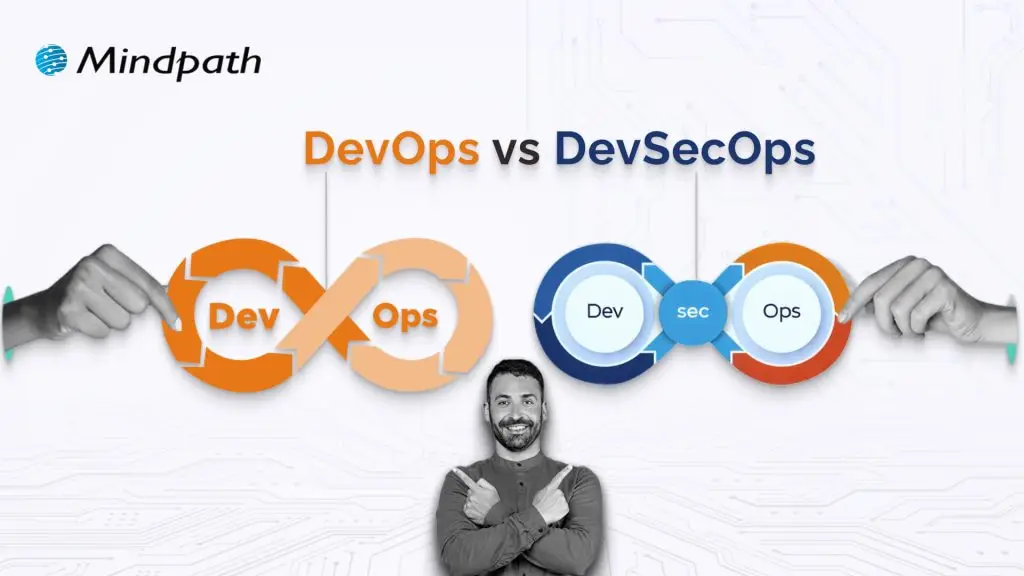
DevOps vs. DevSecOps is a topic that will often arise when companies look for better and faster software delivery. Businesses are looking to release applications and software faster than ever, but they are also mindful of the growing sophistication of security threats. So where can businesses find the balance of speed and safety? This is where the transition from DevOps to DevSecOps comes into play; the need for speed is balanced with more stringent security requirements.

In today’s fast-moving digital age, the speed of development plays an important role, but it’s hardly enough. In addition to wanting systems that develop software quickly, organizations want systems that will also withstand vulnerabilities at each stage. That is why there’s so much interest in DevSecOps. DevSecOps does not replace DevOps; it enhances it by using continuous security assessments and ongoing protection. A clear understanding of these differences allows businesses to make better choices that can balance innovation with resilience. So, keep reading further to know the difference between DevOps and DevSecOps in this blog.

Still unaware of how DevOps benefits your business? Get in touch with us to gain full insight into adopting DevOps services that makes your operations seamless.

What is DevOps?

DevOps is a collaborative software development methodology that unites an organisation’s Development (Dev) and IT Operations (Ops) teams to deliver software faster, more reliably, and at greater scale. Its foundation is automation, continuous integration (CI), and continuous delivery (CD), commonly combined as CI/CD. DevOps helps break down silos between teams, enabling shared goals while reducing risk. It simplifies processes, improves team efficiency, and aligns technology outcomes with both customer and business objectives.

Furthermore, it drives a cultural change that values accountability, empathy, and shared responsibility. With automation, fast iterations, and rapid feedback, businesses are able to deliver secure and reliable software. In addition to this, not only does the process encourage innovation and creativity, but it also gives businesses flexibility and resilience in a competitive marketplace.

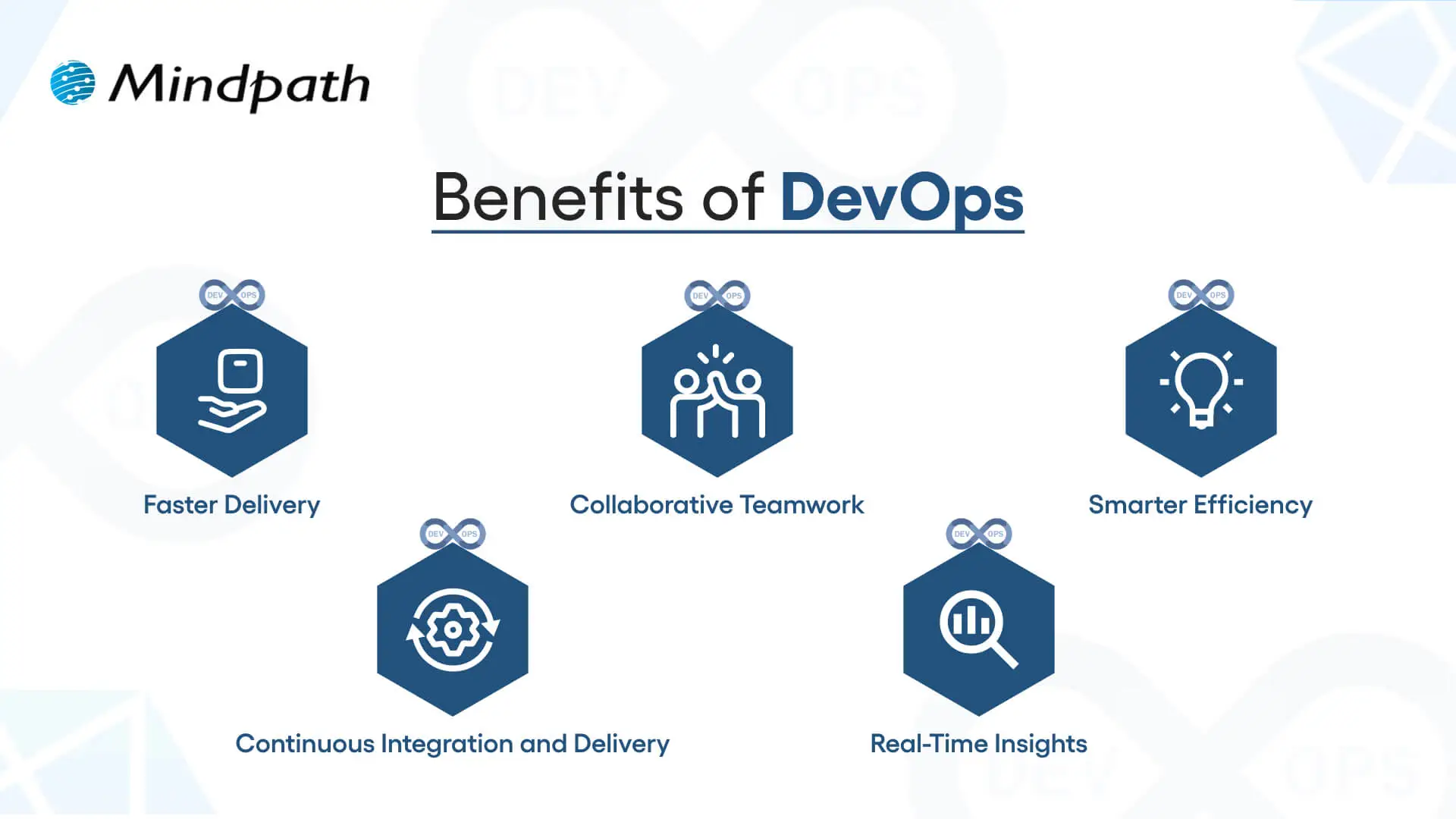
Here are some of the benefits of DevOps: 

1. Faster Delivery

Development cycles can go a lot quicker with automation and simplified processes. This enhanced delivery allows more frequent releases and decreases time to market.

2. Collaborative Teamwork

Development teams, operations, and other teams are all working toward common goals. Good team collaboration eliminates silos and improves project quality.

3. Smarter Efficiency

Automation eliminates repetitive tasks and optimizes workflows. Teams have the ability to save time and focus on activity that produces value, instead of spending time on manual processes.

4. Continuous Integration and Delivery (CI/CD)

Continuous integration and continuous delivery allow for reliable and consistent deployments. Your users can get new features and fixes fast and seamlessly.

5. Real-Time Insights

Monitoring tools enable instant visibility across the ecosystem. Teams can identify problems early, troubleshoot quickly, and improve performance.

These points explain how DevOps speeds up collaboration and delivery when comparing DevOps vs. DevSecOps, while DevSecOps extends an approach that has been inherently faster approach by adding stronger security practices.

Curious how automation and modern practices can improve your DevOps pipeline? Visit our blog on DevOps Trends to discover actionable insights and emerging innovations.

What is DevSecOps?

DevSecOps (Development, Security, and Operations) is the practice of integrating automated security checks into every phase of the software development lifecycle. It unites development, security, and operations teams so they can plan, build, test, and release applications together, making security a shared responsibility from the start. In return, DevSecOps allows for faster, more reliable processes, ensuring that security is built in from the very beginning rather than added as an afterthought.

To better understand the three pillars of DevSecOps, simply think of collaboration, automation, and continuous security. Collaboration ensures that everyone is sharing the responsibility, automation introduces automated security checks into CI/CD pipelines, and continuous security ensures that monitoring is continuous. With the three pillars of DevSecOps, organizations are able to create dependable applications while implementing continuous security measures to defend them against constantly evolving threats.

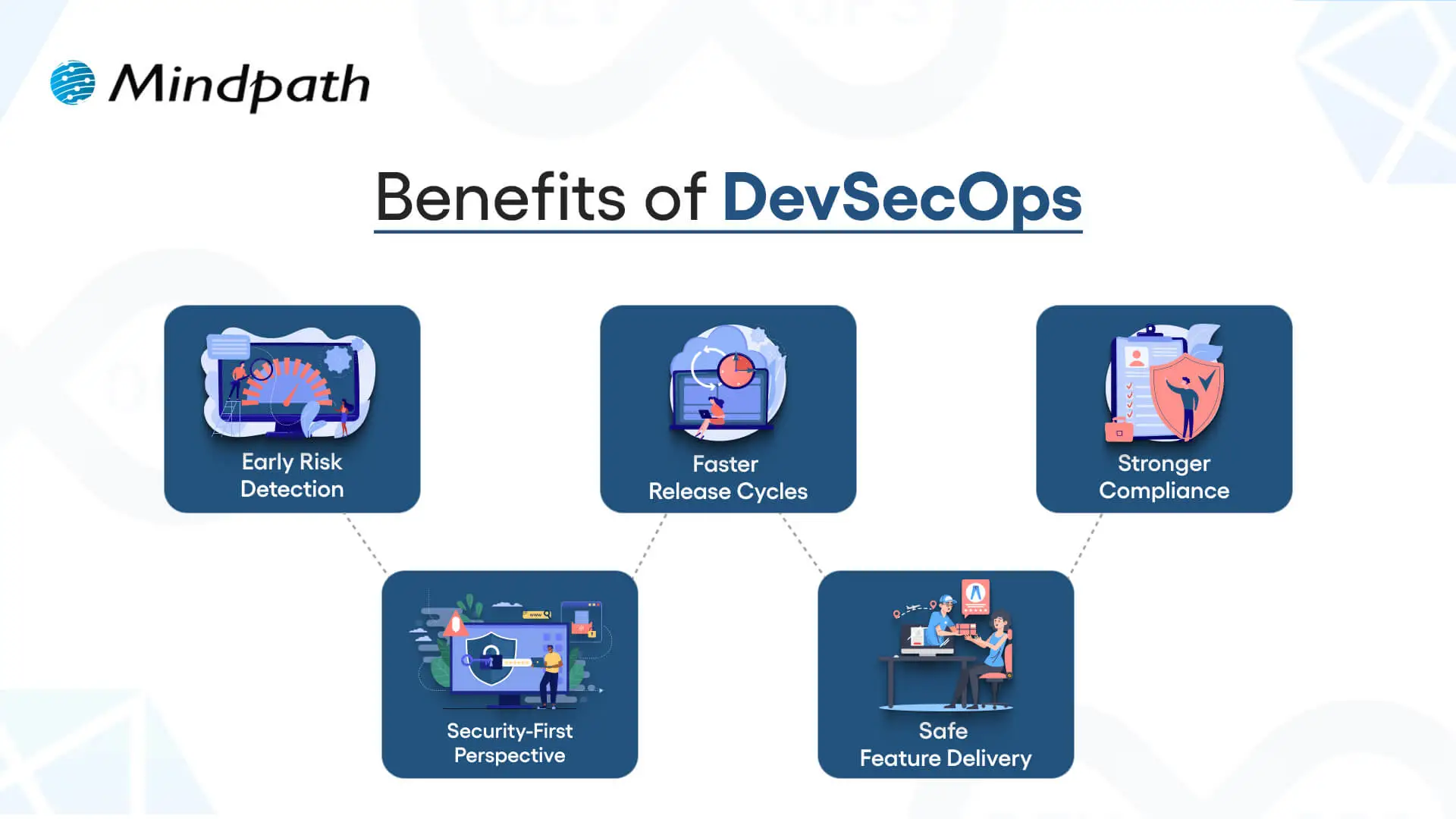
Here are the benefits of DevSecOps:

Benefits of DevSecOps

1. Early Risk Detection

DevSecOps allows for the identification of vulnerabilities during the development phase rather than at the end of the development process. Finding and remediating risk early in this way saves time and expense and means that users receive secure applications.

2. Faster Release Cycles

As teams can impact security testing in their workflow, delays are prevented, human error is removed, and developers get new features into the hands of users sooner.

3. Stronger Compliance

DevSecOps processing can assist software teams in meeting compliance obligations with strict regulatory guidelines. Automated checks and secure development practices ensure that data continues to be protected, while developers can be assured that they meet industry standards.

4. Security-First Perspective

Treating security as a shared responsibility, teams practicing DevSecOps have developers, security professionals, and operations staff collaborating to manage risks actively and ensure they minimize incidents throughout the development period.

5. Safe Feature Delivery

With DevSecOps, teams can deliver new functionality faster while also guaranteeing that security practices are undertaken throughout the development period. This can be one of the key differences in terms of DevOps vs. DevSecOps: how features are delivered.

Aiming to enhance operational efficiency and reduce development risks? Check out our blog on DevOps Challenges and Solutions to discover proven approaches that improve performance, stability, and cross-team cooperation.

DevSecOps vs. DevOps: Key Differences

DevOps vs. DevSecOps reveals how software teams value speed, teamwork, and security. While DevOps emphasizes faster delivery, DevSecOps enhances that process, making security a priority at every step of the development process.

1. Security Focus

The primary distinction between DevOps vs DevSecOps is security. DevOps puts movement between development and operations to speed up the delivery of software, but its security processes are usually significant afterthoughts. DevSecOps has security processes established from start to finish and considers them a core capability. By treating security as a core capability, vulnerabilities are eliminated upstream, so they are remedied before deployment.

2. Collaboration Culture

DevOps emphasizes collaboration between development teams and operations teams to promote continuous integration and delivery. Security is often treated as an independent effort, which creates holes in the development process. DevSecOps emphasizes the work of the security team interacting directly with developers and operations teams in every phase of development. This develops a culture of security being everyone’s responsibility.

3. Timing of Security

Conventional DevOps teams often include security at the final phase of the development cycle. If bugs occur towards the end of the process, they can delay the project significantly. DevSecOps reinforces timing by introducing a shift-left strategy with security at the beginning of the development process to build secure and reliable applications.

4. Tools and Automation

In contrast, when discussing DevOps vs. DevSecOps tools, the distinction is clear. DevOps follows automated processes for build, test, and deploy; however, normally, the security tools are still standalone. With DevSecOps, you use drive-by automated security scans, code analysis, and continuous monitoring in the CI/CD pipeline. It allows teams to detect threats in real-time without having to slow their delivery pace.

5. Salary Comparison

There is a notable salary gap when looking at DevOps vs. DevSecOps salaries in the UK. DevOps Engineers generally earn from £65,000 to £92,500+ with a difference based on skills and location, while DevSecOps Engineers receive a greater salary, with salaries for senior roles exceeding £130,000+ a year, particularly for positions based in London.

Looking to optimize your CI/CD pipeline with smarter automation and streamlined processes? Visit our blog on DevOps Best Practices to discover the strategies high-performing teams use to achieve consistent, stable releases.

DevOps vs. DevSecOps: A Comparison Table

When exploring DevOps vs. DevSecOps, it’s clear that both approaches aim to improve software delivery but take different routes to get there. This table highlights the main distinctions, making it easier to see how DevSecOps builds on DevOps with an added focus on security.

Aspect DevOps DevSecOps
Core Goal Focused on speeding up development and deployment cycles. Balances speed with security to deliver safe, reliable software.
Team Culture Collaboration between development and operations teams. Shared responsibility among development, operations, and security teams.
Security Approach Security checks are introduced late in the release pipeline. Security is integrated into every stage of the development lifecycle.
Automation Uses CI/CD pipelines to automate builds, tests, and deployments. Extends CI/CD with automated security scanning and compliance checks.
Risk Handling Issues are often fixed after vulnerabilities are found in production. Risks are identified and mitigated early to prevent breaches.
Compliance Handled towards the end of development, often as a final step. Built into processes from the beginning, ensuring continuous compliance.
Toolset Relies on monitoring, deployment, and collaboration tools. Adds tools for code analysis, threat detection, and policy enforcement.
End Result Delivers applications quickly but may leave gaps in security. Produces faster releases that are also secure, compliant, and resilient.

Which approach will drive your business forward?

The comparison of DevOps vs. DevSecOps shows that while DevOps accelerates delivery, DevSecOps ensures that speed is not achieved at the cost of security. Businesses gain the ability to innovate quickly while reducing vulnerabilities. Choosing the right model depends on priorities, but integrating security early always results in stronger, more resilient software outcomes.

At Mindpath, we offer tailored DevOps services designed to improve speed, collaboration, and reliability across your software delivery cycle. By helping teams embrace automation, modern practices, and security-focused strategies, Mindpath ensures that businesses not only accelerate development but also deliver secure, high-performing applications that stand out in today’s competitive digital market.

Magento vs wordpess

The question relating to Magento vs WordPress is not new in 2025. However, businesses as well as professionals need to know how these platforms are different from one another so that they can make a wise selection. With Adobe pushing major updates to Magento WordPress has been continuing to dominate the CMS landscape like never before. 

Several modern businesses and professionals all across the globe have been wondering, “Which is better, Magento or WordPress?” You should be able to answer this question as well. This is because the WordPress vs Magento debate has been directly impacting how online stores compete with each other in the crowded digital marketplace. Let us look at these platforms at a deeper level so that you can choose the ideal tool that perfectly aligns with your needs. 

Selecting the right platform can define website success. At Mindpath, we offer WordPress development services that help you elevate your business by creating a custom website that maximizes performance and drives results.

What is Magento?

Magento is a popular open-source e-commerce platform used by businesses to build and manage online stores, founded in 2008. Acquired by Adobe in 2018, it is now officially known as Adobe Commerce. Over the years, it has emerged as a powerful eCommerce platform built for mid-to-large enterprises, growing online retailers, and B2B businesses.

One of its unique features that has contributed to its popularity is its scalability. Magento supports large product catalogs and multi-store management. It has novel B2B features going beyond the capabilities of usual CMS platforms. It offers businesses robust tools for diverse purposes, including checkout optimization and marketing automation. Over the years, Magento has gained high popularity in the dynamic business community. 

What is WordPress?

WordPress is a free, open-source content management system (CMS) that powers over 43% of all websites on the internet. Built for flexibility and ease of use, it comes with a vast plugin ecosystem that lets businesses launch everything from blogs and corporate sites to online stores, without worrying about high development overhead. Custom WordPress development takes this further by tailoring the platform to unique business needs, giving companies a scalable foundation that grows with them.

Some of the core strengths of WordPress lie in content publishing as well as SEO optimization with robust tools such as Yoast and Rank Math. Another unique feature of WordPress is the ability to scale through a large number of themes and extensions. It is time to answer the question: Is Magento better than WordPress?

Key Differences between Magento and WordPress

WordPress and Magento have emerged as revolutionary forces in the contemporary business world. It is a must for professionals and businesses, especially e-commerce businesses, to know about Magento vs WordPress. Some of the major differences between WordPress vs Magento that you must take into account are

1. Purpose of the Platform

One of the key differences between Magento and WordPress is related to the purpose of the platforms. Magento or Adobe Commerce has been built primarily for enterprise-grade eCommerce. Its unique features relating to catalog management and multi-store support are specifically designed to create value for e-Commerce businesses. especially as AI in e-commerce becomes more influential in driving personalization and automation. WordPress was originally created as a content management system. However, it can be extended into the e-Commerce realm through plugins. It is specifically ideal for small to medium-sized online stores.

2. Performance and Scalability

Magento is capable of handling large product catalogs and high traffic. It is also an ideal tool that is designed for complex integrations. It certainly serves as the best tool for mid-sized and large enterprise businesses. It is definitely easier to set up WordPress. In fact, users can scale it for moderate traffic. However, the specific platform may require managed hosting or heavy optimization for handling large stores.

3. Ease of Use

While choosing a platform, it is fundamental for you to take into account the ease of use. WordPress is certainly more user-friendly than Magento. In fact, professionals as well as businesses can easily navigate the tool even if they have limited technical knowledge. However, that is not the case with Magento. This is because it is more complex in nature and requires technical knowledge. You need to bear in mind that it is not beginner-friendly. In case you plan to use Magento, you need to seek support from experts. 

Worried about security risks and vulnerabilities on your WordPress site? Read our guide on safeguarding WordPress vulnerabilities to learn how to protect your site and keep it secure against threats.

4. Customization

Both WordPress and Magento offer extensive customization to users. Magento allows business entities to build custom product pages. You can also integrate third-party tools in a seamless manner. Users even have the option to capitalize on its advanced features and capabilities so that their needs can be perfectly met. Even though WordPress is also customizable in nature, it highly relies on plugins. It is true that essential e-Commerce functionalities are available. However, business entities may require additional plugins for features relating to payment gateways and inventory management.  

5. SEO Capabilities

If you wish to compare WordPress or Magento, it is a must to look at their SEO capabilities. This is because search engine optimization is a must for the success of e-commerce businesses in the prevailing business landscape. Both WordPress and Magento offer robust SEO capabilities to users. But WordPress has a small edge over Magento thanks to its large library of SEO plugins. The specific tool makes it easier for businesses to optimize their content and meta tags. You can certainly leverage these capabilities of WordPress and help your business website rank higher online. Although Magento offers excellent SEO capabilities, you need to possess technical knowledge to leverage them in an optimal manner. 

6. Security Features

One of the most common concerns for online businesses today revolves around cybersecurity. So it is critical to take into account the security features while choosing a novel platform for your e-Commerce business. One of the key strengths of Magento is related to its robust security features. It has built-in security patches along with data encryption features. Another key feature that you should not miss is related to advanced fraud protection features. These security features undoubtedly make Magento a reliable and safe choice for e-commerce businesses.  In the case of WordPress, the security fundamentally depends on third-party plugins. As WordPress is commonly used, there is a chance for you to get targeted by online hackers or cybercriminals. 

Ready to make your hiring process smooth and avoid picking the wrong developer? Our WordPress Developer Checklist gives you a clear, step-by-step framework to evaluate every candidate.

Magento vs WordPress – Comparison Table

The table below gives an insight into the major differences between WordPress and Magento. As the WordPress Magento debate is gaining momentum in the e-commerce realm, you need to look at the differences so that you can choose the ideal platform that best suits your needs. However, an important thing to bear in mind while looking at the differences is that users can use Magento in WordPress in order to use them together.

Magento WordPress
Platform Purpose Designed for e-Commerce Content Management System and can be extended to e-Commerce 
Performance and Scalability Ideal for large e-Commerce businesses Well-suited for small and medium-sized business sites 
Ease of Use Need for technical knowledge Easier to use 
Customization
SEO Capabilities Depends on technical expertise  Better SEO Capabilities 
Security Features High security  Lower security

Who is the Winner: WordPress or Magento?

The exact choice between Magento and WordPress entirely depends on the needs of the users, including their business size, goals, and technical needs. You need to remember that there is no clear winner between these two platforms. 

Magento is suited for enterprise-level stores, and it is ideal for high-volume sales along with multi-store management. In case your business needs advanced features such as B2B support along with custom checkout flows, you must choose the specific platform. You can definitely leverage its strong scalability and enterprise-grade security. However, you need to remember that if you choose Magento, your business must be ready to make a higher investment, and it must possess the necessary technical expertise.

WordPress is definitely a better choice for small to mid-sized businesses. It is an excellent choice for users who are in search of a simple and pocket-friendly tool. The strengths of WordPress, such as its excellence in content publishing and SEO flexibility, can create value for both businesses and professionals. 

Want to ensure your WordPress site is running on the right PHP version for top performance and security? Check out our guide on WordPress PHP compatibility to keep your site efficient, stable, and future-ready.

Final Words

While making the comparison between Magento vs WordPress, you need to remember that there exists no one-size-fits-all solution. Magento stands out for enterprises and fast-scaling retailers that depend on novel features. WordPress is a simpler choice for small and medium-sized businesses. It is great for you if you are in search of flexibility and lower upfront costs. The best platform for you entirely depends on your business needs and goals, its size, and the available technical resources.

If you’re planning to build a website and want to use the best of WordPress, Mindpath WordPress development services will help you with that. Our experts ensure that the capabilities and functionalities of the platform can be optimally utilized to create value for your business. The decision can certainly give an edge to your business in the competitive space.  

healthcare software

Ever pondered how doctors can diagnose faster now-a-days? Or what helps hospitals and clinics to carry out all the operations smoothly? What’s powering the virtual health check-ups? Well, the answer to all these questions in your mind lies in one powerful solution and that is healthcare software. In this blog, we will walk you through the top 20 types of healthcare software in 2026. 

Before learning about the types, let us learn what is the meaning of healthcare software and some of its benefits. 

Looking to reduce manual errors and speed up patient care? Mindpath’s Healthcare Software Development Services build intelligent systems that enhance decision-making and patient satisfaction.

What is Healthcare Software?

Healthcare software is a software that is created to help hospitals, clinics, doctors and patients in managing health related tasks smoothly. It assists in various tasks like booking appointments, keeping digital health records of patients, sending reminders, managing billing process and even making sure medicines get delivered on time. This kind of software makes it easier for the medical staff to focus on their work and help patients to get better care, both in person as well as online. 

The majority of people often get confused between medical software and healthcare software. Medical software is mainly used with medical devices to check and analyze a patient’s health which helps to decide the right treatment. On the other hand, healthcare software mainly focuses on improving the daily operations in healthcare and making patient experience organized and smoother. 

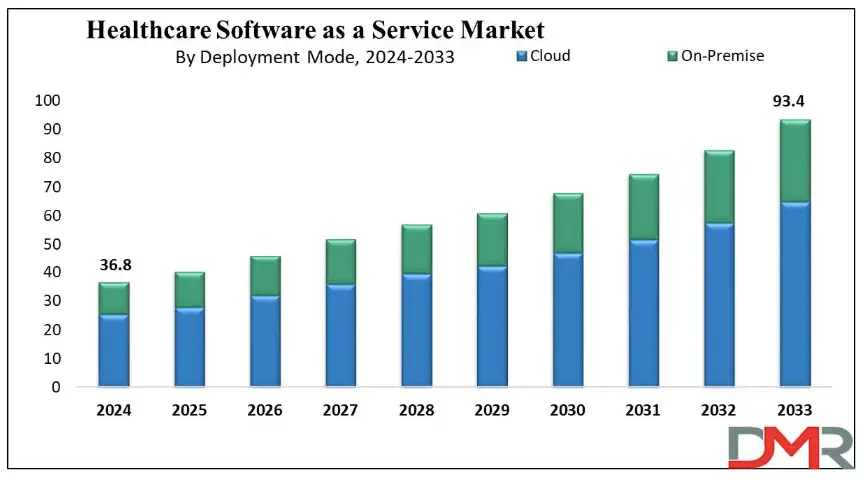
The demand for software in healthcare industry is growing rapidly around the world. According to Dimension Market Research, the global healthcare software as a service market was projected to reach about USD 36.8 billion and experts believe that this number will keep going up every year by around 10.9%, and by 2033, it can reach USD 93.4 billion which indicates that more hospitals and clinics are using this software to make their healthcare better and easier for everyone. 

healthcare software as a service

Benefits of Healthcare Software

Now that we have an idea about the definition of healthcare software and what it can do to the industry, let us know about some of its benefits: 

1. Boost Hospital Operations

It helps hospitals run more smoothly by making tasks like scheduling, billing, and patient record-keeping much faster and easier for staff. 

2. Better Data Handling

Doctors and nurses can quickly access up-to-date patient information, which helps them make better and faster decisions during treatment. 

3. Cost-Effective

By reducing paperwork and cutting down on mistakes, hospitals can save a lot of time and money in their daily operations. 

4. Easy Bookings for Patients

Patients can easily book their appointments online without the stress of long phone calls or waiting in line. 

5. Improve Patient Care from Anywhere

Even if someone lives far from a hospital, they can still talk to their doctor through video calls and get care from the comfort of home. 

6. Easy Monitoring and Health Tracking

Health apps and reminders make it easier for patients to take their medicine on time and keep track of how they’re feeling every day. 

Curious how AI is transforming industries and healthcare? Explore Generative AI use cases across diverse sectors and see how it’s reshaping healthcare platforms.

Let us come to our main topic now, the types of healthcare software: 

Top Healthcare Software in 2026

Having the best healthcare software is very important for making daily tasks easier in clinics, hospitals and labs. Today, many types of software in hospitals help doctors, nurses, and patients to work together and smoothly. Let’s have a look at some of them: 

1. Electronic Health Record (EHR) Software

EHR software stores patient data like medications, procedures, and doctor notes which helps doctors make better decisions and often includes billing features and a patient portal for easy access to health records and prescriptions. 

2. Medical Diagnosis Software

Medical diagnosis software allows doctors to share anonymized patient records to fill information gaps and improve diagnoses. It often uses AI to analyze data and suggest probable diagnoses. There are apps available for individuals to help users assess if they need medical attention. 

3. Medical Imaging Software

Medical imaging software processes MRI/CT/PET scans and creates 3D models. It helps with human anatomy modeling for individual patients, like creating a 3D print of teeth for orthodontics, or designing medical equipment such as artificial limbs. 

4. Medical Research Software

Medical research software aids in education and sharing research within the medical community. It trains healthcare professionals and supports diagnoses by referencing external cases, while also streamlining research processes to reduce costs and improve financial outcomes. 

5. Appointment Scheduling (Booking) Software

This software helps healthcare facilities manage appointments online. It allows patients to schedule appointments through an app or website, with email notifications and automatic reminders for both doctors and patients about upcoming appointments. 

6. Medical Database Software

This medical computer software stores data by disease, not by patient. It helps doctors make better treatment decisions by comparing similar cases and supports learning by offering access to detailed clinical case histories. 

7. Telemedicine Software

Telemedicine software lets doctors see patients online through apps or browsers. Some tools also offer e-prescriptions and billing. It’s super convenient for both patients and doctors, which is why it’s growing fast in the healthcare world. 

8. E-prescribing Software

E-prescribing software helps doctors manage prescriptions easily. They can track, renew, or cancel them digitally. It also connects with national drug databases, making the whole process quicker, safer, and more accurate for both doctors and patients. 

9. Medical Billing Software

Medical billing software helps hospitals manage invoices, payments, and other financial tasks. It’s often built into larger systems like EHRs, making it easier for accounting teams to handle everything in one place, quickly and accurately. 

10. Medical Equipment Management Software

Medical equipment management software helps clinics avoid manual tracking by automating maintenance schedules and sending inventory alerts. It keeps everything running smoothly and reduces the risk of missing important upkeep. 

11. Hospital Management Software

Hospital management software helps hospitals handle daily tasks like billing, accounting, patient management, inventory, bed management and others. It automates these operations to make hospital workflows smoother and more efficient for staff and administrators. 

12. Mobile Health (mHealth) Apps

mHealth apps make healthcare easier by helping patients book appointments, pay bills, and consult doctors online. They connect with EHR systems, so doctors can see medical records during virtual visits, improving care and saving time. 

13. Laboratory Information Management Systems (LIMS)

LIMS helps labs track samples, manage test data, and stay compliant with regulations. It reduces errors, speeds up processing, and keeps lab operations smooth, making sure patients get accurate and timely results. 

14. Personal Health Record Software (medical diaries)

Personal Health Record software, like the Tulipa app for Parkinson’s disease, allows patients to track symptoms, medication, and treatments. It helps generate health reports for doctor visits and alerts healthcare providers if a patient’s condition worsens. 

15. Radiology Information System (RIS)

A Radiology Information System (RIS) manages and stores radiology images and results. It works alongside PACS to streamline radiology department operations, ensuring efficient image storage and integration with EHR/EMR systems for enhanced patient care. 

16. ERP System

An ERP system for healthcare focuses on operational management, optimizing financial, supply chain, and human resources processes. It supports strategic planning, including expansions and mergers, without directly managing patient-facing tasks or data. 

17. Pharmacy Management Software

Pharmacy management software helps control and monitor inventory by classifying medicines, ensuring adequate stock, and avoiding shortages. It also supports drug price management and integrates with prescription systems for seamless access to medication information. 

18. Clinical Trial Management Software

Clinical trial management software records all the information related to the trials, such as patient information, study files, and approval from regulatory bodies. It is utilized mostly in top-class hospitals undertaking large-scale research to maintain compliance and proper trial management. 

19. Health Tracking Apps

Health tracking apps assist users in tracking fitness, diet, stress, and sleep. Many syncs with IoT devices like FitBit or Oura Ring to collect data. They’re popular for making healthy habits easier and more trackable every day. 

20. Remote Patient Monitoring (RPM)

Remote Patient Monitoring (RPM) enables healthcare professionals to gather patient information beyond the confines of standard settings, i.e., hospitals and clinics. RPM encompasses devices like blood glucose meters and heart rate monitors, which improve post-operative care and chronic disease care. 

Looking to speed up hospital operations and reduce errors? See how AI in healthcare is making hospital management smarter and more efficient.

Ready to Revolutionize Your Healthcare Solutions?

Healthcare is changing at a lightning pace, and software is leading the charge. From helping hospitals operate more effectively to making it easier for patients to access care, healthcare software is making a difference. In 2026, these technologies will continue to expand and make care easier, quicker, and more patient centered. 

At Mindpath, we recognize the need for state-of-the-art technology in the healthcare industry. Our healthcare software development services are built to improve operations, enhance patient care, and increase overall efficiency. Let Mindpath help you empower your health care business with robust, scalable, and innovative software that keeps up with the evolving healthcare environment. Let’s create a healthier tomorrow together! 

Frequently Asked Questions

1. How do I choose the right healthcare software for my organization?

Choosing the right healthcare software depends on your facility size, patient volume, budget, and operational needs. Start by identifying workflow challenges, integration requirements, and compliance standards. Always look for scalable solutions that can grow with your organization and support future technological advancements.

2. Is healthcare software secure for storing patient information?

Yes, most modern platforms are built with strong security measures such as encryption, access controls, and regulatory compliance standards. However, healthcare providers must ensure proper implementation, regular updates, and staff training to maintain data privacy and protect sensitive patient information from cyber threats. 

3. Can small clinics afford advanced healthcare software in 2026?

Absolutely. Many healthcare software solutions are now available through cloud-based or SaaS models, making them more affordable for small clinics. These subscription-based systems reduce upfront costs and allow smaller healthcare providers to access advanced features without investing heavily in infrastructure. 

4. How does healthcare software improve patient satisfaction?

Healthcare software enhances patient satisfaction by reducing waiting times, simplifying appointment bookings, enabling digital communication, and ensuring accurate records. When systems run smoothly, patients experience faster service, clearer communication, and more personalized care throughout their treatment journey. 

5. Will healthcare software replace administrative staff in hospitals?

No, healthcare software is designed to support administrative teams, not replace them. It automates repetitive tasks like billing and scheduling, allowing staff to focus on higher-value responsibilities such as patient coordination, service improvement, and overall operational management.