Latest Insights On
GenAI, Tech, and Digital Transformation
Stay updated with expert insights, success stories, and real-world applications of cutting-edge technology.
Cloud computing has certainly revolutionized how business entities leverage technology to carry out their operations. In recent times, many businesses across diverse industries have already migrated to the cloud. These cloud computing trends have gained momentum so that businesses can take advantage of cloud computing technology. However, such a trend has also given rise to a broad range of attacks on cloud.
In the prevailing times, business entities need to know that Cloud computing attacks encompass different types of attacks by malicious actors. These malicious actors could be internal or external. However, they can cause significant damage to businesses in the highly volatile environment. Now is the perfect time to expand your knowledge relating to cloud computing attacks.
Want to strengthen your cloud security without increasing operational complexity? Mindpath’s managed infrastructure services provide the expertise and tools needed to secure your cloud operations
What are Cloud Computing Attacks?
A cloud computing attack refers to a malicious activity that can exploit vulnerabilities in the cloud infrastructure, applications, or services. The purpose of such attacks is to steal data, gain unauthorized access, or disrupt the usual services. The rising instances of cloud attacks have become a major concern for businesses operating in diverse industries or sectors.
Cloud attacks may be of various types. Businesses need to be able to answer: What are the security risks of cloud computing? They need to have an answer to this question before moving to the cloud. The knowledge in this area is vital to being prepared to face such risks in an effective and efficient manner.
Want to strengthen your defences against cloud computing attacks? Discover cloud security tools that help identify threats and secure your workloads effectively.
Top Cloud Computing Attacks that Businesses Need to Be Aware of
The attacks on cloud that target cloud computing resources as well as infrastructure may vary considerably. It is essential for modern businesses to have a holistic insight into these threats as they have the potential to compromise the business operations and sustenance. Some of the key cloud security threats that you need to be familiar with include:
1. Denial-of-Service Attacks
The Denial-of-Service Attack is a cloud attack that intends to make a network or computer resource unavailable to the actual users. It basically floods a cloud server or service with fraudulent traffic. You need to bear in mind that a DoS attack involves a single source. On the other hand, a distributed denial of service attack may involve several compromised sources.
As cloud environments are vulnerable, such types of attacks may lead to costly repercussions. Such attacks may lead to the disruption of service or loss of revenue for a business. Moreover, it may also cause serious damage to the reputation of a business. Understanding cloud computing vulnerabilities is essential to prevent such risks and protect cloud infrastructure.
2. Insider Threats
Insider threats refer to the cloud security threats that arise because of employees, former employees, partners, etc. They continue to affect the security in the cloud computing environment. This threat may occur when an insider either intentionally or unintentionally does harm to the cloud security of an organization.
The key issue that an entity needs to address is striking a balance between the privacy of employees and the security measures that have been adopted. This cloud cyber attack may be quite difficult to detect and prevent since it typically involves individuals who have the authority to access cloud assets.
3. Man-in-the-Middle Attacks
The Man in the Middle Attack takes place on the cloud when a malicious actor is able to intercept the interaction between the cloud user and the cloud service. This attack may also arise when an attacker intercepts the communication between two cloud services. The attacker basically positions themselves in the middle position in order to eavesdrop or steal sensitive information.
These types of issues relating to cybersecurity in cloud computing need to be addressed as a priority. This is because such attacks can take advantage of cloud services that are misconfigured. They can also exploit the vulnerabilities that exist in SSL/TLS protocols.
4. Account Hacking
Account hacking in the cloud environment refers to the unauthorized access or control of a cloud computing account by a malicious actor, such as a hacker. This can certainly allow the hacker to make use of related resources for their malicious purposes. Account hacking can also enable hackers to manipulate or steal the data that is stored on the cloud.
Such cloud computing hacks may give rise to detrimental consequences for business entities. For instance, hackers or attackers may use password cracking techniques for the purpose of guessing or stealing the login credentials of others. Organizations need to prevent cyber attacks as they may lead to financial loss, and they can also tarnish the reputation of an organization.
Struggling to manage infrastructure while scaling applications efficiently? Check out serverless architecture in cloud computing to learn how it lets you build and deploy apps without worrying about servers.
5. Cloud Malware Injection Attacks
Cloud Malware Injection refers to a type of cyber attack that involves the injection of malicious software, such as a virus or ransomware, into cloud resources or cloud infrastructure. Such types of attacks are gradually becoming common as more businesses are moving to the cloud. Such attacks can enable cybercriminals to compromise the infected or affected resources.
Attackers may even steal or destroy data for their own malicious purposes. There exist numerous ways in which attackers may inject malware into the cloud infrastructure, such as by exploiting vulnerabilities in the cloud setting or by gaining unauthorized access to cloud accounts.
6. Security Misconfiguration
In cloud computing, security misconfiguration refers to the lack of proper configuration of cloud computing resources or infrastructure. Due to the failure in terms of configuration, there may be compromised protection against cyber threats and attacks. Businesses need to bear in mind that incorrect security settings have the potential to leave the system and data vulnerable.
Security misconfigurations are considered to be a serious issue that can lead to data breach incidents in the cloud. The issue may be the result of human error or lack of expertise. Similarly, the failure to alter insecure default settings may lead to security misconfiguration in the cloud.
7. Side Channel Attacks
Side channel attacks in the cloud environment are able to take advantage of weaknesses or vulnerabilities in shared hardware resources. Such attacks are capable of extracting confidential data through the observation of indirect information such as power consumption and electromagnetic emissions.
This attack involves the exploitation of information that has been leaked through the physical implementation of a system. In the cloud setting, malicious actors may carry out such types of attacks by positioning a malicious virtual machine on a legal physical host that is used by a business. This technique can enable the attacker to get access to all confidential information about the victim’s machine.
8. Cookie Poisoning
Cookie poisoning is a type of cyber attack where an attacker is responsible for tampering with or altering the web cookies of the user. In cloud applications, this type of attack involves the unauthorized modification or the injection of malicious content into a cookie.
Cookies are typically stored to personalise the experience of users or track their activities. Such attacks can poison the cookies of users without their knowledge to access the applications. It may lead to unauthorized access to accounts. Businesses need to deploy robust cloud security solutions so that such attacks can be prevented in an effective manner.
Ready to take your applications to the next level in the cloud? Explore cloud-native development to learn how modern architectures improve performance and security.
Need for a Solid Cybersecurity Posture
Modern business entities need to maintain a robust cybersecurity posture. Such a posture can enable them to prevent cyberattacks. Business entities need to adopt solid cybersecurity tools and technologies so that they can safeguard sensitive information and maintain regular business operations.
In prevailing times when cloud computing attacks are on the rise, entities across diverse industries need to prioritize their cybersecurity resilience. Proper cybersecurity preparedness is a must to ensure that organizations can effectively function in an uncertain environment. While operating in the cloud, business entities need to prioritise the adoption of robust cloud security solutions such as identity and access management, encryption, data loss prevention, and many more.
Curious how AI can improve cloud security? Check out AI in cybersecurity to see how it detects threats faster and protects your systems.
Final Words
In the existing business landscape, more businesses are moving to the cloud. This has automatically created the need for businesses to broaden their insight relating to cloud computing attacks and threats. Several cloud attacks have been identified that are affecting businesses, such as Denial-of-Service Attacks, Insider Threats, Account hacking, and many more.
Mindpath’s managed cloud services can ensure that your business is well protected against all types of cloud attacks. The professionals and experts will ensure that your business can derive optimum value from the cloud computing technology and stay protected from cybercriminals and other malicious actors.
The rising popularity of cloud computing technology in the business world has automatically led to the popularity of cloud security tools. If you leverage cloud solutions in any manner, you need to be aware of the top cloud-based security tools that are available in the market right now. These tools can certainly make or break the cloud cybersecurity posture of your organization.
Now is the best time to learn about the top 10 cloud security tools. The insight can definitely empower you to derive optimum benefits from these tools while leveraging cloud computing technology. It is time to dive into the world of the best cloud security tools.
Want to stay ahead of evolving cloud security threats with the right tools? Mindpath’s Cloud Infrastructure Services combine expert management with advanced security tools to keep your cloud safe and optimized.
What are Cloud Security Tools?
Cloud security tools include a diverse range of technologies, practices, and controls. They collaborate in order to protect data, the cloud infrastructure, along with all the applications within the cloud environment. The main objective of cloud computing security tools is to defend users against internal or external cybersecurity threats. They also play a catalytic role in mitigating business disruptions that may be caused by power outages, natural disasters, or other kinds of serious events.
Business entities need to bear in mind that the need for cloud security solutions is multidimensional in nature. Encryptions as well as antimalware tools help shield applications and data from possible threats. Similarly, firewalls are responsible for regulating traffic flows to cloud resources for determining which data can pass through. Identity and Access Management (IAM) solutions make sure that only authorized individuals can be given access to resources on the cloud. The role of cloud security tools and solutions is of high strategic importance for organizations.
Wondering how emerging trends are shaping cloud security? Check out the latest cloud computing trends to learn what’s driving secure cloud adoption.
Top 10 Cloud Security Tools
Now that you have a basic understanding of cloud computing security solutions, it is essential to look at some of the top cloud security products that are available to you. You need to familiarize yourself with the most popular tools so that you can choose the best product that can meet all your needs perfectly.
1. Auth0
Auth0 is a well-known identity and access management solution that is available in the market today. It can enhance cloud security by offering secure authentication as well as authorization for applications, users, and APIs. It is a highly developer-friendly platform that offers flexible security solutions.
It is highly adaptable in nature, which makes it extremely suitable for businesses of varying sizes. Its robust APIs, coupled with extensive integration options, make it simpler to embed identity and access management into the applications of organisations without compromising the experience of users.
2. Datadog
Datadog is a highly versatile and robust cloud monitoring platform. It integrates in a seamless manner with popular cloud service providers such as AWS, Google Cloud, and Microsoft Azure. The real-time analytics, as well as customizable dashboards, make it easy for businesses to not only track but also to secure their cloud environments. The tool offers the right kind of insights that businesses require in order to maintain security while scaling their operations in a flexible manner.
3. Microsoft Defender for Cloud
These cloud security products offer robust security solutions for Google Cloud, Azure, and AWS. The best thing about this tool is that it perfectly integrates with the Microsoft ecosystem of other security solutions. Some of its core offerings include vulnerability management, threat detection, and compliance monitoring. The built-in automation feature can even help business organizations to detect and mitigate different types of cybersecurity risks and threats.
Also Read: AI in Cybersecurity
4. Wiz
Wiz is a robust cloud security platform that offers complete visibility along with protection across diverse cloud environments. This tool is capable of continuously scanning the cloud infrastructure, containers, and virtual machines for the purpose of identifying misconfigurations.
It also helps locate vulnerabilities as well as compliance risks. It adopts an agentless approach, unlike conventional agents. It connects directly to cloud service providers for rapid deployment. It not only correlates security findings to highlight the most critical risks, but it also helps teams prioritize the remedial solution.
5. Sysdig
Sysdig is among the popular cloud security tools that can monitor as well as safeguard cloud native applications and services. With the help of this tool, business entities can ensure real-time compliance. A unique feature of this cloud security tool is that it makes use of an open-source threat detection engine. This tool can scan container images prior to their deployment, thereby preventing vulnerabilities. Some of the other offerings of Sysdig include runtime protection, visibility, and cloud audit activities.
Planning to build scalable applications without managing servers? Check out our blog on serverless architecture in cloud computing to learn how it simplifies deployment while supporting secure and efficient workloads.
6. Tenable Cloud Security
Tenable Cloud Security is a popular tool in the market that can safeguard your cloud workloads. It can even monitor threats and assess vulnerabilities in an effective and efficient manner. It is considered to be an ideal solution for dynamic cloud environments. With Tenable, you can customize your security policies and streamline the compliance of your cloud infrastructure. You can leverage the continuous monitoring feature in order to keep a constant tab on cloud activities on a frequent basis.
7. Check Point Cloud Guard
Check Point Cloud Guard is a holistic cloud security platform. It has been designed to protect workloads, assets, and applications across private, public, and hybrid cloud environments. It serves as a useful tool since it offers advanced threat prevention along with posture management and network security.
It offers proper visibility into configurations and helps in detecting misconfigurations as well as vulnerabilities on the cloud. Check Point Cloud Guard helps business entities maintain a solid cloud security thanks to its AI-driven threat intelligence coupled with unified management.
Must Read: Benefits of AI
8. Palo Alto Networks Prisma Cloud
Palo Alto Networks Prisma Cloud is a highly scalable cloud security tool that is available in the market today. It safeguards hybrid environments along with multi-cloud environments. This tool places high emphasis on proactive detection of cloud computing threats and their mitigation. You can leverage this tool to ensure there is seamless compliance as well as risk assessment management. This solution integrates advanced analytics along with AI insights to strengthen security on the cloud.
9. Trend Vision One Cloud Security
Trend Vision One Cloud Security is among the best cloud native security tools that you can find today. It is designed to secure cloud environments throughout their entire lifecycle. This tool offers visibility along with compliance management and threat detection. It effectively integrates cloud workload protection and cloud security posture management, which can help in the identification of vulnerabilities and misconfigurations on a real-time basis. It helps business entities detect, investigate, and respond to threats quickly since it is powered by AI-driven analytics and threat intelligence.
10. CrowdStrike Falcon Cloud Security
In order to address cloud security risks, you can choose CrowdStrike Falcon Cloud Security. It serves as a comprehensive platform that can secure your workloads, containers, and the entire cloud infrastructure. These cloud security solutions offer real-time visibility and threat detection. You can use the flexible tool in order to update or change your cloud security strategy. This tool can connect with the cloud ecosystems and identify and resolve cloud computing attacks and risks. You can also discover misconfigurations and ensure data security.
There exists a diverse range of cloud computing security tools today. You need to know your needs well. The insight can certainly help you choose the right tools and solutions in order to deal with cloud computing vulnerabilities and risks.
Looking to improve cloud security as environments become more complex? Learn more about cloud-native development and how it supports secure and scalable apps.
Final Words
You need to familiarize yourself with the best cloud security tools that are available for users today. Your ideal choice depends on diverse factors such as your needs, the features of the tool, and many more. Some of the top tools that exist today include Auth0, Datadog, Microsoft Defender for Cloud, and many more. You need to know the strengths of each of these tools so that you can effectively identify the tool that perfectly aligns with your needs.
Mindpath’s excellent managed cloud services can help businesses effectively identify and choose the best cloud computing security solutions. The experts will use their capabilities and experience to help businesses find the best security solution that perfectly aligns with their business needs and expectations. You can definitely rest assured by partnering with the trusted name.
Selecting the appropriate SaaS development services may seem like walking through a rapidly shifting technological environment. Businesses in the present day require solutions that are innovative, scalable, and flexible. You may end up comparing different providers, and each one of them claims to have unique expertise. The difficulty lies in finding a service that is consistent with your objectives and generates real value. It involves thinking outside the box and taking into account teamwork, problem-solving, and sustainability. So, how are you going to find a service that best suits your business vision?
The key is to find a partner that is knowledgeable about your growth strategy and technology needs. Successful SaaS development services engage both hands-on experience and progressive innovation. When you are seeking options, make sure you take into account compatibility with your team, development strategy, and scalability. You require a clear understanding of procedures, communication, and delivery schedule. This blog will help you make the right decision in your SaaS development journey. Let’s dive in together!
Want to choose the right partner to build scalable and efficient SaaS software for your business? Mindpath’s SaaS Development Services provide expert developers and custom solutions to deliver growth-oriented applications.
Understanding Software-as-a-Service (SaaS) Development
SaaS development refers to the development, deployment, and maintenance of software applications delivered over the Internet as a service. These applications are cloud-based, unlike the conventional software. They are available to users either on a web browser or on an app interface. An effective SaaS development service makes applications to be scalable, secure and user-friendly. It concentrates on delivering constant updates and excellent user experiences across all devices.
SaaS development needs proper software engineering and cloud knowledge. Developers should also know what customers require and what is trending in the market. This understanding enables the creation of software, which is efficient, reliable, and sustainable. SaaS development focuses on cooperation, problem-solving, and constant enhancement in order to fulfill business objectives. It guarantees the product to expand with the user requirements without compromising the performance or security at any point.
Want to understand how SaaS can streamline your operations and drive business growth more efficiently? Discover our guide on the benefits of SaaS to explore how it enhances scalability, flexibility, and cost savings.
The following are reasons why businesses today require SaaS development services:
1. Cost Optimization
SaaS reduces start-up infrastructure and the cost of licensing. Companies enjoy the benefit of stable prices and expenditure.
2. Scalable Architecture
SaaS software development is capable of scaling users and features in an easy way. The systems can easily adapt to growth and demand.
3. Anywhere Accessibility
The use of the cloud allows remote and distributed teams. Users can be able to work anywhere safely.
4. Rapid Deployment
The SaaS solutions take a shorter time to launch via browsers. This minimizes the setup time and fast-tracks time to value.
5. Simplified Maintenance
Service providers deal with updates, security, and performance. SaaS developers assist in lowering internal IT workloads.
6. Innovation Readiness
SaaS solutions are compatible with contemporary tools and artificial intelligence. This helps companies remain competitive and data oriented.
Wondering how AI can transform your SaaS product with automation and predictive capabilities? Read our guide on the benefits of AI to discover its impact on growth and efficiency.
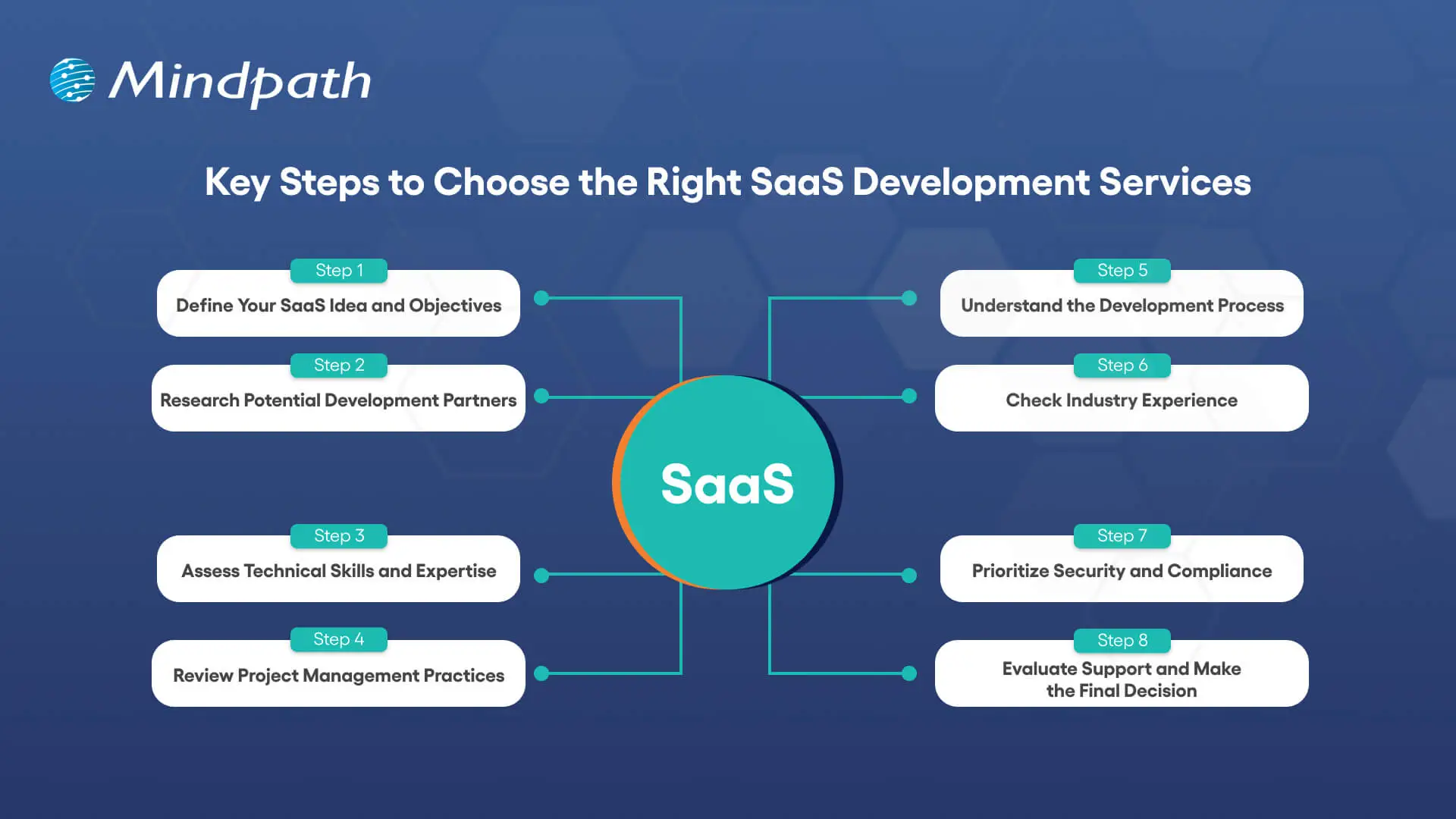
Key Steps to Choose the Right SaaS Development Services
The choice of SaaS development services requires a clear idea, planning, and business orientation. The most important steps to selecting SaaS application development services that facilitate long-term growth are as follows.
1. Define Your SaaS Idea and Objectives
Be clear about your SaaS concept, what problem it will address, and who your audience will be. Clear goals contribute to the alignment of attributes, functionality, and business objectives in the long run. This transparency enables the SaaS development services to create a product that is focused and efficient.
2. Research Potential Development Partners
Begin by doing research on credible SaaS development companies that have a successful track record with SaaS projects. Check their portfolios, case studies, and feedback from clients to determine credibility. This study can assist you in narrowing down partners who can provide scalable solutions.
3. Assess Technical Skills and Expertise
Evaluate the technical competence of the in-house development team in the front end, back end, and cloud computing. Ensure that they know the process of developing secure and scalable SaaS applications. Well-developed technical capabilities reduce the development risks and improve the overall performance of the product.
4. Review Project Management Practices
Understand how the company manages schedules, work and communication in the development process. Agile project management is flexible and responds more rapidly to changes. Analytical thinking will ensure consistency and quality in development.
5. Understand the Development Process
Inquire about their entire development cycle such as designing, testing, and implementation. Make sure that security and performance, as well as scalability, are considered at an early stage. A trusted Saas development platform enhances easier cooperation and implementation.
6. Check Industry Experience
Experience in the industry helps teams to know more about your business challenges. Experienced developers are able to foresee risks and recommend workable improvements. This results in improved custom SaaS development projects.
7. Prioritize Security and Compliance
Make sure that the development team has good security standards and compliance requirements. The process of development should include data protection and compliance with regulations. This ensures the safety of user information and builds up confidence in the product.
8. Evaluate Support and Make the Final Decision
Evaluate the capacity of the company to offer long-term support and maintenance. Constant improvement and interaction are key to successful products. Select SaaS development services, which reflect your growth plans and vision.
Want to stay ahead in the competitive market by understanding how SaaS is evolving? Discover our guide on SaaS trends to explore the latest innovations shaping the future of the industry.
Ready to Transform Your Business with SaaS?
Selecting the appropriate SaaS development services will keep your company competitive, scalable and efficient. Successful SaaS products are the result of clear planning, technical expertise and strong project management. Using systematic steps assists in choosing partners who provide secure, reliable and innovative solutions. Having the right team ensures your software keeps up with the business requirements and enhances performance and user satisfaction.
At Mindpath, we provide professional custom SaaS development services based on your business objectives. We are a team of prolific developers and present scalable, secure, and user-friendly solutions. Our priorities are innovation, a smooth partnership, and continuous support to achieve optimal performance of your SaaS product. Mindpath is the choice that ensures a future-proofed platform that is designed to expand with your users and business vision.

The world is experiencing a huge technological transition, driven by emerging AI trends. This shift is justified by the active development of Artificial Intelligence and powerful AI models. They are high-end neural networks that have the capability to generate code, pictures, videos, and text. The selection of the top AI models can be a breakthrough for a company.
Whether you are launching new products or developing your strategy of content, the best AI models can make all the difference. However, which is the most appropriate one to meet your business requirements? Well, there is no need to fret about it, as this best AI models list contains the top 10 options that are dominating the AI arena. Let’s have a look.
Ready to implement advanced AI models but unsure which ones can truly move your business forward? Mindpath offers expert AI development services that help you build customised, high-performance AI solutions tailored to your goals.
AI Models – Understand the Basics
Before we dive deep into the list of most popular AI models, let’s understand what AI models actually are.
AI models refer to complex computer programs that are used to interpret different patterns and provide results depending on the data. These models power modern tools that code, comprehend languages, and create images.
While certain top AI models are built to perform simple tasks, others focus on domain-specific tasks. The use of AI tools and models is growing with time. In fact, more than 88% of businesses are now using AI tools, and in 2004, it was 78% (Source: McKinsey).
Another report for Gartner informs that total spending on generative AI is projected to cross USD 644 billion in 2026, around a 76% increase from 2025. These numbers clearly prove the rising importance of AI for today’s business.
Want to understand the different kinds of artificial intelligence? Explore types of AI to learn about ANI, AGI, and ASI, and how each is applied in real-world scenarios.
Now, let’s talk about the top AI models you can opt for in 2026 that can support your workflows and business growth.
Top 10 AI Models for Modern Businesses
The best AI models are not just designed to process data. In fact, they have the ability to think and create. Some models can interact like humans, and some can easily explain complex logic. Here are the 10 most popular AI models that define innovation and power.
1. GPT-5
When talking about which AI models are the most popular right now, we can’t ignore GPT-5. Developed by OpenAI, this is the most powerful AI model available to all. It can handle multiple tasks, including code generation, audio, images and text creation. GPT-5 is now powering tools like ChatGPT and Microsoft Copilot.
This model helps users plan, write and solve issues with ease. Besides, it supports ultra-long conversations. That means when you use it, you will feel like interacting with an intelligent assistant. GPT-5 is a versatile model and can be used for personal productivity apps or enterprise tools.
Want to customise AI models for your specific needs? Check out our OpenAI Fine-Tuning API tutorial to learn step-by-step how to fine-tune models for better performance and accuracy.
2. Claude Sonnet 4.5
It is one of the most advanced AI models by Anthropic. Claude Sonnet is developed for power users looking for deep reasoning, speed and precision. This model offers impressive results on maths, long-running tasks and coding.
It is an excellent option for businesses that prioritize ethical AI, reliable automation and compliance. With a 200K token input and powerful tools like content editing, it can handle various complex workflows easily.
3. Gemini 3
Searching for top AI models that can help you bring your ideas to life? Gemini 3 can be a top choice. Developed by Google DeepMind, this model supports sophisticated reasoning and helps users learn and create anything they want.
People like to use Gemini, as it is smart and feels intuitive. Whether you want to analyze complex data, summarize documents, or brainstorm new ideas, Gemini can be your reliable assistant.
4. DeepL
Another popular AI model you can consider is DeepL. It offers quick and accurate translation services. It is popular for its amazing human-like output and impressive accuracy. The model supports multiple languages, more than 30 languages.
Content creators, businesses, and professionals use it for translating documents, emails, and websites. Recently, the company introduced DeepL Write, which helps users with spelling, grammar, and more.
5. Grok 4.1
It is xAI’s most powerful and intelligent AI model and is integrated into X. The model is designed for collaborative, creative, and emotionally intelligent interactions. As a result, all conversations feel more engaging and natural.
The model is generally trained on social media data and can be easily adapted to evolving internet culture. Built on a large-scale reinforcement learning infrastructure, it offers a more compelling and perceptive experience.
Also Read: Benefits of AI
6. Mistral AI’s Mistral Large 2
Mistral Large is an advanced and high-performance language model introduced by Mistral AI. The model is capable enough to handle advanced reasoning and multilingual tasks. It is optimized for accuracy and speed. If you are developing chatbots or want to optimize technical workflows, you can give it a try.
Different from other Mistral models, it activates all parameters and offers consistent results. It can achieve an accuracy rate of 84 percent for code generation (Source: Mistral AI).
7. DeepSeek VL
The AI models list will remain incomplete without covering this particular AI model. This open-source Vision Language model is quite efficient for real-world language and vision applications. It can understand logical diagrams, scientific literature, charts, diagrams, web pages, and more.
Educators and researchers utilize it to analyze scientific papers and make complex concepts easy to understand. The company is now working on a new model that can perform multi-step and complex actions with less human input.
8. Llama
Introduced by Meta, Llama models are developed based on an open-source approach. The latest model released by the company is Llama 4, and it includes two multimodal models, such as Llama 4 Maverick and Llama 4 Scout.
All these models can process short videos, images, and text. As these are based on a MoE- Mixture-of-Experts architecture, they demonstrate increased efficiency. Its open-source nature provides developers with better control and flexibility. You can fine-tune it as per your requirements.
9. Stable Diffusion
It is an open-source AI image creation model based on the Stable Diffusion XL model. The model is popular for generating high-quality images using various text inputs such as frame, presets or style.
Besides, it can also replace or add parts of any images through “outpainting”. Whether you need help for digital storytelling, concept art or marketing, Stable Diffusion can offer you a perfect kickstart. Its speed, community-driven ecosystem and flexibility make it one of the top AI models among designers, artists and content creators.
Wondering how AI can understand and generate human-like text? Check out our Large Language Model (LLM) blog to learn how LLMs power smarter applications and chatbots.
10. Cohere Command R+
This powerful large-language model is built for accuracy, speed and smooth private deployment. It is developed for enterprise-grade search and document analysis. By combining real-time document processing with large language models, it offers accurate question answering and summarization.
Thanks to its API-first design, you can easily integrate it into your existing system. Most businesses are using it for customer support, legal discovery and knowledge management. In an environment where context and accuracy are vital, this model offers reliable performance.
Tips to Choose the Right AI Models
Well, it is common to feel overwhelmed as the options are more. However, by considering these simple tips, you can come up with an informed decision.
1. Understand how you want to use an AI model, for content creation or other purposes.
2. Now, consider your budget as well as your technical skills. If you are using a model for the first time, you can go for GPT 5 or Gemini. Mistral and Llama require technical skills.
3. Don’t forget to check context length. Longer context windows are good for performing multi-step tasks.
4. Go for the free web version and test models properly. Compare the results before making your final decision.
Want to know how AI models focus on important information? Read our attention mechanism explained blog to understand this key concept behind modern AI and LLMs.
Let the Experts Help You Choose the Best AI Models
The AI model arena is evolving rapidly. Some top AI models such as GPT-5 and Gemini, are establishing a new level of accuracy and performance. Specialised models, such as Cohere and Stable Diffusion, on the other hand, are dominating their niches.
Still don’t know which top AI models to use for your business? Allow Mindpath to help to make the right decision. Our team can help you identify, deploy, and fine-tune AI models best suited for you. We also help businesses with AI development services, which guarantee scalability and performance.
Frequently Asked Questions
In the fast-changing business world, AI agents are making a big impact by helping businesses work faster and smarter. As a business owner, you can certainly consider using AI agents for the purpose of automating repetitive tasks and gaining data-driven insights that can help in making strategic decisions. In fact, the strategic integration of AI agents by retail businesses has shown a 30% decline in operational costs, reports Experro in AI Agent Statistics 2025. It shows that when used well, AI agents can boost business efficiency and give a strong competitive edge.
AI agents have definitely cemented their place in the business realm of the 21st century within a short span of time. Although the novel technology is in its nascent stage, it has shown immense promise. Let us explore the role of AI agents in the modern business landscape.
Looking to build AI agents that collaborate to solve complex business challenges? Explore Mindpath’s Multi-Agent System Development Services to create intelligent, scalable systems that automate workflows and improve decision-making.
What are AI Agents?
An AI agent is a software system that can perceive its environment, make decisions, and autonomously take multi-step actions to achieve a specific goal, without requiring constant human input. Unlike traditional chatbots, AI agents go well beyond natural language processing. Their core capabilities include problem-solving, decision-making, tool use (such as web search and APIs), and direct interaction with external systems.
What makes AI agents unique is their ability to break down complex tasks, learn from mistakes, and operate autonomously across enterprise applications. They can solve tasks relating to software design and code generation. Additionally, they are capable of solving tasks relating to conversational assistance as well as IT automation. AI agents basically utilize advanced natural language processing techniques for the purpose of comprehending and responding to the inputs of users.
Curious how AI agents can improve your organisation’s choices? Discover AI in Decision Making to learn how intelligent systems enhance efficiency, reduce risks, and support strategic planning.
Benefits of Using AI Agents In Business Operations
The use of AI in business operations has gained momentum in recent years. Business entities of different natures and sizes have been integrating the capabilities of artificial intelligence in order to simplify and streamline their operations. Furthermore, the emergence of AI agents has been nothing less than a boon for businesses. Some of the popular AI agent examples that you may come across today include Siri as well as Google Assistant.
Some of the top benefits that businesses enjoy by adopting AI agents in their processes and operations include:
1. Increased level of productivity
AI agents undoubtedly increase the overall productivity of business entities. This is possible since AI agent software is able to automate repetitive and time-consuming tasks. Businesses can leverage AI agents and ensure that their human employees can be free to focus on more complex and high-value tasks and processes. This automatically increases the output of businesses.
2. Cost savings
AI agents deliver considerable cost savings for business entities by automating routine operations and minimizing the requirement for labour. With the help of AI agents, you can also decrease operational expenses in a number of areas, such as customer service. Furthermore, by relying on AI agents, the possibility of errors is reduced significantly.
3. Better customer experience
The incorporation of AI agents by businesses creates an opportunity to enhance customer experience. With the help of AI agents, such as chatbots, businesses can offer personalized responses to their customers. Moreover, these AI agents can ensure to respond to the queries and complaints of customers instantly. Therefore, the overall satisfaction level of customers can be enhanced if businesses use AI agents. In fact, the introduction of AI agents in the customer service landscape is nothing new today.
4. Improved operational efficiency
Businesses are able to accelerate their workflows and streamline their processes by leveraging AI agents. AI agents create an opportunity for businesses to coordinate diverse processes and decrease delays. So, businesses are able to focus on their priority areas and optimize their operations. Furthermore, the 24/7 availability of AI agents ensures that there is productivity in an ongoing manner without any downtime.
Wondering how AI agents can directly impact customer engagement? Explore AI Chatbot Examples to discover how intelligent automation improves conversions and customer support.
Revolutionary Impact of AI Agents on Business Operations
In the digital era, numerous digital tools and technologies have come into existence that have been adopted by businesses. However, a technology that is full of promise is none other than the AI Agent. Several business entities have witnessed the power of AI agents. In order to understand the revolutionary nature of AI agents, you need to take a look at their key impacts:
1. Automation
AI agents are optimizing the workflows of businesses through automation. They serve as valuable tools that can automate complicated or complex tasks that would otherwise need human resources. AI agent automation is undoubtedly one of the main areas that has undergone change in the modern business landscape. This shift certainly represents a major change in how businesses operate and handle tasks while ensuring resource optimization. Automation has definitely been acting as a key driver when it comes to modernizing business operations.
2. Data-Driven Insights
The data-driven insights that are powered by AI agents have the potential to help businesses make strategic decisions. As a business owner, you can definitely consider integrating AI agents into your decision-making process. Since AI agents are capable of analyzing a large volume of data, your business can strategically utilize them to uncover patterns and trends. Using AI agents in decision-making is of high strategic value since it can empower businesses to optimize their processes and forecast demands. Moreover, through the data-driven insights, you will be capable of detecting risks that may not be noticed by human beings.
3. Improved Customer Service and Support
The impact of AI business transformation can be felt in the area of customer service and support. The activities that are undertaken in the customer service domain are typically repetitive, and they are high in volume. In recent times, businesses have been integrating AI agents in their customer service function in order to promptly respond to the needs of the customers. This shift has been creating value not only for businesses but also for customers. Business entities are able to promptly respond to their customers thanks to AI agents. Similarly, customers do not have to wait for long hours to get their queries resolved.
4. Increased Scalability
Heightened scalability through AI agents has certainly been transforming business operations today. This is because organizations are able to handle a high workload without having to increase their human resources. While adopting conventional models, businesses had to hire more staff to meet demand. However, that is not the case when it comes to AI agents. AI agents are capable of managing high volumes of tasks in an autonomous manner. Hence, there is efficient as well as rapid scaling that creates value for businesses.
Want to tailor AI agents for your specific business needs? Explore OpenAI Fine-Tuning to discover how you can customize models for smarter, task-specific intelligence.
Best Practices While Incorporating AI Agents
In order to derive optimum value from AI agents, it is fundamental for businesses to adopt best practices. Such practices can play a catalytic role and enable your business to transform its operations in the intended manner. Some of the best practices that business entities need to bear in mind are:
1. Maintaining expert oversight
It is true that AI agents are capable of making decisions in an independent manner. However, human experts need to have the final authority over the decisions made by AI agents. As AI agent development is still a new concept, the role of human beings cannot be negated. Furthermore, it is crucial to set clear guidelines relating to the level of autonomy of the agents.
2. Provision of internal data for training
Business entities need to bear in mind that the effectiveness of AI agents depends on the data used for training. As a business owner, you need to make sure that the AI agents remain connected with the appropriate data sources. This step is crucial to increasing the overall effectiveness of AI agents in the business context.
3. Fostering a collaborative mindset
The staff should understand how AI agents work so that they can be optimally put to use. Members from the technical and non-technical teams must work together to gain a detailed insight into the key features and functionalities of AI agents. They need to locate areas where AI-based automation can alleviate or remove challenges.
4. Emphasis on regular training
Business firms must arrange training workshops and other educational sessions so that their team members can cultivate essential skills to leverage AI agents. The team members need to be updated about the latest developments in the AI landscape.
Looking to see how AI agents can boost your business growth? Explore AI in Business Strategy to discover how autonomous systems align with long-term goals and competitive advantage.
Final Words
AI agents have certainly emerged as a revolutionary force in the contemporary business realm. Business firms can leverage these novel tools to streamline their work processes. Moreover, you can make use of AI agents to simplify how you handle your work and operations. In the prevailing business era, AI agents can certainly act as a lifesaver for your business and help you accomplish your business goals and objectives in an efficient and effective manner.
Mindpath offers world-class AI development services that perfectly meet the needs of modern businesses. You must leverage these services so that your business can be equipped to capitalize on AI agents in an optimal manner. Our top-notch solutions can certainly transform your business processes and practices while giving you a competitive edge against your rivals and competitors.
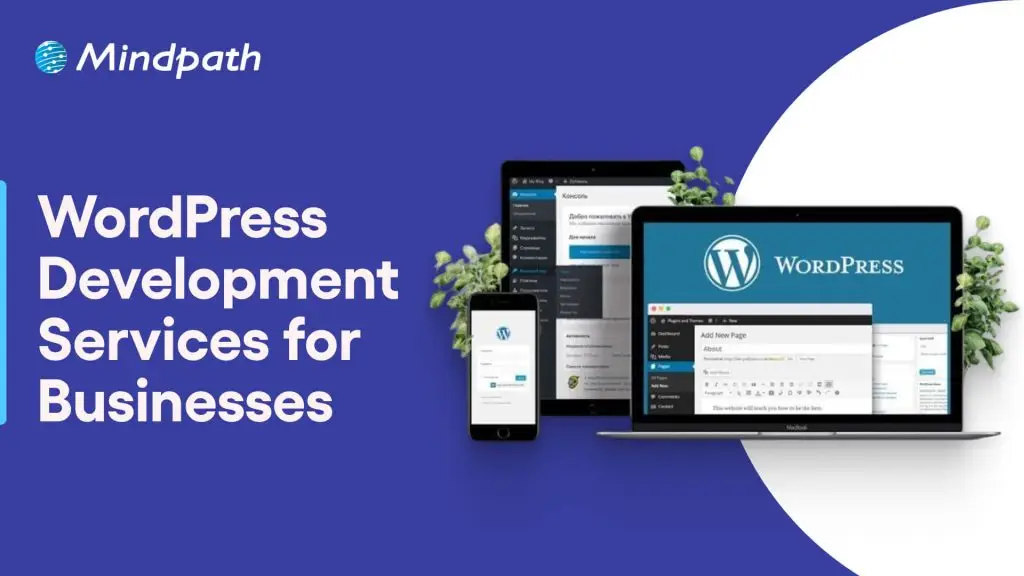
WordPress development services help businesses build, customize, and maintain websites that support their operational goals, customer experience, and online growth. Depending on business requirements, these services can include custom website development, e-commerce functionality, third-party integrations, performance optimization, security, and ongoing maintenance.
Choosing the right solution involves more than selecting a theme or installing plugins. Businesses need a website that reflects their brand, supports their customers’ needs, performs reliably, and can adapt as the organization grows. Working with the right website development company can help align technical decisions with these goals.
Key Takeaways
- 01
WordPress development services cover custom websites, plugins, integrations, e-commerce, performance, security, and maintenance. - 02
Businesses should select services based on their goals, website complexity, customer needs, and future growth plans. - 03
A well-built WordPress website can support usability, search visibility, operational efficiency, and digital sales. - 04
Businesses should evaluate security practices, performance, integration requirements, ownership, and ongoing support before choosing a development partner. - 05
Regular maintenance and performance monitoring help keep a WordPress website reliable as business requirements change.
What are WordPress Development Services?
WordPress development services involve building, customizing, improving, and maintaining websites using WordPress, a content management system (CMS). These services help businesses create websites that match their brand identity, deliver the required functionality, and provide a manageable platform for publishing and updating content.
Depending on project requirements, a WordPress development team may create custom themes, develop plugins, integrate third-party systems, configure WooCommerce, improve website speed, and implement security measures. The scope can range from developing a business website to building a more complex digital platform with specialized functionality.
For example, a professional services company may need a lead-generation website with service pages and contact forms, while an online retailer may require product catalogs, payment processing, inventory integrations, and order management.
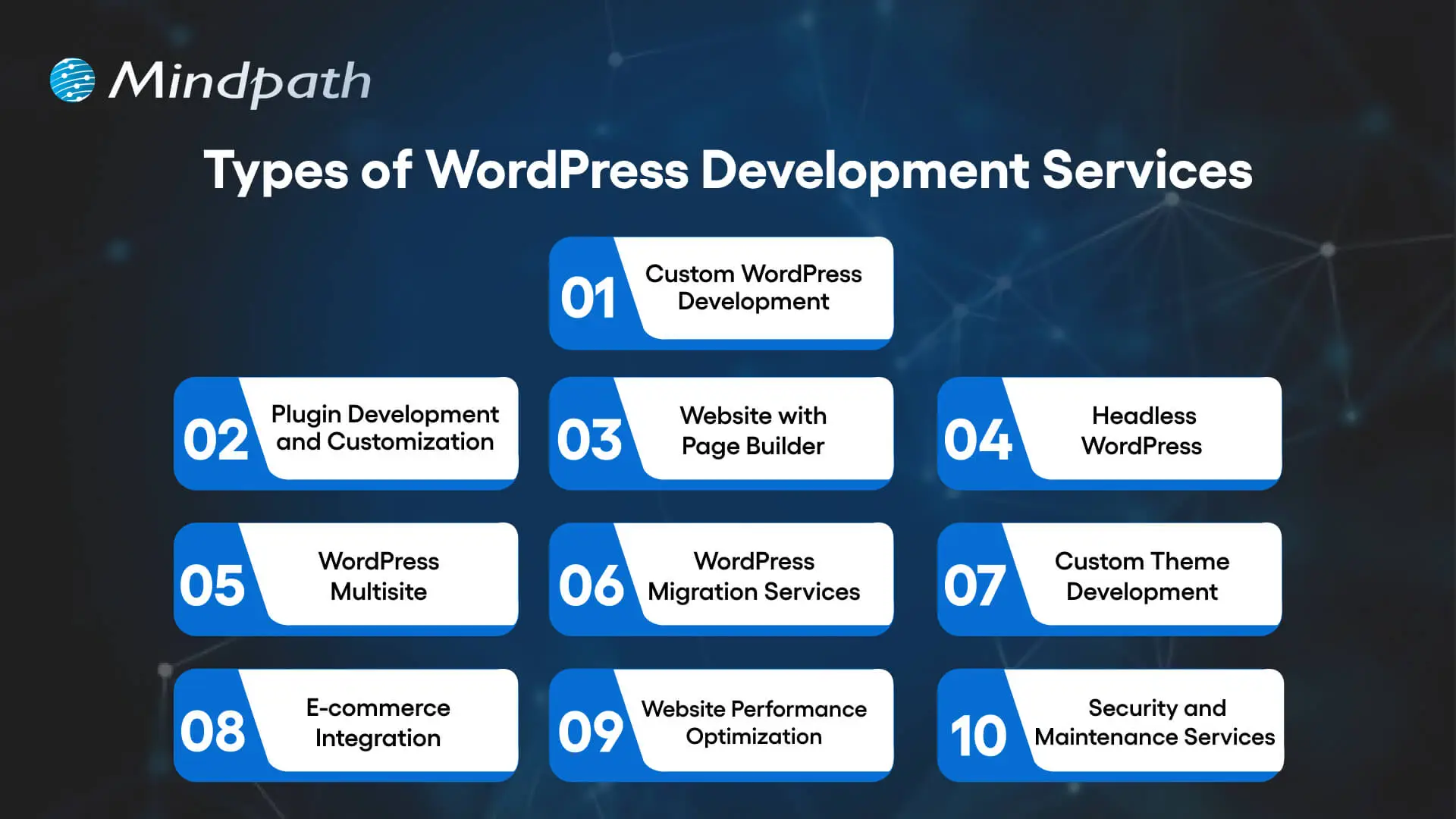
Types of WordPress Development Services Businesses Can Choose
Businesses can choose individual WordPress services or combine several based on their website’s current condition and long-term goals. Understanding the main options helps organizations identify the capabilities they need before starting a project.
1. Custom WordPress Development
Custom WordPress development creates website functionality and layouts around specific business requirements. Instead of relying entirely on a ready-made theme, a development team can build tailored page templates, content structures, custom fields, and workflows.
Business use case: A consulting firm may need industry-specific service pages, detailed case studies, and lead forms connected to its customer relationship management (CRM) system.
Learn more about custom WordPress development and how it supports tailored website requirements.
2. Plugin Development and Customization
WordPress plugins add functionality to a website. Businesses can use existing plugins for common requirements or commission custom plugin development when their workflows need capabilities that available solutions do not adequately support.
Business use case: A company may need a custom booking workflow, a specialized reporting dashboard, or an integration between its website and an internal business application.
Before adding a plugin, businesses should evaluate its maintenance history, compatibility, security, licensing, and effect on website performance.
3. Page Builder Website Development
Page builder solutions such as Elementor, Divi, and Beaver Builder help teams create and manage page layouts through visual editing interfaces. They can be useful when marketing teams need to update landing pages and campaign content without relying on developers for every change.
Business use case: A marketing team can build campaign landing pages and update calls to action while following an established design system.
The choice of page builder should consider editing flexibility, accessibility, maintainability, and its impact on page performance.
4. Headless WordPress Development
Headless WordPress separates the WordPress content management back end from the front-end experience. WordPress manages content, while a separate front end built with technologies such as React can display that content through APIs.
This architecture can offer greater front-end flexibility and support content delivery across multiple interfaces. However, it also introduces additional development, hosting, integration, and maintenance requirements.
Business use case: An organization that delivers content across a website and other digital channels may consider headless WordPress when a traditional WordPress setup cannot meet its requirements efficiently.
5. WordPress Multisite Development
WordPress Multisite allows multiple websites to run within a single WordPress installation. It can help organizations manage related websites centrally while sharing selected administrative resources.
Business use case: A company with multiple brands, regional websites, or departmental sites may benefit from centralized administration.
Businesses should assess user permissions, plugin compatibility, content ownership, and the consequences of shared infrastructure before choosing Multisite.
6. WordPress Migration Services
WordPress migration services help businesses move a website from another CMS, hosting environment, or existing WordPress installation. A structured migration process covers content, media files, databases, redirects, integrations, and testing.
Business use case: A company moving from a legacy CMS to WordPress may need to preserve important URLs, maintain access to existing content, and reduce disruption during the transition.
Migration planning should include backups, redirect mapping, staging tests, analytics checks, and post-launch monitoring to identify issues early.
7. Custom WordPress Theme Development
Custom theme development creates the visual structure and reusable page layouts of a WordPress website. A theme can be designed around a company’s brand guidelines, content requirements, and user journeys.
Business use case: A growing company may need a consistent design across service pages, landing pages, case studies, and blog articles.
A well-structured theme can also make future design updates easier to manage, provided the implementation follows maintainable development practices.
8. E-commerce Development and WooCommerce Integration
WooCommerce extends WordPress with e-commerce capabilities. Development services can include product catalogs, shopping carts, checkout flows, payment gateways, shipping configuration, and integrations with inventory or order management systems.
Business use case: A retailer can manage products and online orders through a WordPress-based store while integrating relevant payment and fulfillment services.
Businesses should review transaction security, checkout usability, mobile performance, product management, and expected traffic before launching an online store.
9. WordPress Performance Optimization
Performance optimization improves how quickly and reliably a WordPress website loads and responds. Depending on the underlying issues, work may include image optimization, caching, database maintenance, code improvements, hosting configuration, and reducing unnecessary scripts or plugins.
Business use case: An e-commerce business experiencing slow product pages can investigate performance bottlenecks to improve browsing and checkout experiences.
Businesses can monitor Core Web Vitals, server response times, page load behavior, and real-user performance to assess improvements.
10. WordPress Security and Maintenance
Security and maintenance services help keep a WordPress website updated, monitored, and recoverable. Depending on the agreement, they may include core, theme, and plugin updates; backups; vulnerability checks; access controls; malware monitoring; and incident support.
Business use case: A business that relies on its website for leads or online sales may need scheduled maintenance, tested backups, and a defined process for resolving security or availability issues.
For additional guidance, read our resource on safeguarding against common WordPress vulnerabilities.
What Should Businesses Expect From a WordPress Development Partner?
Businesses should expect a development partner to understand their goals, define the project scope, explain technical decisions, and establish clear criteria for evaluating the finished website. The exact deliverables depend on the project, but several practices are important across most engagements.
| Expectation | What it should include | Business value |
|---|---|---|
| Requirements and planning | Defined scope, priorities, timelines, and acceptance criteria | Reduces misunderstandings and scope-related delays |
| Design and usability | Brand alignment, responsive layouts, accessible navigation, and clear user journeys | Helps visitors find information and complete important actions |
| Technical development | Appropriate themes, plugins, integrations, and maintainable implementation | Supports required functionality without unnecessary complexity |
| Performance and security | Testing, optimization, updates, access controls, and backup planning | Reduces avoidable operational risks |
| SEO readiness | Crawlable pages, suitable URL structures, metadata support, and redirect planning where needed | Helps search engines discover and understand website content |
| Testing and launch | Functional, mobile, browser, integration, and launch checks | Helps identify issues before they affect visitors |
| Post-launch support | Documented ownership, maintenance responsibilities, and support arrangements | Makes ongoing website management more predictable |
Business Benefits of Professional WordPress Development Services
Professional WordPress development can help businesses create a website that supports marketing, sales, customer service, and day-to-day operations. The value depends on how well the website is planned, implemented, and maintained.
1. Website Functionality Aligned With Business Goals
A website should support specific business objectives rather than simply look attractive. Custom page templates, forms, integrations, and content structures can help visitors find relevant information and take actions such as requesting a quote, booking a consultation, or purchasing a product.
2. Better User Experience Across Devices
Responsive design, clear navigation, readable content, and accessible interactions help people use a website across desktop, tablet, and mobile devices. A well-planned user experience can reduce friction when visitors explore services or complete important tasks.
Businesses can also review our WordPress web accessibility guidelines to understand how inclusive design practices support a wider range of users.
3. More Manageable Website Operations
WordPress provides a content management interface that allows authorized team members to update pages, publish articles, and manage media. Appropriate roles, reusable templates, and editorial workflows can reduce the effort required for routine website updates.
4. A Foundation for Search Visibility
A technically sound WordPress website can support SEO through accessible content, logical internal links, suitable page titles, descriptive metadata, mobile usability, and efficient performance. These foundations help search engines access and interpret content, although they do not guarantee higher rankings.
Businesses should also review indexing, canonical URLs, structured data where appropriate, XML sitemaps, redirects, and the quality of the content published on the website.
5. Improved Security and Reliability
A structured development and maintenance process can reduce avoidable risks associated with outdated software, excessive permissions, vulnerable plugins, and inadequate backups. Security measures should reflect the website’s functionality, data sensitivity, and business importance.
For related technical guidance, see our WordPress and PHP compatibility guide.
6. Flexibility as the Business Grows
A well-planned WordPress website can be extended as requirements change. Businesses may add new service pages, integrate marketing systems, introduce e-commerce functionality, or improve existing workflows without rebuilding the entire website for every new requirement.
The ability to scale depends on the site’s architecture, hosting resources, integration design, and the quality of its implementation.
7. Better Control Over Website Costs
The right development approach can help businesses avoid unnecessary plugins, duplicated functionality, and expensive rework. However, the total cost of ownership also includes hosting, premium extensions, maintenance, security, licensing, and future improvements.
Businesses should compare the expected long-term cost of a proposed solution rather than choosing a provider based only on the initial development quote.
How to Choose the Right WordPress Development Services
The right service provider should be able to connect technical recommendations with your business objectives. Before making a decision, evaluate the following areas.
1. Define Your Website Requirements
Identify the website’s main purpose, target audience, essential features, content needs, integrations, and expected growth. A company website, an online store, and a content-heavy publishing platform will have different technical requirements.
2. Review Relevant Experience
Look for projects that demonstrate experience with similar functionality, industry requirements, integrations, or performance challenges. Ask how the provider approached the work and how the finished website meets the original requirements.
3. Assess Technical and Security Practices
Ask about plugin selection, code quality, access permissions, backups, update procedures, testing, and recovery plans. The provider should be able to explain the approach in terms your business team can understand.
4. Confirm SEO and Performance Requirements
Discuss URL structures, redirects, mobile usability, page performance, indexing, and analytics before development begins. If the project replaces an existing website, make sure the team has a plan to preserve valuable URLs and monitor changes after launch.
5. Clarify Ownership and Ongoing Support
Confirm who owns the website code, domain, hosting account, licenses, content, and administrator credentials. Review the support agreement, maintenance schedule, response expectations, and costs for future changes.
6. Compare Scope, Not Just Price
Review each proposal against the same requirements. Compare deliverables, exclusions, testing, integrations, documentation, launch support, and post-launch services before evaluating the total price.
Businesses evaluating external partners can also read our guide to choosing the right website development company.
How Much Do WordPress Development Services Cost?
The cost of WordPress development services depends on the website’s scope, design requirements, custom functionality, integrations, migration needs, performance targets, and ongoing support. A straightforward business website generally requires a different level of effort from a custom e-commerce platform or a complex, integrated digital experience.
| Cost factor | What affects the cost |
|---|---|
| Design complexity | Custom layouts, responsive behavior, accessibility, and design system requirements |
| Custom functionality | Specialized workflows, custom plugins, user roles, and advanced features |
| Integrations | CRM, payment, inventory, marketing, analytics, and other external systems |
| Migration requirements | Content volume, URL mapping, data transformation, redirects, and testing |
| Performance and security | Optimization, infrastructure configuration, security controls, and monitoring |
| Ongoing maintenance | Updates, backups, troubleshooting, licenses, hosting, and support coverage |
Before approving a proposal, ask for a clear breakdown of development deliverables, recurring expenses, assumptions, exclusions, and change-request costs. This helps businesses budget more accurately and compare providers on a consistent basis.
Common Mistakes to Avoid When Investing in WordPress Development
Even a well-funded website project can create avoidable problems when business requirements and technical decisions are not aligned. Businesses should watch for these common mistakes.
- Choosing based only on the initial quote: A low upfront price may exclude testing, integrations, documentation, or maintenance.
- Installing too many plugins: Unnecessary or poorly maintained plugins can increase complexity and security risks.
- Ignoring performance during development: Heavy themes, oversized images, and excessive scripts can affect user experience.
- Leaving SEO until launch: URL changes, missing redirects, and incorrect indexing settings can create avoidable search visibility issues.
- Skipping backup and recovery planning: Businesses need a practical process for restoring the website after a failure or security incident.
- Failing to clarify ownership: Domain access, hosting accounts, licenses, and administrator credentials should be clearly assigned.
Build a WordPress Website Around Your Business Goals
WordPress development services can help businesses build websites that support their brand, customer experience, marketing activities, and digital operations. The right approach depends on the required functionality, integration needs, security expectations, performance goals, and plans for future growth.
Before starting a project, define the outcomes your website needs to deliver and evaluate providers against those requirements. A clear scope, appropriate technical choices, thorough testing, and a practical maintenance plan can help create a website that remains useful as your business evolves.
At Mindpath’s WordPress development services, businesses can explore solutions for custom themes, plugin development, e-commerce integration, performance optimization, and website maintenance. Discuss your requirements with a development team to identify an approach that fits your website goals.
Have you ever thought to yourself about how AI can interpret images, voices, or texts so accurately? Well, it is due to the rapid growth of the role of vector databases in AI applications. Standard databases do a good job of storing structured data, while much of AI work involves dealing with complex and unstructured information. Vector databases provide methods for storing and comparing information which allow machines to recognize patterns, context, and meaning much faster and with higher accuracy.
As AI systems become more intelligent, the demand for methods to support thinking beyond the simple data is also increasing. Vector databases provide that opportunity for AI to correlate information, learn from it, and generate more impactful results. They are quickly becoming the framework of modern AI innovation. In this blog, we will take a look at the power of vector databases in AI applications and why they are a necessary future element of intelligent systems.
Key Takeaways
- 01
Vector databases help AI applications search and compare information based on meaning and context. - 02
They support AI use cases such as semantic search, RAG, recommendations, and computer vision. - 03
Vector embeddings convert text, images, audio, and other data into numerical representations that AI can compare. - 04
Fast similarity search allows AI systems to retrieve relevant information from large and complex datasets. - 05
Vector databases can act as a memory layer for AI systems and agents that need to store and retrieve contextual information.
Looking for a way to enhance personalization with the help of AI in your apps using a vector database? Explore Mindpath’s AI development services, which provide expert guidance and knowledge on how to maximize the value of the vector database to elevate your AI capabilities.
What is a Vector Database for AI?
A vector database is a specific type of database that enables storing and searching for data represented as vectors. Vectors are sets of numbers that represent the meaning or features of data such as text, images, and audio. Instead of searching for exact matches of data, a vector database searches for similar items, based on the context, illuminating AI’s capacity to perform at a more intelligent level based on context.
In basic terms, it works like the brain of AI systems that require memory and comparison. A vector database in AI enables quick and accurate data searches among very large and complex datasets. They are often used in applications such as chatbots, recommendation engines, and image searches where the response time and clearly related results mean everything.
In simple terms, a vector database helps AI applications store, search, and retrieve information based on meaning rather than exact keyword matches.
Curious how AI chatbots can boost engagement and revenue? Discover AI Chatbot examples to learn how vector database-driven intelligence improves customer interactions.
How Does a Vector Database Work?
Vector databases assist artificial intelligence to comprehend and look through data in terms of meaning rather than precise words. Data is stored as numbers that illustrate what the data depicts. This helps AI connect ideas, find similarities, and give more accurate and useful results.
1. Creating vector embeddings
AI models process raw data to create vectors, which are sets of numbers that represent the meaning of the data. Vectors are mechanisms for AI to understand the connections among different data points.
2. Storing and indexing vectors
The vectors are kept within a vector database, which can be indexed with smart indexing methods, such as HNSW (Hierarchical Navigable Small World) or IVF (Inverted File Index). The role of vector databases in AI applications here is to store, group, and quickly find similar data when needed.
3. Performing similarity search
When the search begins, it will convert the query into a vector, which it begins to compare to other stored vectors. The database returns the closest elements based on meaning, so the AI can accurately and relevantly respond to the user.
Looking to optimize AI models without heavy computational costs? Explore Low-Rank Adaptation (LoRA) to discover techniques that improve vector database-powered AI efficiently.
Role of Vector Databases in AI Applications
The importance of the vector database for the AI application is becoming more necessary and prevalent as AI works with larger and more complicated data. Below are the main ways in which it helps and enhances the AI systems.
1. Smarter Search with Meaning
An AI application that utilizes a vector database can perform searches on meaning, rather than just a specific word. It finds things that are contextually similar in vector space; this is a lot more precise and much more human-like. This is incredibly useful, because the AI system can determine what users mean, not simply what they type.
2. Supporting Retrieval-Augmented Generation (RAG)
Vector databases provide large language models with access to current facts, knowledge, and data points from the public domain. The user’s inquiry is converted to a vector, which retrieves information from data similar to that represented in the user’s question. The information and materials retrieved help the AI provide responses that are elevated in relevance and made to be factually accurate.
3. Managing Complex Data Types
The role of vector database in AI application is to be able to manage unstructured data including images, text, and audio. A vector database does this by representing the unstructured data as numerical vectors that convey meaning. This allows AI to be able to compare unstructured data types more easily.
4. Enabling Fast Similarity Search
Vector databases leverage novel algorithms to identify similar items quickly, even among massive datasets. This capability is crucial for a number of artificial intelligence (AI) applications that depend on real-time results. The vector database in the AI application in this case is to return results quickly and still maintain precision.
5. Improving Recommendations
Recommendation systems utilized vector databases to recommend similar attributes to items or products that users had liked before. AI uses patterns in the vectors and can customize content for each individual. This leads to a more meaningful and engaging experience for the user.
6. Powering Computer Vision
In computer vision, a vector database in AI helps identify and compare images or videos efficiently. It supports tasks like face recognition, image search, and visual content filtering. By finding visually similar vectors in AI systems it improves speed and accuracy.
7. Building AI Memory
The role of the vector database in AI applications is that it is a dependable memory mechanism for the AI agents. It strengthens the AI agent’s ability to store and retrieve information in support of reasoning and decision-making. Thus, vector capacity increases the multi-step capabilities of AI agents when solving complex tasks.
8. Hybrid and Refined Search
Vector databases have the ability to merge traditional filters like date or category with similarity search. This hybrid effort increases the precision and relevance of a search result. Users can quickly and clearly find exactly what they are looking for.
Wondering how AI systems focus on the most important information in complex datasets? Discover the Attention Mechanism to learn how it enhances AI performance in combination with vector databases.
Ready to Build Smarter AI Solutions with Vector Databases?
Vector databases are transforming how AI systems process and understand information. They enable faster searches, handle complex data, and make AI responses more meaningful and accurate. As technology continues to advance, the role of vector databases in AI applications will remain central to building intelligent and scalable solutions across industries.
At Mindpath, our AI development services combine the power of vector databases with advanced machine learning models to build smarter and more efficient systems. We help businesses create intelligent applications that learn, adapt, and deliver real results. Partner with us to design AI solutions that drive innovation and long-term success.
Businesses all over Canada are always under pressure to make apps that are fast, scalable, and able to handle real-time interactions in today’s digital-first economy. Your backend technology is very important for long-term success, whether you’re a startup launching your first product or a big company updating old systems. Node.js has become one of the most powerful and widely used backend technologies available today.
This in-depth guide will help you understand Node.js and its benefits, developer skills, hiring models, costs, and best practices if you want to hire NodeJS developers in Canada. This article is set up to give you a full, useful guide to hiring the best Node.js developers in Canada.
Why You Should Hire NodeJS Developers?
Cities like Toronto, Vancouver, Montreal, and Ottawa are at the forefront of innovation in Canada, which is one of the fastest-growing tech hubs in the world.
Important Reasons to Hire in Canada
1. Highly Skilled Talent Pool
Canadian developers are known for having a lot of technical knowledge.
2. Quality Education System
The best universities make good software engineers.
3. Stable Economy
Canada is a safe place to do business.
4. Time Zone Advantage
Works well with businesses in the US.
5. Strong Work Ethics
Employees who are professional and dependable.
For North American businesses, hiring NodeJS developers in Canada guarantees high-quality work and easy communication.
Important Skills for NodeJS Developers
You need to look at both technical and interpersonal skills when hiring expert NodeJS developers.
1. Core Technical Skills
- Strong knowledge of JavaScript (ES6+)
- Proficiency in Node.js frameworks like Express.js or NestJS
- Experience with REST APIs and GraphQL
- Understanding of asynchronous programming
- Familiarity with databases (MongoDB, MySQL, PostgreSQL)
- Knowledge of Git and version control
2. Advanced Technical Skills
- Microservices architecture
- Cloud services (AWS, Azure, Google Cloud)
- Docker and Kubernetes
- CI/CD pipelines
- Security best practices
3. Soft Skills
- Problem-solving mindset
- Communication skills
- Ability to work in agile teams
- Time management
A good developer should be able to write clean code and know how to make a program work for a lot of users.
Hiring Models for NodeJS Developers
The size, budget, and timeline of your project will help you choose the best hiring model.
1. In-House Developers
- People who work full-time
- Best for projects that will last a long time
- Higher cost because of benefits and infrastructure
2. Freelancers
- Cost-effective and adaptable
- Great for small or short-term projects
- Can be hired right away
3. Dedicated Developers
- Only work on your project
- Best for new businesses and teams that are growing
4. Remote NodeJS Developers
- Get access to talent from all over the world
- Cut down on the costs of doing business
- A hiring process that goes faster
Step-by-Step Process to Hire NodeJS Developers in Canada
Hiring the right Node.js developers in Canada requires a well-planned and structured approach. With a rapidly growing tech ecosystem and increasing demand for skilled professionals, businesses need a clear hiring strategy to identify the right talent, reduce risks, and ensure long-term project success.
Step 1: Identify Your Project Needs
Begin by clearly defining your project requirements in detail. This includes outlining the scope of the project, core features, and expected outcomes. Determine whether you are building a real-time application, API, SaaS platform, or enterprise solution. Additionally, establish your budget, timeline, and preferred technology stack. A well-defined project plan not only helps you communicate your vision effectively but also ensures you attract developers who are aligned with your technical and business objectives.
Step 2: Select the Appropriate Hiring Model
Choosing the right hiring model is crucial for balancing cost, flexibility, and control. Evaluate whether you need full-time developers for long-term collaboration, freelancers for short-term or specialized tasks, or remote development teams for scalability. Consider factors such as project complexity, duration, and internal resources. Making the right choice at this stage can significantly impact productivity, communication, and overall project efficiency.
Step 3: Develop a Comprehensive Job Description
Create a detailed and well-structured job description that clearly communicates your expectations. Include required technical skills such as proficiency in JavaScript, Node.js frameworks (e.g., Express.js, NestJS), API development, and database management. Define roles, responsibilities, deliverables, and the level of experience needed. A strong job description not only attracts qualified candidates but also filters out unsuitable applicants, saving time during the hiring process.
Step 4: Explore Talent Through Multiple Channels
To find the best Node.js developers in Canada, use a combination of sourcing channels. Leverage professional networks like LinkedIn, freelance platforms such as Upwork, and specialized tech job boards. You can also explore developer communities, referrals, and recruitment agencies. Using multiple channels increases your reach and improves your chances of finding experienced and reliable developers in a competitive market.
Step 5: Review and Shortlist Candidates
Carefully evaluate candidate profiles by reviewing resumes, portfolios, and past work experience. Focus on previous projects that are similar to your requirements and assess their contributions. Checking GitHub repositories can provide insights into coding standards, problem-solving approaches, and real-world experience. Shortlisting the right candidates ensures you move forward with individuals who have both the technical expertise and relevant experience.
Step 6: Conduct Technical and Practical Assessments
Assess candidates through a combination of technical interviews, coding tests, and real-world problem-solving exercises. Evaluate their understanding of Node.js concepts such as asynchronous programming, event-driven architecture, API integration, and database handling. Practical assessments help you determine how candidates approach challenges, write efficient code, and perform in real project scenarios.
Step 7: Complete Hiring and Ensure Smooth Onboarding
Once you have selected the right candidate, finalize the hiring process by offering competitive compensation and clearly defining roles, responsibilities, and expectations. Provide structured onboarding, including access to tools, documentation, and workflows. A smooth onboarding process helps developers integrate quickly into your team, improves productivity, and sets the foundation for long-term success.
Cost of Hiring NodeJS Developers in Canada
There are several factors that influence the cost of hiring a NodeJS developer in Canada, including experience level, geographic location, and the hiring model you choose.
1. Hourly Rates
(Based on Glassdoor and market salary data)
- Junior Developers: $30 – $50/hour
- Mid-Level Developers: $50 – $90/hour
- Senior Developers: $90 – $140+/hour
2. Annual Salaries
(Source: Glassdoor Canada & Payscale)
- Junior: ~$60,000 – $75,000/year
- Mid-Level: ~$75,000 – $100,000/year
- Senior: ~$100,000 – $130,000+/year
Factors Affecting Cost
1. Developer Experience
Senior developers charge significantly higher rates
2. Geographic Location
Cities like Toronto and Vancouver have higher salaries
3. Project Complexity
Advanced applications (SaaS, real-time systems) cost more
4. Engagement Model
In-house, freelance, or outsourcing impacts pricing
5. Technology Stack
Skills like cloud, DevOps, and microservices increase cost
Hiring developers who work from home can save you a lot of money while still getting good work done.
Why Hiring Dedicated NodeJS Developers in Canada is a Smart Long-Term Investment?
Hiring dedicated NodeJS developers in Canada is one of the most effective ways to build scalable, high-performance applications while maintaining quality and long-term consistency. For businesses looking to hire NodeJS developers in Canada, dedicated developers offer greater reliability, stronger collaboration, and better project control. This hiring model is especially beneficial for startups, growing businesses, and enterprises that need continuous development and long-term technical support.
Key Benefits of Hiring Dedicated NodeJS Developers in Canada
1. Full Commitment to Your Project
Dedicated developers work exclusively on your project, ensuring steady progress, faster delivery, and minimal distractions.
2. Consistent Focus and Higher Productivity
Since they are fully involved in your project, dedicated NodeJS developers in Canada can maintain momentum, meet deadlines, and deliver quality results consistently.
3. Better Understanding of Business Goals
Over time, dedicated developers gain deeper insights into your business objectives, workflows, and user needs, leading to more tailored and effective solutions.
4. Improved Code Quality and Maintainability
Continuous involvement helps maintain coding standards, improve system performance, and reduce technical debt.
5. Faster Issue Resolution and Support
Dedicated developers can quickly identify and fix bugs, performance issues, or technical challenges, reducing downtime and improving efficiency.
6. Seamless Team Integration
Dedicated NodeJS developers act as an extension of your in-house team, aligning with your processes, communication tools, and project workflows.
7. Scalability and Flexibility
This model makes it easier to scale your team up or down based on project demands without disrupting progress.
8. Long-Term Cost Efficiency
Although the initial investment may be higher, dedicated developers reduce costs related to hiring, onboarding, and managing multiple short-term resources.
9. Greater Control and Transparency
You benefit from direct communication, better visibility into progress, and more control over timelines, priorities, and deliverables.
Common Mistakes to Avoid When Hiring Dedicated NodeJS Developers in Canada
- Not clearly defining project requirements
- Hiring based only on cost rather than expertise
- Ignoring communication and collaboration skills
- Skipping technical interviews or coding tests
- Choosing the wrong hiring model for your project
Hiring dedicated NodeJS developers in Canada can provide significant long-term value when done correctly. By choosing the right talent, setting clear expectations, and avoiding common mistakes, businesses can build stronger development teams, improve product quality, and achieve faster, more sustainable growth.
Hire Top NodeJS Experts in Canada to Accelerate Your Business
Businesses that want to make high-performance, scalable apps should hire NodeJS developers in Canada. Canada is a great place to hire both local and remote developers because it has a lot of talented people, low prices, and a growing tech ecosystem.
You can confidently hire expert NodeJS developers who will help you reach your business goals and get great results if you know what skills they need, how to hire them, how much it will cost, and what the best practices are.
Companies need backend technologies that can handle real-time data, are quick, and can grow with the business in today’s digital-first economy. Node.js is now one of the most popular backend tools for building SaaS platforms, fintech apps, and business software.
California is one of the best places to find Node.js developers because it is home to Silicon Valley and some of the biggest tech companies in the world. You need to know a lot about skills, costs, hiring models, and market demand to hire the right people here.
This guide gives you a complete, research-based look at how to hire NodeJS developers in California. It covers everything from the skills and costs to the steps you need to take and the best ways to do it.
Key Benefits of Hiring NodeJS Developers
Node.js is popular because it is fast and can make apps that can grow. Its event-driven, non-blocking architecture makes it great for modern apps like APIs, real-time apps, and microservices. Let’s dive in to understand the key benefits of hiring nodejs developer in California.
1. High performance and Scalability
Node.js is great for apps that get a lot of traffic because it can handle many requests at the same time.
2. Faster development
Node.js uses JavaScript on both the front end and the back end, which makes development faster and more productive.
3. Strong Ecosystem
NPM, which stands for Node Package Manager, lets developers use thousands of libraries to get their work done faster.
4. Ideal for Real-Time Applications
A lot of people use Node.js to build live apps like messaging apps and streaming services.
5. The Availability of Skilled Workers in California
California has a strong tech ecosystem that helps businesses find the best workers.
What Skills Should You Look for in a Node.js Developer?
You need to know what skills a developer needs in order to hire the right one. Not all JavaScript developers know a lot about Node.js.
1. Core Technical Skills
- A lot of experience with JavaScript (ES6+).
- Getting the back end to work with Node.js
- Familiarity with frameworks like NestJS or Express.js
- Creating RESTful APIs
- Taking care of databases like MySQL, MongoDB, and PostgreSQL
- Version control tools like Git
2. Advanced Skills (For Experienced Developers)
- The structure of microservices
- Cloud platforms, such as AWS, Azure, and Google Cloud
- Computing without servers
- Making things work better
- Best ways to keep things safe
Senior developers often make more money because they can design systems that can grow and handle complex architectures.
3. Soft Skills
- Being able to solve problems
- The ability to talk to people
- Working as a team
- Managing time
Strategic Hiring Models: Choosing the Right Fit for Your Node.js Project
When looking to hire Node.js developers in California, businesses are no longer restricted to traditional hiring methods. Depending on your project’s budget, timeline, and security requirements, you have four distinct hiring models to choose from. Selecting the right one is critical for balancing cost with technical output.
1. In-House Hiring
Building an internal, full-time engineering team is the traditional route, ideal for core product development that requires deep institutional knowledge.
2. Freelance Developers
For short-term projects, bug fixes, or highly specialized micro-tasks, hiring independent freelancers from platforms like Upwork or Toptal can be an attractive option.
3. Dedicated Developers
This model involves partnering with a specialized IT agency to “hire” full-time developers who work exclusively on your project but remain legally employed by the agency.
4. Remote & Distributed Developers
With the rise of robust remote work infrastructure, you are no longer limited by geographical borders. You can hire full-time or contract developers who work entirely from home.
The Cost of Hiring NodeJS Developers in California
When budgeting for your next major software project, relying on anecdotal salary data, Reddit threads, or outdated job boards is a fast track to under-budgeting. If you want to secure top-tier talent in one of the most competitive tech ecosystems in the world, you need to understand the actual market rates.
To give you an accurate, transparent look at the current landscape, we cross-referenced real-world agency pricing with official government labor statistics from the U.S. Bureau of Labor Statistics (BLS) and the California Employment Development Department (EDD).
Because the government classifies Node.js engineers under the broader “Software Developers” category, we can use their highly regulated data to validate exactly what elite talent costs in the Golden State today.
1. Annual Salary Benchmarks (Full-Time / In-House)
If your goal is to hire an in-house, full-time Node.js developer, the baseline costs are substantial. You are competing directly with Silicon Valley giants and well-funded startups.
- The Baseline Average: Historical BLS data and active job aggregators have long placed the median tech salary in California around $137,600.
- The Current Competitive Rate: As demand for advanced back-end architecture and highly scalable applications grows, the official BLS mean annual wage for Software Developers in California has surged to $173,780.
- The Silicon Valley Premium: If you are hiring in hyper-competitive tech hubs like the San Jose-Sunnyvale-Santa Clara metropolitan area, you must pay a premium. The government reports an average annual salary of $199,800 for top-tier engineers in these regions.
Keep in Mind: These numbers represent base salaries. When you factor in recruitment costs, health benefits, equity, and equipment, the true cost of an in-house hire is often 20% to 30% higher than their base pay.
2. Hourly Rates & The “Agency Markup” Explained
For many agile companies, hiring full-time W-2 employees is not the most efficient solution. Choosing to work with dedicated freelancers or a staff augmentation agency changes the pricing model to an hourly rate.
Our market research shows that hiring a mid-level to senior Node.js developer on a contract basis generally costs between $80 and $150+ per hour. Here is exactly how that aligns with official government data:
- The Government Base Rate: The BLS reports the mean hourly base wage for a developer in California is $83.55, climbing to $96.06 in Silicon Valley.
- The Fully Loaded Cost: It is critical to understand that the BLS tracks raw W-2 base pay. When you hire through an agency or a premium contractor, the hourly rate includes overhead, software licenses, healthcare benefits, and the agency’s operational margin.
This standard 20% to 40% markup perfectly explains why a base wage of $83–$96 per hour translates directly to the $120 to $150+ per hour billing rate you will see on professional agency proposals.
California is expensive, but it also houses the most innovative and experienced developers in the world. Paying these rates ensures you are securing engineers who possess the elite architectural knowledge required to build secure, scalable, and high-performance Node.js applications that won’t break under pressure.
Step-by-Step Guide to Hire Node.js Developers in California
Hiring top-tier Node.js developers in California means navigating one of the world’s most dynamic and fiercely competitive tech ecosystems. To attract and secure high-impact engineers who can drive your vision forward, you must execute a strategic, rigorous, and highly targeted hiring process that filters out the average and hones in on the exceptional.
Step 1: Define Precise Project Requirements
Begin by pinpointing the exact architectural scope, determining whether you are constructing a high-frequency trading platform, a globally scaled SaaS product, a real-time communication tool, or a complex enterprise backend. Clearly define the necessary tech stack, including proficiency in databases and cloud infrastructure. Establishing firm timelines, budget constraints, and core deliverables at this stage creates a roadmap that ensures alignment and prevents costly scope creep down the line.
Step 2: Strategically Select Your Hiring Model
Building an in-house team might be essential for highly secure, proprietary projects requiring deep institutional knowledge. Conversely, you might opt for remote developers across the US or adjacent time zones to optimize costs without sacrificing synchronous collaboration. If your goal is to rapidly scale for a specific sprint or product launch, partnering with vetted agencies to onboard dedicated Node.js developers can provide immediate, high-impact momentum without the long-term commitments of traditional employment.
Step 3: Craft a High-Impact, Technical Job Description
Clearly outline the day-to-day responsibilities, key deliverables, and performance expectations, which serves a dual purpose: it acts as a magnet for highly qualified candidates who thrive on clarity, while simultaneously functioning as an immediate filter to deter applicants who lack the requisite depth of experience.
Step 4: Deploy Sourcing Strategies
Actively scout open-source contributors on GitHub and technical forums to find nodejs developers who demonstrate genuine passion and peer-validated skills. Furthermore, leverage internal referral networks or collaborate with elite, specialized technical recruitment agencies that maintain exclusive pipelines of passive, high-caliber candidates who are not actively browsing public job listings.
Step 5: Conduct Technical Evaluations
Assess their ability to design scalable backend architectures, seamlessly integrate complex databases, and identify performance bottlenecks under heavy load. By presenting them with assignments mirroring your actual codebase or architectural challenges, you gain unparalleled insight into their practical problem-solving methodologies and coding standards.
Step 6: Assess Soft Skills and Cultural Alignment
Evaluate candidates’ adaptability, time management, and approach to teamwork, particularly their receptiveness during code reviews and their ability to mentor junior peers. Ultimately, you are looking for developers who not only write exceptional code but also elevate the entire team’s dynamic and align seamlessly with your company’s core values and operational tempo.
Step 7: Finalize Hiring and Execute Onboarding
Provide the new developer with immediate, frictionless access to all required repositories, project management tools, and comprehensive system documentation so they can begin familiarizing themselves with the architecture on day one. A meticulously planned onboarding phase minimizes friction, accelerates the developer’s path to their first code commit, and establishes a foundation of trust and productivity that secures long-term retention.
Ready to Bypass the California Hiring Headache?
You can work with some of the best tech experts in the world if you hire Node.js developers in California. But it costs a lot and there are a lot of other people who want it. Finding NodeJS developers in California is the most important thing, whether you hire them in person or online. We at Mindpath have a dedicated team of nodejs developer from mid to high level experience. Contact us today with your requirements and we’ll provide you with the best nodejs developer in California.
Did you ever wish you could brainstorm new concepts, create beautiful visuals, or write codes without any creative personnel or technical expertise? Now that there are well-developed generative AI tools for content creation and code generation, this is not a dream anymore. These smart tools are enabling users to develop quality content and working code in a matter of minutes. Whether it is writing blogs or coming up with generative code snippets, these tools are aiding productivity and creativity in industries.
All you need is the right tool to witness the magic. Here, in this blog, you will learn about generative AI for code generation and content development. In addition to that, we will discuss some of the most essential aspects that will allow you to select a generative AI tool without any confusion.
Want to improve your business content creation and coding capabilities without increasing the workforce? Mindpath’s Generative AI development services build custom GenAI solutions that deliver consistency and measurable results.
What are Generative AI Tools?
Generative AI tools are software applications powered by machine learning models that create new content, such as text, images, audio, video, and code, in response to user prompts. Popular examples include ChatGPT, Midjourney, and Claude. Gen AI is changing creative work by automating repetitive processes, and since these tools are trained on huge amounts of data, they can generate context-aware content that benefits teachers, marketers, developers, and designers alike.
Here is how generative AI can help in code and content creation.
1. Produce beautiful marketing images.
2. Write social posts, emails and articles.
3. Computerize routine development processes.
4. Write code using various languages.
Whether you are a marketer who wants to optimize the content or a developer who needs to quickly get the code finished, generative AI can serve as your creative partner.
Wondering where generative AI is making the biggest impact? Discover generative AI use cases to explore real-world applications across industries.
Let’s now learn about the most popular generative AI tools for content creation and code generation and know how to select the appropriate one for your business.
Generative AI Tools for Content Creation
Generative AI has enabled more scalable, faster, and smarter content creation processes across industries. Here are some popular tools assisting with ideation, editing, and drafting.
1. Copy.ai
It generally focuses on generating short-form content. Businesses can use it to generate taglines, headlines, and relevant email subject lines. Copy.ai is an ideal option for quick ideation and A/B testing across multiple campaigns.
2. Jasper
This AI-based tool is an advanced writing assistant that is developed for sales teams, marketers, and brands in need of conversion-driven and persuasive content. It comes with built-in templates as well as SEO integration. Jasper can assist you with the social media posts, landing pages, and advertising.
3. Hypotenuse AI
This tool specializes in generating e-commerce-focused content and product descriptions. It is also able to develop SEO-friendly blogs depending on the nature of your brand so that you can gain organic traffic. Using this, you can maintain a consistent brand tone for your marketing content.
4. ChatGPT
This versatile tool is an excellent option for long-form writing, conversational content, and brainstorming. It is flexible in style and tone, and is therefore excellent for emails, product description, and blogging.
Wondering how tools like ChatGPT generate human-like responses? Explore the Large Language Models (LLM) guide to understand the technology powering content and code creation.
Wondering which AI tool is best for content creation? Well, that entirely depends on your requirement. You should choose generative AI tools for content creation considering your audience base, content format, workflow requirement, and platform.
Top Generative AI Tools For Code Generation
AI coding tools are not here to replace developers; they are here to enhance their efficiency and capabilities. Well, if you want to experience it, here are some of the best generative AI tools for code generation that you can try.
1. Tabnine
It is a deep-learning code assistant and can easily adapt to every developer’s style. The platform supports IDEs and multiple languages. Besides, it offers privacy-first deployment along with team-based training. With this tool, you can ensure context-aware code generation.
2. Qodo
It is an AI-based code quality platform, which provides comprehensive test cover, compliance, and code integrity. It can easily be incorporated into CI pipelines, JetBrains, VS Code, and IDEs. Qodo also promotes features like code explanation, SDLC coverage, and automated test development.
3. GitHub Copilot
This tool is built in with Visual Studio Code and provides smart code completion, automatic snippet generation and real-time suggestions. It supports several programming languages and assists programmers to code more quickly and with minimum errors.
4. Replit
It is a browser-based coding platform that offers AI-powered contextual code generation and auto-completion. In addition, it is also capable of detecting errors and breaks down complicated code snippets efficiently with a reasonable explanation. Replit also supports real-time collaboration and rapid prototyping.
Interested in AI-powered image and media generation? Explore our Stability AI guide to see how Stability AI tools support creative workflows.
Tips to Choose the Right Generative AI Tools
Selecting the best generative AI tools for your needs requires a strategic approach. After all, not all the tools are the same, and one tool can’t fulfil all your wishes. However, you don’t have to worry at all, as here we have listed down some useful tips that will help you make an informed decision.
1. Know Your Goals
Always begin by learning about the core objectives. Understand whether you need a tool for editing multimedia, writing SEO-optimized content, or generating code. With a clear goal, it will be easier for you to match tools to particular tasks.
2. Pilot Various Tools
Extensively test multiple AI tools and compare their output quality, feature alignment, and usability. Piloting can help you find out which tools perfectly fit your existing workflows and adapt to your technical and creative style.
3. Customization and Training
Opt for generative AI tools that allow quick tuning, model training, and brand voice adaptation. Flexibility in customization ensures the results are consistent and relevant.
4. Integration Compatibility
While searching for generative AI tools for content creation, you should ensure that they will integrate with your existing tools, like IDEs, CMS, etc. A seamless integration will reduce friction and increase productivity while supporting your future scalability.
5. Support and Community
Some tools can be a little challenging to get started with. However, a tool with strong documentation and active forums will be easy to use. A growing community will accelerate learning and help you troubleshoot different issues.
Keep these points in mind and align your organizational goals with the tool’s capabilities to find the best solutions. Only the right one can help enhance creativity as well as productivity.
Want to stay ahead of emerging AI innovations? Check out generative AI trends to learn what’s shaping the future of AI tools.
Challenges and Considerations in Gen AI
As generative AI platforms become essential to code and content creation, many ethical considerations and challenges demand attention. Read to know more about this.
1. Ownership Conflict
One of the major concerns is ownership. Who truly owns AI-generated outputs- the developer, the platform, or the users? We all know that the current legal frameworks are not designed for technological innovation. This has created confusion around licensing, distribution rights, and copyright. Every organization should establish transparent internal policies that clearly state ownership.
2. Ethical Grey Zones
Generative AI tools are trained on massive datasets, and that data may carry bias, cultural blind spots, and misinformation. Without proper oversight, those flaws can be seen in outputs. Organizations should consider ethical AI and focus more on fairness, transparency, and, of course, accountability. Speaking about the responsible use of models, it includes proper auditing models, flagging problematic content, and aligning outputs with societal values.
3. Human Judgment Still Matters
Undoubtedly, generative AI tools have impressive capabilities. However, they are not infallible. These tools can misinterpret prompts, offer irrelevant content, and hallucinate facts. That’s why human oversight will remain essential for quality checks. Editorial review, domain expertise, and critical thinking are irreplaceable.
4. Access Gaps
Powerful AI tools often need significant resources such as financial investment, computing power, and technical expertise. This may create obstacles for small creators and teams. Eliminating such issues is important for equitable innovation. Affordable pricing, inclusive design, and open-source models can lead to vast adaptation.
Addressing these issues will ensure that generative AI tools evolve responsibly and can benefit various users.
Wondering how businesses can adopt generative AI responsibly? Discover generative AI for business to learn strategies that balance innovation, cost, and accessibility.
Generative AI Tools – What’s There in the Future?
The future of generative AI tools for content and code creation is evolving rapidly. The trends indicate more accessible, intelligent, as well as collaborative experiences. In the future we shall be able to observe:
- Stunning multimodality features combining images, audio, code, and text generation.
- More developed and elaborate fine-tuning of industry-specific code standards and writing.
- The risk of errors will be reduced as AI will be able to comprehend context on a profound level.
- AI will function as a technical and creative partner, helping businesses boost productivity.
- AI-powered content and code creation will become more accessible to small businesses, startups, and non-technical users.
Curious how generative AI is reshaping business operations? Explore our generative AI revolution blog to see how it is transforming content creation and the future.
Generative AI Tools- Driving Innovation in Code and Content
Generative AI tools for content creation and code generation are transforming the way developers and businesses operate. These tools are driving high-speed innovation, increasing the power of creativity, and improving quality. Whether you need to write interesting marketing copy or just want to automate some of your coding tasks, these tools can help you with this seamlessly.
Mindpath’s AI development services have been leading this revolution and assisting businesses in embracing the potential of generative AI. Using our experience in offering tailored AI solutions and fine-tuning, you can have your AI tools aligned per your specific needs. With us, you can strategically select the best generative AI tools for content creation or code generation. Shine out in this changing online scenario with us!
In this generative AI revolution, one name that stands out as a leader of open-source AI models is Stability AI. The company has introduced many powerful AI models that have completely changed the way of generating digital content. This Stability AI guide explains what the platform is, how its models work, and how they can be used for digital content creation.
Key Takeaways
- 01
Stability AI provides open-source AI models for generating images, audio, text, video, and 3D content. - 02
Stable Diffusion is one of Stability AI’s best-known models for creating images from text prompts. - 03
Stability AI models can be accessed through hosted platforms, browser-based interfaces, or local installations. - 04
Different Stability AI models support use cases ranging from image generation and language tasks to 3D and audio creation. - 05
Businesses and creators can use Stability AI to produce digital content, automate creative workflows, and explore new AI-powered possibilities.
If you are looking to explore the most powerful, flexible, and accessible toolkit to create audio, videos, images, and more, this Stability AI guide is for you. Read on to find out what it is and the various models offered by Stability AI. Besides, here you will find the answer to an important question: “How can I use Stability AI?”
Want to explore Stability AI but need guidance on turning its capabilities into real business value? Mindpath provides end-to-end AI development services that bring your AI ideas to life with reliable, future-ready solutions.
What is Stability AI?
Let’s start this Stability AI guide by understanding the basics – what Stability AI is. Stability AI is a renowned company that was established in 2019. It strives to provide powerful and open-source AI models to perform different tasks. The brand is known for its Stable Diffusion model, a powerful image generation model.
Different from other platforms, Stability AI releases the source code and the weights of their models, as it emphasizes openness. This has made it a top choice among startups, hobbyists, and artists. Developers can easily fine-tune and build upon various models offered by Stability AI. The product portfolio of Stability AI expands beyond just image creation. The ecosystem includes multiple models for all types of digital content.
Must Read: Generative AI Tools for Content Creation
So, how does Stability AI work? Its models learn patterns from datasets and use those learned patterns to generate content based on user inputs.
How Does Stability AI Work?
In general, Stability AI creates as well as trains various foundational models, or we can say large neural networks. These models can generate content based on the patterns they have learned from different datasets. All these models are trained utilizing diffusion techniques, and the most popular of these is Stable Diffusion.
It basically starts with random noise. Next, by reversing the diffusion process, it eliminates the noise for generating realistic images that are based on the prompts of the user. For language-related tasks, Stability AI has advanced models such as StableVicuna and Stable LM. Stability AI wants to make modern AI technologies easier to access by making AI models open-source and offering comprehensive documentation.
Want to know what makes generative AI models so powerful? Discover the attention mechanism to learn how neural networks focus on important information during generation.
Understanding Various Stability AI Models
In order to maximize the use of Stability AI, it is essential to learn about its fundamental models. After all, these models are the basis of the incredible functionality of this platform. Continue reading this Stability AI guide and explore the key models. This will assist you in choosing the right one for your needs.
1. Stable Diffusion 3.5
This represents the ability of Stability AI to create an image based on text. This model produces high-quality and detailed images based on the user’s prompt. It is available in different sizes, like Medium, Turbo, and Large. It demonstrates a perfect combination of speed and quality. Whether you need an AI model for concept design, artwork, social media posts and product mockups, you can count on it.
2. Stable Diffusion XL
Even though it is an old model, it can still produce high-resolution and large images without compromising detail. It balances between quality and performance. This is the reason why this model is still being used by many workflows and community UIs.
3. Stable LM 2 12B
It is one of the popular Stability AI models, well-known for various types of natural language processing tasks. It supports 12 billion parameters and performs efficiently for tasks like question answering and text generation, as well as summarization.
4. Stable Point Aware 3D
We can say that it is a groundbreaking AI model for quick yet efficient 3D content generation. It can convert 2D images into detailed 3D models. It has made 3D modelling more accessible and easier than before. This model is valuable for industrial design, VR/ AR and gaming industries.
5. Stable Audio Open 1.0
This particular model lets users to create sound effects, instrumental tracks and music using text prompts. Using this, you can produce original audio content without worrying about royalty constraints. As the model is open-source, you can also fine-tune it for different projects.
You don’t need to learn about all these models at once. Just begin with Stable Diffusion as it is simple to learn.
Curious how generative AI models like Stability AI actually work? Read the Large Language Model (LLM) guide to gain clear insights into how these models process data and generate intelligent outputs.
How Can I Use Stability AI?
Stability AI can be used through hosted platforms, browser-based interfaces, or local installations. The right approach depends on your technical skills, desired level of control, and available computing resources.
1. Utilizing a Hosted Platform
This is the most convenient and quickest method of using Stability AI. You don’t have to deal with configuring the tools or downloads. All you have to do is use platforms such as DreamStudio or others using Stability AI models.
You can sign up for an account with platforms like Sinkin AI, Playground AI, DreamStudio, Childdrop or Invoke AI. Then, type your text prompt and click on the Generate button to view the result.
It is an ideal method if you want to learn the potential of Stability AI without developing any technical skills.
2. Online UI Built on Stable Diffusion
Do you want to have better control without dealing with code? There are many third-party websites offering easy-to-use interfaces developed on Stable Diffusion. These sites provide you with advanced features such as upscaling, guidance scale, negative prompts and more.
The best part is that you still don’t have to worry about local installation and spending money on high-end GPUs.
3. Run Stability AI Models Locally
This approach should be used when a user has a strong GPU and decent technical abilities. With this method, you can run AI models on your own system. It gives you maximum control, and you can switch between various models as per your needs.
Furthermore, you can even find-tune models and add LoRA. What’s more? Once configured, you can use features like outpainting, inpainting and more.
Local installation can be challenging and has a steeper learning curve. But in the long run, you will find it more secure, fast as well as highly customizable.
In short, as a beginner, you can prefer to follow the first two methods. After developing the required skills and knowledge, you can install the models locally and enjoy more creative possibilities.
Looking to customize AI models for your projects? Read OpenAI’s Fine-Tuning API tutorial to discover techniques for fine-tuning AI models and improving performance.
Real-World Stability AI Examples
Let’s end this Stability AI guide with some Stability AI examples that show the ways businesses and individuals are utilizing Stability AI.
1. For Creators
Using Stability AI image generator, creators can generate album covers, concept arts, book illustrations and more. The media tools make it easy to create unique visuals for digital campaigns and branding.
2. For Businesses
Organizations can use Stability AI to automate various tasks and save resources as well as time. Stability AI enables the creation of quality digital content, whether it is a video or a prototype design of a new product. These examples clearly show that you don’t need to be a technically skilled individual to leverage the power of Stability AI. It is one of the most effective AI solutions for small businesses, helping them streamline operations and create professional content without heavy technical expertise.
Want to understand how AI agents improve the performance of Stability AI? Explore the role of AI Agents to see how they guide generative processes and expand what Stability AI can achieve.
Ready to Explore the Full Potential of Stability AI?
Stability AI makes generative technology more accessible with powerful open-source models for images, audio, text, and 3D content. From beginners to businesses, anyone can create, experiment, and innovate by choosing the right tools, platforms, and workflows.
At Mindpath, we provide expert AI development services to help you turn Stability AI capabilities into real business outcomes. From model integration to deployment and optimization, our team ensures scalable, efficient, and future-ready solutions. Partner with us to build smarter AI-driven solutions.
AI solutions for small businesses help owners and startup teams automate routine work, improve customer communication, analyze business information, and create content with fewer manual steps. These solutions range from ready-to-use AI applications to custom systems integrated with a company’s existing software. The right choice depends on the business problem, available budget, team capacity, and data requirements.
Key Takeaways
- 01
AI solutions for small businesses can support content creation, customer service, marketing, bookkeeping, reporting, and routine workflow automation. - 02
The main benefits include reduced manual effort, more consistent workflows, faster access to information, and better support for business decisions. - 03
Tools such as ChatGPT, Microsoft 365 Copilot, HubSpot AI, Canva Magic Studio, and customer support platforms serve different business needs. - 04
Businesses should compare features, pricing, integrations, privacy controls, and expected value before selecting an AI solution. - 05
Starting with a measurable, low-risk use case helps small teams test AI, review the results, and expand adoption responsibly.
Small businesses do not need to build a complex AI system to benefit from the technology. They can begin with focused tasks such as drafting emails, organizing customer enquiries, summarizing documents, analyzing sales data, or preparing marketing content. By selecting tools that solve specific problems and measuring their results, smaller teams can evaluate AI’s value before making a larger investment.
What are AI Solutions for Small Businesses?
AI solutions for small businesses are tools and applications that use artificial intelligence to assist with specific business activities. Depending on the product, they may generate text, summarize information, answer customer questions, classify documents, analyze data, recommend actions, or automate parts of a workflow.
These solutions include ready-to-use software, AI features built into existing business platforms, and custom applications developed for particular requirements. A small retailer might use AI to prepare product descriptions, while a professional services firm could use it to summarize documents or organize client enquiries. A startup with more specialized needs might integrate an AI model with its customer relationship management system or internal knowledge base.
The objective is not to introduce AI into every process. It is to identify tasks where AI can provide practical value while maintaining appropriate human review, data protection, and quality standards. Businesses can begin with AI for customer service or other focused applications before considering more advanced implementations.
Benefits of AI Solutions for Small Businesses and Startups
Small businesses often work with limited budgets and lean teams. AI can help address some operational constraints by assisting with repetitive tasks and making business information easier to use. The actual benefits depend on the chosen tool, the process being improved, and how effectively the solution is implemented.
1. Increased Productivity
AI writing assistants, summarization tools, and workflow applications can help employees complete routine tasks with fewer manual steps. For example, a team member could use AI to prepare a first draft of a proposal, summarize a lengthy report, or organize notes from a meeting.
Employees should still review the output for accuracy and relevance. Measuring time saved and the amount of rework required can help businesses determine whether the tool improves productivity.
2. Improved Customer Engagement
AI can support customer communication by helping businesses draft personalized messages, answer common questions, summarize support conversations, and organize incoming requests. AI-enabled chatbots can also handle selected routine enquiries when connected to reliable information sources.
Businesses should make it easy for customers to reach a human representative when an issue is sensitive, complex, or outside the system’s capabilities. Customer satisfaction and resolution quality are more useful measures than automation volume alone.
3. Automation of Repetitive Tasks
AI-enabled applications can assist with tasks such as scheduling, document classification, data extraction, email drafting, and processing routine enquiries. When connected to business software, they may help coordinate multiple steps in a workflow.
Not every repetitive task requires AI. Fixed, predictable processes may be better suited to conventional automation. Businesses should choose the simplest approach that reliably addresses the problem.
4. Better-Informed Business Decisions
AI-powered analytics tools can help business owners summarize sales records, identify patterns, compare performance indicators, and prepare forecasts. These insights can support decisions about inventory, marketing campaigns, staffing, and customer retention.
AI-generated analysis should be checked against the underlying data and business context. Owners remain responsible for interpreting results and considering factors the system may not capture. Read our guide to AI decision-making use cases for related applications.
5. More Consistent Marketing and Content
AI tools can help small teams generate content outlines, prepare social media drafts, rewrite product descriptions, and adapt messages for different channels. They can also support brainstorming and editing when a business has limited in-house marketing resources.
Human review remains important for factual accuracy, brand voice, originality, and audience relevance. AI-generated content should reflect the company’s expertise and actual offerings rather than relying on generic material.
6. Support for Business Growth
As a business grows, the volume of customer enquiries, transactions, documents, and internal coordination can increase. Suitable AI tools may help a small team manage some of this additional work without immediately adding manual steps to every process.
Growth still depends on product quality, customer demand, sound operations, and effective management. AI can support these activities, but it does not guarantee revenue growth or eliminate the need for skilled employees.
11 AI Solutions Small Businesses Can Consider
The right AI tool depends on the work a business needs to improve. Some applications focus on writing and content creation, while others support customer service, marketing, accounting, analytics, or online store management. The following options reflect the tools covered in this guide; available features, product names, integrations, and plans may change over time.
| Tool | Primary use | Potential business application | What to evaluate |
|---|---|---|---|
| ChatGPT | Writing, analysis, brainstorming, and general assistance | Drafting emails, preparing outlines, summarizing documents, and organizing ideas | Output accuracy, data handling, and suitability for the task |
| Microsoft 365 Copilot | Assistance within supported Microsoft applications | Working with documents, email, meetings, and business data | Plan availability, application support, and organizational permissions |
| HubSpot AI | Marketing, sales, and CRM assistance | Supporting outreach, CRM workflows, and customer communication | Existing CRM setup, feature availability, and pricing |
| Shopify Sidekick | Assistance for Shopify merchants | Supporting store-related tasks and understanding store information | Shopify plan, supported capabilities, and store requirements |
| Grammarly | Writing and communication support | Reviewing grammar, clarity, tone, and professional messages | Language support, integrations, and data policies |
| Canva Magic Studio | Visual design and content creation | Preparing marketing graphics, social content, and presentations | Design requirements, brand consistency, and usage rights |
| Bookkeeping.ai | Bookkeeping-related assistance | Supporting transaction organization and financial workflows | Accounting integrations, accuracy, and review requirements |
| Zendesk AI | Customer service and support workflows | Supporting ticket classification, responses, and service operations | Support volume, integration needs, and plan availability |
| Tableau Pulse | Business intelligence and metric insights | Reviewing business performance and key indicators | Data sources, analytics requirements, and licensing |
| Buffer | Social media management | Planning posts and coordinating social media activity | Supported channels, scheduling needs, and available AI features |
| Lumen5 | Video content creation | Turning written material into video content | Video formats, branding needs, licensing, and plan limits |
1. ChatGPT
ChatGPT can assist small businesses with drafting content, brainstorming ideas, summarizing information, analyzing supported data, and preparing customer communication. For example, a business owner could use it to draft a product description, organize a meeting agenda, or create an initial response to a frequently asked question.
The tool is most useful when employees provide clear context, review the output, and adapt it to the business’s needs. Sensitive customer information and confidential company data should only be shared in accordance with the organization’s privacy requirements and the tool’s applicable data controls.
2. Microsoft 365 Copilot
Microsoft 365 Copilot brings AI assistance into supported Microsoft applications and workflows. Depending on the plan and configuration, businesses may use it to help draft documents, summarize meetings, work with email, or analyze information in supported applications.
It may be useful for small teams that already rely on Microsoft 365. Before adopting it, businesses should review licensing, supported features, data access permissions, and how the tool works with their existing documents and collaboration practices.
3. HubSpot AI
HubSpot offers AI capabilities across parts of its customer relationship management, marketing, sales, and service platform. Depending on the available features and plan, businesses can use AI assistance to support content creation, customer communication, sales workflows, and the organization of CRM information.
For a small business managing leads and customer relationships, the main consideration is how well the platform fits its current sales process. Review available integrations, automation limits, data quality requirements, and pricing before moving essential workflows into a new system.
4. Shopify Sidekick
Shopify Sidekick is an AI assistant designed for Shopify merchants. Depending on the supported capabilities, it can help store owners work with store information, understand business activity, and carry out selected store-management tasks.
An online retailer should assess whether the available features address its actual needs, such as managing product information or reviewing store performance. Verify the current availability and scope of features for the store’s plan before relying on them in daily operations.
5. Grammarly
Grammarly provides writing assistance that can help businesses improve grammar, clarity, tone, and professional communication. It may be useful when preparing proposals, customer emails, internal documents, and marketing copy.
Writing assistance can reduce editing effort, but it cannot replace subject-matter review. Employees should confirm names, figures, contractual details, and other important information before sending or publishing a document.
6. Canva Magic Studio
Canva Magic Studio provides AI-powered features for supported design and content workflows. Small businesses can use available capabilities to help prepare social media graphics, presentations, promotional materials, and other visual assets.
These tools can help teams produce initial design concepts, but the results should be checked for brand consistency, readability, factual accuracy, and appropriate use of visual assets. Important brand materials may still require review by a professional designer.
7. Bookkeeping.ai
Bookkeeping.ai is a bookkeeping-focused option to evaluate when looking for support with financial administration. Depending on its current capabilities and integrations, a tool in this category may help organize transaction information, support reconciliation workflows, or prepare financial summaries.
Financial records require a high degree of accuracy. Before adopting any bookkeeping tool, verify its supported accounting systems, data security practices, audit trail, and review process. Reconciliation results, tax-related information, and financial reports should be checked by a qualified person where appropriate.
8. Zendesk AI
Zendesk offers AI capabilities for customer service workflows. Depending on the configuration and plan, these may support ticket classification, response assistance, customer self-service, and other support operations.
Businesses with recurring customer enquiries can assess whether these features reduce manual triage and help representatives resolve cases efficiently. They should also define escalation rules for sensitive issues, complaints, and requests that require human judgment.
9. Tableau Pulse
Tableau Pulse is designed to help users engage with business metrics and data insights through supported analytics capabilities. Small businesses with organized sales, marketing, or operational data may use business intelligence tools to review performance and identify areas that need attention.
The usefulness of analytics depends on accurate data, well-defined metrics, and appropriate interpretation. Businesses should confirm that the product fits their data sources, licensing requirements, reporting needs, and level of analytical complexity.
10. Buffer
Buffer helps businesses organize and schedule social media content across supported platforms. Its available AI-assisted features may help users brainstorm ideas or prepare and adapt post drafts.
For a small marketing team, the main benefit is having a more organized publishing workflow. Content should still be reviewed for accuracy, brand voice, platform requirements, and relevance to the intended audience.
11. Lumen5
Lumen5 is a video creation platform that can help turn written material into video content using supported templates and media features. Small businesses may evaluate it when adapting blog posts, scripts, or other content into videos for marketing and communication.
Before choosing a video tool, assess the available formats, editing controls, branding options, media licensing, and export limits. Generated videos should be reviewed for visual consistency, captions, factual accuracy, and accessibility.
How to Choose the Right AI Solution for Your Small Business
The best AI solution is not necessarily the one with the largest feature set. Small businesses should choose tools based on their most pressing needs, existing systems, budget, and ability to maintain the solution over time.
1. Identify a Specific Business Problem
Start by identifying a task that consumes time, creates avoidable errors, or delays customer service. Examples include drafting routine emails, sorting enquiries, preparing reports, or organizing product information. Define what a successful improvement would look like before choosing a tool.
2. Compare Features and Total Cost
Compare the features required for the task rather than paying for capabilities the team may not use. Consider subscription costs, usage limits, setup time, integration expenses, training, and ongoing maintenance when estimating the total cost of adoption.
3. Check Integrations and Compatibility
An AI tool is easier to adopt when it works with the software the business already uses. Check whether it integrates with existing email, accounting, CRM, e-commerce, or collaboration systems. Also consider whether information can be exported if the business changes tools later.
4. Review Privacy and Security
Understand what information the tool processes, how data is stored, who can access it, and what controls are available. Avoid entering sensitive business, financial, employee, or customer information into a service without reviewing its data handling practices and the business’s obligations.
5. Test Before Expanding
Run a small pilot with a defined workflow and a limited group of users. Compare the results with the existing process, including time required, error rates, output quality, and user experience. Expand adoption only when the results justify the cost and the risks are adequately managed.
How Small Businesses Can Implement AI Step by Step
A practical implementation process helps small teams move from experimentation to reliable use without committing to a large project too early.
1. Document the Current Workflow
Record how the task is completed today, who is involved, which systems are used, and where delays or errors occur. This provides a baseline for evaluating whether AI improves the process.
2. Select a Low-Risk Use Case
Choose a task where errors can be identified and corrected easily, such as preparing internal summaries or drafting marketing content. Keep a human reviewer involved while the team evaluates the output.
3. Configure the Tool and Set Guidelines
Define the information employees can use, the tasks the AI may support, the outputs that need review, and the situations that require escalation. Provide examples and instructions that help employees use the tool consistently.
4. Train Employees and Review Results
Show employees how to use the tool, recognize unreliable output, protect confidential information, and report problems. Collect feedback from the people using the system and compare performance with the original baseline.
5. Expand Based on Evidence
If the pilot produces meaningful improvements, consider applying the approach to similar tasks. Review the cost, accuracy, employee experience, and operational risks before expanding to more complex workflows or introducing greater automation.
Challenges of Using AI in Small Businesses
AI tools can be accessible, but adoption still involves practical considerations. Recognizing these challenges early can help small businesses select suitable applications and avoid unnecessary expense.
1. Cost and Subscription Management
Multiple subscriptions, usage-based charges, integrations, and training can increase the total cost of adoption. Businesses should review recurring expenses and confirm that the solution provides enough value to justify its ongoing cost.
2. Accuracy and Reliability
AI-generated text, analysis, or recommendations can contain errors or omit important context. Establish review procedures for customer-facing content, financial information, legal documents, and other outputs where mistakes could have significant consequences.
3. Privacy and Data Protection
Small businesses may handle confidential client records, financial information, or employee data. Review the provider’s data practices, set appropriate access controls, and ensure that employees understand what information can be entered into AI tools.
4. Employee Training and Adoption
A tool may not deliver value if employees do not understand how to use it or when to question its output. Provide practical training, clear usage guidelines, and a process for sharing feedback and resolving problems.
5. Choosing the Right Level of Automation
Not every task should be automated completely. Begin with AI assistance or draft generation when human judgment is important. Allow systems to take actions only when permissions, testing, monitoring, and recovery procedures are appropriate for the task.
The Future of AI Solutions for Small Businesses
AI tools continue to develop across content creation, analytics, customer support, workflow automation, and business software. Small businesses may increasingly encounter AI features built directly into applications they already use, reducing the need to adopt a separate tool for every task.
AI agents may also help coordinate multiple steps across connected systems, while low-code and no-code platforms can make selected workflows easier to configure. However, more advanced capabilities may introduce additional costs, integration requirements, and governance needs.
Rather than adopting technology based on predictions alone, businesses should evaluate new features against real operational needs. Tools that fit existing processes, protect business data, and deliver measurable improvements are more useful than systems selected simply because they are new.
Choose AI Solutions That Support Your Business Goals
AI solutions for small businesses can support everyday work across customer service, marketing, content creation, reporting, and operations. The most effective approach is to start with a clear business problem, choose a tool that fits the team’s requirements, and measure whether it improves the existing process.
As requirements become more specialized, businesses may need integrations or custom AI applications that connect their data, workflows, and existing systems. A planned approach helps teams balance potential benefits with cost, reliability, privacy, and ongoing maintenance.
Mindpath provides AI development services for businesses evaluating tailored AI solutions. Discuss your goals and technical requirements to determine whether an existing tool, an integration, or a custom application is the right fit.
Join our Newsletter!
categories
Join the world's largest training library and unlock new opportunities!
Featured Posts
Turn Insights Into
Real Business Solutions
Exploring trends is only the beginning. Whether you’re planning AI adoption, modernizing legacy systems, or building scalable software, our experts help transform ideas into practical business outcomes.