GenAI Hallucinations: A Business Guide to Reliable GenAI Outputs

Join our Newsletter!

Featured Posts

Support Is One Click Away

Home

GenAI Hallucinations: A Business Guide to Reliable GenAI Outputs

genai hallucinations

GenAI Hallucinations: A Business Guide to Reliable GenAI Outputs

The whole world has welcomed artificial intelligence into almost every aspect of everyday life. At the same time, the concerns for careful and responsible use of AI have also been coming under the limelight. One of the notable highlights associated with responsible AI usage points at GenAI hallucinations, which can affect the credibility of generative AI. The use cases of generative AI have opened the doors to numerous opportunities for businesses worldwide across different sectors.

The arrival of generative AI improved efficiency across different areas, including the development of marketing materials and streamlining customer service. Generative AI also promises massive shifts in the conventional approaches to work. However, the insidious threat of generative AI hallucinations places huge roadblocks in the path to large-scale adoption of AI. Let us learn more about GenAI hallucinations and how to avoid them.

Deploying GenAI successfully requires more than just technology, it needs expertise and precision. Our AI development services help businesses design, train, and implement models that deliver reliable and consistent results

Understanding GenAI Hallucinations

Artificial intelligence has been modeled to think, act and work like humans. Just like humans come up with false or misleading answers when they don’t know how to respond to some questions, AI may also do the same. The basic explanation for generative AI hallucination is almost the same as generative AI models can offer nonsensical answers as factual responses. Businesses must know that AI hallucinations can invite legal challenges, affect critical decisions and lead to loss of trust.

You can get a better idea about GenAI hallucinations when you know why AI models hallucinate. AI hallucinations are the result of the approaches through which AI models learn and generate new content. Assume that a student has read multiple books in the library but has not learned how to use his knowledge in the real world. The student can connect different ideas and present convincing ideas, although some of them might not have any plausible impact.

Curious how Generative AI is transforming industries? Explore our blog on Generative AI Revolution to understand the innovations shaping the future of AI and its business applications.

Common Reasons Underlying GenAI Hallucinations

The definition of AI hallucination suggests that it represents any situation where generative AI models present false and nonsensical answers as factual output. At this point of time, you might want to dive deeper into the gen AI hallucination meaning to identify the factors that lead to AI hallucinations. The most common culprits for AI hallucinations include insufficient or biased training data, complex prompts, model architecture and overfitting.

Generative AI models learn from the training data and their effectiveness depends on the quality of data. If the data contains biases or is incomplete, then the AI models will reflect the same flaws in output of the models. Similarly, unclear prompts can also lead AI models to generate made-up information just to serve responses. The internal working and learning approach of gen AI models are also some of the notable factors responsible for hallucinations.

The consequences of these factors can be far-reaching, especially in terms of legal conflicts. On top of it, businesses should worry about AI hallucinations as they can have a negative impact on customer trust, operational efficiency and brand reputation. You can find gen AI hallucination examples in which lawyers were fined for wrong citations and businesses had to incur massive losses due to fabricated financial forecasts.

For instance, an attorney in New York used ChatGPT to conduct legal research for an injury claim. The federal judge noted that the lawyer had provided quotes and citations that never existed. The generative AI tool had not only made them up but also suggested that they were available in all major legal databases.

Wondering how businesses are putting Generative AI into action today? Explore our blog on Generative AI Use Cases in diverse industries to see real-world applications driving innovation across sectors.

How Can You Avoid GenAI Hallucinations?

Businesses must understand the consequences of AI hallucinations and follow a multi-layered approach to address the limitations. The best way to avoid them involves a combination of human oversight and technical safeguards. On top of it, businesses must follow a culture of critical evaluation with generative AI to prevent hallucinations. The following points can play a major role in strengthening a business with protection from hallucinations.

1. Pay Attention to Data Quality and Governance

The foremost solution to GenAI hallucinations is data quality as high-quality data is essential for creating reliable generative AI systems. What can a business do to ensure high-quality training data for their generative AI systems? The easiest way to remove hallucination in generative AI models is through cleaning your training data. It is important to clean the training data by removing duplicates, irrelevant entries and outdated information. On top of it, businesses must also use robust data cleaning methods to ensure accuracy, timeliness, validity and consistency.

The next crucial recommendation for improving data quality involves building a knowledge base for each business. The knowledge base will serve as a reliable source of truth, which offers company-specific and accurate information. In addition, businesses should also use diverse and representative data to reduce bias.

2. Choosing and Enhancing Gen AI Models

The choice of a generative AI model can have a significant influence on the possibilities of AI hallucinations. You should know how to identify the language model for specific tasks. For example, you may need advanced models like GPT-4 for complex applications while lighter models will be useful for simpler tasks. However, choosing the right AI models may be difficult in certain cases.

The list of ways to solve the problem of hallucinations in AI also points at techniques like Retrieval-Augmented Generation or RAG. The primary advantage of RAG is the ability to connect generative AI models to external data sources in real-time. With the help of RAG, AI models retrieve relevant information for responding to different queries. As a result, the models are less likely to hallucinate and will provide factual responses.

Also Read: Gen AI Tools

3. Prompt Engineering

The way you interact with generative AI models also affects the quality of their output. You must learn about the importance of prompt engineering in eliciting desired responses from AI models. Businesses can avoid GenAI hallucinations by following the best practices of prompt engineering. The first recommendation anyone would give for prompt engineering is to maintain accuracy in prompts. When you give clear and detailed instructions with the relevant context to an AI model, you can expect credible responses.

Businesses can also use advanced prompting techniques to improve accuracy alongside understanding the decision-making process of AI models. Effective prompt engineering can also help you fight against AI hallucinations by repeating key instructions at the beginning and end of the prompts to obtain desired responses.

4. The Human Element

The overview of some ChatGPT hallucination examples, like the one involving a New York attorney, suggests that human intervention could have solved the problem. Rather than trusting the output of AI models blindly, businesses should choose the human-in-the-loop validation approach. Continuous feedback loops for checking AI outputs against actual data can play a vital role in reducing AI hallucination.

Businesses should also implement critical evaluation training to help employees evaluate generative AI outputs. On top of it, every business must offer transparency into the working of their AI models to reduce confusion in the event of AI hallucinations.

What’s next for intelligent technologies? Read our blog on Generative AI Predictions to learn about the emerging trends defining the future of AI.

Final Thoughts

The answer to ‘what is an AI hallucination’ establishes a direct link between quality of data, prompting techniques and human-in-the-loop validation. AI hallucination is the result of the ways in which AI models learn and respond to user queries. With the growing adoption of generative AI, businesses must avoid GenAI hallucinations to protect their brand and avoid financial losses. Learn more about the effective solutions to AI hallucination now.

Related Post

Discover how AI is transforming the world. Explore the top 10 benefits of artificial intelligence, from solving complex problems to enhancing customer experiences.

Related Post

Agentic ai vs generative ai

Artificial intelligence created the biggest ripples in the domain of technology in the last decade. Following the adoption of generative AI tools, there is a new type of AI that showcases how artificial intelligence continues evolving. The agentic AI vs generative AI comparison has become a hot topic of discussion for businesses worldwide. Which one do you think delivers the best of AI for your business?

Since the public release of ChatGPT, many businesses have gradually incorporated generative AI in their workflows. However, agentic AI emerged as a practical solution to address the unrealistic expectations users had from generative AI. Is agentic AI better than generative AI? You should know that each one of them has distinct strengths for optimizing professional business practices.

If you are looking to build innovative AI solutions that help enhance your business performance. Explore Mindpath AI development services to see how you can leverage the best through our expertise in agentic and generative AI.

Understanding the Definition of Generative AI

Many people would think of ChatGPT and other tools like Midjourney upon hearing generative AI. How can you define generative AI in the present context? You can assume that generative AI refers to the variant of artificial intelligence that focuses only on creation. Take a generative AI tool and imagine something that you want to create, such as an image or a letter to your friend. All you have to do is offer instructions and it can create your image or letter. 

How does generative AI create something new from your instructions? The core design of generative AI or gen AI revolves around models learning from existing data. Generative AI models use the knowledge gained from their training to create new output that features some elements of human creativity. 

You must have searched for ‘what is gen AI’ after learning about the mainstream adoption of ChatGPT, DALL-E and other generative AI tools. The effectiveness of these tools revolves around advanced machine learning models or neural networks to understand and recreate the patterns from their training dataset.

Even with the widespread adoption, generative AI does not come without limitations. The outputs by generative AI systems are as accurate and relevant as the data used for their training. On top of it, generative AI is not capable of making decisions on its own and just creates from the patterns it has learned.

Wondering how your business can leverage AI to stay competitive? Discover generative AI for business to learn how intelligent systems drive innovation, efficiency, and growth.

Emergence of Agentic AI

The quest to solve the limitations associated with gen AI led to the creation of agentic AI. With the use of smart agents, AI switched to proactive functionality from its traditional reactive nature. You can define agent AI as a new variant of artificial intelligence that focuses on specific tasks and autonomous operation. Smart AI agents will not only generate outputs based on your instructions but also learn in real time, make decisions, and implement actions required to achieve your goals. 

One of the most distinctive highlights of agentic AI, which makes it capable of autonomous decision-making, is adaptability. The best example of agentic AI is evident in agents used for customer support or in the infrastructure of autonomous vehicles. AI agents use sensors and algorithms to understand the environment and process information, followed by executing actions with different degrees of human oversight.

You can understand the answers to “what does agentic AI mean” in the fast-paced digital landscape by identifying how it acts with a purpose. Agentic AI is not only about responding to input like generative AI. On the contrary, AI agents understand the objectives and make informed choices to achieve the specific goals.     

Curious how Agentic AI and Generative AI fit into the broader AI landscape? Explore types of Artificial Intelligence to discover how ANI, AGI, and ASI provide the foundation for advanced AI systems.

Unraveling Key Differences in the Agentic AI vs Generative AI Debate

The arrival of agentic AI represents a major paradigm shift in the domain of artificial intelligence after generative AI. At the same time, you cannot ignore how generative AI is the most effective option for content creation. Therefore, an overview of the differences between agentic and generative AI is essential to pick the right option for your requirements.

1. Core Objectives

The foremost point in any generative AI vs agent AI comparison shall focus on the core purpose of the two types of artificial intelligence. Generative AI emphasizes creation and its core purpose is to create original content from user instructions. You can create images, draft emails or generate marketing materials with generative AI. The primary value proposition offered by generative AI revolves around augmenting the creativity of humans. Generative AI aims to achieve its purpose with the help of pattern matching and linguistic fluency.

Agentic AI works with the core purpose to achieve the goals assigned to it. The primary goal of agentic AI exceeds beyond content creation and aims to achieve a broader set of specific goals. The role of AI agents is to work autonomously without waiting for your prompts, which empowers them to identify opportunities and make relevant decisions. You can find answers to ‘what is agent AI vs generative AI’ in the fact that agentic AI can come up with different strategies and pick the right one to achieve the defined goals. For example, agentic AI use cases in software testing not only focus on writing test cases but also adopt a proactive approach to ensure software quality.

2. Dependence on Prompts

You wouldn’t get any prizes for guessing that generative AI is highly dependent on prompts. Generative AI has been designed to be reactive, which means that it responds only to user queries or prompts. You can have the most sophisticated LLMs in your generative AI systems and they won’t do a thing without human inputs. It clearly shows that generative AI is not capable of identifying problems or initiating conversations on its own. The reliance on prompts creates a significant roadblock for expanding the utility of generative AI. As a result, the most sophisticated generative AI models also need human oversight for every decision.

The difference between generative AI and agentic AI is evident in the fact that agentic AI has been designed for autonomy. AI agents operate within specific constraints to achieve defined goals albeit with complete autonomy. Agentic AI knows exactly when it must execute an action and determines the ideal strategy that can help in achieve the desired goal. You can notice the autonomy of agentic AI in how they leverage adaptive behavior and sophisticate decision trees in their architecture. Upon encountering problems, AI agents know how to solve them independently without human intervention.      

3. Use Cases in Real World

Another point of comparison between agentic AI and generative AI draws attention towards their utility. Generative AI has become the preferred choice for creative and analytical tasks that require human oversight. You can notice most of the use cases of generative AI in content creation and code generation. In addition, it also serves as a promising tool for design and visual creation by translating your ideas into real art. Businesses have also adopted generative AI as a promising solution for complex data analysis tasks to generate valuable insights.

The agentic AI vs generative AI comparison shall also showcase the growing use of AI agents in business functions. Agentic AI can streamline autonomous software testing with its capability to adapt to changes in the software application. Similarly, you can find successful examples of agentic AI applications in supply chain optimization. The other prominent use cases of agentic AI include algorithmic trading and robotic process automation.  

4. Workflow of Agentic and Generative AI

Most of the discussions on differences between agentic and generative AI also emphasize how the two variants of AI work. Generative AI works by providing unidirectional responses according to your input. For example, you provide instructions to generate an image and generative AI will create the image for you. Generative AI does not retain persistent memory or understand the objective you are pursuing as it focuses solely on the immediate instruction. It is one of the reasons for which using generative AI in multi-step processes involves human intervention at every stage.

Agentic AI stands out as the solution where generative AI poses problems. You can understand the difference between generative AI and agentic AI clearly in the various applications of agentic AI. Smart AI agents are capable of handling complex tasks that involve multiple steps and require memory retention. Agentic AI can maintain state across different interactions and track the progress made towards the defined objectives. Subsequently, it can adapt strategies on the basis of results in the intermediate steps to achieve the final goal.  

Looking to leverage the power of both autonomous and creative AI systems? Learn the benefits of AI to explore how Agentic and Generative AI together can transform strategy, operations, and customer engagement.

The following table showcases the notable differences between generative AI and agentic AI.

Criteria Generative AI Agentic AI
Core Objectives Generative AI aims to augment the creativity of humans by facilitating faster content creation. Agentic AI aims to achieve the defined goals with autonomous action.
Dependence on Prompts Generative AI is highly dependent on prompts. Agentic AI can take autonomous decisions without prompts.
Use Cases Generative AI is useful for content creation and data analysis tasks. Agentic AI is useful for autonomous software testing, algorithmic trading and robotic process automation.
Workflow Generative AI works by offering single-shot response to user instructions or queries. Agentic AI works with complex and multi-step workflows by adjusting strategies to achieve defined goals. 

Final Thoughts

The differences between generative and agentic AI reveal how artificial intelligence offers two distinct solutions to achieve different business goals. If you want to create content, generative AI is your best pick. On the other hand, you should choose agentic AI when you need your AI systems to work independently on specific tasks. The overview of the generative AI vs agent AI comparison can help you pick the ideal AI for your business.  

Mindpath is a leading platform to provide AI development services tailored to your business requirements. We also specialize in developing generative AI models to help you achieve promising improvements in productivity. Our ability to identify the pain points of the client and understand their vision helps us create the most relevant solutions. Reach out to us and give your business an additional edge in the AI revolution now.

WordPress maintenance
Is your WordPress site running as smoothly as possible? Do you know what kind of essential maintenance activities should be done on your website to keep it secure and running well? In this blog, we will explore the essential maintenance tasks that will keep your WordPress site in top shape. So, let’s dive in! 

Importance Of Website Maintenance   

Routine WordPress maintenance will help your website to be stable, secure, with better loading speed, and compatible with different browsers and devices. Regular backups guarantee that there is no loss of data in case of website crashing or malware attacks. Up-to-date plugins will ensure that slowdowns and security risks are prevented. Monitoring and analytics on user behavior help you make informed decisions and optimize your content. This provides better maintenance of your website, thus keeping it in top shape, and gives a better experience to the visitor. 

How Much Does WordPress Maintenance Cost?  

The cost of maintaining a WordPress site will be based on the size and complexity of the website. Routine maintenance in 2024 can range from as low as $5 a month to $120 per month or $40 a year to $1,200 a year. For a personal site, maintenance might be as low as $4 a month or $40 annually. Business sites usually start at about $8 per month or $80 per year. The pricing for running corporate websites is usually in the region of $12 a month or $120 yearly. The websites related to entertainment and eCommerce usually cost more, with the former starting at $16 per month and the latter at $20 a month. Routine maintenance includes updating plugins, themes, and WordPress core, managing backups, ensuring security, and keeping up performance. 

The Complete Checklist of Monthly WordPress Maintenance Tasks   

1. Optimize Your Database   

Over time, your WordPress database can become bloated with extraneous data from things like old post revisions, spammy comments, and deleted items, which slow down your site. To clean up your database, first back it up using a tool like Solid Backups to ensure all your data is safe. Then use a plugin such as WP Optimize to clear out any unnecessary data and boost database performance. Alternatively, if you know how to manipulate a database, you can clean up manually with phpMyAdmin. This method is useful when custom settings must be considered, and in all probability, it would be good to talk this over with a developer in case you are unsure. 

2. Manage Backups   

Backing up your website is something you should do regularly for safety against losses and quick recoveries in case of issues. Besides, with Solid Backups, you can configure backups automatically by using the plug-in known as UpdraftPlus. Schedule the backups frequently and let them be safely kept in the cloud, optimally. Moreover, review the process of restoration month by month to confirm that your backup procedure is working well, and in case of need, you will be in a good position to recover your site. 

3. Update WordPress Core, Plugins, And Themes   

WordPress core, theme, and plugin updating have implications for security, compatibility, and accessing new features. According to the Wordfence 2022 State of WordPress Security report, plugins in particular are a weak point, so keeping them up to date is very important. Keep checking for updates, and when found, update them one after the other. Begin with the WordPress core and then proceed to plugins and themes. Remember to always back up before doing any big update and update on a staging site so you can be sure everything works well with your current setup. 

4. Perform Security Scans   

Security scans to vulnerabilities, malware, and unauthorized access should be regularly scheduled. Run full site scans with a plugin like Shield Security, check the logs for any suspicious activity, and configure settings. You should, however, schedule these scans to run periodically, but at least revise them once a month. 

5. Analyze Site Speed   

A website’s speed has a massive impact on user experience and SEO. Among others, you can use Google PageSpeed Insights, GTmetrix, or Pingdom to check how fast your website loads. After testing, fix performance issues of your website against the results. If the speed problems continue, see if there’s a need to review and upgrade your hosting plan. 

6. Check For Broken Links   

Checking for broken links is important both for delivering a good user experience and SEO. Broken links may make visitors and search engines end up in so-called ‘dead ends,’ harming your site’s rankings and authority. Run a check using a plugin such as Broken Link Checker. Thereafter, repair or remove broken links upon finding them, possibly looking into scheduling automated checks to help identify new broken links in the future. 

7. Optimize Images   

Optimizing images will help to increase your site speed and performance radically, particularly when you have a heavy share of images on the site. Tools like Smush or ShortPixel do really well when it comes to compressing existing images. Remember the right formats—JPEG for photos and PNG for graphics where the requirement is transparency. Enable lazy loading; this defers the loading of off-screen images to further speed up page load times. 

8. Submit Your Sitemap   

Making sure that you are regularly submitting your sitemap to search engines will let them index your website in a better way and give you more exposure. Use a plugin such as Yoast SEO to create an updated sitemap, then take the time to manually submit this to search engines via their webmaster tools—like Google Search Console—to check that all your pages are correctly crawled and indexed for maximum search engine visibility. 

9. Monitor Site Performance   

Monitoring your site’s performance frequently will let you know when there is a problem. It helps in making informed decisions and will let you act swiftly. Use tools like Google Analytics and Jetpack to look through key metrics such as page views, bounce rate, and conversion rates. This setting of performance alerts about major changes or problems will let action be taken in time and thus your site runs smoothly. 

10. Test Your Forms   

Testing of forms at regular intervals is paramount to ensure that they work right and harvest data from users effectively. All forms should work well, and process input correctly. Check that email notifications are going to the right addresses, then test for user experience to make sure forms are usable, accessible, and responsive on different browsers and devices. 

11. Clear Site Cache 

It ensures that your site visitors have the most recent content. In addition, it will boost your website’s performance. Sometimes, cached data can become corrupt or outdated, causing display issues and slowing download time. Flush the server cache, then reset any plugin-built caches. Test your site for improved performance after flushing the cache. This can also be done in many ways depending on your unique setup. If you are not comfortable doing it yourself, use something like WP Super Cache and W3 Total Cache

Ready to optimize Your WordPress Experience?

Learn More About Mindpath’s Maintenance Services!

WordPress Development Services at Mindpath   

At Mindpath, we ensure your WordPress website runs at its best with comprehensive maintenance services. This includes regular updates to WordPress Core, plugins, and themes; daily backups for data security; and optimization of the performance of the site so that it loads faster. Our team conducts security scanning to save from threats, monitors and fixes broken links, and looks through analytics to bring about better user engagement. We test forms to make sure they are working well. You just focus on your business while we keep your site secure and efficient with our expert maintenance. 

Conclusion 

Maintenance, on the other hand, will ensure your WordPress site is not only smooth, safe, and high performing, but it will also be defended from many problems for the best user experience. From checking for broken links to analyzing site speed or running security scans, every step is important in keeping your website at its best. 

At Mindpath, we cut down the complexity of WordPress maintenance by offering every necessary service in one place to keep your site in top condition. Let our team take care of updates, backups, performance optimization, security checks, and more, so you can focus on growing your business while we work on keeping your website reliable and engaging. Our expert team at Mindpath makes sure your WordPress site is running at peak performance, ensuring you can get on with business and not worry about it. 

Want to achieve a Faster, Safer WordPress Site?

Find Out More About Mindpath’s Maintenance Solutions!

Ensure your WordPress site runs smoothly with essential maintenance tasks like updates, backups, security scans, and performance optimization.
tech stack for web app success

Have you ever asked yourself what makes a web application run perfectly while another one continues to crash, raise issues, or slow down? The answer often relates to tech stack alternatives. Think of technology stack choices as the foundation and building blocks of your project. They can make your web application more robust or scalable, and easier or harder to maintain. So, how do you know which technologies should run your next big idea? It’s a decision that impacts the success of your project.

The options can seem endless, but if you understand your desired outcomes and the function of every piece of the technology stack, then this decision doesn’t need to feel too overwhelming. When you pick the right combination of tools, you could save yourself a lot of time and money. In this blog, we are going to explain the basics/fundamentals for web application tech stacks, highlight important considerations, and hopefully help you feel confident in regard to choosing the right technology stack for your web application project. So, let’s explore!

Planning to build a new web application? Mindpath’s web development services will help you in choosing the right tech stack and developing applications as per your business needs.

What is a Technology Stack?

A technology stack, or tech stack, is a combination of tools, frameworks, and programming languages that work together to build and run a web application. It serves as the base for your project. Each part of the stack reflects a specific function. Whether handling user actions or managing data behind the scenes, and effectively, they all need to work together if your application is going to function well.

Finding the right combination will have a significant effect on how your application performs and compounds. A prudent choice will allow you to build an organized, flexible, and scalable web application that you can easily maintain and grow as your needs change.

To understand how technology choices fit into the complete development journey, explore our detailed guide on the web application development process.

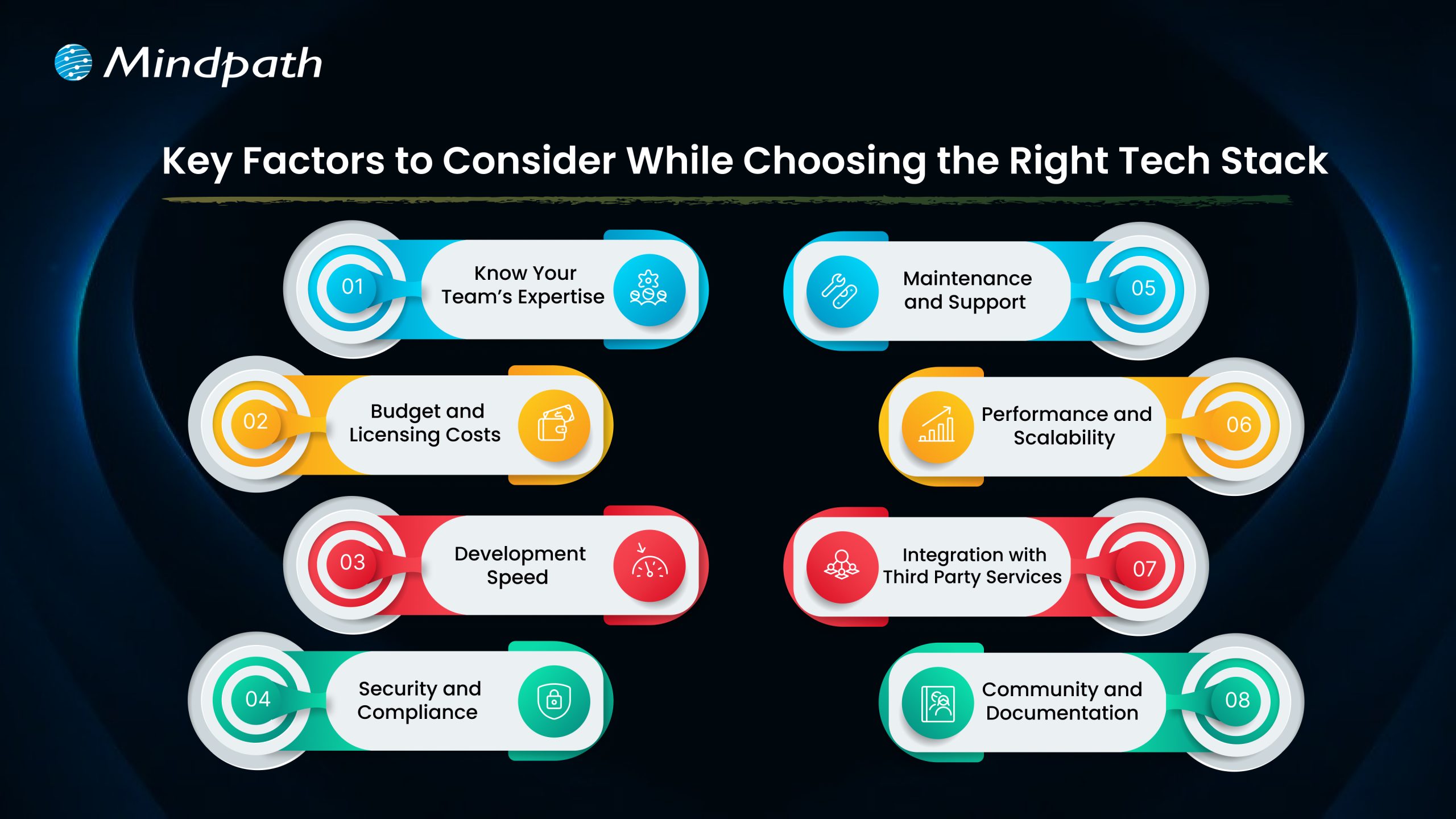
Key Factors to Consider While Choosing the Right Tech Stack

Choosing the right tech stack for web development is one of the most important things you’ll do to ensure the success of your project. The tools and technologies you decide to use will dictate how your application performs, scales, and is kept secure. Here are some key factors to keep in mind while selecting the best tech stack for web development.

Key Factors to Consider While Choosing the Right Tech Stack

1. Know Your Team’s Expertise

Look at what technologies your team already knows well. Using familiar tools can help you develop faster and avoid extra training costs. Make sure the tech stack matches your team’s size and experience to keep the project on track.

2. Budget and Licensing Costs

Think about any licensing fees for paid tools and compare them with free, open-source options. Remember to plan for costs related to maintenance, updates, and security. Also, include cloud service expenses that may grow as your project expands.

3. Development Speed

Getting your product ready fast can be a big advantage, especially for new businesses. Choosing proven frameworks and useful libraries can help your team build features quickly. This saves time and lets you focus on improving your web app for users.

4. Security and Compliance

Prioritizing security is essential, especially if your application handles sensitive data. Choose a tech stack that supports robust security features and aligns with industry regulations. This will help protect user information and maintain compliance as your project grows.

Must Read: Application Security Best Practices 

5. Maintenance and Support

Choose technologies that have strong community or vendor support so you can get help when needed. A reliable tech stack with regular updates will make it easier to fix issues and improve your application over time. This helps you avoid unexpected costs and keeps your project stable in the long run.

6. Performance and Scalability

Make sure your tech stack can handle the speed and load your application needs. If you expect real-time processing or heavy traffic, choose tools that keep response times fast. This helps your web app run smoothly as more users come on board.

7. Integration with Third-Party Services

Check that your tech stack works well with the third-party services your app needs. Good API compatibility makes it easier to connect features like payments, analytics, or social media. This saves time and helps your app deliver a smooth user experience.

8. Community and Documentation

Choose technologies with an active developer community and plenty of shared resources. Strong documentation makes it easier for your team to build, test, and maintain your web application. This support can save time and help solve issues more quickly.

Wondering how your tech stack fits into the bigger picture of web app development? Explore our comprehensive Web App Development Roadmap for 2026 to see how each decision impacts your project’s success.

Top 8 Tech Stack Examples

Exploring technology stack examples can help you see what works best for different types of projects. Here are some of the most popular examples to consider in 2026.

Top 8 Tech Stack Examples  

1. MERN Stack

MERN includes MongoDB, Express.js, React, and Node.js for flexible, dynamic sites. It’s widely chosen as a modern web application stack for responsive interfaces.

2. LAMP Stack

The LAMP stack combines Linux, Apache, MySQL, and PHP to build reliable, cost-effective websites. It is one of the oldest and most trusted web stacks in use today.

3. .NET Stack

The .NET stack is known for secure, large-scale enterprise applications. Many companies choose this web dev stack for its strong integration with Microsoft tools.

4. MEAN Stack

The MEAN stack uses JavaScript across MongoDB, Express.js, Angular, and Node.js. This tech stack for web development is popular for real-time and single-page apps.

5. Ruby on Rails Stack

Ruby on Rails offers a simple, clean approach for rapid web projects. This technology stack example is still a favorite for startups and MVPs.

6. Python-Django Stack

The Python-Django stack helps developers build powerful sites quickly. Many prefer this as a flexible web development stack with great community support.

7. JAM stack

JAM stack uses JavaScript, APIs, and Markup to deliver fast static sites. It is considered one of the best tech stacks for web development for content-heavy projects.

8. Serverless Stack

Serverless architecture removes the need to manage servers directly. It’s a growing example of a tech stack that cuts costs and improves scalability.

Not sure if your business really needs a custom web application? Discover the key signs that your business needs a custom web application that indicate it’s time to invest in a tailored solution for your needs.

Need Help Choosing the Right Tech Stack for Your Web Project?

Selecting the right tech stack for web development shapes how well your application performs, scales, and adapts over time. By knowing your goals, team strengths, and key factors like security, costs, and integrations, you can make informed choices that save you time and money. A thoughtful approach will help you build a reliable, future-ready web application that supports your business growth.

At Mindpath, we help you build secure, high-performing web applications with the best-fit tech stack for your needs. Our experts offer end-to-end web application development services, covering design, development, testing, and support. We make sure your solution stays flexible, scalable, and easy to maintain as your business grows. Let’s create a web app that works for you.