Benefits of DevOps – Transform Your Development Process in 2026

Join our Newsletter!

Featured Posts

Support Is One Click Away

Home

Benefits of DevOps – Transform Your Development Process in 2026

benefits of devops

Benefits of DevOps – Transform Your Development Process in 2026

While building software, just think that the developers and the operations teams are working like a well-coordinated crew, being fast, smooth and always on the same page. Isn’t it an interesting combination? Well, that’s the power behind embracing the benefits of DevOps. It is a new method to simplify your software process, in a way that will help teams work more effectively in an increasingly fast-paced digital world.

As we approach 2026, DevOps continues to evolve the way businesses build and run software. DevOps is not just a fast way to deliver software; it is a cultural approach that allows for speed, scale, agility, and reliability. This blog will look at how DevOps is rewriting the development process and why it is now essential for progressive teams. 

Are you looking to implement DevOps in your organization? Mindpath provides customized solutions to help teams speed up the development process and reach quantifiable goals.

What is DevOps?

DevOps refers to the collaboration of development and IT operations teams working together for the software development processes. It helps them to build, test as well as launch software faster and smoother. The major idea behind DevOps is better teamwork, faster delivery, and fewer problems during the software process. 

Even though it is not a tool or a product, it often includes using helpful technologies such as cloud platforms, containers and real-time communication tools. A big part of it is CI/CD, which stands for continuous integration and continuous delivery. This helps teams update software more often without slowing down. With DevOps, both developers and operations teams can share tasks, improve quality, and make sure the final product reaches users quickly and safely. 

How Does DevOps Work?

DevOps works by bringing development and operations teams together to make software faster and more reliable. The process follows a cycle that includes planning, coding, building, testing, releasing, deploying, operating, monitoring, and collecting feedback. Each step is connected to keep the work smooth and continuous. What is the main purpose of DevOps? It is to create software that meets user needs, runs well from the start, and is delivered without delays. 

To support this, teams use DevOps tools like automation platforms, monitoring systems, and CI/CD pipelines. These tools help developers work independently and speed up tasks that used to take longer. For example, with continuous integration, developers can update shared code several times a day and quickly catch bugs. Teams also follow shared rules for testing and quality, so everyone stays on the same page. 

Planning to modernize your DevOps approach using automation and stronger safeguards? Check out our blog on DevSecOps to learn why automated security integration is essential for speed, stability, and resilience.

What are the Key Benefits of DevOps?

Adopting DevOps brings real improvements to how teams build and deliver software. The DevOps benefits focus on making the development process more efficient, reliable, and easier to manage. Let’s have a look at some of it: 
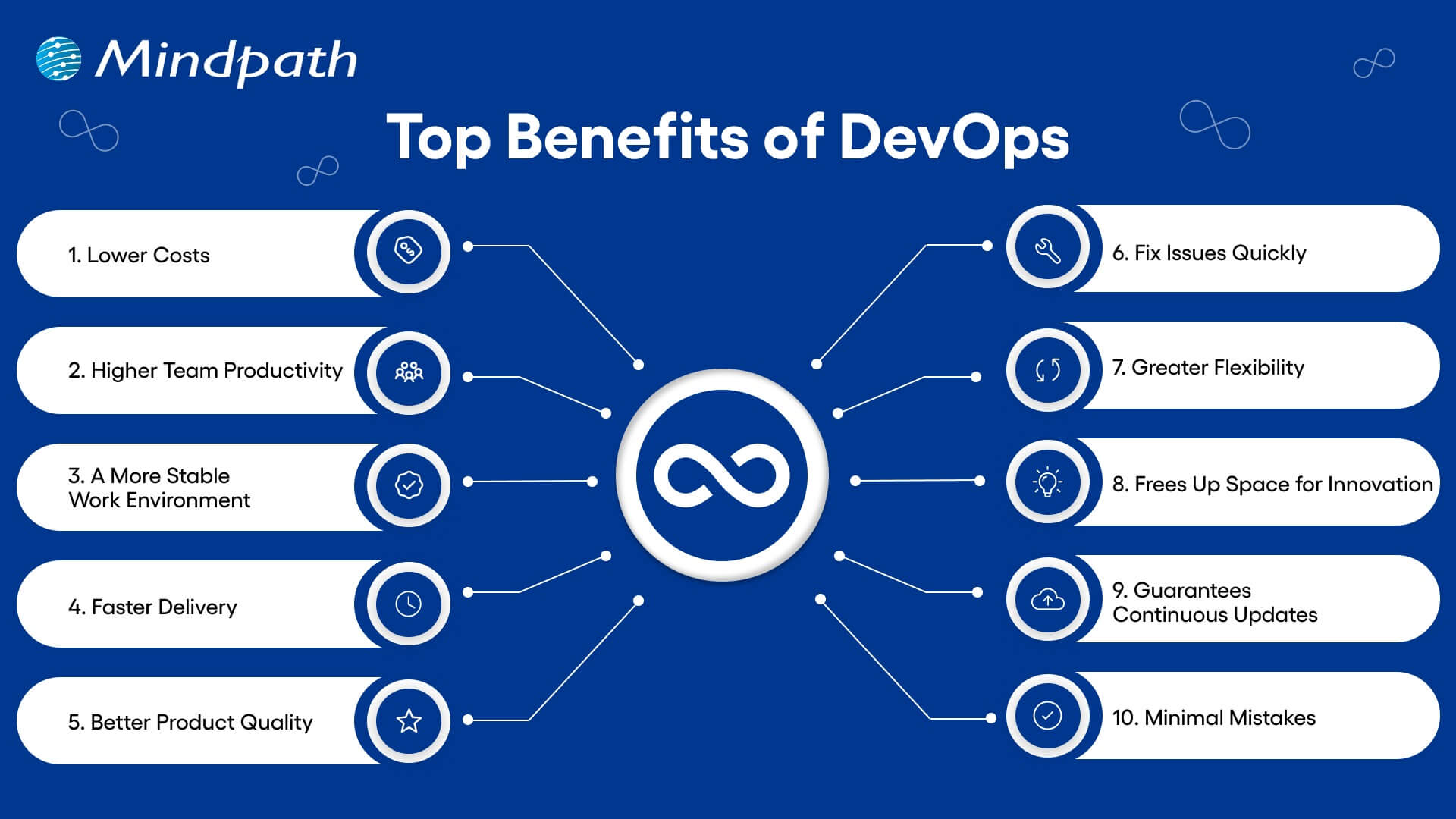
top benefits of devops

1. Lower Costs

Combining updates and maintenance in one process helps teams work more efficiently. DevOps reduces the need for last-minute fixes and wasted effort. This saves money and helps teams do more with the same resources.  

2. Higher Team Productivity

Open communication and fewer repeated tasks let teams focus on real progress. Everyone knows what to do and can work on high-value goals. As a result, productivity rises, and team members feel more involved.  

3. A More Stable Work Environment

DevOps helps create a calmer and more organized workplace by reducing the pressure of constant changes. Teams can handle updates with ease, due to smoother processes and clear communication. This balance helps everyone stay focused and productive. 

4. Faster Delivery

With DevOps, updates and new features can be launched more quickly. DevOps for business helps in meeting customer needs faster and staying ahead of the competition. Streamlined deployment also helps with fewer delays and more consistent results. 

5. Better Product Quality

Frequent feedback and testing throughout development help improve the final product. DevOps uses automation to catch up on problems early, before they grow. This keeps the focus on delivering quality and reduces the need for rework. 

Must Read: DevOps Trends 

6. Fix Issues Quickly

DevOps makes it easier to detect and solve issues early. Smaller releases and constant monitoring help teams act fast when something goes wrong. This keeps systems running smoothly and reduces downtime. 

7. Greater Flexibility

DevOps supports teamwork across different departments, helping companies respond quickly to change. Breaking down barriers between teams encourages flexibility in how work gets done. This leads to quicker decisions and faster progress. 

8. Frees Up Space for Innovation

When tasks like testing and deployment are automated, teams have more time for creative thinking. Developers can focus on building new ideas instead of repeating the same steps. This makes work more exciting and leads to better solutions. 

9. Guarantees Continuous Updates

DevOps supports a smooth flow of updates and new features with every release. Automation and teamwork make sure each change is tested and delivered quickly. This gives users regular improvements while keeping everything stable. 

10. Minimal Mistakes

Frequent code releases and testing help teams catch up with problems early. This keeps software quality high and prevents bigger issues later on. It’s a key benefit of DevOps that helps teams move forward with confidence. 

Aiming to enhance operational efficiency and reduce development risks? Check out our blog on DevOps Challenges and Solutions to discover proven approaches that improve performance, stability, and cross-team cooperation.

DevOps Best Practices

Following the right approach is key to getting the most out of DevOps. It helps teams collaborate better, improve software quality, and speed up delivery. Here are some of the most effective DevOps best practices to consider: 

1. Build a Culture of Trust and Teamwork

To make DevOps work well, teams need to feel safe to share ideas and learn from mistakes. When there is trust and open communication, collaboration becomes much easier. Breaking down walls between departments helps everyone work toward a shared goal. A culture of trust and empathy makes it easier to adopt DevOps smoothly.

2. Continuous Integration and Delivery

CI/CD DevOps practices involve adding small code changes frequently to a shared space. This helps teams spot issues early and keep the code clean. Once the code is tested, it moves into production smoothly through continuous delivery. This process saves time and gives developers confidence when releasing updates.

3. Automate Testing Early On

Automated testing is a key part of a strong CI/CD pipeline. Instead of waiting for manual tests, automated tests run every time a change is made. These tests can include everything from unit to load testing, depending on your needs. This helps reduce bugs and makes sure the software stays reliable.

4. Track the Right Metrics

To keep improving, teams need to measure what matters. Metrics like deployment speed, failure rates, and time to fix issues give a clear picture of performance. Each team may focus on different metrics based on their goals. It’s also important to collect logs and monitor systems to quickly fix problems and improve how everything runs.

5. Automate Repetitive Tasks

Manual tasks can slow down development and lead to mistakes. Automating these tasks speeds things up and keeps results consistent. It also frees up teams to focus on more valuable work. A reliable automation process adds confidence and improves overall efficiency.

Planning to strengthen your software delivery lifecycle? Explore our blog on DevOps vs DevSecOps to understand how shifting from simple automation to integrated security can elevate speed, reliability, and protection.

Ready To See How DevOps Can Boost Your Business?

The benefits of DevOps include enhanced collaboration, faster software delivery, and improved product quality. It also reduces costs while fostering a stable and efficient work environment. Through automation and continuous feedback, teams can quickly adapt and respond to changes, making DevOps a vital approach for building reliable software in today’s dynamic digital landscape. 

At Mindpath, we specialize in helping organizations successfully implement DevOps practices. We focus on automating processes, strengthening team collaboration, and accelerating software delivery with quality and security. Our expert guidance ensures your DevOps transformation aligns with your business objectives, enabling smoother and more efficient software development. 

Frequently Asked Questions

1. How can DevOps help a business recover faster from unexpected failures?

DevOps practices, like automated testing, monitoring, and CI/CD pipelines, allow teams to detect and fix issues early. Quick rollback mechanisms and real-time alerts reduce downtime, ensuring the business can recover faster while maintaining service continuity for customers.

2. Can adopting DevOps change the way teams collaborate beyond development and operations?

Yes. DevOps fosters cross-functional collaboration, breaking silos between teams like QA, security, and product management. Shared responsibility, transparent workflows, and continuous feedback enhance coordination, resulting in faster decision-making and smoother project delivery across the organization.

3. How do the benefits of DevOps extend to customer experience?

DevOps accelerates release cycles, enabling frequent updates and faster bug fixes. Continuous monitoring ensures software stability, while automation reduces errors. Together, these practices deliver a reliable, responsive, and high-quality user experience that aligns with evolving customer expectations.

4. What is the role of automation in reducing operational risks within DevOps?

Automation handles repetitive and error-prone tasks such as deployments, configuration management, and testing. By minimizing human intervention, it lowers the risk of mistakes, ensures consistency across environments, and enhances overall system reliability, even under high-demand scenarios.

5. How can DevOps support businesses preparing for rapid growth or scaling?

DevOps enables scalable infrastructure through containerization, microservices, and cloud integration. Continuous monitoring and automated deployment pipelines allow applications to handle increasing traffic without performance degradation, making growth smoother and reducing technical bottlenecks as demand rises.

Related Post

Related Post

Software Development Cost

When thinking about software development cost in 2026, it is not strictly about budgeting; it is about making informed decisions that end up delivering a successful project. New tools, frameworks, and approaches to development appear every year; therefore, how businesses spend money on development is also changing. How do you maximize your investment while being innovative and keeping your project on track? The solution is to know what drives the cost, and how those drivers may steer the final outcome.

The software world is fast-moving, and when you do not pay attention to these details, you can be setting yourself up for struggles later on when you want to scale. Companies today are not just looking at the bottom-line costs, but at a different perspective centered around value, flexibility, and speed of delivery. This makes it essential to look at the real cost drivers in depth. Understanding all the factors can better inform their decisions, maintain their agility, reduce certain risks, and build software projects that are set up for considerable success in 2026 and the following years. Keep reading to learn more about the cost of software development in detail.

If you need to boost efficiency, growth, and customer satisfaction, that will transform your business. Mindpath’s software development services will help you achieve these goals. Contact us now to unlock the long-term impact.

Why Understanding Software Development Costs Matters?

Comprehending software development costs is significant because it establishes the complete journey of a project. Given the right cost information, it enables teams to plan budgets that are realistic, deploy skilled resources, and be confident with their risk management. This implies avoiding unnecessary costs and deadlines. This also means delivering a project on time, within scope, and within the levels of quality expected by clients.

Moreover, knowing the cost factors will help organizations remain competitive and make better decisions. It can enhance transparency with clients, add trust with clarity and financial planning, and facilitate long-term sustainability by considering upkeep and future capacity. These insights support stronger profitability, but more importantly, they allow organizations to achieve longevity and value for all software development endeavors.

Must Read: Types of Software Development

Key Factors Influencing Software Development Cost

The cost of development in 2026 will be a combination of many important factors, which are not limited to coding. Each of the elements potentially influences the budget, timeline, and success of the software.

Key Factors Influencing Software Development Cost

1. Project Scope and Complexity

A project’s scope indicates the required features, integrations, and functionality. In complex applications that have advanced features, automation, or leveraged AI, you will need to find skilled experts, which increases the costs of development. Simple apps and apps with basic or limited functions require fewer resources and typically have a faster build time and are less expensive.

2. Technology Stack

The choice of technology stack and cloud platform will have a direct impact on the budget. Some are more advanced, and some integration services will necessitate higher expertise by the team; thus, software development cost estimation is even more important. Arriving at an appropriate compromise will maintain performance within a budget constraint.

3. Team Size and Skills

The size and the expertise level of a team will dictate how well a project moves through its lifecycle. More people or more specialized roles will increase costs, but the outcome is generally better. The right mix of skills to bring down custom software development cost and to meet business outcomes is possible.

4. Development Methodology

A project’s management approach is critical in terms of both its time and cost outcomes. Agile approaches provide flexibility and collaboration, while Waterfall is more rigid and less flexible. Choosing the right method will make your team more efficient and control overall software development costs and capitalization.

5. Geographical Location

When hiring talent from different regions, it changes the total price you pay, which comes down to the cost of living and hourly rates in that area. Outsourcing or offshoring gives you access to skilled professionals at a lower cost. You still maintain quality while keeping your software development cost clear and manageable.

Planning to develop unique software solutions? Visit our blog on the custom software development process to see how expert teams combine planning, automation, and best practices to deliver exceptional results.

Software Development Cost Breakdown

When you break down the software development cost, it shows where your money goes in a project. Having an understanding of development costs will allow businesses to leverage that information to plan better, to manage costs, and to optimize value for the end product.

Software Development Cost Breakdown

1. Team Composition

The type of team you choose has an immediate impact on the overall software development cost. Freelancers charge approximately $30 – $80/hour, in-house developers in the UK cost about $65,000 – $120,000/year, while agencies charge about $90 – 150/hour, or approximate project fees of $50,000 – $260,000+. A software development cost calculator is helpful to analyze these various options against your overall business requirements.

2. UI/UX Design

User experience and budget have significant implications for design. In the UK, organisations will typically allocate between 15% and 25% on design within the total cost, with costs of a simple/basic layout around $4,000 – $9,000, to a complex layout with advanced animations and branding costing $10,000 – $33,000+. High-quality design conserves software development costs and increases user adoption.

3. Project Scope & Complexity

The complexity of your app is one of the biggest determinants of software development cost. A simple MVP may cost around $20,000 – $40,000; basic mediums such as CRMs or booking systems will cost $40,000 – $100,000; anything that is enterprise SaaS or an AI platform would start at $100,000 – $325,000+. There is a direct correlation: the more features, the more time and money it takes to develop.

4. Development Time

The number of hours it takes to build an app can also affect the budget. A simple app in the UK requiring approximately 500 hours of work may cost $50,000. A medium app that needs 800 – 1,000 hours might cost $65,000 to $100,000. A large or complex project of 1500+ hours may run over $130,000. All of these estimates are inclusive of coding, testing, and debugging.

Planning to build software tailored to your business? Explore our blog on custom software development benefits to learn how personalized solutions improve efficiency, scalability, and overall performance.

Key Strategies to Manage Software Development Cost

Managing software development costs requires smart planning and clear decisions. By focusing on efficiency and resources, businesses can reduce expenses without losing quality.

Key Strategies to Manage Software Development Cost

1. Start with Clear Planning

A strong plan with well-defined requirements keeps the project on track. It helps avoid confusion, delays, and extra costs later in development.

2. Adopt Agile Development

Agile methods allow teams to work in small, flexible cycles. This makes it easier to fix issues early and adjust to changes without wasting resources.

3. Use Cloud Infrastructure

Cloud services remove the need for heavy hardware investments. They provide scalable resources on a pay-as-you-go model, which keeps expenses under control.

4. Automate for Efficiency

Automation in testing, integration, and deployment saves time and reduces manual effort. It improves quality and keeps the workflow faster and smoother.

5. Focus on MVP First

Building a Minimum Viable Product gets the core idea to users quickly. It helps validate the concept before committing to a larger software development cost.

Ready to avoid costly software errors? Dive into our blog on Custom Software Development Mistakes to learn what to watch out for and ensure smooth project delivery.

Ready to Take Control of Your Software Development Cost?

In 2026, managing software development cost is about making smart choices that balance innovation, speed, and value. By understanding the real cost drivers and applying strategies like Agile, cloud adoption, and focusing on MVPs, companies can deliver projects that scale efficiently, reduce risks, and ensure long-term success in a competitive digital market.

At Mindpath, we provide end-to-end software development services that optimize cost and quality. Our skilled teams combine planning, design, and modern frameworks to create scalable solutions. With transparent pricing models and deep technical expertise, we help businesses control software development costs while delivering impactful applications built to perform and grow with your vision.

Discover the key factors influencing software development costs and how to optimize your budget. Learn how Mindpath can help.
AI use cases for business

The adoption of artificial intelligence in business functions would have sounded like a myth almost a decade ago. You will come across many organizations leading the charge by adopting AI in business functions in 2026. The curiosity to learn about AI use cases for business will also lead to thoughts about the ways in which AI brings value to business operations. According to a 2025 survey by McKinsey, almost 88% of participating organizations claimed that they used AI in one business function (Source).

The McKinsey Global Tech Agenda 2026 report also showcases that 54% of companies treat AI as their top investment (Source). The statistics for AI adoption clearly suggest that businesses see huge potential for ROI in AI use cases. According to Deloitte’s 2026 AI report, almost 42% of companies believe that they are strategically prepared for AI adoption (Source). Every business owner should know the business use cases of AI that deliver tangible improvements in their ROI.

Looking for smarter ways to enhance productivity and deliver better customer outcomes? Mindpath offers end-to-end artificial intelligence development services tailored to optimize performance and drive success.

Unravelling the Top AI Use Cases for Business with Measurable ROI

The growing use of AI in business creates big questions about the value that artificial intelligence brings to the table. Many enterprise AI examples have showcased measurable ROI albeit with modest outcomes, such as growth in capacity, productivity and efficiency. Do you want to adopt AI in business use cases that deliver measurable ROI? It is more important than ever for every business owner to identify AI use cases that improve ROI by enhancing productivity and expanding revenue opportunities.

1. Using AI for Content Generation

One of the most common use cases of AI that you will come across, even in public use, is content generation. Businesses can leverage Generative AI tools for content generation in various ways that empower content and marketing teams with significant time savings. Marketing teams can use AI tools to reduce the time required to generate marketing materials by streamlining the content creation process. On top of it, AI writing assistants serve valuable support in localizing content and creating nuanced translations.

The best example of AI success stories in streamlining marketing content creation workflows is Currys. The UK-based electronics retailer incorporated Adobe Firefly in its creative workflow for faster idea generation, iteration on campaign visuals and producing on-brand asset variants. With the help of AI, the creative team of Currys reduced content production time by almost 50%. AI also helped the marketing team of the organization reduce dependency on third-party agency costs.

2. Predictive Maintenance and Quality Control

For many years, businesses had to rely on vendor recommendations for predictive maintenance. However, vendors with years of industry experience failed to achieve precision and accuracy in predicting malfunctions. Artificial intelligence plays a major role in enhancing predictive analytics to achieve better accuracy in monitoring equipment health. AI-powered predictive maintenance systems can use sensor data, field reports, ERP logs and production records to draw precise estimates of equipment lifetime and probability of failure.

The best example of using AI to enhance predictive maintenance and quality control is Rolls-Royce. It uses a combination of AI-powered predictive analytics and digital twin technology to monitor the performance of aircraft engines and critical systems. Sensors embedded in aircraft engines send real-time data to machine learning models, which can identify subtle patterns that indicate possibility of failure. Rolls-Royce has used AI-driven predictive analytics to extend the time required between maintenance schedules by around 48%. AI has helped in reducing unplanned service events and longer engine runtimes between scheduled maintenance.

Curious how automated machine learning can simplify model building and accelerate your AI initiatives? Discover our guide on automated machine learning to explore how it helps deliver faster insights with minimal manual effort.

3. Personalizing the Customer Experience

Businesses can use AI-powered customer experiences to achieve significant improvement in sales and reducing cost to serve each customer. Personalization is no longer a luxury that brands offer to few selected customers and every customer expects it by default. One of the best examples of applied AI solutions is visible in the applications of highly personalized recommendation engines. You can utilize large language models and AI agents to facilitate real-time interactions with customers while capturing their preferences and understanding the context.

Many successful case studies of AI-powered personalization showcase positive ROI and Starbucks is one of the leading examples. Starbucks introduced Deep Brew, a machine learning platform to integrate AI in the customer experience journey. Deep Brew analyzes transaction and loyalty data to come up with personalized recommendation and offers for customers. The system takes data from the Starbucks mobile app, purchase history of customers and contextual signals to create personalized promotions and digital interactions. Starbucks has achieved a 30% ROI for AI-powered personalization and offers with Deep Brew.

4. Fraud Detection

Almost every industry that you will come across has to experience problems with fraud detection. As a matter of fact, fraud detection is not limited only to the domains of finance and banking. The list of AI use cases for business also emphasizes how artificial intelligence has become a powerful tool for fraud detection. Businesses can use generative AI platforms to detect fraud patterns in user activity and call logs with more accuracy. On top of it, AI agents can facilitate end-to-end management of fraud detection workflows and complement the work of human reviewers.

HSBC is the biggest example of companies leverage AI and machine learning systems to improve fraud detection. The leading global bank has integrated AI and machine learning in its financial crime and fraud detection operations with significant improvement over the traditional rules-based monitoring. The AI platforms of HSBC detect two to four times more suspicious activity as compared to traditional methods. At the same time, the AI systems also helped HSBC in reducing false positives by almost 60%, thereby improving focus on genuine threats.

5. Enhancing Knowledge Management

Knowledge management is probably one of the biggest concerns in everyday operations of a business in 2026. The ability to leverage AI in operations that require knowledge sharing will empower businesses to improve their ROI by significant margins. The combination of conversational AI and autonomous agents can help teams in supporting new employees with personalized assistance. New hires don’t have to rely on managers and team leaders for basic questions, thereby empowering senior employees to focus on high-priority tasks.

Morgan Stanley has implemented Morgan Stanley Assistant, an internal knowledge copilot to help financial advisors gain access to institutional knowledge. The assistant helps advisors in searching, retrieving and understanding content from the large internal database of the organization. The interesting part is that advisors can do all of these tasks directly in their workflow without manually searching through policy materials and research. Morgan Stanley has successfully expanded the scale of its assistant to help more than 16,000 financial advisors.

Looking to enhance your customer service experience with faster responses and smarter support solutions? Explore the benefits of AI for customer service to discover how it improves efficiency, personalization, and customer satisfaction.

Final Thoughts

The ability to leverage AI for transformation can be one of the biggest strengths for any business in 2026. If you are a business owner, then it is high time to think about AI as a strategic investment and not as a fancy experiment. The AI use cases for business clearly showcase the power of artificial intelligence to deliver measurable ROI. You should choose a reliable technology partner to help you embrace the power of AI for your business.

Mindpath is one of the leading platforms for AI development services with years of experience in the industry. Our team of experts specializes in creating custom AI solutions for businesses in every industry with unwavering focus on client requirements. We are committed to bring your vision to life with our distinct capabilities and industry expertise in AI. Consult with our experts to find the ideal roadmap for AI adoption now.

FAQs

What are the most notable use cases of AI in business?

The most notable use cases of AI in business revolve around content generation, marketing, customer service and operations. Businesses can use AI tools to personalize customer service and improve digital interactions with chatbots and virtual assistants. AI-powered predictive analytics can help businesses streamline maintenance operations and provide significant boost to supply chain optimization.

How can businesses use AI to save time and money?

Artificial intelligence plays a crucial role in reducing operational costs and saving time. Businesses can incorporate AI for automation of manual and repetitive tasks, such as generating reports or knowledge sharing. For example, new employees can rely on copilots or virtual assistants to find answers from internal company databases. AI can empower business teams to focus on strategic work that delivers more value and enhances efficiency.

What are the biggest challenges in AI adoption?

The prominent challenges in AI adoption are evident in the high upfront costs of initial setup and shortage of talent. In addition, businesses will also have to fight against employee resistance to ensure seamless integration of AI in business functions. Another notable challenge for businesses working on AI adoption revolves around concerns for data privacy.

What are the key steps in a roadmap for AI adoption?

If you want to adopt AI in your business, then it is important to begin with a clear definition of your goals. You must know what exactly you want to achieve with artificial intelligence and write down your objectives. It is also important to have clean, organized and highly accessible data for the AI systems that you plan to build. Business owners should always try to begin with specific use cases on a small scale before moving into production.

Multimodal Generative AI

Artificial intelligence is changing faster than ever before, and multimodal generative AI is one of the most important new technologies that is making this happen. Unlike traditional AI systems, multimodal AI can work with more than one type of data at the same time. It can put together text, pictures, sound, and video into one structure. This change is making machines talk to people in a different way and speeding up the future of AI.

Being able to process and understand data in different formats is no longer a choice; it’s a must. Businesses and technologies are becoming more reliant on data. We can understand things better, automate things more intelligently, and talk to people more like people do with multimodal systems.

Want to automate complex processes and improve efficiency using smart technologies? Mindpath offers generative AI development services that enable seamless automation and innovation.

What is Multimodal Generative AI?

Multimodal generative AI is a kind of AI that can work with more than one type of data at the same time to make outputs. These systems take in text, pictures, and sound and mix them together to make results that are more detailed and aware of the situation.

Single-modal AI only looks at one kind of data. Multimodal generative AI models, on the other hand, use advanced architectures like transformers and neural networks to combine different data streams. They can do things like make pictures from words, talk about pictures, or look at videos and written content at the same time.

This skill is similar to how people naturally use sight, sound, and language to understand the world.

Wondering how real-world companies are applying generative AI to solve complex challenges? Discover generative AI use cases that showcase practical applications across industries.

Evolution of Multimodal Generative AI Models

Multimodal generative AI models are now possible thanks to improvements in machine learning, natural language processing, and computer vision. Old AI systems could only process a few inputs at a time. Now, though, modern models can easily handle many at once.

With the help of technologies like transformer-based architectures and diffusion models, AI can now quickly process a wide range of datasets. These models take different types of data and turn them into shared representations. This lets you make outputs in different ways.

This change fits with what is happening in AI right now, which is moving toward AI systems that can handle complicated, real-world situations.

Multimodal AI Examples in Action

There are already many powerful multimodal AI examples that are changing the way we work and live.

  • AI systems that can turn written instructions into pictures
  • Programs that write about pictures they see
  • Voice assistants that can understand what you say and respond with pictures that make sense in the situation
  • Platforms that let you mix video, audio, and text to make content

These examples show how multimodal AI tools are making it easier and faster to talk to people.

Planning to scale your content strategy using generative AI-powered tools? Check out generative AI tools for content creation to streamline and automate your workflows.

Multimodal AI Applications Across Industries

Multimodal AI apps are changing industries by making workflows smarter and helping people make better choices.

1. Health Care

Multimodal AI uses medical imaging, patient records, and clinical data to improve the accuracy of diagnoses and treatments.

2. Retail and E-commerce

With visual search tools, users can upload photos and get suggestions for products. This makes things better for users and boosts sales.

3. Education

Text, video, and audio are all used together on interactive learning platforms to help people understand and stay interested.

4. Customer Service

AI-powered assistants use Generative AI Applications to quickly and personally answer both text and voice questions.

Planning to leverage generative AI to transform your business operations and customer experiences? Explore generative AI for business to understand how intelligent automation can drive real growth.

Multimodal AI Use Cases Driving Innovation

More and more companies are using Multimodal AI Use Cases to get ahead of their competitors. Here are some important examples of use cases:

  • Automatically making content like text, pictures, and videos
  • Processing documents smartly
  • Finding fraud by reading and looking at pictures
  • Plans for marketing that are unique to each person
  • Smart virtual assistants

These examples show how multimodal AI can help you get things done faster and give you useful information in the real world.

Planning to transform your enterprise operations with advanced AI solutions? Explore generative AI applications for enterprises to discover how businesses are driving efficiency and innovation.

Multimodal Generative AI Advantages

There are many reasons why more and more people are using this technology. Some of the benefits of multimodal generative AI are:

1. Enhanced Contextual Understanding

AI can make better sense of information when it has access to more than one kind of data.

2. Improved User Experience

People can talk to, type to, or send pictures to AI systems, which makes them easier to use.

3. Increased Efficiency

It saves time and money to automate hard tasks that come in different formats.

4. Better Decision-Making

Multimodal systems give us more information by looking at different kinds of data.

5. Innovation Enablement

There are now new apps that let you have immersive experiences and use AI to help you be more creative.

Looking to stay updated with the fast-changing world of generative AI? Discover generative AI trends that are redefining business and technology landscapes.

Multimodal AI Agents and Tools

AI has come a long way since the rise of multimodal AI agents. These agents can see, think about, and act on a wide range of data, which makes them very adaptable.

At the same time, the ecosystem of generative AI tools is also growing. These tools are being added to different platforms, which helps businesses automate tasks, get more done, and get customers more involved.

Today’s multimodal AI tools can do things like:

  • Content creation
  • Data analysis
  • Software development assistance
  • Real-time communication

Challenges and Key AI Trends

There are a lot of good things about multimodal AI, but there are also a lot of bad things:

  • High computational requirements
  • Need for large, high-quality datasets
  • Data privacy and ethical concerns
  • Risk of bias and misinformation

But new trends in AI show that these problems are being fixed quickly. Multimodal systems are getting easier to use and more efficient thanks to better hardware, model optimization, and data generation.

Looking to understand how generative AI will impact your industry in the coming years? Explore generative AI predictions for insights into what lies ahead in the AI landscape.

The Future of AI with Multimodal Intelligence

Using a lot of different kinds of data is changing the future of AI. As multimodal systems get better, they will allow for:

  • More human-like interactions
  • Fully autonomous AI systems
  • Seamless integration into everyday technologies
  • Enhanced decision-making across industries

To summerize, multimodal generative AI will be the foundation for the next generation of smart systems. It will change how we use technology and give us new chances to come up with new ideas.

FAQs:

1. What does “multimodal generative AI” mean?

It is an AI system that can read and write different kinds of data, like text, pictures, sound, and video.

2. What are some multimodal AI examples?

AI image generators, voice assistants that show you pictures, and tools that look at both text and pictures are some examples.

3. What are multimodal generative AI advantages?

Some of them are better understanding, a better user experience, more efficiency, and making better choices.

4. What are multimodal AI applications?

Multimodal AI applications refer to how AI systems use multiple types of data (such as text, images, audio, and video) to perform tasks. These are applied across various industries, including healthcare, education, retail, customer service, and content creation.

5. How does multimodal AI impact the future of AI?

It makes AI systems that are more advanced and human-like, and it encourages new ideas in many areas.