The AI App Development Playbook: From Idea to Execution 

Join our Newsletter!

Featured Posts

Support Is One Click Away

Home

The AI App Development Playbook: From Idea to Execution 

ai app development playbook

The AI App Development Playbook: From Idea to Execution 

Have you ever wondered how AI app development can take a basic idea and create something that is smart, user-friendly, and helpful? Imagine an app that learns, impacts your activities, and improves your life without cognitive load! By developing an appropriate strategy, businesses can build apps that make a difference. A well-thought-out strategy will position you to create something that adds real value to users every day.

That’s why an AI app development playbook is necessary. A good playbook maps out the process into actionable steps, so it doesn’t feel overwhelming. A playbook will guide you through the process of validating your idea, selecting the right tools, developing your app, testing it, and launching it. The playbook provides a roadmap to work from, which can save time, reduce risk, and set you apart from the competition. In this blog, you will learn more about how this playbook can help you succeed. So let’s dive in!

Looking for a way to adopt an AI-powered application? Our AI development services help businesses and teams to build intelligent apps that are secure, scalable, and relevant to the needs of the user.

What does AI App Development Mean?

AI app development refers to the development of applications that use artificial intelligence to achieve tasks that typically require human-like thinking. AI functionality in applications includes understanding human language, recognizing images, making recommendations, or learning users’ preferences over time. Developers can have these applications learn and improve infinitely by using sophisticated algorithms, machine learning models, and large data samples, which allow applications to provide the most relevant and valuable experiences for the user, improving continuously.

In contrast to traditional app development, which has fixed rules and stagnant workflows, AI app development allows apps to update, evolve, and respond in real time. AI development uses data processing, pattern recognition, and predictions to be presented in a flexible state and to solve more complex problems. With the right strategy, app development with AI can equip businesses with solutions that differentiate them from competitors and adapt to new user demands.

Must Read: Role of Gen AI in app development

What is an AI App Development Playbook?

An AI app development playbook is a structured guide that helps teams and businesses create applications powered by artificial intelligence. It brings together proven methods, industry best practices, and practical tips to manage the unique challenges of building AI solutions.

Instead of approaching development without direction, a playbook provides clarity and keeps everyone aligned with the same vision and goals. It helps you make better decisions, avoid common mistakes, and use resources more effectively. Having an AI app development playbook means you have a clear plan to turn an innovative idea into an intelligent, successful application.

Looking to leverage artificial intelligence to make your mobile apps smarter and more user-friendly? Discover how AI in mobile apps can enhance functionality, personalization, and overall user experience.

Benefits of Building AI App Development Playbook

A well-crafted playbook does more than just outline steps; it brings clarity to every decision you make during AI app development. It helps you build with confidence and turn innovative ideas into real, valuable solutions. Let’s dive into some of its benefits:
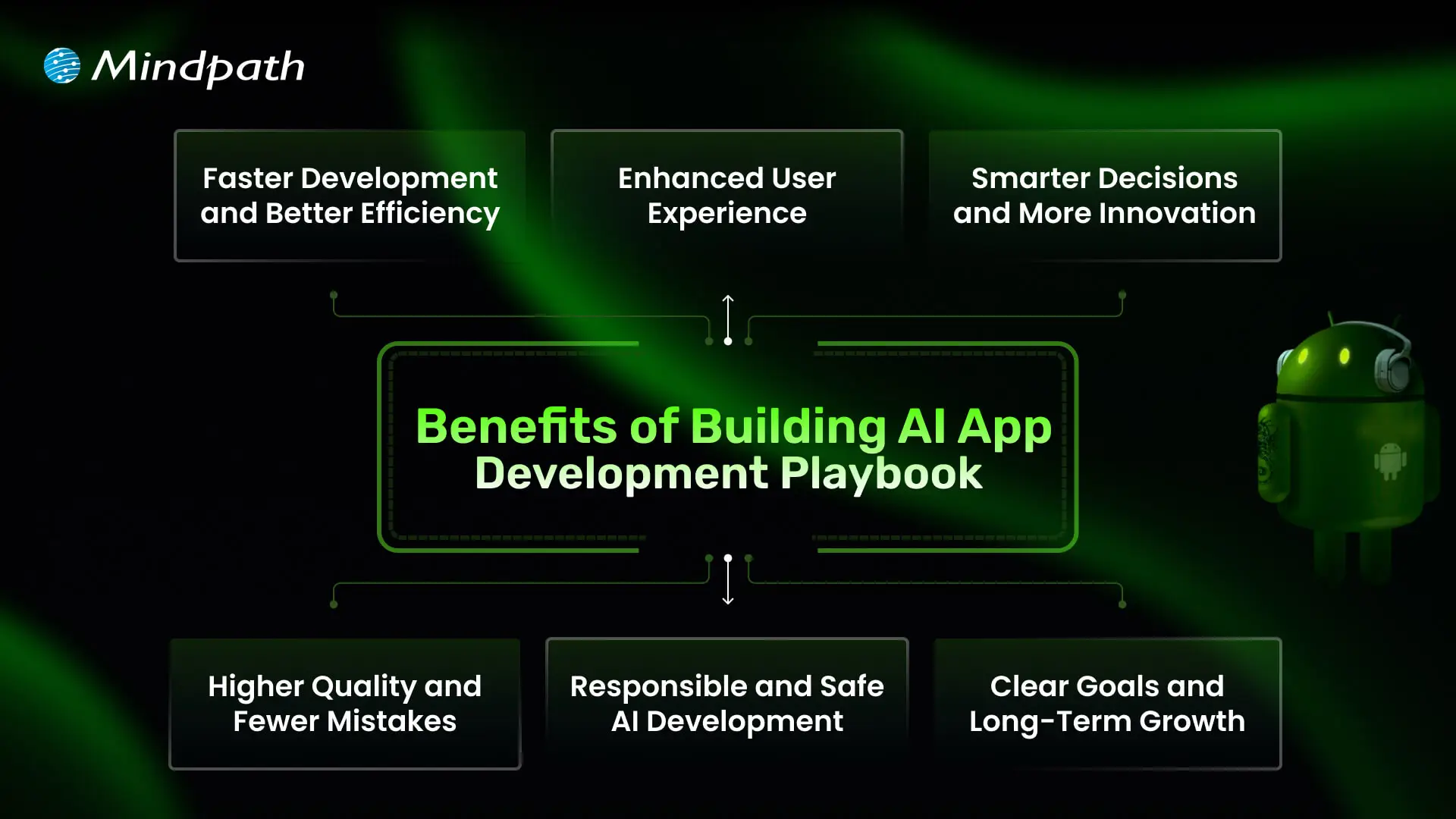
Benefits of Building AI App Development Playbook

1. Faster Development and Better Efficiency

A well-structured playbook helps teams work smarter and avoid wastage of time. By following proven steps and using the right AI development tools, you can speed up tasks like coding and testing. This leads to faster delivery and more efficient use of resources.

2. Enhanced User Experience

A clear plan helps you build apps that feel more personal and easier to use. Smart features like chatbots and recommendations keep users engaged and satisfied. With the right approach, your app becomes something people enjoy using every day.

3. Smarter Decisions and More Innovation

A playbook supports better choices by using data and clear workflows. Teams can experiment and improve quickly, turning ideas into working features faster. This creates an environment where new ideas thrive.

Also Read: AI in Business Strategy

4. Higher Quality and Fewer Mistakes

When you follow a playbook, your team knows when and how to test and debug. This helps catch issues early and maintain a higher standard. In the end, users get a stable app that works as expected.

5. Responsible and Safe AI Development

A strong guide ensures your team builds solutions that are fair, secure, and trustworthy. It helps address risks like bias or privacy concerns early on. This makes your AI software development more reliable and compliant with industry rules.

6. Clear Goals and Long-Term Growth

A playbook aligns your team with clear objectives that support your business goals. It helps you plan where AI fits best, including when to add features like AI chatbot development services that bring real value. This approach keeps you competitive and ready for steady growth.

Want to enhance user engagement and automate interactions in your AI applications? Discover how lead generation chatbot strategies can streamline customer interactions and boost conversions.

Steps to Build an AI App Development Playbook

Creating an AI app development Playbook gives your team a clear roadmap to build smarter, more reliable applications. It helps you plan each stage carefully, avoid common mistakes, and deliver real value to users. Use these practical steps to shape a playbook that keeps your AI projects focused and successful.
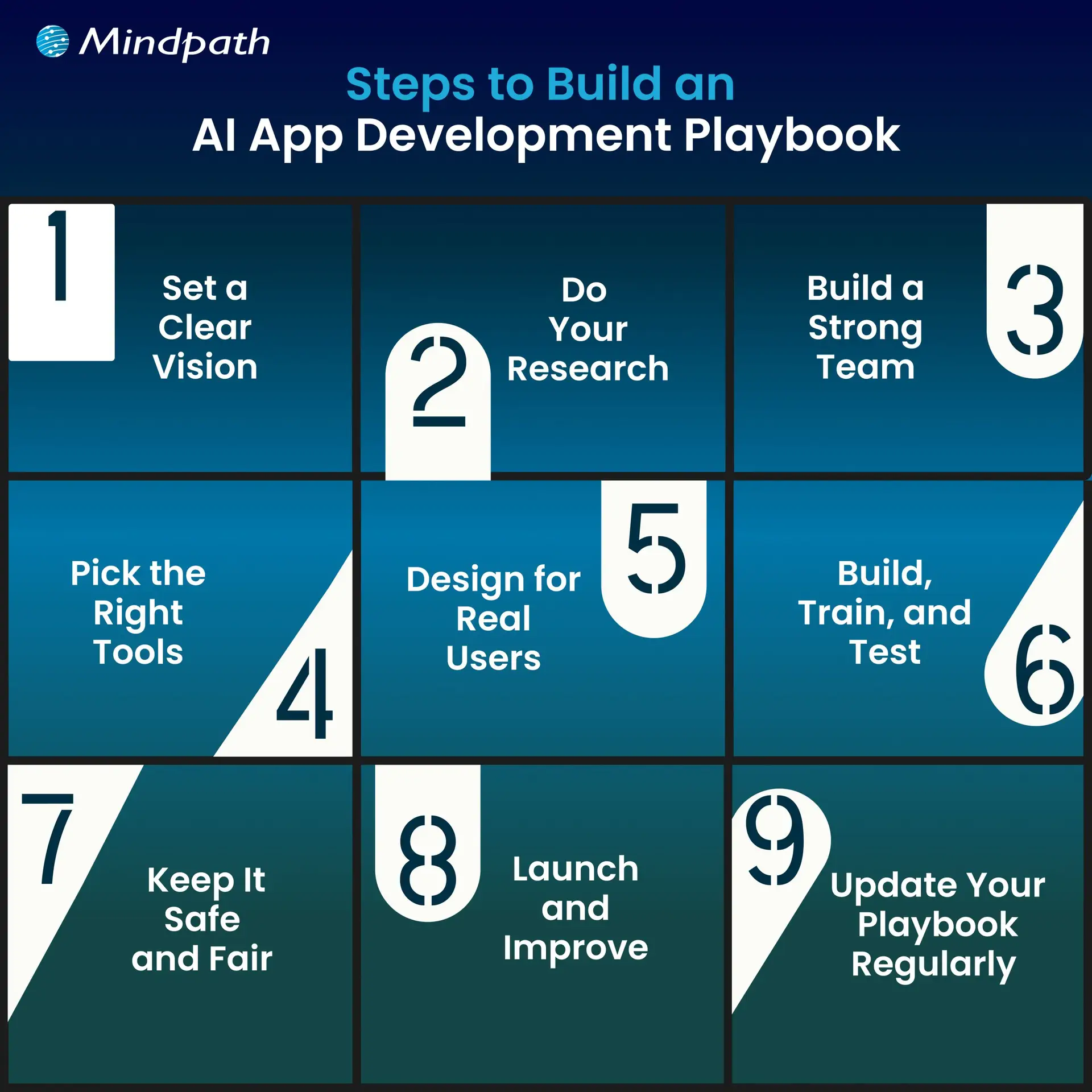
Steps to Build an AI App Development Playbook

1. Set a Clear Vision

Begin by defining exactly what your AI app should achieve and why it matters. Know the specific problem you’re solving and the audience it will help. Make sure your vision is realistic and tied to your broader business goals. A clear vision gives your team direction and purpose. It sets the tone for every decision you make during development.

2. Do Your Research

Spend time understanding your market, target users, and any competitors. Identify the data you’ll need and check if you can access it responsibly. Look into what AI features will add the most real value. Planning for data privacy and quality early helps you avoid problems later. Good research lays the groundwork for a stronger build.

3. Build a Strong Team

Bring together people with the right mix of skills in AI, design, development, and testing. Make sure everyone understands their role and how they’ll work together. Clear communication and teamwork keep the project on track. A well-prepared team can solve challenges faster. This creates a smoother workflow and better results.

4. Pick the Right Tools

Choose AI development tools, frameworks, and cloud platforms that fit your app’s goals and budget. Look for trusted solutions that make it easier to train, test, and update your AI models. Make sure your tech stack supports scaling as your app grows. Keep your tools flexible so you can adapt to new trends and needs. The right setup saves you time and keeps development efficient.

Want to stay ahead in the rapidly evolving world of artificial intelligence? Discover the latest AI trends that are shaping applications, development, and business strategies for the future.

5. Design for Real Users

Think about how people will actually use your app in daily life. Keep the design simple, clear, and focused on solving user problems. Test early designs with real users to spot areas that need improvement. A smooth experience builds trust in your AI features. The best AI apps feel helpful and natural, not confusing or intrusive.

6. Build, Train, and Test

Start with a minimum viable product that gets the basics right. Train your AI models using clean, reliable data to get accurate results. Test often to catch problems early, rather than fixing big issues later. Use real user feedback to improve your app’s performance. A strong cycle of training and testing keeps your app working well over time

7. Keep It Safe and Fair

Map out how you will securely and responsibly handle user data. You should address any possible biases in your AI models to ensure your app is fair to all users. Stay on top of current data protection practices and regulations. Establish guidelines for your team to follow for every engagement. Following these steps will help you establish trust and remain ethical with your AI solutions.

8. Launch and Improve

Prepare to launch by testing your app in a real-world environment. Observe the ways your app works and the way users will interact with it. Explore what aspects work well and what aspects need improvement. Record these notations for use very soon after launch. Consistent updates allow you to keep your AI app up to date and trustworthy.

9. Update Your Playbook Regularly

Treat your playbook as a living document that grows with every project. After each launch, review what went well and what you could do better. Add lessons learned, updated tools, and new best practices. This keeps your team ready for future AI projects. A well-maintained playbook is an investment in long-term success.

Looking to ensure that your AI applications are secure and reliable for users? Discover essential strategies for protecting your apps by exploring web application security guide.

Want to Turn Your Smart Ideas into a Powerful AI App?

Creating an AI app development playbook helps you move an idea forward with structure, focus, and confidence. It guides your team through clear steps that save time, reduce mistakes, and make the most of available resources. With a practical playbook, you can deliver apps that adapt, solve real problems, and keep users engaged. It’s the smartest way to stand out.

Mindpath is a renowned AI development company that helps businesses build solutions that work in the real world. Our AI development services cover everything you need to plan, develop, test, and grow your app responsibly. We bring trusted strategies and proven tools to your project. Let’s work together to turn your AI app vision into a successful story.


Related Post

Discover how Generative AI is revolutionizing manufacturing with smarter designs, enhanced operations, quality control, and customer support.
Discover how big data transforms business decision-making, uncovering opportunities, enhancing customer feedback, and driving strategic growth.

Related Post

generative ai in market research

Generative AI is undoubtedly among the most promising technologies that have come into existence in recent years. The impact of Generative AI can be felt in diverse domains such as healthcare, business, and many more. The global generative AI market size is expected to touch USD 890.59 billion by the year 2032.

A particular area where generative AI is being used as a revolutionary tool is market research. Typically, businesses conduct market research, which helps them to make strategic decisions. In recent times, businesses across diverse industries have been leveraging generative AI in order to simplify their market research process. If you are curious to know, ‘How is generative AI in market research?’ You will find an answer to this question now.

Ready to advantage generative AI for smarter market research? At Mindpath, we offer AI development services to build custom solutions that deliver actionable insights and a competitive edge.

Role of Generative AI in Market Research

Before understanding the exact role of generative AI in market research, one must have clarity on “what is generative AI.” Generative AI refers to the type of AI technology that is capable of creating new content. Thus, this novel technology can create content in diverse formats like images, texts, video, and audio. It relies on the patterns that it has learned from the existing data.

Today, the role of generative AI in market research is of immense value. By integrating this novel technology, businesses are able to gain valuable insights into the latest market trends. Moreover, they are able to predict customer behavior and needs in an effective manner and deliver offerings in a prompt manner. According to McKinsey AI Report 2025, the potential of generative AI is immense. This innovative technology has the power to maximize the productivity of businesses.

Benefits of Generative AI in Market Research

The economic potential of generative AI in the next productivity frontier is immense. In the market research landscape, generative AI is already playing an instrumental role in creating value for businesses. Some of the chief benefits of generative AI include:

1. Ability to gain faster insights

Generally, market research is a lengthy process for businesses. Traditionally, businesses took several days or even weeks to conduct market research. However, the adoption of generative AI in market research has simplified the entire process. Businesses can conduct market research in an efficient and accurate manner with the help of generative AI. Thanks to the novel technology, the boundaries of market research AI have expanded for businesses.

2. The bigger picture of customers

Thanks to generative AI, businesses are able to get a bigger picture of their existing as well as potential customers. By using the capabilities of generative AI, businesses are in a position to understand the exact preferences of their target audience. Moreover, they are able to create detailed customer profiles, which helps to create value for them.

3. Improved cost efficiency

Previously, businesses had to incur significant costs to carry out market research. Many businesses had to hire researchers or interviewers. Even if research was carried out in-house, it was time-consuming and expensive. However, the integration of generative AI in the market research process has made it much more cost-efficient. By adopting the novel technology, businesses are able to automate recurring tasks. Thus, the possibility of human errors is reduced significantly.

Top Use Cases

Today, a greater number of businesses have started to rely on generative AI to conduct market research.  In order to understand the potential of this innovative technology, it is necessary to look at the real-world use cases of it. Some of the top use cases include:

1. Automation of data collection

Many business entities are adopting generative AI to automate how they gather data from the market. For example, they are able to generate survey questions. Moreover, this novel technology enables business entities to analyze the responses of their audience in an instant manner. As a result, it is possible to save valuable time and resources while undertaking market research activities.

2. Generation of research reports

After conducting research, businesses create reports based on the research findings and insights. The adoption of generative AI in the market research process has simplified how businesses create content for their reports. Instead of relying on manual report generation, businesses are able to use it to generate quality and accurate reports that are based on their market research. Thus, they can refer to these informative documents to craft their business strategies and plans.

3. Information synthesis

In the current era, a large number of data is available for businesses. This automatically makes the market research process very tedious in nature. However, by using generative AI for market research purposes, businesses today are able to synthesize information effectively. This is because generative AI is capable of sifting through a large volume of data in a precise and efficient manner. By synthesizing information at a comprehensive level, businesses are able to gain valuable and accurate insights.

Future Trends

The future trends for generative AI in market research are full of new opportunities and possibilities. It may redefine the entire market research landscape. As the impact of it can already be felt today, it is necessary for businesses to keep a tab on future trends. Some of the top future trends include:

1. Better collaboration between AI and humans

In the future, the use of generative AI for conducting market research may facilitate better collaboration between AI technology and human researchers. As a result, the overall richness of the research process may be enhanced. This type of collaboration can help businesses get better insights, which can impact their operations.

2. Higher personalization in research

The integration of generative AI in market research may contribute to heightened personalization. Businesses may rely on AI-driven solutions so that they can tailor their research approaches as well as strategies. So they may be in a position to get their hands on more precise and accurate insights. It can certainly empower business entities to take advantage of their research findings and create value for their market audience.

3. Real-time research

By using generative AI, businesses may be able to carry out research activities on a real-time basis. In the evolving market landscape, such a research technique can be of high strategic relevance for businesses. By gaining accurate insights in real time, businesses can deploy strategies in a proactive manner. Moreover, new opportunities can arise in their path to move ahead of their competition.

Final Words

The adoption of generative AI in market research has been nothing less than revolutionary. The rapid adoption of novel technology in diverse areas is likely to contribute to the growth of the generative AI market in the future. Gradually, businesses have started realizing the amazing potential of it.

The benefits, as well as the use cases of generative AI in market research, highlight its promising nature. In fact, the future of generative AI in the market research context is very bright. Business entities need to capitalize on the capabilities of generative AI so that they can strengthen their market research process and gain an edge over their competitors. AI development services can help organizations design and implement custom generative AI solutions tailored to their market research needs.

Explore how generative AI is transforming market research, enhancing data management, collection, analysis, and insight sharing for smarter decision-making. 
Need Expert Legal Software Solutions

Looking for that one legal software developer who will turn your idea into a real project? Choosing a partner may seem truly overwhelming, but it doesn’t have to be. In this blog we will know about the factors to consider while hiring legal software developers. 

The legal tech market is growing beyond walled gardens, with newly built tools fueled by demand from law firms, corporate legal departments, and individual practitioners. Legal software is specialized to be applied in managing specific legal tasks such as secure electronic signatures and contract reviews; it’s not quite like the general genre of technological tools illustrated by email systems or file-sharing services. This can take the form of tools for in-house legal departments that streamline internal processes, such as document management and compliance; law firm management software for keeping cases, billing, and client communications in check; and consumer applications to help them with personal legal problems, whether concerning bankruptcy or parking tickets. 

Hiring legal software developers becomes essential to ensure that your legal software development services runs effectively and does everything that you would want it to do. The developers working on this legal software specialize in creating and customizing solutions regarding case file management, deadline tracking, document management, and more. They help build tools that better law firms by handling tasks such as searching case files, running calendars, following tasks, even access to information on-the-go through their mobile features. By hiring skilled legal software developers, you get the assurance that your software will be well-designed and secure, coupled with features tailored to meet your specific requirements, making the task of managing legal cases and firm operations much smoother and efficient. 

Let us dive deep into this blog to know about the factors to consider before hiring legal software developers. 

Factors To Consider Before Hiring Legal Software Developers   

Factors To Consider Before Hiring Legal Software Developers

1. Define Needs  

Before you hire legal software developers, the needs must be clearly defined. It means determining what one wants the developers to be able to do. Consider the integration of the software with other systems in use like email and file storage for perfect workflow. This includes setting a budget, which will serve as a guideline regarding priorities and finding a developer or developers to deliver what you will need within your financial limits. Defining your needs will allow you to communicate your needs to the developers, hence bridging to a more successful, tailor-made software solution. 

2. Evaluating Developer Expertise   

Before hiring, critically evaluate the expertise of legal software developers. Are they technically competent? Do they have the skill sets and experience using their tools? Engage developers who have experience in working with legal software. After all, their better understanding of the unique needs of law firms and legal departments is good enough for saying so. Just look at all the client testimonials that app developers have gotten to understand that they do quality work. Make sure they are good at communication and that they are responsive, friendly developers. That way, by appraising their expertise, you can find developers who would be well equipped to build the software for you. 

3. Reviewing Past Projects and Client Testimonials 

Before you start hiring legal software developers, view their past projects; what kind of work they have done, how many projects they have handled. See if they have done any similar projects as you want. They can deliver qualitative software related to the legal field. Moreover, you can look over the client testimonials and reviews to know how the previous clients feel about their experience. It will provide you with positive feedback, thereby giving you confidence in their ability and reliability. This step helps in choosing a developer who has the potential to prove his results and satisfy your needs accordingly. 

4. Communication and Collaboration Skills   

When looking to hire legal software developers, try and pay attention to their communication and collaboration skills. Pick the ones you can talk with easily and hear you out. They should be responsive, updating you on the progress of their work. Good collaboration means they can work well with your team, share ideas, and solve problems together. Effective communication means everyone is on the same page, thus leading to a smoother development process toward a successful software solution. 

5. Cost and Budget Considerations   

The cost or budget for hiring a legal software developer should be considered. It will be important for you to decide just how much you are prepared to pay for your project and then compare legal software developers who can work within your budget. Different pricing models—like fixed price or hourly rate—might suit your needs better. Be sure to discuss extra costs that may arise. This will help you to understand better the financial aspects of the matter and find out the developers who offer maximum value for your money.

Looking for Expert Legal Software Development?

At Mindpath, we offer comprehensive legal software development services to meet your unique needs.

Legal software development services at Mindpath    

We have a variety of legal software development services designed to make your life simple and give you more time. Our solutions improve client service, streamline operations, and help remain compliant with regulations. 

legal software development services designed

1. Legal Website Development 

We provide law firms with professional websites that are attractive, user-friendly, and search engine friendly, so you will have an excellent online presence that really attracts potential clients. 

2. Legal Chatbot Development 

Our chatbots automate client interactions through answering questions, setting up appointments, and providing updates. They offer support 24/7 to help reduce the admin workload and increase client satisfaction. 

3. Legal Case Management Software 

Our software simplifies case management by providing real-time data and automated tasks so you will be able to have full control over your cases and gain valuable insights into their progress. 

4. Legal App Development 

We create user-friendly apps on iOS and Android to handle client interactions and case information from anywhere, creating a better experience for the client. 

5. Compliance Management Software 

This software takes extra care to keep you compliant with the legal framework and provides automated tracking of risk management to keep your practice updated. 

6. Cloud Migration 

We ensure the safe transfer of your data to the cloud so that flexibility and security are enhanced with easy access anywhere, along with system performance during cloud optimization. 

Conclusion 

The fast-changing legal technology landscape dictates that law firms and legal departments should catch up. In the modern world, technology is the way to achieve efficiency, better customer service, and compliance. While hiring a legal software developer, due consideration of things such as defining your needs, evaluating experience, and good communication can result in successful partnering and effective software solutions. 

At Mindpath, we look to simply your process and introduce you to innovation that will automate your legal practice. By choosing Mindpath, you’re putting your money into innovation and expertise to drive your success against competition in the legal arena. Stay ahead with Mindpath and focus on what you do best by providing exceptional legal services.  

Looking to Revolutionize Your Legal Practice?

At Mindpath, we build custom legal software websites, chatbots, and case management systems just for you.

Discover essential factors for hiring legal software developers and see how Mindpath’s custom solutions like websites and chatbots can transform your practice.
AI implementation
Have you ever wondered how companies such as Amazon or Google come to decisions quickly and easily, and how they use technology to simplify complex tasks? The answer lies in Artificial Intelligence (AI). But how can you harness this powerful technology to transform your own business? In this blog we will explore the implementation of Artificial Intelligence which can be the solution for you. So, let us dive in! 

What is AI Implementation?   

AI implementation makes use of smart technology in making your business function better. It simply embeds AI tools into your daily activities to make them easier and more efficient. This could be anything from responding to customer inquiries to analyzing massive data or even predicting what the next possible sale to a given customer would be. Basically, this is meant to save time and improve customer service and think smarter. This way, your business will be able to grow and make your goals a reality very fast due to working smarter, not harder.  Artificial Intelligence is important in today’s world because it makes life and working procedures easy. It helps organizations in automating tasks, analyzing data, and making speedy decisions. AI improves healthcare by supporting doctors in the diagnoses of diseases and improves the customer experience within retail shops through the personalization of shopping activities. As technology grows, AI becomes even more vital in helping us innovate and stay competitive. 

AI Implementation Strategy    

1. Data Type   

If you really want to start leveraging the power of AI properly, then it becomes quite important to use the right model for your data type. Use models that treat pictures well for image data, those that understand the language for text, and those that track changes over time for time-based information such as stock prices. Using the appropriate AI model according to your data makes it work better and gives you more accurate results. 

2. Problem Complexity   

Keep in mind how complex your problem will be when using AI. Easy problems likely can be satisfactorily solved with some pre-trained model that has been set up for common issues. For more unique or complex problems, you will want an AI tailor-made for your requirements. Matching an AI model with your problem’s complexity enables much better results and effective solutions. 

3. Labeled Data  

Deep learning requires a lot of labeled data—information that has been tagged with correct answers. Check whether you have enough labeled data for the project to be executed; otherwise, you can use techniques such as transfer learning, where you get a model that is already trained on similar data. In that case, you can still have good results with limited labeled data. 

4. Managing Computational Resources  

While using AI, do not forget to think about what kind of computing power you have. Big models, like GPT-3, really eat through resources—of course, not all companies will have these resources. Therefore, ensure that your infrastructure can sustain the computing burden for the kind of AI model you intend to use. This way, it will align the needs of the model with your computing means, thus implementing both smoothly and effectively. 

5. Interpretability  

Consider the interpretability at which you need to understand how your AI model works. In domains like healthcare or finance—where models must explain their decisions to be compliant and build trust—choose AI models that are transparent enough to interpret and justify their outputs. 

Step For Successful AI Implementation   

1. Set Clear Goals and Objectives  

Clearly define what you want to achieve before implementing AI in business. Be specific on the problems that must be solved, the gains to be achieved, improve customer satisfaction, or boost productivity. Knowing the target will help in choosing the correct tools and technologies of AI for you. 

2. Find the Best Data Sources  

AI’s ability to work correctly depends on the use of relevant data sources. This can involve using either internally generated data, like customer information or financial information, or even external sources such as social media and news feeds. Ensure that data used is relevant, accurate, and up to date. 

3. Pick the Right AI Tools  

With the plethora of tools in artificial intelligence at your fingertips, select only those that work for your business. These could be machine learning, language processing, or even analytic tools. Consider things like cost, scalability, and usability in finding the right fit for your business. 

4. Create a Solid Data Plan  

AI systems require enormous amounts of data to perform well. Build a robust data plan indicating how you will collect, store, process, and analyze your data. This includes setting up data management policies, ensuring the security and privacy of your data, and architecting a data system that works for your AI needs. 

5. Invest in Training and Skill Development  

An AI business can only succeed past the tools if equipped with the right people for the job. Invest in training and education for workers so that they develop appropriate skills for working with AI. The upskilling may entail learning more about data science, machine learning, or other skills that are relevant in AI. This will equip your team to effectively use the AI system to maximize its benefits. 

6. Start with Small Projects and Expand  

AI implementations can be very complex and time-consuming. Start small, engage in doable tasks that will yield some sense of how AI works for you in business. Test it in only one area or department of your business. From the experience and confidence, you will build from these first projects, over time, you can spread AI to other areas of your business. 

7. Monitor and Adjust 

Once your AI system is in place, monitor its performance. Key metrics should be observed, which include accuracy, speed, and efficiency. Monitor user feedback and adjust your AI algorithms or data strategy accordingly. Regular adjustments help ensure that your AI will continue working effectively for you.

Ready to take your business to the next level with AI?

At Mindpath, we offer cutting-edge AI development services designed to enhance efficiency and drive innovation.

AI Development Services at Mindpath    

Enrich your business with cutting-edge AI development services at Mindpath. We deal in predictive analytics, helping you foresee future trends and make decisions in advance. Machine learning applications will let you create automated decision-making for the enhancement of operational efficiency in your business. Additionally, data-driven insights are delivered to let your business understand and act upon the data appropriately. Our Business Intelligence services turn raw data into insightful visualizations and comprehensive reports so that you have a view of the performance of your business from a bird’s eye perspective. You could, therefore, make informed decisions that would drive strategic planning and make processes optimized with data-driven intelligence.  We also offer conversational AI services in developing smart chatbots and virtual assistants that increase engagement, provide real-time support, and automate tasks to create a seamless, highly personalized experience for users. At Mindpath, our AI development services are designed to innovate efficiency in your business to make it thrive in the rapidly changing digital landscape. 

Conclusion 

Artificial Intelligence offers transformative power to any business that can innovate and adapt. It aids in understanding and implementation of artificial intelligence at each level of your journey—from defining clear goals and selecting the right tools for your job through managing data—so that you unlock new levels of efficiency and insight. The AI development services offered at Mindpath will help you harness this power by turning complex data into actionable intelligence and automating processes for fueling growth. Embrace the future of technology with AI and see your business not only competing but leading in today’s dynamic market. 

Want to see how AI can revolutionize your business?

Mindpath’s expert team is here to help you leverage advanced AI technologies for smarter decision-making and greater success.

Discover how AI can revolutionize your business with predictive analytics, machine learning, and conversational AI for smarter decisions and improved efficiency.