Streamline Your Hiring: Easy Steps to Recruit Computer Programmers in 2024

Join our Newsletter!

Featured Posts

Support Is One Click Away

Home

Streamline Your Hiring: Easy Steps to Recruit Computer Programmers in 2024

Recruit Computer Programmers in 2024

Streamline Your Hiring: Easy Steps to Recruit Computer Programmers in 2024

Looking to hire a computer programmer in 2024 but feeling overwhelmed by the process? Wondering how to find the perfect fit for your team amidst the sea of talent? Don’t worry! In this blog we will learn about the simple steps to recruit a computer programmer in 2024. 

A computer programmer writes and fixes code for software and apps. They utilize specialized programming languages to write instructions that computers follow to do things. This means they create the applications and programs we use every day, ranging from social networking apps to corporate tools. Programmers frequently work alone or in collaboration with other technical specialists, such as software developers and engineers. Their job includes not only developing code, but also identifying and resolving any issues that may arise, ensuring that everything functions well. 

As technology grows more integrated into our daily lives, talented programmers are in high demand in many sectors. Hiring a computer programmer is vital because they help in developing and updating the software that keeps our digital world working smoothly. Without them, many of the tools and apps we use would not exist or function correctly. 

So, let’s dig in to explore the simple steps to recruit a computer programmer! 

Steps to Recruit Computer Programmers
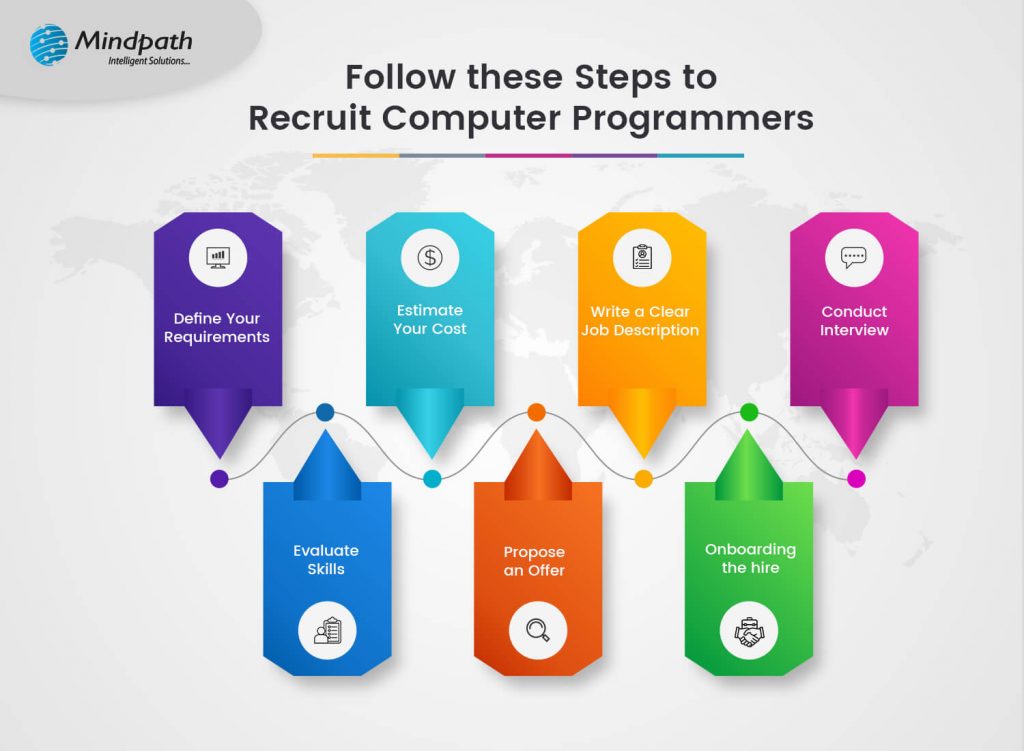
1. Define Your Requirements

Before you start looking for a computer programmer, you should know exactly what you’re looking for. Determine which programming languages the programmer should be familiar with, such as Java, Python, or JavaScript, based on the requirements of your project. Consider what technologies and tools they should be familiar with, especially if you’re creating anything specific such as a website. Decide if you need someone with extensive knowledge to take on leadership responsibilities or someone with a few years of experience to undertake routine tasks. Consider the personal abilities you value, such as being an effective communicator or team player. Knowing these details can assist you in finding the ideal programmer for your requirements. 

2. Estimate Your Cost

Before you begin looking for a computer programmer, you must first determine your budget. The cost of employing a programmer varies greatly depending on their degree of expertise, location, and the unique abilities they bring to the table. For example, a highly experienced programmer or one with specialized abilities may command a greater wage than someone with less experience or more generic skills. Setting a budget ahead of time not only helps you identify a programmer that fits inside your budget, but it also ensures that you are realistic about your financial situation. 

3. Clear Job Description

When recruiting a computer programmer, it’s essential to have a clear job description. This allows potential applicants to understand exactly what you’re looking for, ensuring that you recruit the right kind of individuals. Begin by using plain and straightforward language. Avoid using technical terms or sophisticated terminology that may mislead candidates. Clearly outline the position, including the activities and responsibilities that the programmer will be handling. Be precise about the technologies and programming languages they’ll be using. 

Include a list of the required qualifications and skills, such as years of experience and any specific background needs. Do not forget to add the soft skills essential to you, such as teamwork or communication. This manner, you’ll attract individuals that not only have the necessary technical talents but also fit in with your company’s culture. 

4. Conduct Interview

Conducting interviews helps you get to know the individuals and assess their abilities. Enquire about their programming background, problem-solving skills, and communication style. You might also assign them a coding challenge to put their abilities to the test.  

Interviews can be conducted via video, phone, or in person, and should include both technical and behavioral topics. The technical section evaluates coding abilities, whereas the behavioral section examines communication and team fit. Involve other team members in the selection process to verify the candidate is a good fit for the team. 

5. Evaluate Skills

A computer programmer’s communication abilities are critical to the success of any project. They must properly communicate their ideas and work successfully with team members. During the employment process, these soft skills should be assessed. To assess a candidate’s ability to break down technical nuances, ask them to describe a complicated programming concept in easy words. Additionally, assess their responsiveness and clarity in responding to your enquiries. 

Good communication skills include the ability to listen and deliver constructive feedback. Pay attention to how they connect with others; this might provide insight into their teamwork and problem-solving ability. Ensuring that a programmer can explain their ideas and collaborate well with your team will considerably improve the overall success of your projects. 

6. Propose an Offer

Once you’ve identified the best computer programmers for your project, make an official offer. To minimize misunderstandings, clearly state the project scope, timing, and budget. Be precise about what to expect and how the project will be managed. Discuss your communication expectations properly. This covers preferred modes of communication, frequency of updates, and response time frames. If your staff are in separate time zones, make rules to manage possible obstacles, such as overlapping working hours or dealing with urgent concerns. Include any additional terms or conditions, such as confidentiality agreements or specific targets. This guarantees that both parties are on the same page and contributes to a strong basis for a successful working relationship. 

7. Onboarding the hire

To ensure a seamless start to your collaboration, you must efficiently onboard your new hire. Once the hiring procedure is complete, it’s time to put your new computer programmer’s skills into action. Begin by giving them full access to systems and tools. Introduce them to the immediate staff and make sure they understand their roles and duties. Begin the project by outlining the initial tasks and setting expectations for delivery. This will allow your new team member to integrate fast and contribute to the project’s success from the beginning. 

Ready to hire top computer programmers? 

Connect with Mindpath to find the perfect fit for your project and start achieving your goals today! 

Hire Computer Programmers at Mindpath

At Mindpath, recruiting computer programmers is a simple and advantageous procedure that ensures your project’s success. We start by knowing your specific needs and goals to connect you with the right personnel. Our objective is to make the hiring process as simple and efficient as possible, offering ongoing help from beginning to end.  Here’s how we make hiring easier: 

1. Discuss Your Needs

Reach out to us to discuss your project requirements. We’ll work with you to create a detailed plan that outlines the project scope, timeline, and budget. 

2. Find the Right Programmer

Based on your needs, we’ll recommend skilled programmers who are well-suited for your project. You’ll have the opportunity to interview and select the ones who fit best with your vision. 

3. Start the Project

Once you’ve chosen your programmer, we’ll kick off the project with a clear plan and timeline. We’ll keep you informed with regular updates and seek your feedback to ensure everything is on track. 

4. Get Ongoing Support

We’ll continue to assist you throughout the process and beyond, addressing any issues promptly and ensuring your goals are met. 

Wrapping Note!

Recruiting an appropriate computer programmer is an essential stage in achieving your project’s objectives and assuring success. By following the simple but effective steps outlined—defining your requirements, estimating costs, creating a clear job description, conducting thorough interviews, evaluating skills, proposing a well-defined offer, and effectively onboarding—you can streamline the hiring process and find a programmer who perfectly fits your needs. 

Mindpath simplifies the process by providing specialized help at every stage. We offer a seamless and productive recruiting process by knowing your project needs and finding and integrating the perfect programmer. Our aim is to give continuing support and resolve any concerns, ensuring that your project not only meets, but exceeds, your expectations. 

Looking for dedicated programmers?

Mindpath makes hiring easy and efficient. Contact us now to get started and elevate your project with the best! 

Related Post

Discover the top tech trends for 2024 and how Mindpath’s cutting-edge IT services, from modernization to AI, can help you stay ahead and drive innovation.
Discover the key factors influencing software development costs and how to optimize your budget. Learn how Mindpath can help.

Related Post

AI and Cloud Computing
Ever wondered how combining AI with cloud computing can transform your business? What if you could harness these technologies to boost efficiency, security, and innovation? Curious? In this blog, we will explore the powerful synergy of AI and cloud computing, uncovering the key benefits, best practices, and how Mindpath’s solutions can drive your success.  Artificial Intelligence and cloud computing are very much interlinked, not least because cloud companies were among the first to make significant use of AI to research ways of improving their services. AI works well through making enlightened decisions based on the rules laid down within an IT system. This means cloud providers can easily automate lots of activities inside their big data centers: management of services, detection of errors by watching patterns, cyberattacks, and fraud. These AI capabilities can enable cloud companies to efficiently deliver services to thousands or millions of customers at this enormous scale. Cloud providers automate systems for delivering IT services and software applications efficiently and at low cost using Artificial Intelligence. Artificial intelligence sets up, manages, and optimizes large cloud systems. As more businesses want to use AI, especially new tools like generative AI, cloud companies are ready to support them.   Let us dive deep to explore the benefits of Artificial Intelligence in cloud computing, some best practices as well as how Mindpath can help accelerate AI in cloud computing! 

Benefits of AI in Cloud Computing

1. Scalability

AI enhances scalability by automating a variety of processes, allowing cloud providers to operate huge data centers with flexible scalability that would be difficult to achieve if everything was manually managed. This implies that cloud providers may easily scale capacity up or down to meet demand, all without requiring human interaction. Cloud users across various industries, including marketing, shipping, and healthcare, benefit from this efficiency too. AI enables these organizations to easily scale up their operations with fewer workers, making it simpler to handle rising workloads or extend services as needed. This enables firms to expand and adapt more quickly and efficiently. 

2. Improved Security

AI plays an important role in improving security by constantly monitoring networks and users inside a well-designed data security architecture. It looks for changes that might suggest a concern, such as possible threats or unusual conduct. Unlike humans, AI can quickly and completely analyze massive volumes of network data, discovering problems faster and more efficiently.

3. Enhanced Productivity and Efficiency

AI excels at dealing with complex or time-consuming activities that humans struggle with. Businesses may use AI-powered systems to do tasks such as document management, package sorting, invoice matching, and document summarization (such as legal briefs) far quicker and more accurately than people can. This increase in efficiency enables employees to focus on more difficult activities that need human judgment, creativity, and relationship-building, so increasing total productivity. 

4. Cost Effective

AI reduces expenses by completing complicated jobs faster and with fewer people engaged. This encompasses IT administration, data security, and commercial operations such as automated help desks. Customers may use AI to modify their cloud use based on their changing demands, which saves them money. Customers may grow more loyal when they see these savings, particularly to cloud providers who provide clear and transparent invoicing. When current customers utilize more cloud services, suppliers may make more money than if they were continuously recruiting and onboarding new consumers. 

5. Cloud Management

AI allows cloud services to run more efficiently at scale by automating numerous IT administration chores. For example, AI can handle service provisioning and scalability, detect and avoid errors, and protect against cyberattacks, all with minimum human intervention. Additionally, AI simplifies tracking service consumption and billing, as well as workload monitoring and management for clients, making these procedures more scalable and manageable. 

6. Personalization

AI’s powerful pattern recognition and observational capabilities help businesses, particularly cloud providers, to obtain a better understanding of their customers’ behavior and preferences. This enables organizations to provide more personalized services and suggestions, improving client happiness, retention, and income. 

Curious how AI can transform your cloud strategy?

With Mindpath’s expertise, we turn your vision into reality, optimizing your systems for exceptional results. 

Choose Mindpath for Accelerating AI in Cloud Computing

When it comes to integrating AI and cloud computing, Mindpath stands out as a top alternative for companies looking for ways to unlock the potential of these powerful technologies. Here’s why Mindpath is the best partner for boosting AI in cloud computing: 

1. Experience in AI and Cloud Integration

Mindpath has years of expertise in both AI and cloud technologies, allowing a smooth integration that leverages on the strengths of both domains. Our team excels at implementing powerful AI algorithms and machine learning models in cloud environments, hence improving performance and driving innovation.

2. Improved Security and Compliance

Security is a significant priority for Mindpath. We use strong cloud security methods to secure your data and AI models. From identity and access control to continuous monitoring, our security methods guarantee your cloud environment is secure and meets industry requirements.

3. Flexible Solutions for Growth

Your demands will change as the company expands. Mindpath’s AI and cloud solutions are designed to expand with your company, allowing you to modify resources and capabilities as needed. This scalability enables you to manage larger workloads and grow your operations while maintaining performance.

4. Established Track Record

Mindpath has a proven track record of successfully completing AI and cloud projects. Our case studies and customer testimonials show our ability to deliver major gains in efficiency, productivity, and creativity for firms across various sectors.

End Note

As AI and cloud computing grow, their synergy transforms company operations, resulting in unparalleled levels of efficiency, security, and creativity. Embracing this strong mix enables businesses to effortlessly grow operations, increase efficiency, and cut costs, all while providing personalized experiences to customers. At Mindpath, we recognize the enormous potential of combining AI with cloud technologies. Our knowledge guarantees that you not only make use of AI’s full potential but also apply them safely and effectively in the cloud. Partnering with us allows you to seize new chances for growth and stay ahead in an increasingly competitive market. 

Ready to see AI and cloud computing revolutionize your business?

At Mindpath, we specialize in turning complex challenges into innovative solutions, driving efficiency and growth. 

Digital Twin Technology

Manufacturers all over the world have been under pressure to meet emerging challenges in an environment with limited resources. The prominent setbacks for the manufacturing industry include supply chain shortages and talent gaps. However, the advent of digital twin technology serves as the best example of how technological innovation can shape the future of manufacturing. Digital twins can not only enhance capacity but also ensure more efficiency and resiliency in manufacturing operations.

The growing demand for fast-paced and continuous operations in manufacturing creates various limitations. Digital twins offer virtual representations of production lines, equipment or the whole factory to help manufacturers with more effective decision-making. Manufacturers must know about the utility of digital twins and how they can unlock untapped value to prepare factories of the future.

Looking to harness digital twin technology to gain deeper insights and future-proof your business? Contact us for expert guidance and tailored solutions that help turn digital twin innovation into real-world impact.

Understanding the Digital Twin Technology

The foremost highlight in any introduction to digital twins will focus on their definition. The most common answers to ‘what is digital twin technology’ paint them as virtual representations of physical objects or systems. Digital twins use real-time data to imitate the behavior, conditions and performance of their physical counterparts. Digital twins help with continuous monitoring and analysis of objects, systems or products throughout their complete lifecycle. In addition, digital twins can also feature external processes and crucial variables that can influence the performance of real-world assets.

One of the significant highlights of digital twins is that they work with data flowing between the object and its virtual representation in real-time. The two-way flow of data ensures the most accurate simulations of the physical world. Businesses can also use multiple digital twins together to create models for more complex systems, aimed at a larger digital transformation strategy.

Digital twins provide a clear impression of how something works and predicts its behavior in future scenarios. As a result, they can help in accelerating innovation and improving efficiency along with making well informed decisions. You can come across use cases of digital twins in predictive maintenance, product development, supply chain optimization and process optimization.

Breaking Down the Architecture of Digital Twins

If you want to capitalize on the power of digital twins in diverse use cases, then it is important to know their architecture. You can find digital twin providers like IBM, Microsoft, General Electric and Siemens with solutions that provide a comprehensive suite of services. The digital twin examples may feature hardware layers, synchronization services, data processors and other tools to draw the most accurate simulations of real objects and processes. However, awareness of the architecture of digital twins can help you figure out exactly what you need to make the most of the innovative technology.

1. Physical Asset

The physical asset in digital twins can be any real-world object, process or system that you want to study or monitor within virtual environments.

2. Virtual Model

The virtual model in digital twins is the digital representation of the physical asset that you want to know more about.

3. Data Sources

One of the notable highlights in the answers to ‘what is a digital twin’ points at the two-way flow of data between the physical asset and the virtual model. Data sources are an integral component in digital twin architecture as they ensure accuracy in virtual representations. Internet of Things or IoT devices serve as data sources by recording relevant metrics for creating digital twins.

4. Data Pipelines

Data pipelines are used for transmitting sensor data to the virtual model in real time. They play a vital role in ensuring that the digital twin is synchronized with the physical asset.

5. Feedback Loop

The feedback loop helps in sending control signals or insights from the virtual model to the physical asset. It serves as a promising component for optimizing performance and efficiency alongside enhancing decision-making.

6. Analytics Engine

Digital twins needs an analytics engine running on AI or machine learning to detect patterns and facilitate predictive analytics. The functionalities of the analytics engine helps in drawing accurate simulations alongside offering support for effective asset tracking.

7. Visualization Dashboard

The visualization dashboard is another crucial component that completes the digital twin definition by providing access to the virtual representation. You can use the visualization dashboard to interact with the two-dimensional or 3D representation of the physical asset.

Breaking Down the Working Mechanism of Digital Twins

The uses of digital twins can vary by huge margins across different industries and applications. You must also know that digital twins follow some common steps that you will find in every example.

1. Data Collection

Organizations can start their digital twin projects by embedding sensors on a physical object to capture its performance, operating environment and condition. The digital twin meaning in case of IoT applications revolves around using smart objects that feature in-built sensors to collect and share data continuously. In the case of IT environments, teams can create digital representations of computers, applications and software with virtualization technologies. Subsequently, the teams can use software agents to collect data from the digital asset for supporting the digital twin.

2. Creation of the Virtual Model

The primary focus of digital twins aligns with the creation of digital replicas of certain objects or systems. Virtual modeling involves using the data collected from the physical asset to create a digital model. It is important to define digital twins with key attributes that help them offer realistic reactions to variables. The variables can refer to interactions with the physical asset or its environmental conditions. The attention to virtual modeling ensures that digital twins can offer reliable and accurate simulation of the responses of the physical assets in different conditions.

3. Real-Time Data Integration

You cannot think of a digital twin without live data integration as it ensures continuous communication between the digital twin and physical asset in real time. Live data integration offers a dynamic feedback loop that can help organizations with performance optimization and enhancements in system reliability. The two-way data exchange also helps in efficient predictive maintenance by anticipating issues ahead of time. Most of the organizations automate the real-time data exchange process to focus on more critical and strategic tasks.

4. Analysis and Decision-Making

Digital twins offer the most promising solutions to experiment safely within virtual environments. You find better answers to ‘how do digital twins work’ in manufacturing plants where digital twins can help in finding out how an upgrade may affect efficiency and performance. The best thing here is that manufacturers don’t have to implement the upgrade directly to measure its impact. On top of it, analytics engines used in digital twins can recommend operational changes to make the changes more cost-effective.

Variants of Digital Twins

Most of the discussions about digital twins don’t emphasize the fact that you can find different types of digital twins. Organizations can deploy different variants of digital twins in one production environment with the advantage of learning from different levels of physical assets.

1. Product Twins

Product twins refer to the virtual representations of products after the ideation stage or throughout the complete lifecycle. You can use product digital twins for design improvements, enhancing service satisfaction and manufacturing efficiency.

2. Process Twins

The variety of digital twin applications also draws attention towards the use of process twins that help in understanding how different systems work with each other. Process twins offer visualization of the interactions between systems and suggest actionable feedback to improve quality standard or process speed.

3. Part Twins

Part twins or component twins focus on the most granular level of larger systems. The primary goal of part twins revolves around measuring the insights from basic components of larger systems. Component twins serve a promising role in understanding the performance of certain components and identifying larger problems before they happen.

4. Place Twins

The largest deployment of digital twins can happen in the form of place twins. You can find examples of place twins in factory twins, which simulate a complete physical location or place. In some cases, you may assume similarities between process twins and place twins. However, place twins also include spatial data, such as climate, context and temperature of the physical location.

Unraveling the Use Cases of Digital Twins

Organizations in different industries leverage digital models to understand complex systems and promote innovation. Digital models have also proved as the most useful tools for efficient optimization and predictive equipment maintenance. You can find a digital twin use case in almost every major industry with widespread applications.

1. Construction of Physical Structures

Digital twins can prove to be the most useful tools for engineers to design durable and safe physical structures, such as buildings, bridges and dams. For example, digital twins can help engineers determine whether a specific design for a bridge can enhance its durability. As a result, engineers can identify any setbacks and make changes in the design before starting construction.

2. Healthcare

Another promising area where digital twins can offer significant advantages is in the domain of healthcare. Digital twins can come up with crucial insights from forecasts of disease progression to identify how patients will respond to different treatment options. Furthermore, healthcare professionals can use digital twins to enhance diagnosis through detailed modeling that helps in understanding how interactions between organs can affect health.

3. Urban Planning

You can also notice the benefits of digital twins in urban planning applications, especially for traffic supervision. City models use spatial data, IoT object data and AI analytics to determine how new transportation systems or infrastructure upgrades will affect the city’s environment and traffic. Digital twins serve a pivotal role in planning for smart cities and urban planning experts aim to tap into their power to enhance sustainability and quality of life.

Identifying the Advantages of Digital Twin Technology

The use cases of digital twins across different industries reveal their potential to revolutionize digital transformation. You can notice how digital twins offer more visibility into complex systems while opening doors for experimentation without real-world changes. An overview of their advantages can help you understand how they can unlock the future.

1. Faster Research and Development

How do you think a business can step into the future ahead of time? Without research and development, companies cannot experiment with new product designs, manufacturing processes or workflows. The advantages of digital twins make it easier to experiment within a virtual environment, thereby opening the doors for accelerated innovation. Digital twins offer a more cost-effective and safer approach to research and development without the need for real tests.

2. Scalability

Companies can stay competitive in the modern business landscape only by adapting to changes in product demand, customer priorities and economic conditions. Digital twins offer virtual environments where you can adjust parameters and test configurations safely before full-scale deployment. You can also connect digital twins to live systems and ensure that they can continuously transmit their scaling adjustments in real time to the physical asset.

3. Operational Efficiency

The next crucial outcome of digital twin technology is the assurance of enhanced operational efficiency. Digital twins can provide the insights required to achieve operational efficiencies throughout the value chain. Organizations can use different datasets to collect real-time data on physical asset and production performance. With more visibility into the asset or process bottlenecks, digital twins can help in crafting potential solutions.

Final Thoughts

The progressive use of digital twins is a perfect example of how the world is welcoming innovation and preparing for the future. Digital twins provide the easiest solution to multiple problems that affect efficiency, cost-effectiveness and productivity in different industries. With the help of virtual models that mimic real-world assets, companies can reinvent their manufacturing, services and internal management.

Mindpath is one of the leading destinations for digital twin app development with years of expertise in end-to-end IT solution development. We are proud to have team members who are eager to learn and specialize in new technologies, including digital twins. Our experts are familiar with the use of popular tech stacks for digital twin development in alignment with your business goals. Consult with our team and build your first digital twin right now.

Discover how digital twin technology boosts efficiency, enhances product quality, and supports sustainability. Learn its impact on modern businesses and industry sectors.
Tech Trends

Curious about what’s going to be big in tech this year? Want to know the trends that will shape our world in 2024? In this blog we will explore the latest technology trends that are set to shape the future. 

The world today is fast-moving and changing constantly; hence, businesses and professionals need to keep up with the latest technologies.  Be it learning new skills to get ahead in your career or just knowing what’s happening around you to effectively communicate in your workplace, knowing the changes in technology makes all the difference.  It would make the workflow easier, save much time, and increase productivity.  Much of today’s job search is conducted through digital tools and platforms, so keeping ahead of the game to ensure you present yourself in the best light possible is highly important. In addition, updated technology has made it possible for businesses to better reach their potential customers with very relevant content across social media, apps, and blogs. Staying ahead of the technology curve better engages and understands your audience, establishes stronger relationships, and helps to differentiate you in the marketplace. 

So, let’s dive into the latest technology trends that can help you stay updated as well as transform the future! 

Top 10 Technology Trends 2024  

1.  AI-Generated Content   

One of the major tech trends of 2024 should be AI-created content. Artificial intelligence is capable of creating high-quality content in textual, visual, video, and even musical formats. For example, tools like GPT can write articles or help with education-related materials, such as generating summaries for textbooks or creating engaging blog posts. DALL-E will produce unique and different images based on simple descriptions, like custom illustration designs for a website or to use for adding visuals to a social media campaign. It eases and speeds content creation, especially for small businesses or individuals with meager budgets. For example, a small online shop could use AI to create promotional graphics for a sale or quickly generate product descriptions. AI-generated content saves time and money, giving more opportunities to let their ideas be heard on a greater scale. 

2. Quantum Computing   

Quantum computing is one of the most exciting technology trends that will make a difference in 2024. A quantum computer avails itself of the law of quantum mechanics to deal with information much more quickly compared to traditional computers, especially for specific tasks. This could be applied to cryptography: quantum computers would resolve cryptographic codes and change the idea of securing data. The quantum computer can accelerate the process of drug discovery by emulating a complex structure of molecules precisely, and thus aid in the development of new medicines. Though still in its infant stage, quantum computing is sure to be a game-changer in different industries; it gives solutions to problems that ordinary computers cannot solve. It stands on the verge of reshaping everything about how complications are handled and can be of vital importance in domains such as cybersecurity or pharmaceuticals. 

3. 5G Expansion   

Compared to previous generations, 5G offers much greater data speed, far superior coverage, and connections more reliable. This huge growth in 5G has spurred the development of technologies that are considered transforming—for example, the Internet of Things, augmented reality, and autonomous vehicles. 5G underpins the very fast and efficient communication among many IoT devices leading to smart homes and cities. Augmented reality experiences, like interactive games or virtual training, require ultra-low-latency connections of 5G. In the same way, the quick data interchange feature and high-speed data processing ability of 5G technology are applied in autonomous vehicles for safe and very accurate self-driving capability. 

4. Virtual Reality (VR) 2.0   

Virtual Reality 2.0 provides even more realistic and engaging experiences. Improved VR technologies enhance display resolution, motion tracking, and interaction features, giving a world that is brimming with activity and character. For instance, in gaming, next-generation VR provides highly detailed graphics and motion tracking to give users the impression of complete immersion into their video game environments. In training, it is used in simulating scenarios of the real world for effective learning. Moreover, VR also brings benefits in therapeutic settings where controlled virtual environments can treat a wide range of anxiety or PTSD cases. Recent improvements are also geared toward making VR more user-friendly, with lighter headsets and longer battery life that may see more people using VR in daily life.  

5. Augmented Reality (AR) in Retail   

Augmented Reality (AR), in the retail sector, created something different this 2024 by providing consumers with new ways of shopping. In other words, AR technology really makes it possible for shoppers to see products in their real-world environment right on their smartphones or tablets. For instance, AR applications that will let you have a virtual trial of specific attire, showing you how you are likely to look in it. Likewise, AR can show furniture fitting and appearance in a room prior to one making a purchase. Such kinds of interactions provide more than better customer satisfaction since people can make better decisions. Rather, they increase sales and reduce return rates. By providing customers with a better feel for how products are going to work in their lives, AR is revolutionizing the retail experience to make it not only more fun, but more convenient. 

6. Internet of Things (IoT) in Smart Cities   

Smart cities are being implemented in 2024 through the power of the Internet of Things. IoT technology interlinks a variety of sensors and devices involved in running the resources and services of cities for easy gathering and analysis of data. For example, it can monitor traffic patterns and public transport systems to bring about ease in congestion and reduce travel time. On the other hand, smart grids make use of IoT to optimize energy consumption and, hence, make cities more energy-efficient and cost-effective. IoT facilitates public safety by interconnecting various emergency services and monitoring public places against incidents to enable quicker responses. As cities continue to grow in population, IoT helps deal with the increasingly complex management of urban areas to ensure an improved quality of life through responsive and sustainable cities. 

7. Blockchain Beyond Crypto   

This blockchain technology, first developed for Bitcoin, is making waves way beyond just cryptocurrency in 2024. It’s very unique features are harnessed across a plethora of industries: transparency, security, and reduction of fraud. For example, blockchain will track where something came from and its journey in supply chains to ensure authenticity and prevent counterfeiting. In voting systems, blockchain provides a tamper-proof way of recording votes, hence making elections safer and more trustworthy. Moreover, blockchain is useful in managing secure medical records and thus in safeguarding sensitive health information against unwarranted access. These new applications underline blockchain’s potential for improving transparency and security within different fields, stretching its benefits far from the world of digital currency. 

8. Neuromorphic Computing   

Neuromorphic computing is one of the most exciting tech trends looking forward to 2024, which is basically a kind of computing intended to develop computer chips like the neural structure of the human brain. In contrast to traditional computers, chips process information like our brains. This approach improves efficiency, especially in tasks like pattern recognition and sensory data processing. It can make Technologies that require real-time learning and adaptation—in terms of advanced robotics or AI systems that work in interaction with their environment—much better. Such chips offer enormous gains in energy efficiency and computational power, hence making them ideal for uses where quick, adaptive responses are needed. When completely developed, this technology has the potential to cause revolutions in how we look at complex computing tasks. 

9. Autonomous Vehicles   

Autonomous vehicles are among the top tech trends for 2024. These are cars that use AI, sensors, and machine learning to drive on roads and navigate without human intervention. Even though a completely self-driving car has not yet been developed, remarkable development has happened in having different degrees of autonomy within public transport and freight logistics. For example, cities are testing autonomous buses to make public transport more efficient and safer. In freight logistics, self-driving trucks are already applied to facilitate deliveries, reducing traffic accidents by ensuring that the right routes are followed while lowering emissions. The further development of these technologies will provide higher road safety, reduce congestion, and contribute to cleaner air. 

10. Edge Computing 

Edge computing is another leading technology trend. It deals with processing data closer to its source and thus does not have any central data center. This is quite critical for applications requiring real-time processing and quick decision-making, which was hitherto faced with latency in the case of cloud computing. For example, edge computing in autonomous vehicles performs instantaneous processing of sensor data to support quick driving decisions. In industrial IoT, it helps real-time monitoring and control of machinery for increased efficiency and safety. Moreover, edge computing supports local data processing in remote areas where internet connectivity may be poor, hence ensuring that crucial data is well processed and acted on. This technology enhances performance and lowers latency across a wide variety of applications. 

Ready to Transform Your Future?

At Mindpath, our expert team is here to guide you through modernization, digitization, and innovation, ensuring you stay ahead of the curve.

Lead the Way in Technology with Mindpath 

In the fast-changing technological world today, one needs innovation, expertise, and strategic planning to be ahead. Mindpath empowers your business to lead in this by offering cutting-edge IT services that are tailor-made for you. Our team works hard to ensure you leverage new technologies, optimize your processes, and drive growth to be competitive and successful in a changing digital world. Here are the services we offer: 

1. Modernization 

Bring your business up to speed with legacy system upgrades, process optimization, and state-of-the-art technologies. We provide modernization services to help you keep up with the ever-changing world of business. 

2. Digitization 

Get proper visibility online through our all-rounded Web Development and App solutions. We give you the tools and strategies to help your business remain relevant and competitive across the digital space. 

3. Innovation Hub 

Our Innovation Hub is where creativity meets implementation. We are an innovative, collaborative space for ideas, project development, and making things happen. From an initial concept to the final execution, we will guide you through your innovation journey. 

4. Custom Chatbot Development 

Take user experience to another level by our bespoke chatbot solutions. Our intelligent, conversational chatbots will smooth interactions and great insights that improve customer engagement and support. 

5. Artificial Intelligence Development 

Leverage AI to unlock new insights to do what really matters, automate processes, and predict trends. Tailored AI solutions will let you drive efficiency and foster innovation while lining them up with your business goals. 

6. Staff Augmentation 

Make use of our skilled professionals in aiding you to achieve your project objectives—short- or long-term. Experts integrate into your team to raise your business to the next level with exceptional results. 

Conclusion 

2024 is the handiwork of innovation that will change our world in immense ways. From AI-generated content to quantum computing, the very pervasiveness of 5G, and the transformative power of augmented and virtual reality, keeping ourselves conversant and adaptable becomes imperative. These trends call for more innovation than ever but equally demand readiness to tap their full potential. The reason for embracing these technologies is threefold: efficiency, growth, and new opportunities within many industries.   In this age of rapidly changing technology, Mindpath stands ready to guide and lead you in the digital age. Our suite of expertise in IT services is crafted for you and your specific needs to move your business forward. From modernizing systems to digitizing an online presence or innovation in our collaborative hub, Mindpath is equipping businesses like yours for success. Our services are developed in the belief in the easy integration of bespoke chatbot development, advanced AI solutions, and skilled staff augmentation, giving wings to your goals and elevating your projects. 

Ready to Embrace the Future?

Dive into the latest tech trends with Mindpath and explore how our tailored IT solutions can transform your business!

Discover the top tech trends for 2024 and how Mindpath’s cutting-edge IT services, from modernization to AI, can help you stay ahead and drive innovation.