Home

Energy-Efficient Computing: Building Sustainable IT Solutions for Enterprises

Energy-Efficient Computing: Building Sustainable IT Solutions for Enterprises

Join our Newsletter!

energy efficient computing

Every application, server, database, and cloud workload uses computing resources. As businesses continue to move more of their operations online, the amount of processing power and infrastructure they rely on also grows. That makes energy use an important part of modern IT planning.

Energy-efficient computing is about getting the work done without using more computing power than necessary. That can mean optimizing an application, reducing unnecessary database processing, choosing the right cloud resources, improving server utilization, or replacing inefficient infrastructure. The goal is not simply to use less power. It is to make technology work more efficiently without compromising the performance a business depends on.

For enterprises, this matters for both operational and sustainability reasons. Better resource utilization can help control technology costs, while more efficient systems can support broader environmental goals. As cloud computing, AI, and data-intensive applications become part of everyday business operations, energy efficiency is becoming a more practical consideration in technology decisions.

Looking to make your technology environment more efficient? Talk to Mindpath about software, cloud, and technology solutions built around performance, scalability, and smarter resource usage.

What is Energy-Efficient Computing?

Energy-efficient computing means designing and running computing systems in a way that uses fewer energy and infrastructure resources while still delivering the required results. It applies to more than the physical devices in an IT environment. Software, databases, cloud infrastructure, servers, storage, networks, and workloads can all affect how efficiently a system operates.

Consider a cloud application that runs several servers around the clock even though most of them are only lightly used. The infrastructure is doing its job, but some of that capacity may not be necessary. The same applies to an application that repeatedly processes information that could have been cached or a database that performs expensive queries unnecessarily.

Energy-efficient computing looks at these situations and asks a simple question: can the same work be completed with fewer resources?

What Makes Computing Energy Efficient?

There is no single technology that makes a computing environment energy efficient. It usually comes from a combination of better software, appropriate infrastructure, efficient hardware, sensible workload management, and regular monitoring.

For one organization, the biggest opportunity may be cloud resource optimization. For another, it could be application modernization or database optimization. The right approach depends on how the technology environment is built and how it is being used.

How Does Energy-Efficient Computing Work?

Improving computing efficiency usually starts with understanding where resources are being consumed. A business needs to know which applications, servers, databases, and workloads are using significant processing, storage, or network capacity before it can decide what needs to change.

For example, a company may discover that some cloud resources are running continuously despite having very little activity. Another company may find that an application is making repeated API requests or processing the same information multiple times. A database may also be spending unnecessary resources on queries that could be improved through better indexing or data handling.

Once these areas are identified, teams can optimize the application, adjust infrastructure, consolidate suitable workloads, or introduce automation. The results should then be monitored to make sure the changes actually improve efficiency without affecting performance or reliability.

A Practical Approach

  1. Understand the current environment: Review applications, infrastructure, cloud resources, databases, storage, and workloads.
  2. Find areas of waste: Look for idle resources, unnecessary processing, inefficient queries, repeated operations, and over-provisioned infrastructure.
  3. Optimize the technology: Improve application code, databases, APIs, cloud resources, and infrastructure where appropriate.
  4. Match capacity to demand: Use scaling, scheduling, consolidation, or automation when workloads do not require constant capacity.
  5. Measure the outcome: Monitor resource usage, performance, infrastructure costs, and other relevant metrics after making changes.

Principles of Energy-Efficient Computing

Energy efficiency can be improved at several levels of an IT environment. The following areas are particularly relevant for businesses that want to reduce unnecessary computing resources without sacrificing the performance of their systems.

1. Algorithm and Code Optimization

The way software is written can affect how much computing power an application requires. Inefficient algorithms, repeated calculations, unnecessary background processes, and excessive data processing can all increase resource usage.

Developers can improve efficiency by selecting appropriate algorithms, reducing redundant operations, optimizing data processing, improving API usage, and using caching where it makes sense. These changes can also improve application performance, which means energy efficiency does not necessarily have to come at the expense of speed.

2. Efficient Hardware

Hardware remains an important part of the equation. Processors, memory, storage, networking equipment, and other components all have different performance and resource requirements.

Businesses should choose hardware based on actual workload requirements rather than simply selecting the most powerful option available. Hardware that is significantly over-sized for its workload may provide capacity that is rarely used.

3. Power and Workload Management

Not every workload needs to run at maximum capacity all the time. Systems can often be configured to respond to actual demand instead.

Autoscaling, workload scheduling, resource consolidation, and automated management can help match infrastructure capacity with usage. This is particularly useful for applications where demand changes significantly throughout the day or week.

4. Cloud Resource Optimization

Moving to the cloud does not automatically make an IT environment energy efficient. Poorly managed cloud resources can still result in unnecessary computing capacity and operating costs.

Businesses can review instance sizes, storage, databases, containers, and other cloud resources to determine whether they are being used effectively. Removing unused resources and adjusting capacity according to actual demand can make a meaningful difference to overall resource utilization.

5. Sustainable Software Development

Software architecture influences how much infrastructure an application needs. An application that performs unnecessary processing or handles data inefficiently may require more resources as usage grows.

Efficient data handling, appropriate caching, well-designed APIs, sensible architecture, and careful resource management can help applications remain efficient as they scale.

Want to explore technology strategies that can improve business efficiency? Check out emerging technologies for small businesses to see how modern technology can support more efficient IT operations.

Energy-Efficient Computing vs. Green Computing

Energy-efficient computing and green computing are closely related, but they are not exactly the same thing. Energy efficiency focuses mainly on reducing the resources required to perform computing tasks. Green computing takes a broader view of the environmental impact associated with technology.

Energy-Efficient Computing Green Computing
Focuses on using computing resources more efficiently. Looks at the broader environmental impact of technology.
Includes software, hardware, infrastructure, and workload optimization. Can include energy use, hardware lifecycle, materials, recycling, and electronic waste.
Focuses on completing required work with fewer resources. Focuses on reducing the overall environmental impact of technology.
Often considers resource utilization and computing efficiency. Can include broader sustainability and lifecycle considerations.

Benefits of Energy-Efficient Computing

For businesses, energy efficiency is not only about environmental responsibility. It can also affect infrastructure costs, application performance, resource utilization, and the way technology is managed as the organization grows.

1. Lower Energy Consumption

When applications and infrastructure perform unnecessary work, they consume resources that may not contribute any real business value. Optimizing those workloads can reduce unnecessary processing and make better use of available computing capacity.

2. Lower IT Operating Costs

More efficient use of infrastructure can help reduce some of the ongoing costs associated with computing resources. In cloud environments, for example, removing unused resources and choosing capacity according to actual demand can help avoid unnecessary spending.

3. Better Infrastructure Utilization

Energy-efficient computing encourages businesses to understand how their infrastructure is actually being used. This can reveal systems that are underutilized, over-provisioned, or performing unnecessary work.

4. Reduced Environmental Impact

Using fewer computing resources can reduce the energy requirements associated with digital operations. When combined with responsible hardware and infrastructure practices, efficiency can become part of a wider technology sustainability strategy.

5. Easier Scaling

Efficient systems are often easier to scale because they make better use of available resources. Applications designed with sensible architecture and resource management can adapt to changing demand without automatically requiring a large increase in infrastructure.

6. Better Resource Planning

Tracking resource usage gives technology teams better information when planning infrastructure investments. Instead of relying entirely on assumptions, teams can use actual usage patterns to make decisions about capacity and modernization.

Real-World Examples of Energy-Efficient Computing

Energy-efficient computing can be applied in many different ways. The right approach depends on the technology environment, workload, and business requirements.

1. Cloud Workload Optimization

Imagine a business running several cloud servers continuously even though application demand changes throughout the day. Some of those resources may spend a significant amount of time underutilized.

Reviewing resource usage, adjusting instance sizes, using appropriate scaling, and removing resources that are no longer required can help bring infrastructure closer to actual demand.

2. Software Optimization

An application may perform the same calculation repeatedly, make unnecessary API requests, or process more information than it actually needs. Developers can review these workflows and reduce unnecessary operations.

Caching, better algorithms, more efficient data processing, and improved API design are some of the approaches that can help.

3. Database Optimization

Databases can become resource intensive when queries are poorly designed or when applications repeatedly request information that could be handled more efficiently.

Query optimization, appropriate indexing, caching, data lifecycle management, and database architecture can all contribute to more efficient data processing.

4. AI Workload Optimization

AI workloads can require substantial computing resources, depending on the model, task, and volume of requests. Businesses can look at whether every task requires the same type of model or amount of computing capacity.

Using an appropriate model for the task, reducing unnecessary model calls, improving inference workflows, and managing workloads carefully can help avoid using more computing resources than the application requires.

5. Infrastructure Consolidation

Some organizations operate separate infrastructure for workloads that could potentially share resources. Where the architecture and business requirements allow it, consolidation can improve utilization and reduce unnecessary infrastructure capacity.

How Enterprises Can Implement Energy-Efficient Computing

For an enterprise, improving energy efficiency is usually an ongoing process. It is not necessary to replace the entire technology environment at once. A more practical approach is to identify the areas where inefficient resource usage is having the greatest impact and address them gradually.

1. Start With an Infrastructure Audit

Begin by understanding what is currently running. This includes servers, cloud resources, databases, applications, storage, networking, and other infrastructure.

The goal is to create a clear picture of what resources are available, how they are being used, and where potential inefficiencies exist.

2. Identify High-Consumption Workloads

Not every application deserves the same level of attention. Look for workloads that consume significant processing, memory, storage, or network resources.

Idle infrastructure, over-provisioned resources, repeated data processing, and inefficient applications can all be candidates for optimization.

3. Optimize Applications and Databases

Review application code, database queries, APIs, data processing, and background tasks. Small changes in these areas can sometimes remove a significant amount of unnecessary work, particularly in applications with high traffic or large datasets.

4. Review Cloud Resources

Cloud environments should be reviewed regularly rather than treated as set-and-forget infrastructure. Check whether resources are appropriately sized and whether unused storage, instances, databases, or other services can be removed or adjusted.

5. Consider Legacy Modernization

Older systems can sometimes require more resources to perform tasks that newer architectures can handle more efficiently. Modernization does not always mean rebuilding everything from scratch. Depending on the application, businesses can evaluate approaches such as refactoring, replatforming, restructuring, or selective replacement.

6. Match Resources to Demand

Applications with variable demand may not need the same infrastructure capacity at all times. Scaling and workload scheduling can help align resources with actual usage when the architecture supports it.

7. Monitor the Results

Optimization should be measured after implementation. Teams should compare resource utilization, application performance, infrastructure costs, and other relevant metrics to understand whether a change actually delivered the expected result.

Want to improve IT infrastructure efficiency while preparing for changing technology requirements? Explore cloud computing trends to learn more about how modern cloud approaches can support efficient enterprise computing.

How to Measure Computing Efficiency?

It is difficult to improve efficiency if there is no way to measure it. The right metrics will depend on the organization’s infrastructure and workloads, but several measurements can provide useful insight into how efficiently computing resources are being used.

Metric What It Tells You
Energy Consumption Shows how much energy is being used by computing infrastructure or a specific workload.
CPU Utilization Provides insight into how much available processing capacity is actually being used.
Server Utilization Helps identify infrastructure that may be underused or over-provisioned.
Cloud Resource Utilization Shows whether cloud capacity is aligned with actual application demand.
Energy per Workload Helps compare the resources required to complete a particular computing task.
Infrastructure Cost Shows the operational cost associated with the computing resources being used.

Energy-Efficient Computing and Modern Technology

The conversation around computing efficiency is becoming more relevant as businesses adopt cloud platforms, AI applications, distributed systems, and data-intensive software. These technologies can provide significant business value, but they also make resource planning more important.

1. AI and Computing Efficiency

AI applications can involve repeated model inference, large datasets, and specialized computing resources. Businesses should consider the actual requirements of each AI use case rather than automatically choosing the most resource-intensive option.

Model selection, inference optimization, efficient data processing, and workload management can all be considered when building AI-powered systems.

2. Cloud Computing and Resource Efficiency

Cloud platforms give businesses flexibility, but that flexibility needs to be managed carefully. Resources that are provisioned but rarely used can still contribute to unnecessary operating costs and resource consumption.

Regular reviews of cloud infrastructure, resource sizing, storage, databases, and scaling policies can help businesses keep their environments aligned with actual requirements.

3. Software Architecture and Efficiency

Architecture decisions can have a long-term effect on how much infrastructure an application requires. Efficient APIs, appropriate caching, sensible data flows, and well-designed services can reduce unnecessary processing as an application grows.

4. Legacy Technology and Modernization

Legacy applications are another area worth reviewing. Some older systems are difficult to scale or maintain efficiently because of outdated architecture and tightly connected components.

When modernization is appropriate, businesses can evaluate different approaches based on application complexity, business requirements, performance, security, scalability, and long-term maintenance needs.

Challenges of Energy-Efficient Computing

Improving computing efficiency sounds straightforward, but enterprise environments are rarely simple. Technology teams have to balance efficiency with performance, availability, security, scalability, and business requirements.

1. Legacy Infrastructure

Older systems may depend on technologies that are difficult to modify or integrate with newer infrastructure. In these cases, optimization may require careful planning rather than a quick technical change.

2. Limited Visibility

It is difficult to optimize infrastructure when teams do not have enough information about how resources are being consumed. Monitoring and observability therefore play an important role in identifying inefficient workloads.

3. Performance Trade-Offs

An efficiency improvement is only useful if the application continues to meet its business requirements. Reducing resources should not result in slower applications, poor user experiences, reduced availability, or security problems.

4. Complex Technology Environments

Enterprise environments often combine cloud services, on-premises infrastructure, SaaS applications, APIs, databases, and distributed applications. Improving efficiency requires looking at how these components work together rather than optimizing each one in isolation.

How Mindpath Helps Businesses Build Sustainable IT Solutions

Making technology more efficient is not always about replacing existing infrastructure. In many cases, the biggest improvements come from understanding how a system is being used and then making targeted changes to its software, architecture, infrastructure, or workload management.

At Mindpath, we help businesses build and modernize technology solutions with a focus on performance, scalability, and efficient resource usage. This can include software development, application modernization, cloud-focused improvements, architecture planning, and other technology initiatives based on the organization’s specific requirements.

Whether you are improving an existing application or planning a new digital product, an efficiency-focused approach can help create systems that are easier to manage, scale, and optimize over time.


Want Leaner, Lower-Energy Systems?

We design infrastructure that uses less compute for the same work.

Frequently Asked Questions

Cloud computing can support efficient resource management, but simply moving an application to the cloud does not guarantee efficiency. Businesses still need to review resource sizing, scaling, storage, workloads, and unused infrastructure.
Energy-efficient computing focuses primarily on reducing the resources required for computing tasks. Green computing is a broader concept that can include energy consumption, hardware lifecycle, materials, electronic waste, recycling, and other environmental considerations.
Energy-efficient computing is designed to maintain or even improve performance while reducing energy usage. Optimized algorithms, smart hardware, and better power management ensure systems run efficiently without slowing down, making it possible to achieve both sustainability and high performance together.
AI workloads can be made more efficient by choosing models that match the task, reducing unnecessary model calls, optimizing inference, improving data processing, and allocating computing resources according to actual requirements.
Businesses can use metrics such as energy consumption, CPU utilization, server utilization, cloud resource utilization, energy required per workload, infrastructure costs, and application performance to evaluate efficiency.

Support Is One Click Away

Featured Posts

Related Post

convert html to Wordpress

Businesses often convert HTML to WordPress when they need an easier way to manage website content, update pages, add new features, and support future growth. A static HTML website can offer speed and control, but making frequent content changes may require technical assistance. WordPress provides a content management system (CMS) that allows authorized users to manage website content through an administrative dashboard.

However, converting an existing website involves more than transferring HTML files. The process may require rebuilding page templates, migrating content and media, preserving important URLs, recreating functionality, and testing the website before launch. A structured migration helps businesses retain useful website assets while preparing for future requirements.

Key Takeaways

  • 01
    Converting HTML to WordPress makes website content easier to manage and can support new business features without rebuilding every page from scratch.
  • 02
    Businesses can choose a custom WordPress theme, a suitable existing theme, or a content migration approach based on their website requirements.
  • 03
    A manual conversion involves separating reusable layouts, preparing theme files, integrating WordPress functions, and testing the new theme.
  • 04
    Preserving URLs, metadata, internal links, analytics, and redirects helps reduce avoidable SEO issues during migration.
  • 05
    Businesses should test website functionality, mobile usability, performance, security, and backups before switching the live website.

Is Converting an HTML Website to WordPress the Right Decision?

Converting an HTML website to WordPress can be useful when a business needs more control over content publishing, website maintenance, and future development. The decision should depend on the limitations of the existing website and the capabilities required from the new platform.

WordPress provides an administrative interface for managing pages, posts, media, and other content. Depending on the selected theme and plugins, businesses can also add forms, e-commerce features, marketing integrations, and custom functionality.

An HTML website may still be suitable when its content rarely changes, its functionality is limited, and the current setup meets performance and maintenance requirements. Migration is worth considering when the existing approach creates recurring work or prevents the business from implementing necessary improvements.

When Should a Business Consider HTML-to-WordPress Migration?

Business requirement How WordPress may help
Frequent content updates Authorized team members can update pages and publish articles through the CMS.
Growing website content Reusable templates and content management features can make larger websites easier to maintain.
New website functionality Themes, plugins, integrations, and custom development can support additional features.
Marketing campaign management Teams can manage landing pages and website content without editing every HTML file manually.
E-commerce requirements WooCommerce can add product catalogs, checkout functionality, and online order management.
Centralized website management Content, media, users, and selected site settings can be managed through the WordPress dashboard.

Before deciding, review the existing website’s size, functionality, content structure, technical dependencies, and SEO performance. These details help determine whether a complete migration, a partial rebuild, or improvements to the existing website will provide the most practical outcome.

For more information about the business benefits, read our guide to the benefits of converting HTML to WordPress.

Three Ways to Convert HTML to WordPress

The best conversion method depends on the existing website design, the number of pages, the required functionality, the available budget, and the team’s technical experience. Businesses can choose from three common approaches.

1. Build a Custom WordPress Theme

A custom theme converts the existing website’s design into WordPress-compatible templates. The process involves separating shared layouts, preparing theme files, integrating WordPress functions, and connecting the templates to manageable content.

This approach provides greater control over the website’s design and functionality. It is suitable for businesses that want to retain an established visual identity while introducing a more flexible content management system.

2. Rebuild the Website Using an Existing Theme or Page Builder

Businesses can choose an appropriate WordPress theme or a page builder such as Elementor and recreate their existing layouts within that system. This can reduce the amount of custom theme development required when the website’s design and functionality fit the selected solution.

The team should still review layout differences, responsive behavior, performance, accessibility, and the amount of customization required. A ready-made theme may not be the most efficient option when the existing design depends on complex or highly specialized functionality.

3. Import Content Into WordPress

A content migration approach transfers existing HTML page content, text, images, and other supported assets into WordPress. Depending on the number of pages and their structure, this may involve manual transfer, a migration tool, or a custom import script.

Importing content does not automatically convert an entire HTML website into a working WordPress theme. The destination website still needs an appropriate design, templates, navigation, and any required functionality.

Which Conversion Method Should You Choose?

Approach Best suited for Key consideration
Custom theme development Businesses that need to retain a specific design or support custom requirements Requires development, testing, and ongoing maintenance.
Existing theme or page builder Websites whose layouts and functionality fit an available WordPress solution Customization limits and performance should be evaluated.
Content import Websites with substantial content that needs to move into WordPress Content transfer alone does not recreate the complete website.

A child theme is another option when customizing an existing WordPress theme. However, it is not a standalone conversion method for a static HTML website. A child theme extends a compatible parent theme and is useful when the selected parent theme already provides a suitable foundation.

Businesses that need tailored layouts or functionality can review custom WordPress development before selecting an approach.

What You Need Before Converting HTML to WordPress

Preparing the existing website before migration helps prevent missing content, broken links, and avoidable launch delays. Complete these checks before changing the live website.

  • Back up the existing website: Keep copies of HTML files, CSS, JavaScript, images, documents, and any server-side components.
  • Prepare a URL inventory: Record existing page URLs, titles, metadata, canonical tags, and important internal links.
  • Review website functionality: Document contact forms, search features, account areas, integrations, and other interactive elements.
  • Choose WordPress hosting: Confirm that the hosting environment supports the required WordPress and PHP versions, database, storage, and traffic.
  • Set up a development environment: Build and test the new website on a local installation or staging environment before launch.
  • Choose a conversion method: Decide whether to develop a custom theme, rebuild the layouts with an existing theme, or import the content.
  • Plan the migration schedule: Assign responsibilities for development, content checks, SEO validation, testing, and launch approval.

Businesses should also identify the people responsible for domain access, hosting, analytics, and website administration. These accounts and assets should remain accessible to the organization throughout the migration.

How to Convert HTML to WordPress Manually: Step-by-Step Guide

Manual conversion is useful when the business wants to retain its existing design while making the website manageable through WordPress. The following process describes how to build a basic classic WordPress theme from an existing HTML layout. More complex websites may require custom post types, additional templates, plugins, or specialized development.

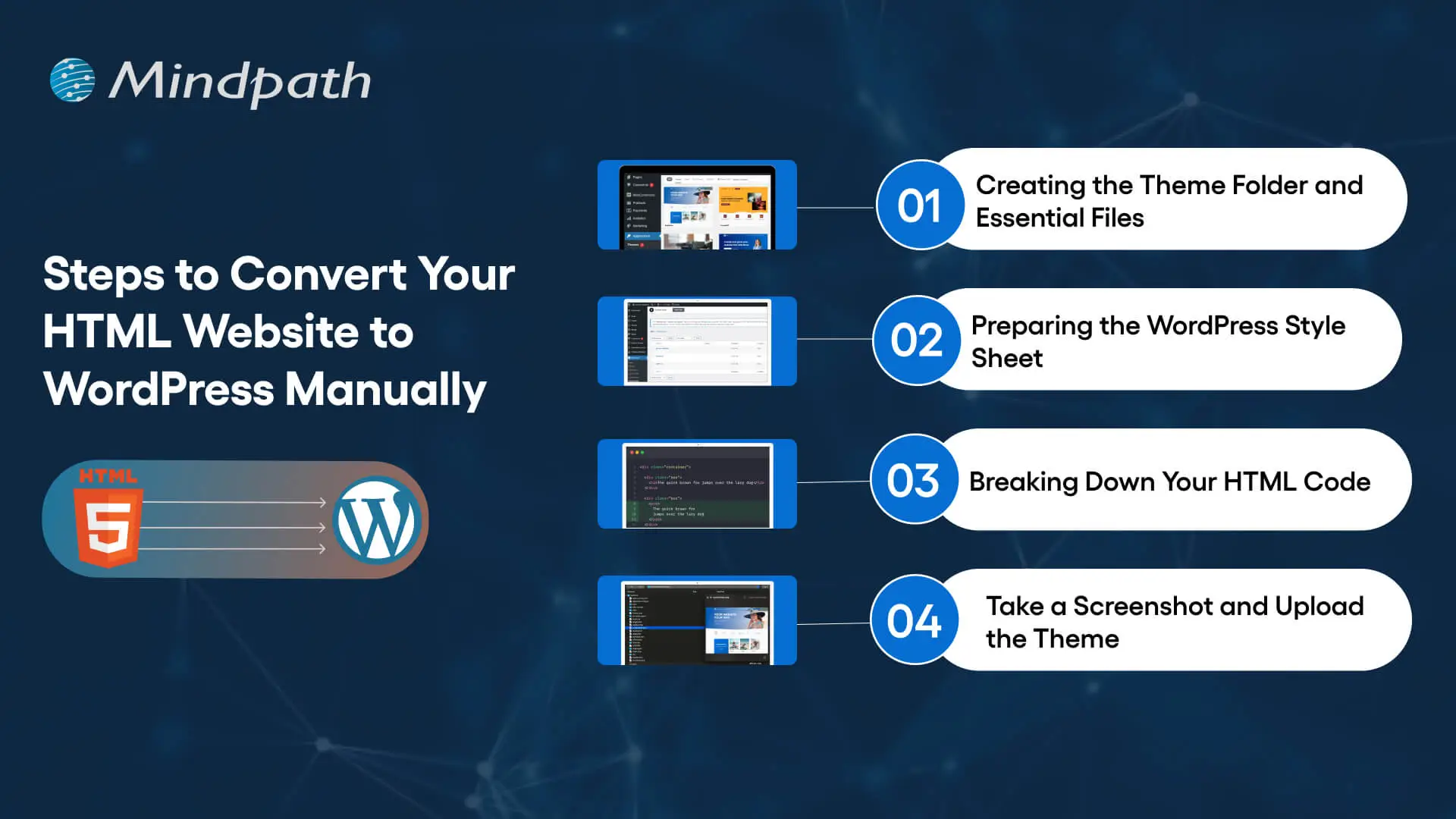
Steps to convert an HTML website into a WordPress theme

Step 1: Create the WordPress Theme Folder and Essential Files

Start by creating a dedicated folder for the custom theme inside the WordPress installation’s wp-content/themes/ directory. Use a descriptive folder name, such as business-custom-theme.

A basic classic theme can begin with the following files:

  • style.css for theme information and stylesheet rules.
  • index.php as the required fallback template for a classic theme.
  • header.php for the shared header and opening page structure.
  • footer.php for the shared footer and closing page structure.
  • functions.php for registering theme features, loading assets, and adding theme functionality.
  • front-page.php when a dedicated homepage template is needed.
  • page.php for standard static pages.
  • single.php for individual blog posts when the website publishes articles.

Additional files may be required depending on the design and content structure. For example, archive templates can control category or post listing pages, while custom templates can support specialized landing pages.

Step 2: Prepare the WordPress Theme Stylesheet

Open style.css and add the theme header information. WordPress uses this information to identify the theme in the administration dashboard.

/*
Theme Name: Business Custom Theme
Description: A custom theme converted from an existing HTML website.
Version: 1.0
Text Domain: business-custom-theme
*/

Replace the example name and description with details relevant to your project. Then transfer the existing website’s CSS rules into the stylesheet, adjusting selectors where necessary to work with the new WordPress markup.

Avoid copying every style without reviewing it. Duplicate rules, fixed-width layouts, and styles that depend on the original HTML structure may cause problems after the templates are reorganized.

Step 3: Separate the Existing HTML Into Reusable Templates

Review the original HTML files and identify elements that appear across multiple pages, such as the header, navigation, footer, and shared scripts. Move these elements into the corresponding WordPress template files instead of repeating the same markup across every page.

For example, the header template can contain the document structure, site branding, navigation, and opening layout. The footer template can contain footer content and the closing structure. WordPress template functions can then include these shared files in the main templates.

A basic template structure can use the following functions:

<?php get_header(); ?>

<main id="main-content">
    <!-- Add the page-specific template markup here. -->
</main>

<?php get_footer(); ?>

This is a structural example, not a complete website template. The page-specific markup must still be integrated with WordPress content, navigation, and the required theme functions.

Step 4: Connect the Templates to WordPress Content

A static HTML page contains content directly in its markup. In WordPress, content can be managed through the dashboard and displayed using template functions or the WordPress Loop.

For example, a basic page or post template can retrieve its content through the Loop:

<?php if ( have_posts() ) : ?>
    <?php while ( have_posts() ) : the_post(); ?>

        <h1><?php the_title(); ?></h1>

        <div class="entry-content">
            <?php the_content(); ?>
        </div>

    <?php endwhile; ?>
<?php endif; ?>

This example displays the title and content for the queried WordPress page or post. Additional template logic may be needed for featured images, custom fields, navigation, pagination, or other website features.

When moving a large website, decide which content should become WordPress pages, blog posts, or custom post types. This makes future content management easier and reduces the risk of treating every page as a manually maintained template.

Step 5: Load CSS, JavaScript, and Images Correctly

The existing HTML website may use stylesheets, JavaScript files, fonts, icons, and images stored in different directories. Update their paths and load theme assets through WordPress where appropriate.

For a classic theme, stylesheets and scripts can be registered or enqueued in functions.php. This helps WordPress manage dependencies and avoids hardcoding asset paths throughout the templates.

Review image paths, responsive image behavior, script dependencies, and any third-party services. Test navigation menus, interactive elements, forms, and other functionality that depends on JavaScript.

Step 6: Add WordPress Theme Features

Register the theme features required by the website. Depending on the project, these may include featured images, custom logos, navigation menus, title tags, and other supported capabilities.

Use WordPress functions for features that WordPress already manages. For example, register navigation menus rather than permanently hardcoding every navigation link when the business needs to manage them through the dashboard.

If the website uses custom fields, third-party APIs, contact forms, or e-commerce features, configure the appropriate plugins or custom development. Confirm that the implementation follows security and data-handling requirements.

Step 7: Create the Theme Preview and Activate the Theme

A theme screenshot can provide a visual preview in the WordPress administration interface. Save an appropriate image as screenshot.png in the theme folder. Check the current WordPress theme documentation for supported dimensions and formats.

Once the theme files are ready, open the WordPress dashboard and navigate to Appearance and then Themes. The theme should appear if its files and stylesheet header are valid. Preview it where the setup supports previewing, and activate it only after completing the initial checks.

Do not activate an unfinished theme on the live business website. Use a staging environment to verify templates, content, navigation, forms, and integrations before switching production traffic to the new site.

Step 8: Make the WordPress Website Responsive

The converted website should work across mobile phones, tablets, laptops, and desktop screens. Reusing the original HTML and CSS does not automatically guarantee responsive behavior in the new theme.

Use flexible layouts, appropriate CSS media queries, responsive images, readable typography, and accessible navigation. Test menus, buttons, forms, tables, and other interactive elements at different viewport sizes.

Check whether page builder styles, plugin interfaces, or custom components introduce layout problems. Also review keyboard navigation, focus states, contrast, and form labels to improve accessibility.

Step 9: Test the Website Before Launch

Once the theme is functional, compare the new WordPress website with the original HTML version. Confirm that the required design elements, content, images, and functionality have been preserved or intentionally improved.

  • Check important pages and navigation links.
  • Submit forms and test integrations.
  • Verify image loading and responsive layouts.
  • Review browser console errors and server-side errors.
  • Check page performance and Core Web Vitals.
  • Verify page titles, meta descriptions, canonical tags, and indexing settings.
  • Confirm that analytics and conversion tracking work correctly.
  • Test backups and confirm that the team can restore the site if needed.

For a more detailed quality review, refer to the WordPress developer checklist.

How to Protect SEO During an HTML-to-WordPress Migration

Changing a website’s CMS can affect its search visibility if URLs, page content, metadata, redirects, or indexing settings change unexpectedly. A migration plan should therefore include SEO checks before and after launch.

1. Preserve Existing URLs Where Possible

Keep existing URLs when they remain appropriate for the new website. If a URL must change, map the old address to the most relevant new page using a permanent redirect, usually a 301 redirect. Avoid redirecting every retired URL to the homepage when a more relevant destination exists.

2. Retain Important Page Content and Metadata

Record important headings, page titles, meta descriptions, canonical tags, image alt text, and structured data before migration. Recreate the relevant elements in WordPress and check that they render correctly on the final pages.

3. Review Internal Links and Media

Update internal links where page locations change. Check images, downloadable files, embedded media, and other assets to ensure they load correctly. Broken internal links and missing media can create usability problems and weaken the quality of the migration.

4. Check Indexing and XML Sitemaps

Verify that important pages are accessible to search engines and that production pages do not retain accidental noindex directives from the staging environment. Review the XML sitemap and canonical tags, and ensure that the sitemap lists the correct preferred URLs.

5. Monitor Search Performance After Launch

Use Google Search Console and website analytics to monitor indexing, organic traffic, landing-page performance, and conversion activity. Investigate unexpected changes, crawl errors, redirect problems, and missing pages after launch.

A technically sound migration helps reduce avoidable SEO risks, but it cannot guarantee that rankings or organic traffic will remain unchanged.

Common HTML-to-WordPress Migration Mistakes

A migration can create problems when the team focuses only on transferring the design. Businesses should address the following issues during planning and testing.

  • Copying the entire HTML page into one template: This can prevent content from being managed properly and create duplicated layouts across pages.
  • Ignoring existing URLs: Unplanned URL changes can lead to broken links and lost search traffic.
  • Forgetting website functionality: Forms, search, interactive elements, and third-party integrations need to be rebuilt or reconfigured.
  • Using unnecessary plugins: Excessive or poorly maintained plugins can add complexity and introduce security or compatibility risks.
  • Skipping mobile testing: A desktop layout may not work well on smaller screens after conversion.
  • Launching without backups: A verified backup and recovery process helps protect business data and website availability.
  • Testing only the homepage: Service pages, blog posts, forms, archives, and other important page types also need validation.

Convert Your HTML Website to WordPress With a Clear Plan

Converting HTML to WordPress can give a business more control over content management and create room for new website capabilities. The most suitable approach depends on the existing design, content structure, required functionality, technical resources, and long-term business goals.

Before migration, back up the existing website, document its URLs and functionality, choose the right conversion method, and prepare a testing plan. After development, validate the new website across devices, preserve important SEO elements, and monitor performance following launch.

Businesses that need support with theme development, content migration, or specialized functionality can review Mindpath’s expert WordPress developers. A properly scoped migration can help align the website with current operational needs while preparing it for future improvements.

Web development roadmap

Producing impactful online experiences begins with a clearly defined web development roadmap. The ultimate goal is to create an application where every click, scroll, and animation feels natural and engaging. You are not simply building webpages; you are creating experiences that resonate with people and enable ideas to be expressed, although it is an endless process that presents incredible skills to learn, tools to manipulate, and decisions that will define how your web applications will perform, appear, and feel.

Every step of this journey adds a new dimension to your skills and perspectives. From planning your layouts, designing usable interactions, creating activities, and optimizing the performance, all are built to produce something fantastic. The web development roadmap acts like a compass, guiding you towards building valuable applications for users that “stand out” in a digital moving landscape.

If you are planning to build an ultimate web app development? Mindpath’s web app development services will bring expertise and deliver digital solutions that enhance your business performance.

Understanding the Basics of Web Development

Web development is the act of developing and maintaining websites and web applications. It involves tasks like coding, design, testing, and maintaining that ensure everything is performing as it should for the user. All of these different platforms allow businesses, educational entities, governments, and other organizations to distribute information, market and sell products, provide services, and communicate with others online. Well-developed websites and web applications improve user experience, improve accessibility to information, and support business objectives, which is why they play a major role in achieving success in presently shared digital and real-world spaces.

Collectively, Business Insight Research has valued the global web development market at USD 70.6 billion in 2024, which is expected to grow to USD 141.49 billion by 2033, with a CAGR of 8.03% between 2025 and 2033. The growth is attributed to the proliferation of the internet, smartphones, and e-commerce. The globalization of business has led organizations to invest in professionals to create websites that are visually appealing, fast, and have a highly navigable experience to stay profitable.

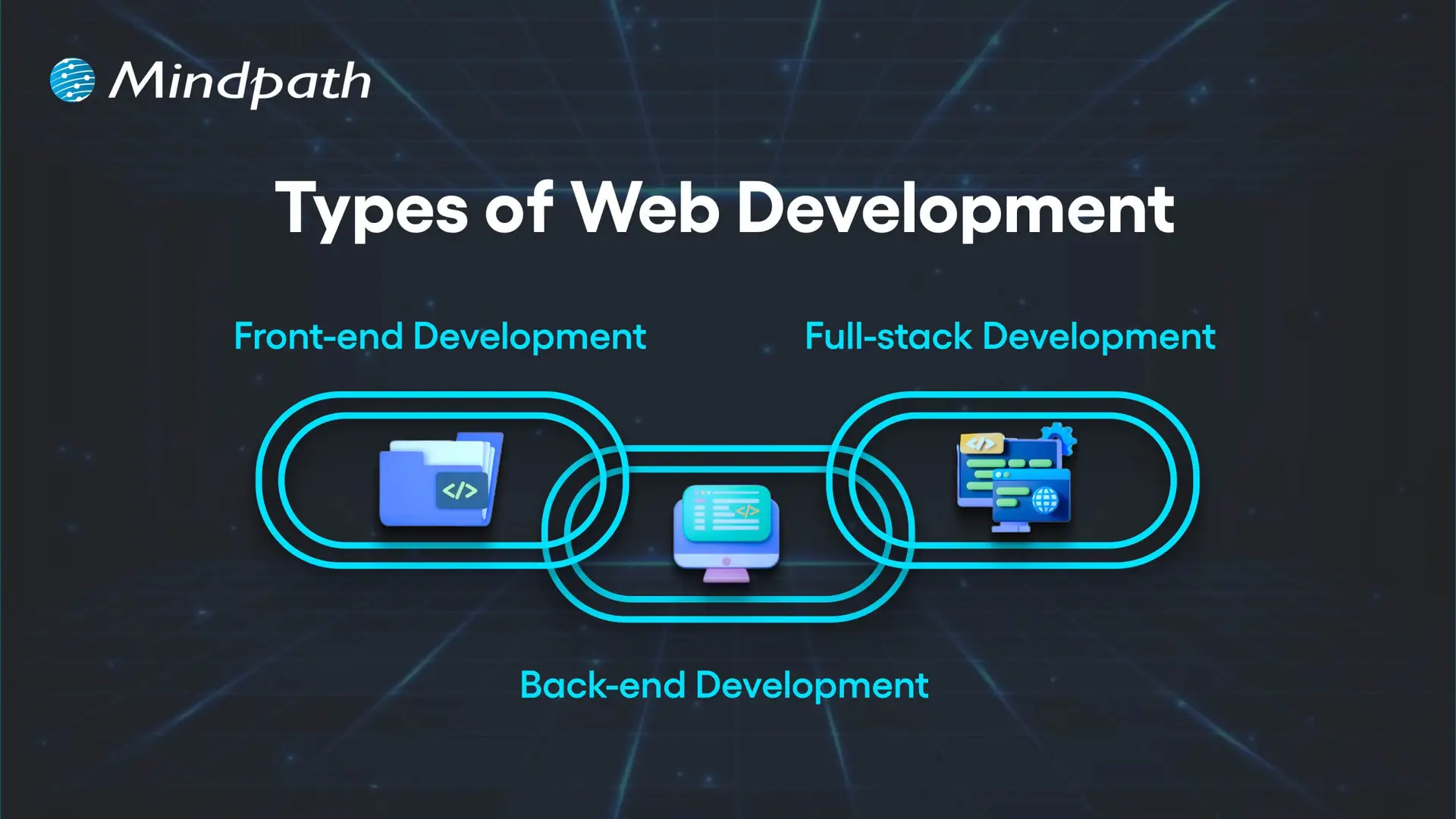
Here are the three types of Web Development

Types of Web Development

1. Front-end Development

Front-end development refers to all the content and elements that appear on the screen in a web browser. Developers using HTML, CSS, and JavaScript create page layouts, decorative elements, and interactive front-end functionality. The purpose of each front-end web page is to be visually appealing, responsive, and usable. Understanding this part is essential in any web development roadmap.

2. Back-end Development

Back-end development refers to everything that happens server-side in order for a website to run properly. Developers will work with data, databases, and user authentication and will largely be responsible for connecting the front-end to the server through application programming interfaces (API). Essentially, back-end development means processing data, executing business logic, and making sure everything is secure.

3. Full-stack Development

Full-stack development encompasses both front-end and back-end development as a way to build fully operating web apps. Developers take on user interface design, server-side, database operation, and everything in between. In this, developers are able to drive every aspect of a project and maximize consistency in integrating the interface visited by a user and the underlying system.

Curious how a web application actually works behind the scenes? Explore the role of frontend and Backend to understand how both layers drive performance and user experience.

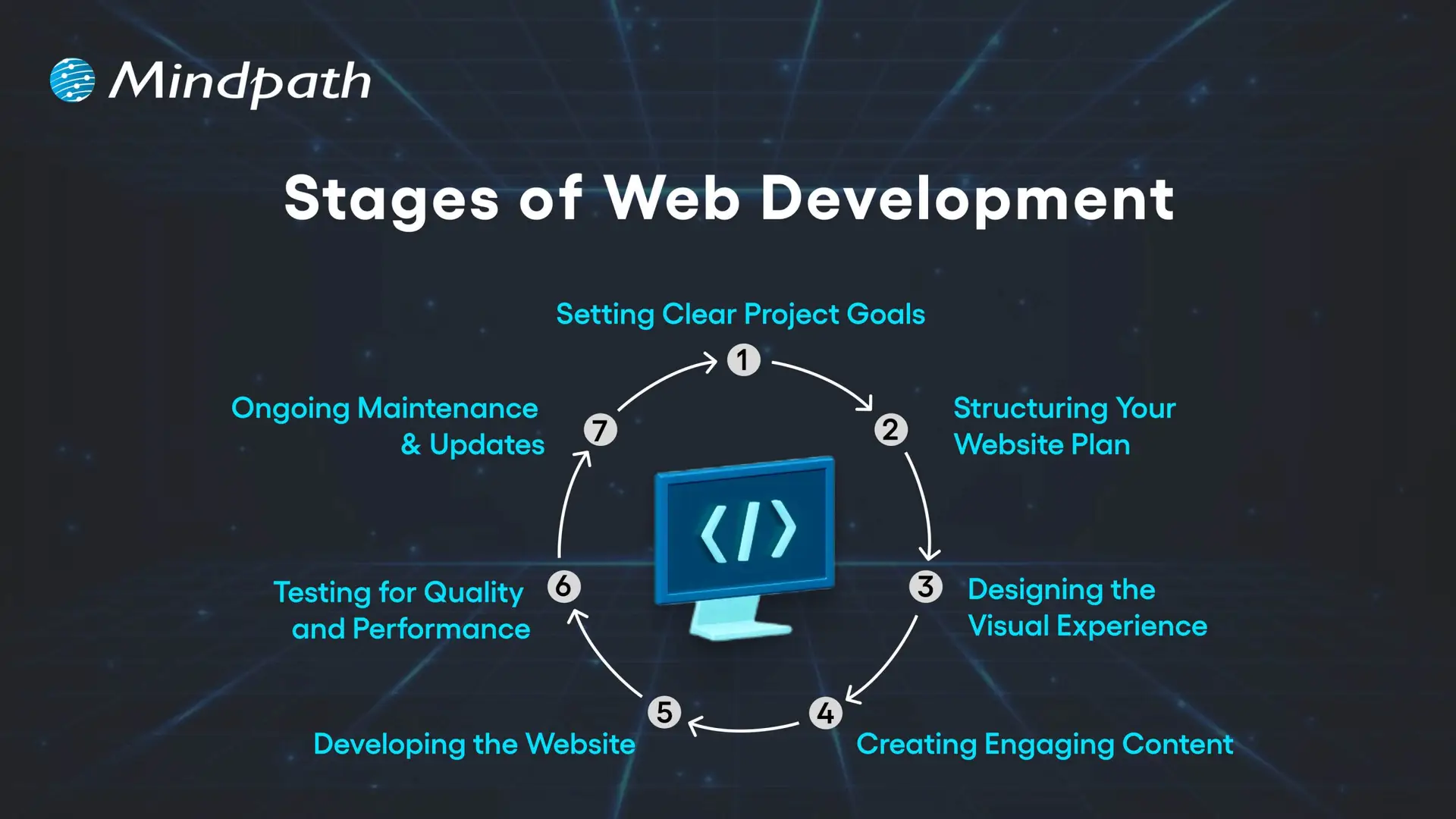
What are the 7 Stages of Web Development?

Web development is a precise discipline as it transforms ideas into interactive digital experiences. In web development, everything is sequenced and implemented purposefully, which culminates in a well-polished, functional product that leaves an impression. Each stage is dependent on the prior stage, which allows web developers to build a website or web application for a target audience. Grasping these stages is an essential step in building a successful web development roadmap.

Stages of Web Development

1. Setting Clear Project Goals

Identifying the purpose of your site is the first step, as well as how it will serve your audience. You need to identify your business goals, unique value proposition, audience preferences, and competitive space. A clear vision is the basis of the whole web development plan.

2. Structuring Your Website Plan

Developing a full model for your website will include solid materials such as sitemaps and wireframes. The sitemap will tell you how pages are linked, while the wireframes provide a visual representation of how you want the major elements of your site structured and what areas they will fill. Getting this correct will help ensure that your website navigation, layout, and the way users will travel around the site are thought out in a solid manner from the start.

3. Designing the Visual Experience

At this stage, we start to think about site aesthetic and brand elements, color, typeface, imagery, and iconography. The design must remain uniform across channels to build brand awareness. User user-friendly and aesthetically pleasing design can draw people in and build trust!

4. Creating Engaging Content

At this stage, you’ll develop content for landing pages, product descriptions, blogs, images, videos, etc., in more detail. Content not only needs to align with the needs and questions of your audience, but content also provides engagement opportunities. Keywords will be employed, and if we do this strategically, we can improve reach and connect with specific traffic that can bring targeted traffic to your site.

5. Developing the Website

Once everything about your design and content has been established, developers will start building the front end (client side) and back end (server side) of your website. Their job is to code your site, code in your required functionalities, and build a technical foundation on which the site can grow as needed. It is essential that you have the technical foundation in place, as having the right technical foundation allows your site to function seamlessly while hopefully supporting businesses in their growth.

6. Testing for Quality and Performance

Everything on your website needs to work correctly before the site launches. Prior to launch, the site must be tested on different devices and different browsers. This testing will include broken link checking, speed optimization, and mobile responsiveness. Testing is considered a crucial step in the process to ensure that the user experience is flawless when the user first experiences the website.

7. Ongoing Maintenance & Updates

Once a website is launched, it must be updated on a regular basis to remain useful, secure, and on trend. Updating a website can mean a lot of things and can include adding content, fixing bugs, adding features or functionality, and backing up. Frequent maintenance will keep you more competitive and help with longer-term success. Mastering these stages plays a vital role in shaping a clear and effective web development roadmap.

Is your web application prepared to handle modern security threats? Explore application security best practices for Web and Mobile Apps to learn how to protect your data, users, and business operations.

Web Development Roadmap 2026: A Step-by-Step Guide

A website development roadmap is a structured plan that outlines the stages, tasks, and goals involved in building and launching a website. This web development roadmap for beginners explains what a website roadmap is by showing how each step connects, helping you create a professional, user-friendly site that meets your goals and performs well in 2026.

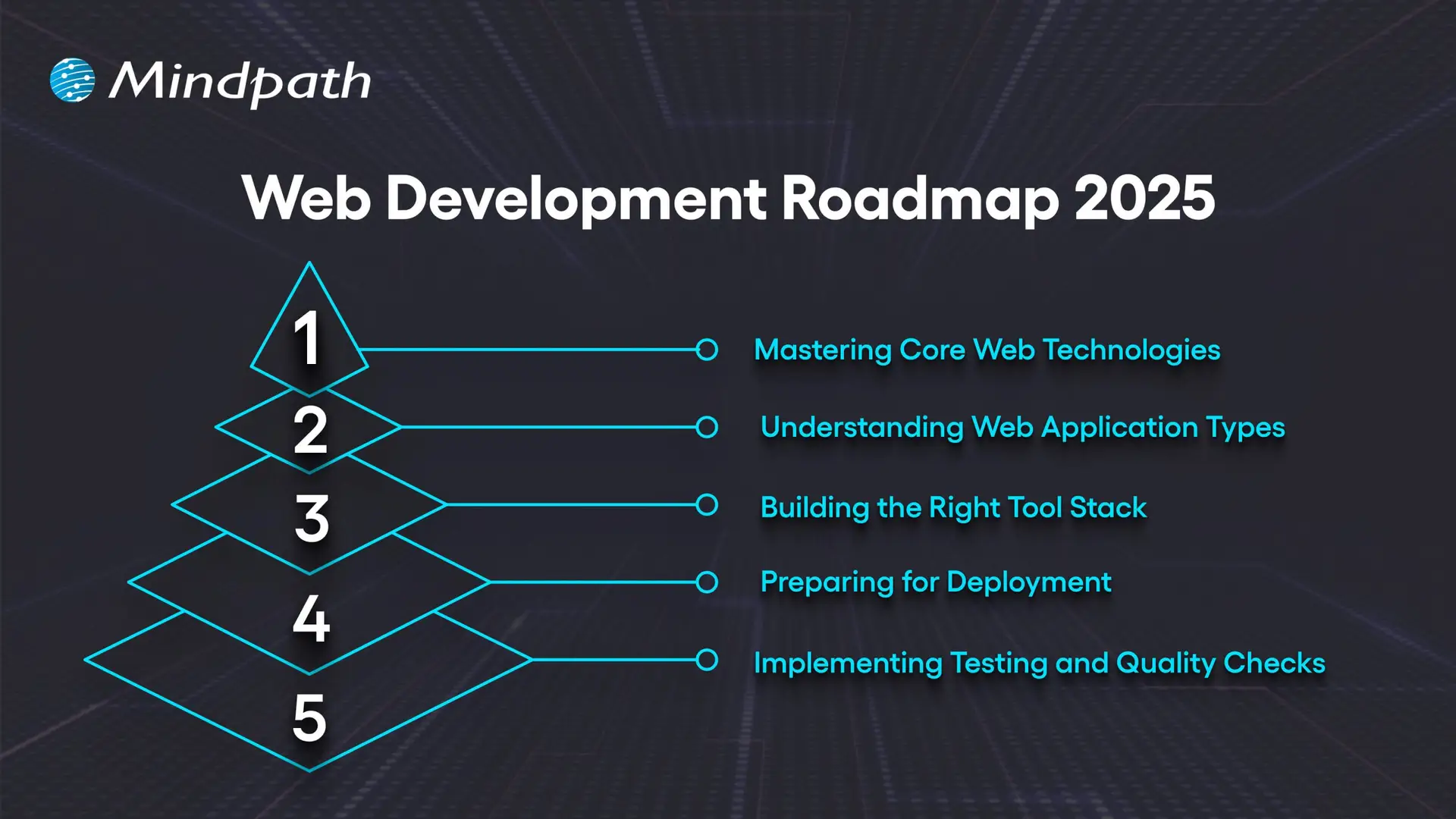
Web Development Roadmap 2025

1. Mastering Core Web Technologies

The important first part of the web development roadmap is getting familiar with the core technologies that underpin the internet. HTML provides the structure, CSS provides the layout, and JavaScript provides interactivity to web pages. Developers should be familiar with some protocols like HTTP/HTTPS, FTP, and TCP/IP that define how data is transferred between the server and the browser. The basics of accessibility, usability, and web semantics are important to know to create accessible, well-structured websites. The fundamentals are the starting point for anyone on the roadmap.

2. Understanding Web Application Types

Before you start building, it’s a good idea to understand the different kinds of web applications and their use cases. Static HTML pages indicate fixed content. Dynamic pages have content that changes based on user interaction. Server-side applications deliver content through languages like PHP, Python, and Java.

Single-page applications provide fast and fluid experiences, with only slight page reloads. Progressive web apps provide offline capabilities and app-like experiences. Hybrid apps combine web and native features. Understanding these types of web applications familiarizes web developers with the appropriate way to develop for each available project.

3. Building the Right Tool Stack

A complete full-stack web development roadmap involves selecting the proper tool set to orchestrate front- and back-end work simultaneously. For the front end, tools like React, Angular, and Vue.js facilitate responsive and interactive interfaces supported by a variety of CSS pre-processors like Sass for long-term maintainability. For the back end, languages like Java, Python, and PHP power the application logic supported by frameworks like Express.js and Django.

Databases like MySQL and MongoDB facilitate data storage. APIs link the client and server, which helps decouple the presentation of data and business logic. There are many elements that the client and server need against the tool stack for productivity, scaling, and performance.

4. Preparing for Deployment

Deployment refers to the process of making your application available to users on the internet. While the use of Git version control helps keep track of application code changes, Docker guarantees the environment in which we run applications will be consistent. Orchestration tools such as Kubernetes are used to serve developer needs when we are doing large deployments.

Most CI/CD pipelines, like Jenkins and GitLab CI, work together to automate the build and release process for applications. Many providers in the cloud space, such as AWS, Azure, and Google Cloud, give us secure environments where our products can be built and serve to scale with ease. Finally, monitoring tools will allow a web developer to track the service performance and ensure their application is performing as expected post-launch.

5. Implementing Testing and Quality Checks

Testing is vital in web development because it ensures that the website is functioning across devices, browsers, and user conditions. Testing types include unit tests, which test individual items (API, elements, etc at the component level) integration testing, which tests that the pieces of the application work together correctly, and end-to-end testing, such as Cypress or Selenium, which will simulate user behaviors to verify a complete workflow. Accessibility testing is a type that checks that the website can be accessed by individuals with disabilities, and performance testing looks to see how quickly the site responds and how it responds under heavy load conditions.

Periodic testing is an essential factor of this process that leads to quality and reliability in the web. The integration testing tests the pieces of the application work together correctly; and end-to-end testing, such as Cypress or Selenium, which will simulate user behaviors to verify a complete workflow.

Not sure which technologies are right for your web app? Explore the tech stack for your web app success to make informed decisions that drive growth and reliability.

Want to Turn Your Web Development Roadmap into a Success Story?

Following a clear web development roadmap ensures you move through each stage with purpose and precision. It helps align design, functionality, and performance to create websites that truly serve their audience. By mastering core technologies, understanding application types, and implementing strong testing, you build projects that are scalable, secure, and ready for long-term success.

At Mindpath, we create websites that are fast, secure, and built to grow with your business. Our web development services cover everything from front-end design to back-end functionality, ensuring a seamless user experience. We specialize in custom web applications, e-commerce platforms, CMS solutions, API integrations, and performance optimization. With a focus on scalability, usability, and innovative design, we turn your ideas into high-performing digital solutions that engage users and deliver results.

Custom web application development

A growing business often reaches a point where off-the-shelf solutions no longer match its unique needs. Right? This is where custom web application development comes in. It gives you the web applications that work exactly the way you want them to, based on your specific requirements. Think about how much easier your daily operations would be if every feature were custom-made based solely on how your team works day to day, rather than trying to adapt to a generic application. It happens when technology becomes more than just a tool or a utility and partners with you to scale with your business.

Over time, certain changes in daily operations start to hint that your business might benefit from such a tailored solution. While these changes often seem subtle, they show up as your team performs operations, handles data, or relates to customers. When the shifts appear, it is highly likely that operational efficiency, productivity, or growth will be impacted. Understanding these signals can help you determine the proper time to invest in a strategy that is specifically built to suit the needs of the business.

Every business challenge needs a custom solution. Look how Mindpath’s custom web app development services resolve the issues and support businesses to convert unique needs into powerful digital tools.

What are Custom Web Applications?

Custom web application development for business means you’re building software that is specific to a business’s needs. This means instead of general tools that are often not specific to the goal of the software, you can tailor the application to a business’s workflows and goals, thus providing better efficiency and customer experience. In short, a custom web application for business will be able to manage data, create automation, provide reporting, and centralize operations. This process will result in a secure, scalable solution that supports the overall growth of the business.

Developers choose programming languages, frameworks, and tools relevant to particular project requirements. They communicate with the business to understand the challenges while integrating within the existing systems. During the web application development, the team regularly checks for progress and verifies if everything is aligned, keeping the cost, time, and risk to an acceptable level. The result is a working, well-designed, reliable application that the business finds intuitive, enhances the business, and can adapt as the business grows.

Benefits of Custom Web Application Development

Knowing the custom web application benefits can help you understand how the proper solution can have an impact on how you work. When considering why to build a custom web application, it is usually due to the fact that it can fit your precise requirements, allow you to work more efficiently, and facilitate growth. It is a strategic investment that will provide a return reflecting your investment and your growth aspirations.

Benefits of Custom Web Application Development

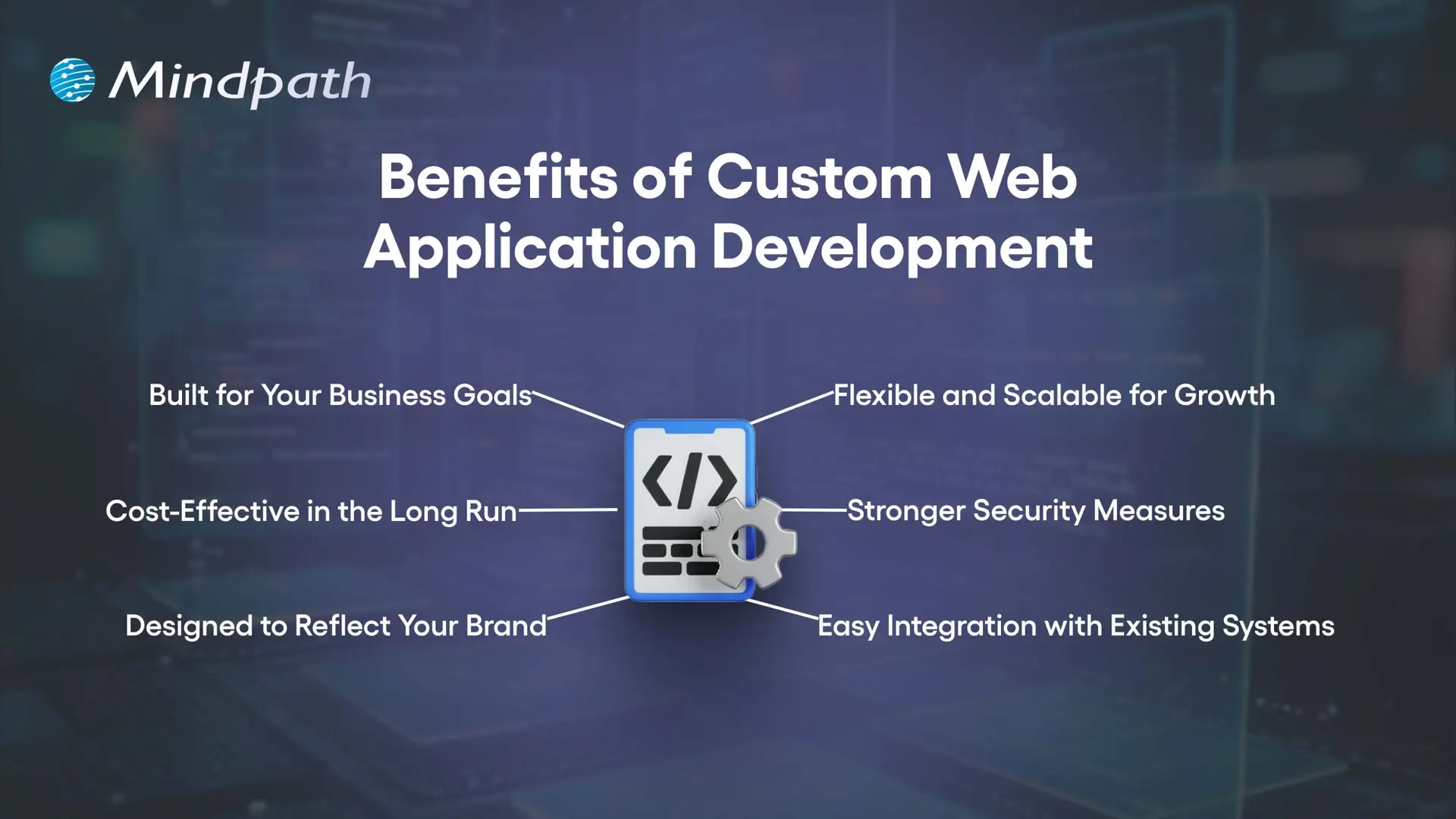
1. Built for Your Business Goals

When you use Custom web application development, you have every feature custom development to suit your needs. This makes integrating workflows easier and an easier experience for your employees.

2. Cost-Effective in the Long Run

A custom solution takes out the licensing fees and unnecessary features, which will save you in the long run. You can also reduce some infrastructure and hardware costs if you are going to outsource the development, too.

3. Designed to Reflect Your Brand

Custom web app development allows you to create every aspect of the application, to your brand’s identity. It can give your application a customized, professional, and unique identity that users will definitely recognize.

4. Flexible and Scalable for Growth

Custom-built applications will grow with your business and meet new demands. You will be able to add new features, accommodate increased traffic and usage, and still have a smooth performance.

5. Stronger Security Measures

Security is a key feature of Custom web application development, ensuring that your business is safe from common cyber threats. Custom apps will be fun to breach and take over than commercial apps found on the market.

6. Easy Integration with Existing Systems

Custom web applications will integrate easily with your current systems and databases. This allows you to keep data synchronized, accurate, and consistent across all platforms.

Choosing a custom web application is a strategic business decision! Discover web development trends to ensure your development strategy aligns with current and future digital demands.

10 Signs Your Business Needs a Custom Web Application

As businesses change, many times their needs exceed what generic software can deliver. Knowing the signs that you need a custom web application will allow you to reduce the damage that can happen before inefficiencies grind your business down.

10 Signs Your Business Needs a Custom Web Application

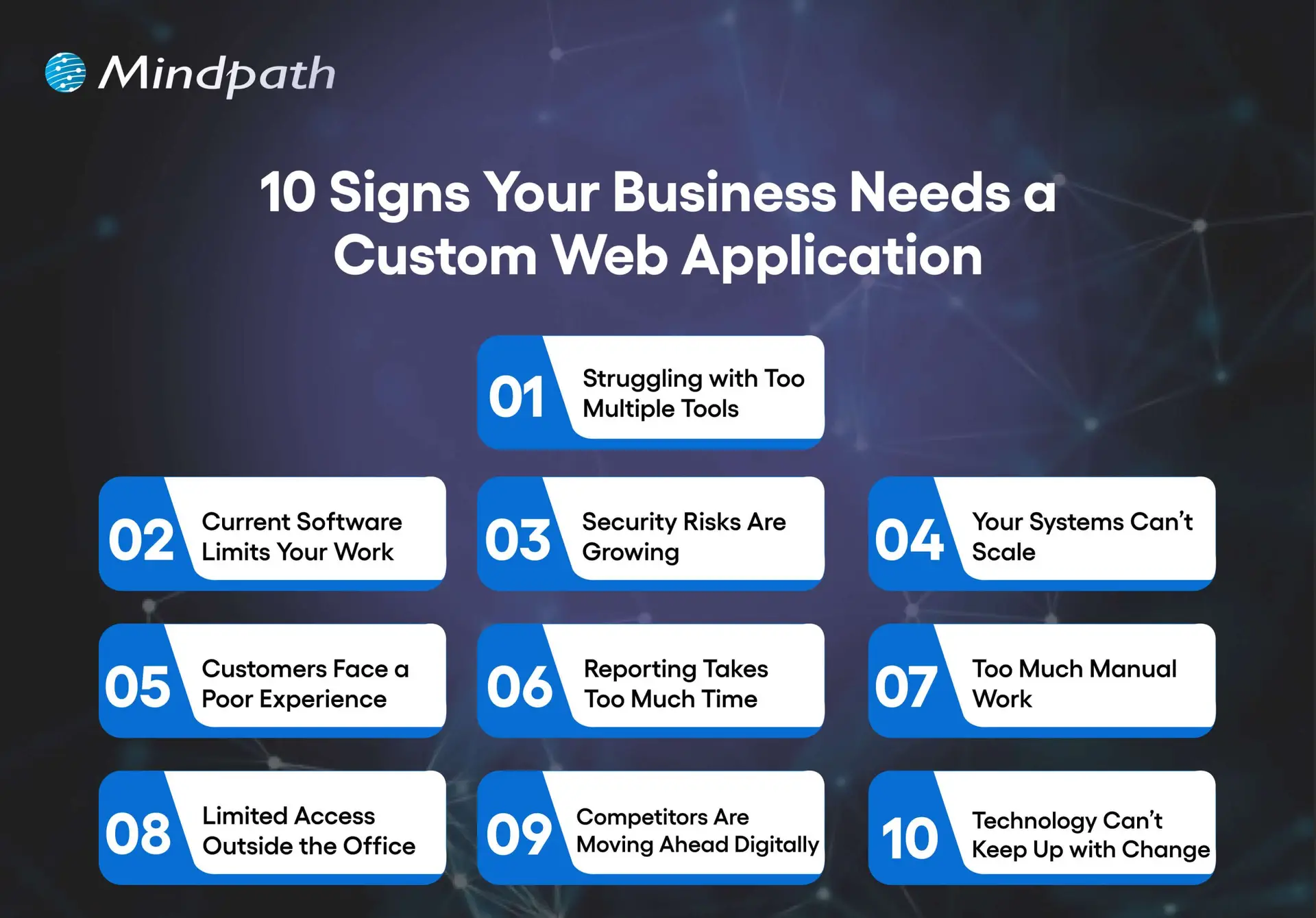
1. Struggling With Too Many Tools

Switching between spreadsheets, emails, and multiple apps slows work and causes mistakes. A custom web app centralizes your operations in one platform for better efficiency.

2. Current Software Limits Your Work

Generic software forces you to adjust your process to fit its features. Custom web application development creates solutions that match your exact workflows.

3. Security Risks are Growing

Using outdated systems leaves sensitive data exposed. A custom web app includes strong security controls, encryption, and adheres to all industry standards.

4. Your Systems Can’t Scale

Organizations evolve. As your business grows, so should your tools increase their users, data, and functionality. Custom software is built to scale without performance issues.

5. Customers Face a Poor Experience

Using slow, outdated, or limited platforms can leave users frustrated. A custom web app will provide users with modern interfaces, fast service, and customized experiences.

6. Reporting Takes Too Much Time

If your reporting is done manually, or it takes too long to collect and analyze, it will limit your decision-making. Custom web apps will provide real-time dashboards and allow for instant self-serve reporting.

7. Too Much Manual Work

When staff are tied up with repetitive data entry or repetitive tasks, it is hard to be productive. A custom application can be built with automation features to allow staff to concentrate on high-value opportunities or higher-skilled work.

8. Limited Access Outside the Office

If your employees can’t easily access your systems while off-site or, even worse, don’t have access to them at all, your flexibility is limited. A custom web application can be secured and hosted in the cloud, allowing staff to work from anywhere.

9. Competitors Are Moving Ahead Digitally

If you’re used to out-of-date tools and systems, keeping up will mostly be impossible. Custom web application development will give you the opportunity to develop useful features that are unique to your organization.

10. Technology Can’t Keep Up with Change

If your business pivots, expands, or introduces new services, the old systems won’t accommodate this change. Custom applications allow you to adapt to these opportunities, adding integrations, and are designed with flexibility.

Wondering what comes next after deciding to build a custom web application? Explore the web app development roadmap to gain clarity on development stages, timelines, and technology choices.

Ready to Build a Solution That Fits Your Business?

A growing business needs tools that adapt to its pace, processes, and vision. Custom web application development delivers tailored solutions that improve efficiency, strengthen security, and enhance customer experience. Recognizing the signs early allows you to invest in a platform that aligns perfectly with your goals and supports sustainable growth.

At Mindpath, our Custom web application development services create secure, scalable, and user-friendly platforms that integrate seamlessly with your operations. We focus on understanding your unique workflows and delivering features designed to simplify tasks, automate processes, and empower your team. The result is technology that becomes a true partner in your business journey.