Top Mistakes to Avoid When Building Custom Software 

Join our Newsletter!

Featured Posts

Support Is One Click Away

Home

Top Mistakes to Avoid When Building Custom Software 

Custom software development mistakes

Top Mistakes to Avoid When Building Custom Software 

What can cause a well-planned software project to stray off track? Have you ever thought about this? Most of you must have found yourself in a similar situation, right? If so, you are not alone. Many organizations, just like yours, start with the right intentions, a highly skilled team, and a strong idea, but often face delays or an unexpected outcome. Typically, the problem dwells in small custom software development mistakes that begin in the early phases, and it ultimately grows into bigger challenges. If you ignore the early warning signs, it can quickly slow down the whole process. So, how do you keep a custom software project on target, on a clear and quick path toward your business goals?

Every custom software project is full of important decisions that shape the final product. From how you outline your needs to how your team communicates, every aspect matters a little more than you think. Without a defined process, even good ideas have a tendency to derail. In this blog, we will highlight the key custom software development pitfalls you need to avoid, making sure your custom software project stays on track! So, keep reading to find out!

Looking forward to tailoring a software which exactly fit your organizational needs? At Mindpath, we offer custom software development services that help in designing and developing software that meets your business goals.

Why Choose Custom Software Development for Your Business?

Custom software development is a process to create tailor-made software for your organization. It reflects your exact workflow, needs, and goals of the users. It is designed to suit your needs by solving your problems, rather than using predefined features as is the case with off-the-shelf software. Custom software offers better performance, is easily scaled, and puts you in control of the functionality, design, and updates as your business adapts and grows.

Standard software may be quicker to set up; however, it is inflexible, comes with ongoing licensing, and requires ongoing hardware changes. Custom software, on the other hand, is a long-term investment. It does not have unnecessary features, it supports your effective operation, and it also fits in smoothly with your systems. Interestingly, if it is designed by your team, it reduces time, minimizes long-term costs to improve decision-making throughout your business.

Let us take a quick dive into the benefits of custom software development:

1. Custom software will scale with your business as it grows. It also adapts easily when you expand your services or change your processes without incurring the costs of upgrades.

2. It is developed around your specific workflows and business objectives. This provides you with smoother operations without the restrictions and inefficiencies of a one-size-fits-all system.

3. Custom software also integrates well with your current systems. It allows data to flow from one platform to another with minimal manual work and with fewer mistakes.

4. It ultimately saves you money over time, and you won’t incur future licensing fees. You pay for only what you require, and the total cost of ownership is lower.

5. Custom solutions differentiate you in the marketplace. With unique features and enhancements to the user experience, you can be more competitive and more customer-centric.

6. It makes teams more productive in their daily tasks. When software matches each role, teams work faster, make fewer mistakes, and deliver better results.

Want to know more about the benefits of custom software development for your business? Head to our blog: Top Benefits of Custom Software Development

Top Mistakes to Avoid in Custom Software Development

Knowing the common challenges of custom software development is important for creating a successful solution. Many teams overlook some small but critical details, which are often the reason why custom software projects fail or are delayed.
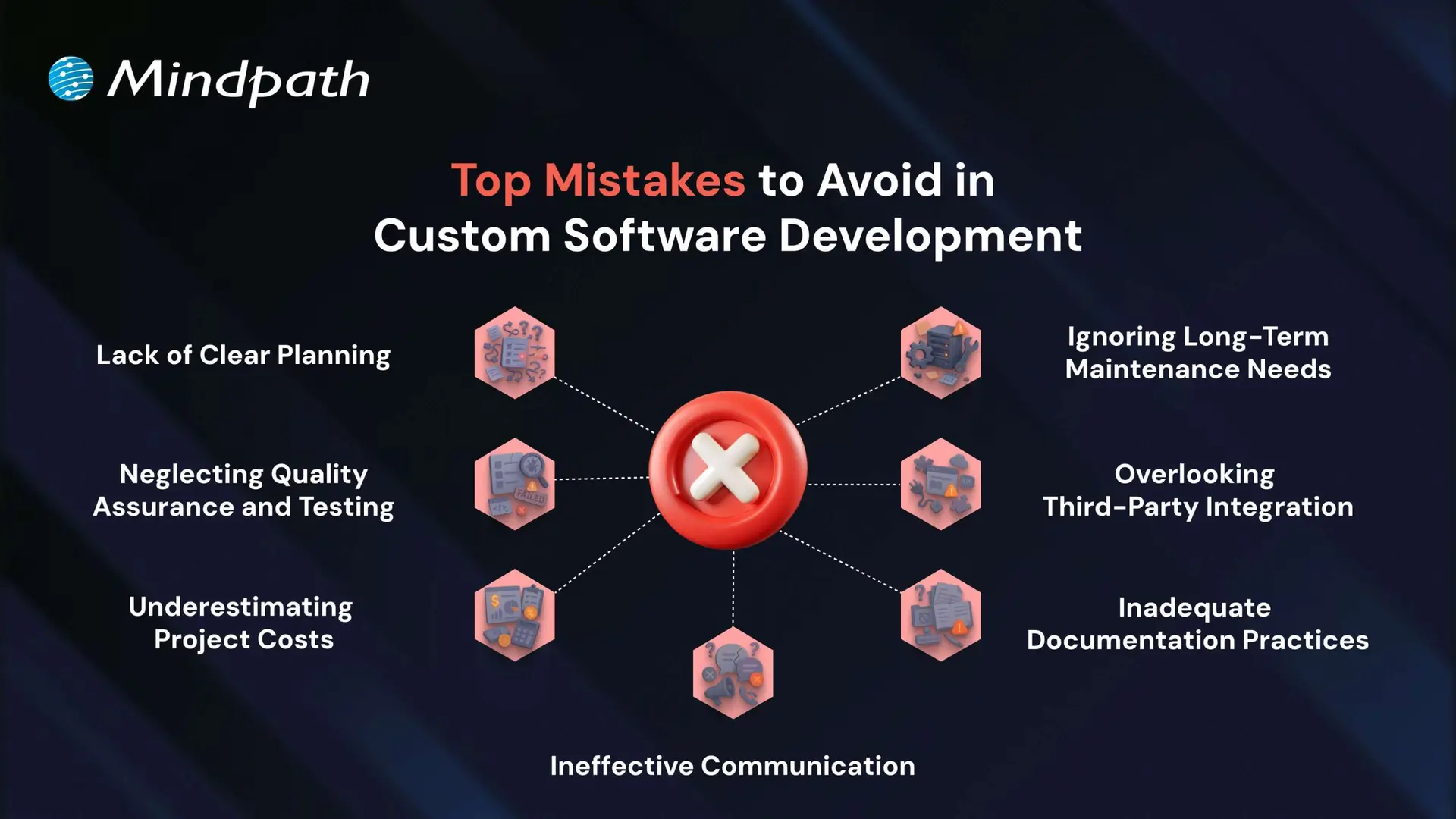
Top Mistakes to Avoid in Custom Software Development

1. Lack of Clear Planning

A very frequently made mistake in custom software development is a lack of planning. If the business objectives are unclear and there is no well-structured roadmap in place, projects like these can end up with inflated costs and delays.

To prevent this, first ensure that key stakeholders are engaged and assess current processes, technologies, and long-term needs. Specify system requirements in detail, including integrations, UI/UX, architecture, and security, before you start the development.

2. Neglecting Quality Assurance and Testing

Omitting or neglecting testing is one of the common custom software development mistakes that can result in considerable problems post-launch. In many instances, some form of quality assurance takes place; however, in sufficient time to perform quality assurance, or altogether ignoring QA means bugs are left unidentified until it has become much harder (and much more expensive to fix).

In order to eliminate custom software mistakes like this, testing should be completed by qualified individuals using legitimate QA and UAT practices to deliver software that provides the customer or user, by and large, what they require to a fully qualified and operational level.

3. Underestimating Project Costs

Cost overruns are one of the most frequent custom software mistakes, primarily due to vague requirements and complexities not being properly assessed. When there is no clear requirement scope, budgets can easily become unbounded, creating delays and the likelihood of project failure.

To tackle this issue, establish a clear MVP with key features and distinguish them from desirable features. This will lead to realistic budgets and phases that can be developed incrementally and in alignment with business goals.

4. Ignoring Long-Term Maintenance Needs

Lack of planning for the ongoing maintenance of software is a challenge in the software development process. It can result in performance and obsolescence issues. Many well-built software solutions are inefficient and potentially vulnerable when support doesn’t happen, and you should not be surprised if yours is in the same boat when software support does not take place.

How can you prevent this? One place to start is with a clear maintenance strategy from the beginning. Budget for planned updates, security patches, and feature improvements so your software can run efficiently and securely.

If you’re planning a custom solution, our step-by-step guide to the custom software development process will help you understand each stage clearly.

5. Overlooking Third-Party Integration

Not considering compatibility issues with third-party systems is a custom software development mistake that can slow down development and reduce software performance. A poor integration strategy can result in data flow problems, missing functionality, and even unanticipated system failures.

To avoid this possibility, complete a full tech audit and feasibility study at the beginning of the project to help ensure the intended integration will go smoothly when the project is complete. This allows you to make informed decisions to move forward with a strategy that meets your business needs.

6. Inadequate Documentation Practices

Poor documentation is a custom software development mistake that results in a misalignment of expectations, confusion, and challenges for long-term maintenance. Documenting decisions and details of the project is imperative. Without documentation, teams cannot go back to understand or support the software later.

To avoid this mistake, be sure to define the scope of the project in advance and document as you go. Another solid practice is to have complete user documentation and technical documentation to enhance transparency, ease of handoff, and longevity.

7. Ineffective Communication

Poor communication is a common issue that leads to misunderstandings, missed deadlines, and project inefficiencies. When teams and stakeholders are not aligned, important decisions and updates can be lost or misinterpreted.

Following custom software development best practices involves maintaining open communication channels, regular check-ins, and clear documentation. This helps ensure transparency, accountability, and better collaboration throughout the development process.

Want to Build Smarter by Avoiding Common Custom Development Mistakes

Successful software projects rely on clear planning, communication, testing, and proper budgeting. Avoiding these common custom software development mistakes helps keep your solution on track and aligned with your business goals. By recognizing early pitfalls and following best practices, your team can build scalable, efficient software that delivers long-term value.

As a trusted custom software development company, we at Mindpath provide tailored solutions built around your unique business goals. Our custom software development services ensure seamless integration, ongoing support, and full transparency throughout the project lifecycle. Partner with us to turn your vision into a secure, high-performing solution that grows with your business.


Related Post

Discover how hyperautomation can transform your business by boosting efficiency, productivity, and ROI. Learn how Mindpath can help.

Related Post

Stability AI guide

In this generative AI revolution, one name that stands out as a leader of open-source AI models is Stability AI. The company has introduced many powerful AI models that have completely changed the way of generating digital content. In this comprehensive Stability AI guide, we will discuss more about this platform.

If you are looking to explore the most powerful, flexible, and accessible toolkit to create audio, videos, images, and more, this Stability AI guide is for you. Read on to find out what it is and the various models offered by Stability AI. Besides, here you will find the answer to an important question: “How can I use Stability AI?”

Want to explore Stability AI but need guidance on turning its capabilities into real business value? Mindpath provides end-to-end AI development services that bring your AI ideas to life with reliable, future-ready solutions.

What is Stability AI?

Let’s start this Stability AI guide by understanding the basics – what Stability AI is. Stability AI is a renowned company that was established in 2019. It strives to provide powerful and open-source AI models to perform different tasks. The brand is known for its Stable Diffusion model, a powerful image generation model.

Different from other platforms, Stability AI releases the source code and the weights of their models, as it emphasizes openness. This has made it a top choice among startups, hobbyists, and artists. Developers can easily fine-tune and build upon various models offered by Stability AI. The product portfolio of Stability AI expands beyond just image creation. The ecosystem includes multiple models for all types of digital content.

Must Read: Generative AI Tools for Content Creation

Now that you learn about Stability AI, it’s time to move into an important question in this Stability AI guide, i.e., how does it work?

How Does Stability AI Work?

In general, Stability AI creates as well as trains various foundational models, or we can say large neural networks. These models can generate content based on the patterns they have learned from different datasets. All these models are trained utilizing diffusion techniques, and the most popular of these is Stable Diffusion.

It basically starts with random noise. Next, by reversing the diffusion process, it eliminates the noise for generating realistic images that are based on the prompts of the user. For language-related tasks, Stability AI has advanced models such as StableVicuna and Stable LM. Stability AI wants to make modern AI technologies easier to access by making AI models open-source and offering comprehensive documentation.

Want to know what makes generative AI models so powerful? Discover the attention mechanism to learn how neural networks focus on important information during generation.

Understanding Various Stability AI Models

In order to maximize the use of Stability AI, it is essential to learn about its fundamental models. After all, these models are the basis of the incredible functionality of this platform. Continue reading this Stability AI guide and explore the key models. This will assist you in choosing the right one for your needs.

1. Stable Diffusion 3.5

This represents the ability of Stability AI to create an image based on text. This model produces high-quality and detailed images based on the user’s prompt. It is available in different sizes, like Medium, Turbo, and Large. It demonstrates a perfect combination of speed and quality. Whether you need an AI model for concept design, artwork, social media posts and product mockups, you can count on it.

2. Stable Diffusion XL

Even though it is an old model, it can still produce high-resolution and large images without compromising detail. It balances between quality and performance. This is the reason why this model is still being used by many workflows and community UIs.

3. Stable LM 2 12B

It is one of the popular Stability AI models, well-known for various types of natural language processing tasks. It supports 12 billion parameters and performs efficiently for tasks like question answering and text generation, as well as summarization.

4. Stable Point Aware 3D

We can say that it is a groundbreaking AI model for quick yet efficient 3D content generation. It can convert 2D images into detailed 3D models. It has made 3D modelling more accessible and easier than before. This model is valuable for industrial design, VR/ AR and gaming industries.

5. Stable Audio Open 1.0

This particular model lets users to create sound effects, instrumental tracks and music using text prompts. Using this, you can produce original audio content without worrying about royalty constraints. As the model is open-source, you can also fine-tune it for different projects.

You don’t need to learn about all these models at once. Just begin with Stable Diffusion as it is simple to learn.

Curious how generative AI models like Stability AI actually work? Read the Large Language Model (LLM) guide to gain clear insights into how these models process data and generate intelligent outputs.

How Can I Use Stability AI?

If you are wondering, “How can I use Stability AI?” then you are not alone. Well, the good news is that there is no specific answer to this question. You can get started with this platform through different methods. Check out the below sections to explore the methods.

1. Utilizing a Hosted Platform

This is the most convenient and quickest method of using Stability AI. You don’t have to deal with configuring the tools or downloads. All you have to do is use platforms such as DreamStudio or others using Stability AI models.

You can sign up for an account with platforms like Sinkin AI, Playground AI, DreamStudio, Childdrop or Invoke AI. Then, type your text prompt and click on the Generate button to view the result.

It is an ideal method if you want to learn the potential of Stability AI without developing any technical skills.

2. Online UI Built on Stable Diffusion

Do you want to have better control without dealing with code? There are many third-party websites offering easy-to-use interfaces developed on Stable Diffusion. These sites provide you with advanced features such as upscaling, guidance scale, negative prompts and more.

The best part is that you still don’t have to worry about local installation and spending money on high-end GPUs.

3. Run Stability AI Models Locally

This approach should be used when a user has a strong GPU and decent technical abilities. With this method, you can run AI models on your own system. It gives you maximum control, and you can switch between various models as per your needs.

Furthermore, you can even find-tune models and add LoRA. What’s more? Once configured, you can use features like outpainting, inpainting and more.

Local installation can be challenging and has a steeper learning curve. But in the long run, you will find it more secure, fast as well as highly customizable.

In short, as a beginner, you can prefer to follow the first two methods. After developing the required skills and knowledge, you can install the models locally and enjoy more creative possibilities.

Looking to customize AI models for your projects? Read OpenAI’s Fine-Tuning API tutorial to discover techniques for fine-tuning AI models and improving performance.

Real-World Stability AI Examples

Let’s end this Stability AI guide with some Stability AI examples that show the ways businesses and individuals are utilizing Stability AI.

1. For Creators

Using Stability AI image generator, creators can generate album covers, concept arts, book illustrations and more. The media tools make it easy to create unique visuals for digital campaigns and branding.

2. For Businesses

Organizations can use Stability AI to automate various tasks and save resources as well as time. Stability AI enables the creation of quality digital content, whether it is a video or a prototype design of a new product. These examples clearly show that you don’t need to be a technically skilled individual to leverage the power of Stability AI. It is one of the most effective AI solutions for small businesses, helping them streamline operations and create professional content without heavy technical expertise.

Want to understand how AI agents improve the performance of Stability AI? Explore the role of AI Agents to see how they guide generative processes and expand what Stability AI can achieve.

Ready to Explore the Full Potential of Stability AI?

Stability AI makes generative technology more accessible with powerful open-source models for images, audio, text, and 3D content. From beginners to businesses, anyone can create, experiment, and innovate by choosing the right tools, platforms, and workflows.

At Mindpath, we provide expert AI development services to help you turn Stability AI capabilities into real business outcomes. From model integration to deployment and optimization, our team ensures scalable, efficient, and future-ready solutions. Partner with us to build smarter AI-driven solutions.

ReactJS Trends 

If you have any interest in web development, you have likely seen how everything is evolving. Developers are examining better ways of implementing new interfaces that deliver a better experience to their users. As the demand for fast, reliable interfaces is continually increasing, it’s increasingly vital to keep up with the evolving ReactJS trends. By establishing these foundations within yourself, you will be able to develop and apply smarter development choices soon.

With each successive year, ReactJS continues to develop and create outcomes in how modern applications are designed. The updates, tools, and ideas that make up the ReactJS universe are forcing developers to think differently and advance the way they work. These changes aren’t just technical; they also reflect what users expect from digital experiences. Knowing what’s gaining attention and where the focus is shifting can give you an edge, right? So, in this blog, we will look at the best ReactJS trends to watch in 2026. Let’s dig in!

Want to stay ahead with the latest ReactJS trends? Our ReactJS development services can help you create modern, scalable, and future-ready applications, designed as per your business requirements.

Evolution of ReactJS

Since it was first implemented in 2013, React has changed the frontend development space through its component structure and virtual DOM. In earlier versions of React, we had JSX and rendering efficiency, which all led to building scalable user interfaces. Newer versions (React 15 and 16) further refined the usability of the library through performance improvements, error boundaries, and server rendering, and in the process, significantly improved development stability and experience. Meanwhile, React 17 through 19 introduced further original ideas and modern development workflows.

With React 17, we saw improvements to the upgrade paths of React and compliance with the browsers, while React 18 gave us concurrent rendering, new powerful hooks, and React 19 built on React 18 with server components, action-based state management, and support for Web Components. React continues to evolve to meet the needs of web development.

Must Read: ReactJS Web Development 

Upcoming Features in ReactJS

ReactJS 19 is the latest version, bringing fresh improvements to the way developers build user interfaces. With ReactJS’ upcoming features, version 19 focuses on better performance, cleaner code, and easier state handling. These updates mark a big step forward in the future of ReactJS and give a clear view of what’s new in ReactJS in 2026.

Upcoming Feature in ReactJS

1. Enhanced Hooks

One of the React 2026 updates includes powerful new hooks that will make state and effect management even smoother. These enhanced hooks aim to simplify logic and reduce repetitive code in components. They’re designed to give developers more flexibility and control in modern web development.

2. React Compiler

React is introducing a new compiler that optimizes code during build time. It helps reduce manual work by automatically improving performance behind the scenes. Instagram is already using this tool, making it one of the most promising ReactJS features.

3. Server Components

React now supports server components, allowing parts of the UI to render on the server. This feature works well with frameworks like Next.js and helps improve app performance. It reduces the JavaScript sent to the browser, making pages load faster.

4. Web Components Support

React will soon support the direct use of web components inside your code. This opens the door to combining different front-end technologies in one project. It’s a big step forward in creating flexible and reusable UI elements for modern web development.

5. Document Metadata

React 2026 updates will include better control over document metadata like titles and meta tags. This allows developers to manage SEO-related data more efficiently within their components. It saves time and keeps everything organized in one place.

Want to ensure your digital products stay competitive as new react trends shape the future of web development? Discover how the latest React roadmap helps business owners plan smarter, more future-ready tech investments.

What are the Top ReactJS Trends for 2026?

The React ecosystem is going through major improvements that are changing the way developers approach front-end development. ReactJS trends 2026 highlight a shift toward more efficient workflows, faster rendering, and cleaner architecture. With smarter tools and updated features, we can see how ReactJS is evolving in 2026 to meet the growing demands of modern web development.

ReactJS Trends 

1. Server Components in Action

React’s new server components allow parts of the UI to be rendered on the server, reducing the workload on the browser. This makes applications faster and easier to manage, aligning with the latest ReactJS trends. They also allow developers to send less JavaScript to the client, improving performance. This results in faster initial page loads and a smoother user experience.

2. Advanced Concurrent Features

React’s concurrent features, like Suspense and automatic batching, make multitasking smoother and interfaces more responsive. This update improves how React handles rendering without blocking the user experience. It helps manage large-scale applications more efficiently. Developers can build interfaces that stay fast even during heavy updates.

3. Improved Developer Experience

Tools like React DevTools are being enhanced to support more efficient debugging and testing. These improvements help streamline development workflows and reduce troubleshooting time. Developers get better visibility into component behavior and performance bottlenecks. This leads to quicker bug fixes and smoother iterations.

4. TypeScript Integration

The adoption of TypeScript continues to grow as teams seek more scalable and maintainable codebases. This is now a major trend in front-end trends 2026, supporting safer and more reliable coding. TypeScript’s static typing reduces runtime errors and improves code clarity. It also makes collaboration easier across large development teams.

5. Advancing React Native

React Native updates are making it easier to develop high-quality cross-platform apps. It remains a strong choice for teams working across both web and mobile interfaces. New libraries and tools are being introduced to improve development speed. These updates also enhance native-like performance and UI consistency.

Want to be sure that your web application delivers a fast and smooth user experience that keeps customers engaged? Discover how improving React performance can directly enhance satisfaction and boost overall business results.

6. AI-Powered User Interfaces

React is being used to build smarter, AI-driven interfaces that adapt to user behavior in real time. These features support more personalized and predictive user experiences. AI integration helps applications anticipate user actions and deliver relevant content. This enhances engagement and boosts user satisfaction.

7. Enhanced Performance Optimization

Performance remains a top focus, with React adding better support for edge computing and efficient memory handling. These updates are critical to meeting modern speed and scalability demands. They ensure faster content delivery across global networks. Optimizations also help reduce power and data usage on devices.

8. Web3 Integration

React is being adapted to work smoothly with decentralized technologies like blockchain wallets and smart contracts. This is part of the broader movement in JavaScript frameworks 2026 towards Web3-ready solutions. It simplifies the process of building secure and decentralized apps. React’s flexibility supports fast adoption in emerging blockchain-based platforms.

9. Faster and Smarter Toolchains

Modern tools like Vite and frameworks such as Next.js and Gatsby are becoming more powerful. These enhancements reflect improvements seen across React front-end development practices. They reduce build times and make testing and deployment more efficient. Developers benefit from improved hot reloading and modular workflows.

10. Community-Led Progress

The React ecosystem continues to expand thanks to open-source contributors who build tools, libraries, and new practices. These efforts keep ReactJS trends moving forward with fresh ideas and evolving standards. Active community support ensures regular updates and fast issue resolution. It also helps spread knowledge and best practices across the industry.

Want to scale your application seamlessly as your customer base grows? Learn how the benefits of ReactJS development services make large-scale, high-traffic apps easier to maintain and expand.

Are You Looking Forward to Embracing the Future of ReactJS?

ReactJS trends are reshaping the landscape of modern web development. With fresh tools, smarter architecture, and growing support for cutting-edge features, staying current is no longer optional. Developers who stay informed can build faster, smarter, and more scalable applications. Understanding these shifts puts you in control of how you approach digital solutions in 2026 and beyond.

At Mindpath, we offer expert ReactJS development services designed for growth and scalability. Our team stays aligned with the latest ReactJS trends, ensuring your product is future-ready. From concept to deployment, we develop efficient and high-performing applications tailored to your goals. Partner with us to unlock seamless, modern interfaces built with precision and care.

Augmented IT Staff Onboarding

Businesses are in constant need of scaling their IT workforce in the current scenario. This is why many organizations have turned to staff augmentation. It is a viable approach to bring in the external IT experts to work along with your internal teams. As per recent ISACA studies, around 75% of employees are prioritizing hybrid work environments. This has made IT staff augmentation even more powerful.

However, simply hiring augmented professionals is not enough. Without a structured approach, even the most talented developers might struggle to integrate properly with your workflow. In this guide, we will go through some practical steps for staff augmentation onboarding. This can help you successfully adopt remote or hybrid teams while maintaining precise collaboration.

Need a cost-effective way to scale your team with qualified IT talent on demand? At Mindpath, we offer flexible staff augmentation services to help businesses hire top-tier developers and specialists without long-term commitments.

What is Augmented Staff Onboarding and How It Can Upgrade Your Operations?

IT staff augmentation is all about hiring experts temporarily from a third-party organization. Further, the extended team will help your business grow while accelerating the project workflow. They will work under your management while filling the skill gaps.

With proper augmented staff onboarding, you can easily tackle the risks and expenses related to traditional hiring models. A company leveraging these services will match you with all the resources you require for a limited timeframe. Here are the benefits that make staff augmentation an attractive prospect.

1. Minimal Cost

If we compare it to full-scale hiring, augmented staff is a much more budget-friendly solution. Your vendor will cover their recruitment charges and benefits. However, the pricing structure completely depends on the region or the offshore companies you are selecting.

2. Outstanding Productivity

Unlike freelancers or outsourced teams, integrating augmented teams can be managed in real time. You can collaborate with them and encourage your productivity.

3. Global Pool of Talent

With IT staff augmentation, you are breaking the limits of the local talent pool. Further, casting a wider net offers you a better chance of finding skills that exactly match your business objectives.

For your knowledge, an effective onboarding process can upgrade your business productivity by 70%. Organizations with a streamlined onboarding process can boost new hire retention by 82%.

Want to stay ahead of evolving workforce strategies and technology demands? Discover the latest staff augmentation trends that are transforming how businesses scale teams and adopt hybrid work models.

A Detailed Step-by-Step IT Staff Onboarding Process

Integrating augmented professionals into your team needs more than an orientation meeting. So, here is a structured approach to ensure seamless integration of augmented teams into your existing workforce.

1. Define the Roles and Project Expectations

Before the augmented team starts working on your project, you should clearly define your expectations. Moreover, you need to be precise about your project goals and milestones. Make the experts know their individual responsibilities and reporting structure.

Clear expectations can eliminate any type of confusion while allowing your team members to start contributing faster. In the recent scenario, average tech skills are becoming outdated. So, identify their gaps and bring in experts who can make an immediate impact.

2. Prepare the Technical Environment

One of the biggest onboarding delays happens when new employees wait to access new tools and systems. So, before your staff augmentation onboarding, make sure they have access to development environments and other collaboration tools. They should also be aware of your security credentials and permissions.

Offering access to project management tools and collaboration platforms ensures everyone can trace the task and can update the feedback in real time. The new team should be responsible enough to immediately begin exploring the system architecture and your project structure.

3. Conduct a Structured Orientation Session

Orientation can be tagged as the first official step in the remote team onboarding. So, this session should introduce augmented staff to the company’s mission and culture.

You should be vocal about your company’s goals and values. Further, you can discuss the overview of your products or services. Give an introduction to key stakeholders and be sure about the project timelines.

You can also schedule a one-on-one session with the managers or team leads to explain the expectations. This approach will ensure augmented professionals completely understand the bigger picture.

Planning to streamline your recruitment process and onboard experts faster? Check out how staff augmentation hiring enables businesses to quickly integrate skilled professionals into their teams.

4. Introduce Augmented Staff to Your Internal Team

A major challenge in staff augmentation is generating a sense of belonging. So, if your external professionals are not feeling connected enough, the overall collaboration can suffer.

You can introduce your team members through virtual team meetings. Further, you can make informal introductions with your major stakeholders. This is one of the major steps in staff augmentation onboarding as it encourages collaboration.

5. Assign a Mentor or Guide

Assigning a mentor can speed up the learning process. The mentor can help the new members understand the internal workflows. Further, they can answer queries regarding the tools or other internal systems.

A dedicated point of contact can minimize communication gaps, and the augmented staff will also understand who to approach when they find something challenging. This approach can encourage productivity while strengthening collaboration between the internal and external teams.

A professional point of contact can easily fill in the communication gaps, and the external staff will also understand who to contact when they face any issues. This step can upgrade your productivity while strengthening the collaboration efforts.

6. Regarding a Clear Communication Channel

Communication is the backbone of successful staff augmentation onboarding. So, when your team works across multiple regions or time zones, clear communication becomes essential.

To ensure clear communication, define your communication protocols and response expectations. Conduct a meeting and use an individual collaboration platform to assess the doubts of your team. Your organization should also welcome queries and concerns of the augmented staff. In this way, professionals will feel comfortable sharing their innovations or ideas.

Want to optimize your team collaboration while keeping operational costs under control? Discover how cost effective IT staff augmentation helps businesses maintain efficiency and productivity without increasing hiring expenses.

7. Provide Training and Resources

Even experienced professionals or IT specialists need time to understand a company’s internal systems. So, your stretched team should have proper access to your documentation process.

Continuous training and workshops can upgrade the knowledge while making your team understand the overall project environment.

8. Verify Performance and Progress

Your onboarding process shouldn’t be for the first weeks. You should acknowledge continuous feedback to make your external staff know your project needs. Your managers should also check the performance of your team every week. Assess their work and give them reviews for better work processing.

These sessions can help you identify early opportunities to improve collaboration and overall productivity.

9. Follow up on the Onboarding Process

Your business should assess the importance of the onboarding process. Most importantly, consider the concerns and feedback of your internal team. Companies that refine their onboarding strategies over time can scale their augmented teams more effectively while increasing productivity.

Wondering which workforce model best fits your business needs and long-term goals? Learn the key differences between staff augmentation vs managed services to make a more informed decision.

Conclusion

If your business needs quick and scalable IT talent, staff augmentation can be an ideal solution. However, your IT staff onboarding process should be streamlined enough. It can simplify the process while making your augmented teams match the existing workflows.

Companies like Mindpath can help your business upgrade its IT capabilities. Our expert team leverages efficient strategies and streamlined staff augmentation. Our approaches have already been beneficial for many industry leaders. We can be your perfect match for fulfilling the digital transformation your company demands.

Discover best practices for onboarding augmented IT staff, from identifying team needs to seamless integration, ensuring success.