Home

Custom Software Development Process: Step-by-Step Guide 

Custom Software Development Process: Step-by-Step Guide 

Join our Newsletter!

custom software development process

Whenever you are creating a tailored solution for your business, it is very important to clearly understand how the development process will be structured. The custom software development process clearly guides you in turning your ideas into a usable working solution. Every step matters – from understanding the requirements, conceptualizing the software, determining the specifications, and creating software that supports your goals. You will get to know what is to come, how teams will work together, and what to expect at every step as your project moves forward in purpose and clarity.

A thorough comprehension of how this process works gives you a better sense of clarity and confidence as you engage with the project. You will be able to understand each phase clearly and watch your vision come together step by step. Upon having this understanding, it is very easy and clear to collaborate with your development team. In this blog, you’ll go through the whole process and will understand how the custom software will come to life, step by step.

At Mindpath, we offer custom software development services to turn your vision into reality by guiding you through every step. Contact us today for a solution that turns your ideas into real-world project.

Importance of Custom Software Development for Businesses

Custom software development is valuable because it provides businesses with tools made solely for them. Unlike off-the-shelf software, custom software solutions fit unique business requirements and methods. This leads to improved performance, increased efficiencies, and better results. It also minimizes unnecessary rework, saving time and money, and allowing companies to be more efficient overall.

Custom software is scalable with your business. You will be able to add features or alter functionality based on your requirements. This adjustable system uniquely supports a company’s long-term goals and puts you ahead of your competitors. Custom software solutions offer a better experience for both the user and employees, which supports increased productivity and satisfaction.

Understanding the Custom Software Development Process

It is essential to know about the process to be followed prior to starting a software project. By getting familiar with the software development process steps, you can be an active participant and an advantageous decision-maker throughout the project. By understanding the process, you will also ensure value delivery by building software with clear goals, planning, and execution.
Custom Software Development Process

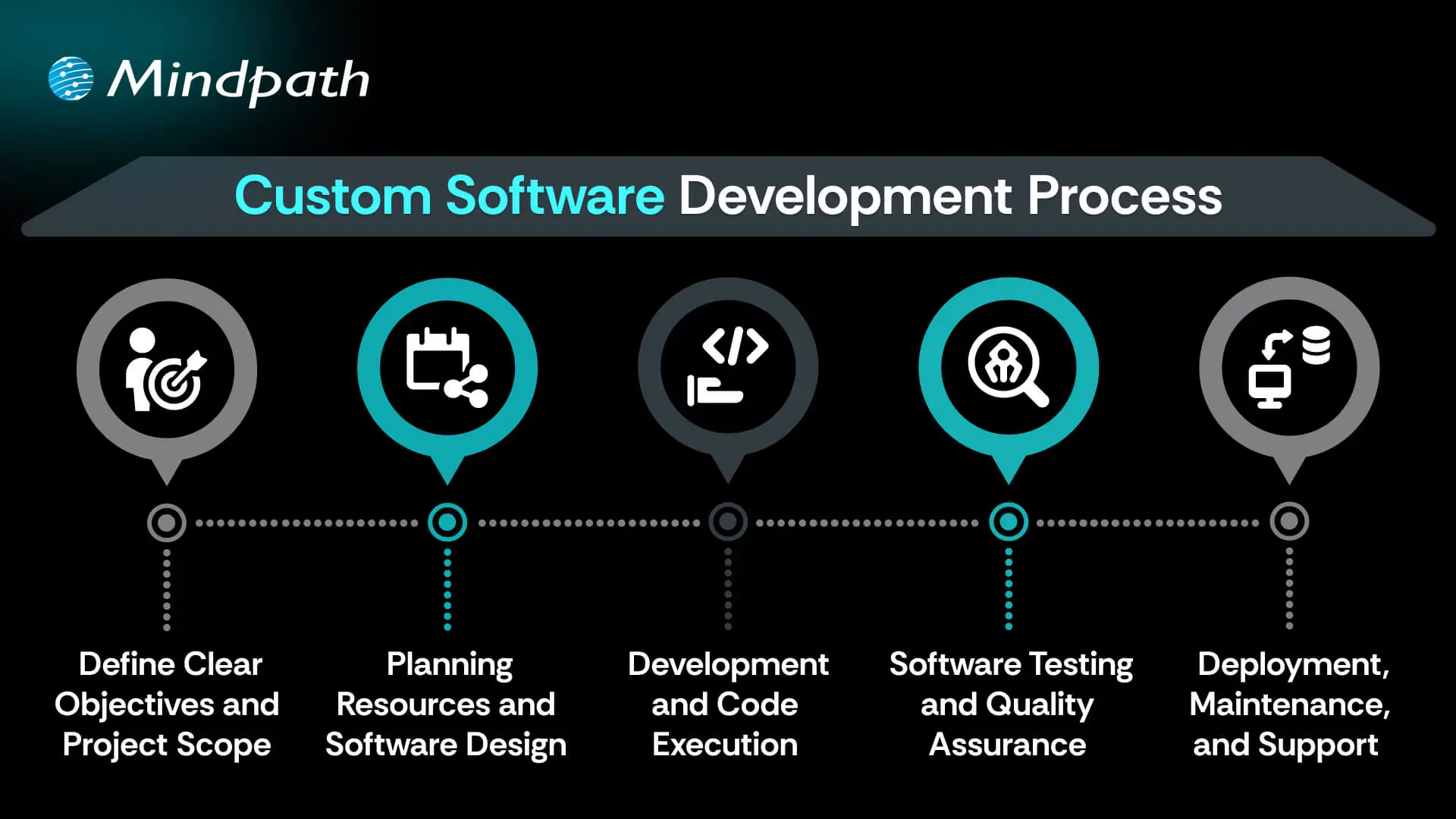
1. Define Clear Objectives and Project Scope

The custom software development process begins by defining your goals and understanding what the software must achieve. This includes identifying the target users, the problem it solves, and how it should perform differently from existing tools. A detailed list of features and expected outcomes is prepared. Both functional and non-functional requirements are clearly documented. This step sets the direction and purpose for everything that follows.

2. Planning Resources and Software Design

Planning involves creating a detailed timeline, setting milestones, and organizing resources for development. Budgets, risks, and deliverables are clearly outlined to avoid delays or extra costs. During software development design, wireframes and prototypes are created to visualize the interface and user flow. The architecture is also planned, including system components and how they will interact. Technologies such as programming languages, frameworks, and databases are chosen here.

3. Development and Code Execution

At this point in the custom software development process, the programmers will begin the actual coding based on the approved designs. The developers will prepare technical infrastructure with tools, servers, and version control. The front-end, back-end, and database modules are built and integrated together. Each piece of software functionality is developed based on the description created in the design documents. The functionality is translated into active, live software with working features to start testing.

Curious how software functions seamlessly from the user interface to the server? Explore the role of frontend and backend to understand how both sides work together to deliver smooth, secure, and engaging digital experiences.

4. Software Testing and Quality Assurance

After the software is developed, it will go through a series of testing strategies to check for quality and reliability. The first step, or unit testing, will cover each feature and try to eliminate some early problems. Then the following step, called integration testing, will check the work of modules and ensure they work as a system. Once that’s complete, the next phase is system testing, which ensures all performance, security, usability, and reliability aspects are achieved and validated prior to the release of the product.

5. Deployment, Maintenance, and Support

In the final step of the custom software development process, the solution moves to a live environment for end users. The deployment may include installing the software on servers, setting up databases, and giving users access. After launch, the software is continuously monitored for issues. Maintenance includes fixing bugs, adding new features, and updating it for better performance. Ongoing support keeps the software running smoothly over time.

Concerned about risks that could slow down your custom software build? Explore the major custom software development mistakes that can disrupt progress and find out how to avoid them.

Real-World Examples of Customized Software

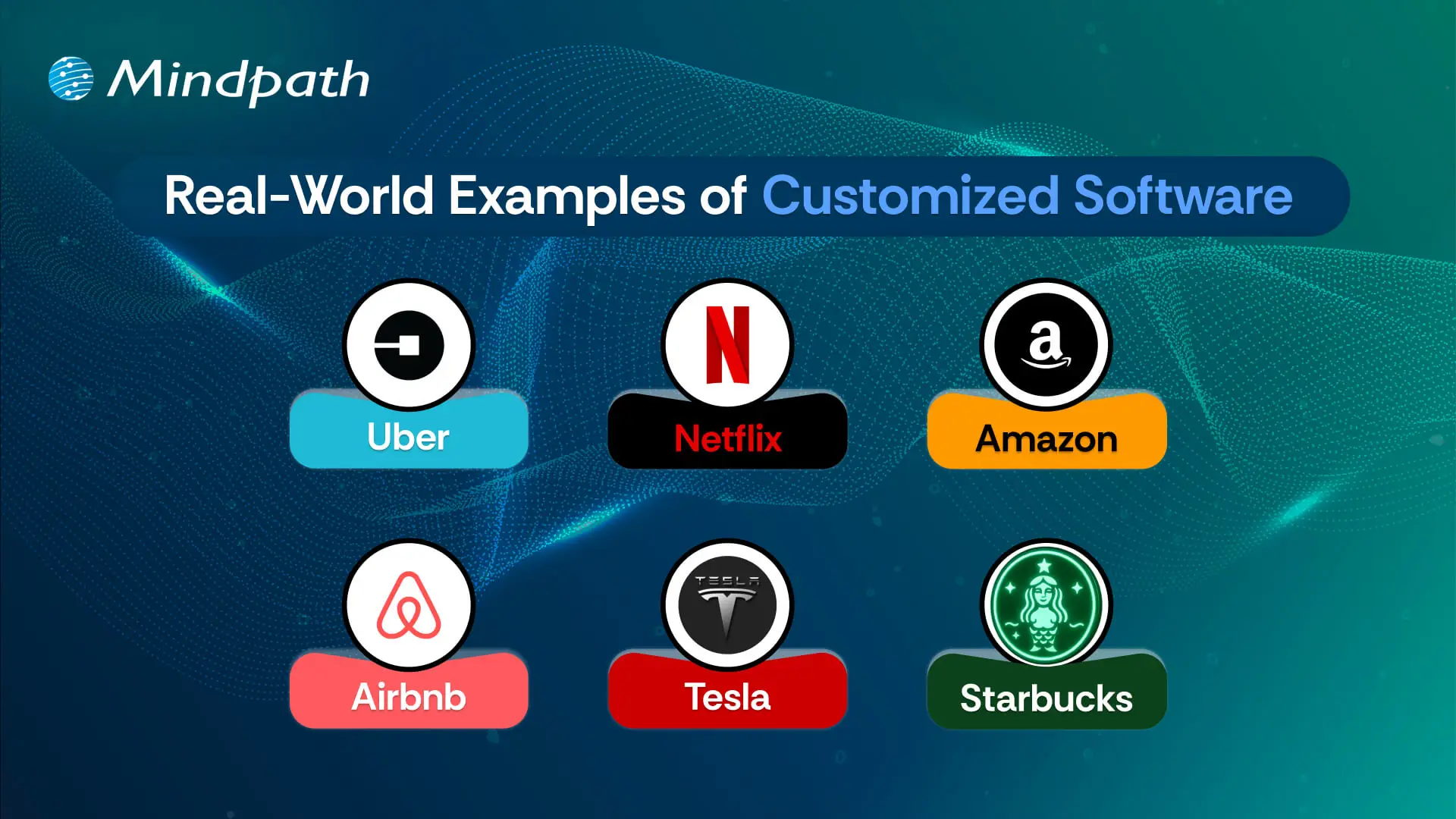
Below are six real-world customized software examples that demonstrate how businesses are navigating unique challenges by investing in custom software to create a digital solution. These tools have been developed to improve usability, performance, and long-term sustainability.
Real-World Examples of Customized Software

1. Uber

Uber constructed a custom ride-booking system complete with GPS tracking, so you know where your ride is located, secure payment options, and updates on the driver’s progression. The app shifted transportation in cities globally.

2. Netflix

Netflix utilizes AI-based recommendation engines and adaptive streaming systems to provide an overall personalized viewing experience through a fully custom platform.

3. Amazon

Amazon uses custom software to manage inventory, predict customer preferences, and allow one-click ordering for a fast and reliable purchasing experience.

4. Airbnb

Airbnb built a custom platform for travelers to pay securely, check real-time availability, and search by location for hosted accommodations around the globe.

5. Tesla

Tesla uses customized software for its smart vehicles to drive the autopilot capabilities, over-the-air updates, and real-time diagnostics to enable sophisticated performance.

6. Starbucks

Starbucks utilizes a custom application to allow customers to mobile order, encrypt reward tracking, and offer options for contactless payments, making the product experience more convenient and helping to cultivate loyalty.

Curious how different kinds of software are built to serve unique business and user needs? Discover the various types of software development to understand how each one contributes to creating powerful digital solutions.

Ready to Create Software That Aligns with Your Business?

Custom software development is the process of creating digital solutions that fulfill your specific business goals. From clarifying your vision to deploying the software and providing ongoing support, every step of the official custom software development process undergoes proper plan and execution. The final outcome of custom software typically entails better efficiency, enhanced experiences for users, and long-term growth through technology that suits your needs.

As a premier custom software development company, we at Mindpath specialize in providing full-spectrum custom software development services that suit your specific business. Our team expertly develops scalable, secure, and simple solutions that integrate well into your workflows and future goals. Partner with us to turn your ideas into powerful, high-performance software built for results.


Frequently Asked Questions

1. How long does the custom software development process typically take?

Timelines vary based on project complexity, team size, and scope. A simple custom solution may take three to six months, while enterprise-level software can take over a year. Defining clear objectives and requirements from the start significantly reduces delays and keeps the custom software development process on track.

2. How do you know if your business actually needs custom software?

If existing tools require constant workarounds, limit your workflows, or fail to scale with your growth, custom software is worth considering. Businesses with highly specific processes or unique user needs often find that off-the-shelf solutions create more problems than they solve over time.

3. What happens if requirements change midway through development?

Requirement changes mid-project are common and manageable with proper planning. Agile development methodologies allow teams to adapt without derailing the entire project. However, significant scope changes can impact timelines and budgets, so communicating updates early and maintaining clear documentation throughout the process is always the smarter approach.

4. Who should be involved from the business side during custom software development?

Key stakeholders, department leads, and end users should all be involved at different stages. Their input during requirement gathering and testing phases ensures the software solves real problems. Leaving these voices out often leads to a final product that looks complete but fails to perform in practice.

5. What is the difference between custom software development and buying a SaaS product?

SaaS products offer quick setup and lower upfront costs but come with fixed features and limitations. Custom software development builds exactly what your business needs, with full ownership and flexibility to scale. For businesses with unique workflows, custom solutions deliver stronger long-term value despite the higher initial investment.

Support Is One Click Away

Featured Posts

Related Post

Hire node js developers

Recruiting the right talent is the backbone of every successful digital project. That is why many businesses hire Node.js developers to build fast, scalable, and modern applications. Node.js is so popular right now that it’s powering websites and apps around the world, which is a great sign of how trusted and reliable it has become in the tech marketplace. According to recent report by W3Techs, Node.js powers 4.9% of all known websites that are identifiable as running on a web server. Isn’t it exciting to see how the runtime continues to evolve while we get more adoption and verified efficiencies in performance-centric applications?

The gradual rise in Node.js usage clearly indicates just how much impact it makes in the current web development landscape. The capacity to provide reliable and fast applications while being able to handle high volumes of traffic is a strong source of support for businesses looking to grow sustainably. With the right Node.js developers, organizations can convert ideas into reality and create valuable experiences for users. In this blog, we will explore why this is a meaningful choice.

Want to leverage the power of a fast and scalable web application in your next project? Mindpath’s Node.js development services focus on developing reliable and future-ready applications to acheive considerable business growth.

Why Choose Node.js for Your Dream Project?

Node.js is an open-source, cross-platform JavaScript runtime environment that enables developers to run JavaScript on the server-side. It is extremely fast and efficient, and it is a popular way to build modern applications that require high performance. When companies look to hire Node.js developers, they probably need a scalable, reliable, future-ready solution; one that could meet a growing user base with a fast and seamless digital experience.

Node.js delivers strong benefits through its powerful features. Based on Google’s V8 engine, it can deliver real-time, high-performance applications, such as chats, live updates, and streaming. It offers scalability to allow you to handle large amounts of traffic as well as ease of use so that cross-team members can collaborate using the same language, JavaScript. With npm’s large ecosystem, ease of development, and support for microservices, Node.js services provide plenty of flexibility for companies to enable faster innovation and faster time to market with reliable applications.

Want to take your Node.js application to the next level, but don’t know how? Learn how AI can help you transform your app with our ultimate guide to Node.js Libraries for AI Integration.

Benefits of Hiring Node.js Developers for High-Performance Apps

To build high-performance applications, developers need expertise, and Node.js has emerged as a top choice for today’s development projects for many reasons. Here are some principal reasons why businesses choose to hire dedicated Node.js developers for their projects.

Benefits of Hiring Node.js Developers for High-Performance Apps

1. Scalable and High-Performing Apps

Node.js is able to process multiple requests at once using an event-driven and non-blocking model. This makes applications fast and reliable, while also ensuring that they can support high traffic without losing speed. Businesses that hire Node.js developers will be able to make sure that their apps can scale with user demand.

2. Faster Development and Quick Launch

The lightweight structure of Node.js gives the programmer the option of using reusable modules, which allows them to code faster. With npm, programmers have access to thousands of open-source libraries ready to use for database, authentication, and security. Companies that hire expert Node.js developers save time and get products to market faster.

3. Real-Time Features

Node.js makes building real-time applications easy, including chat, notifications, and live updates. With WebSockets, developers can create real-time movement of data between users and servers. When businesses bring in Node.js Developers with some real-time experience, they can provide users with more interactive and engaging experiences.

4. Cost-Effective Development

Because Node.js employs JavaScript on both the front end and back end, one developer can support the entire application with relative ease. Since Node.js applications run easily on a single server, there is less reliance on costly infrastructure. Startups and small businesses benefit the most when they hire Node.js developers to build their applications and grow within a budget.

5. Secure and Reliable Solutions

Node.js can provide a strong security practice, encryption, and authentication for applications and safe API functionality. Skilled coders also work to update applications constantly to protect against breaches and unauthorized development. By getting the right group together, a company will be able to sustain and protect applications over time.

6. Smooth Integrations

Node.js integrates seamlessly with databases like MongoDB, MySQL, and PostgreSQL. It can also easily integrate with front-end frameworks such as MongoDB, MySQL, and Postgres. Cloud makes it easy for Node.js to integrate into AWS or Azure. Node.js removes the technical barriers, allowing developers to develop powerful solutions.

7. Power of Node.js Microservices

Node.js is ideal for modular architectures, where a service operates independently from others. Therefore, developers can scale or upgrade a part of their application independently. With a Node.js microservices approach, businesses benefit from speed, flexibility, and easier maintenance. 8

8. Strong Community and Ecosystem

Node.js is a development community that is increasingly active and improving its ecosystem with more updates and tools. Developers can find quick solutions through community-shared libraries, tutorials, and forums. This means that companies that hire Node.js developers are always relevant and evolving according to modern trends and practices.

9. Multi-Platform Development

Node.js is used by developers to build web, desktop, and mobile application projects (from the same codebase). For instance, Electron is a simple and easy-to-use Node.js-based framework that can run the same code in the same runtime performance consistently across web, desktop, and mobile applications.

10. SEO-Friendly Experience

Node.js, through server-side rendering, allows applications to load faster and be searchable. Improvements in load speed improve user experience and increase visibility on the web. Server-side rendering makes it easier for developers to enjoy the performance and increases search visibility for their applications.

Not sure which development partner is right for your project? Explore our expert insights on choosing NodeJS Development Company to make the right decision with confidence.

Ready to Build High-Performance Apps with Node.js?

Node.js is still emerging as a dependable technology for building fast, scalable, and modern applications. Given its strong features, flexibility, and vast ecosystem, Node.js is undoubtedly one of the top choices in the market for companies that want to provide high-performing digital solutions. By hiring professional Node.js developers, companies get the expertise required to enable developers to bring ideas to life while considering user experience and developing sustainable applications.

Partnering with Mindpath gives you access to trusted Node.js development services tailored to your business goals. You can easily hire remote Node.js developer teams who bring proven expertise and adaptability to every project. With the right talent by your side, you gain the power to innovate faster, scale smarter, and deliver applications that perform at every level.

How much does hiring a ReactJS developer cost? Learn about factors affecting rates, and how to find the best talent within your budget.
Website Development Cost

It may sound easy to create a site in 2026, yet one must be very careful with planning. The web development cost is a topic that can cause a real debate between business owners and project teams. People desire to make a good investment. Although a budget is significant, the ultimate outcomes must be considered first. The overall cost is dependent on the design, features, and future needs. Having experience in a tech-expert company, we observe that people tend to stop at this point and reconsider themselves. Such a break enables them to become wiser with digital decisions.

In fact, knowing the cost is not just a matter of money. It is a matter of aligning your idea with the appropriate solution. Companies nowadays require speedy websites that can develop without any problems and remain safe. The prices are being influenced by these demands gradually. However, the latter still goes on changing because of new tools and trends. This puts cost planning at a higher level than before. So, in this blog, we explain what shapes website development prices in 2026 and how to plan them clearly.

Want a website that works effectively for your business without exceeding your budget? Mindpath’s web development services create tailored solutions that are reliable, scalable, and affordable.

Why Cost Matters While Creating a Website?

Cost planning determines the degree of strength of your website, and it influences all decisions. Website development cost directly dictates the quality of design, functionality, security, and user experience, and ultimately your site’s conversion rate. An effective budget allows one to employ talented professionals and prevent poor growth. It also helps avoid hidden fees and expensive redesigns caused by poor performance or technical downtime. Webpage development cost also includes hosting, tools, and testing. A combination of these components forms a site that can support business objectives and generate long-term value.

The site also requires routine maintenance to continue to be useful after launching. Web development service costs involve updates, security checks, and performance improvements. These measures make the site stable and reliable. A preplanned budget also regulates the alterations in features and averts unnecessary costs. You can monitor the leads and sales with proper cost planning. This enables the site to be a powerful, quantifiable business resource.

Want to avoid unexpected website development costs? Check out the web development roadmap to understand project milestones and cost drivers.

Factors Influencing Website Development Costs in 2026

Website expenses in 2026 are based on a combination of various intertwined aspects that will inform the course of planning decisions. Webpage development and website design cost makes businesses understand how to establish a realistic budget early.

Factors Influencing Website Development Costs in 2026

1. Project Complexity

Basic websites are inexpensive and will satisfy fundamental requirements. The inclusion of more specific features like e-commerce or user accounts complicates and adds more planning. All these additions increase the average website development costs.

2. Content and SEO Requirements

Excellent content is advantageous to the user and the search engines. Establishing the SEO takes serious planning and technical effort. This increases visibility but increases the budget.

3. Security and Compliance Needs

Secure websites save the data of users and maintain the reputations of the business. Compliance regulations impose additional development phases, which introduce relevant layers of costs.

4. Technology Stack Choices

The contemporary tools determine the strength of a web site. It is time-consuming to work with AI, AR, and sophisticated frameworks. This option has a powerful influence on the website development costs.

Curious why some web projects cost more than others? Discover web development tools and see how technology choices influence productivity and expenses.

5. Development Team and Location

Expert teams provide scalable and stable websites. Compared to freelancers, agencies are more expensive due to their wider knowledge. Location is also a factor that affects rates and total expenditure.

6. Third Party Integrations

Websites usually have a connection with payment or CRM tools. Additional setup and testing time is added in every connection. An increase in integrations implies increased development effort.

7. Maintenance and Scalability

Websites need updates after launch. Hosting, fixes, and growth planning require steady investment. These costs support long-term performance and ROI.

8. Design and User Experience

Good design improves trust and user flow. Custom layouts need research and testing across devices. This work increases value and raises the average website development cost.

Looking to understand how emerging trends affect website development costs? Check out the latest web development trends to see how new technologies and practices influence project scope.

Understanding Website Development Costs

Website development costs depend on planning, technology, and business goals working together. Understanding these costs helps businesses make smart decisions before starting development.

1. Enterprise Website

The cost usually starts from £50,000 and can exceed £150,000 based on scale. Pricing increases due to security, integrations, and multi-language requirements.

2. Single-Page Website

Costs typically range between £250 and £800 for a basic setup. The price stays low because development time and features remain minimal.

3. Custom Web Platform

These platforms cost between £15,000 and £75,000 or more depending on logic. Higher costs reflect custom development, testing, and long build cycles.

Curious how web development costs compare to full-scale software projects? Discover software development cost insights to understand long-term budgeting and investment planning.

4. Small Business Website

The average cost falls between £800 and £3,000 for 5 to 10 pages. Pricing depends on CMS use, design level, and basic SEO setup.

5. E-Commerce Website

Costs usually start around £2,500 and can exceed £20,000. The final price depends on products, payment systems, and inventory complexity.

6. Advanced Brochure Website

Pricing ranges from £3,000 to £8,000 for custom design builds. Costs rise due to animations, performance hosting, and lead-focused features.

Planning your web development budget more effectively? Explore web development technologies to see how choosing the right stack affects cost and performance.

Ready to Plan Your Website Budget with Confidence?

Planning a website in 2026 needs clarity and smart thinking. Costs connect with design, features, security, and growth plans. Website development costs change with every decision you make. Clear planning avoids confusion later. It also helps balance value and spending. When you understand web development pricing, you invest with purpose and confidence.

Mindpath web development services focus on clarity, quality, and growth. Our teams plan projects with clear goals and transparent charges for website development. We build secure, scalable websites that support real business needs. Every solution balances performance and cost. With Mindpath, planning stays simple and results stay strong.

WordPress maintenance
Is your WordPress site running as smoothly as possible? Do you know what kind of essential maintenance activities should be done on your website to keep it secure and running well? In this blog, we will explore the essential maintenance tasks that will keep your WordPress site in top shape. So, let’s dive in! 

Importance Of Website Maintenance   

Routine WordPress maintenance will help your website to be stable, secure, with better loading speed, and compatible with different browsers and devices. Regular backups guarantee that there is no loss of data in case of website crashing or malware attacks. Up-to-date plugins will ensure that slowdowns and security risks are prevented. Monitoring and analytics on user behavior help you make informed decisions and optimize your content. This provides better maintenance of your website, thus keeping it in top shape, and gives a better experience to the visitor. 

How Much Does WordPress Maintenance Cost?  

The cost of maintaining a WordPress site will be based on the size and complexity of the website. Routine maintenance in 2024 can range from as low as $5 a month to $120 per month or $40 a year to $1,200 a year. For a personal site, maintenance might be as low as $4 a month or $40 annually. Business sites usually start at about $8 per month or $80 per year. The pricing for running corporate websites is usually in the region of $12 a month or $120 yearly. The websites related to entertainment and eCommerce usually cost more, with the former starting at $16 per month and the latter at $20 a month. Routine maintenance includes updating plugins, themes, and WordPress core, managing backups, ensuring security, and keeping up performance. 

The Complete Checklist of Monthly WordPress Maintenance Tasks   

1. Optimize Your Database   

Over time, your WordPress database can become bloated with extraneous data from things like old post revisions, spammy comments, and deleted items, which slow down your site. To clean up your database, first back it up using a tool like Solid Backups to ensure all your data is safe. Then use a plugin such as WP Optimize to clear out any unnecessary data and boost database performance. Alternatively, if you know how to manipulate a database, you can clean up manually with phpMyAdmin. This method is useful when custom settings must be considered, and in all probability, it would be good to talk this over with a developer in case you are unsure. 

2. Manage Backups   

Backing up your website is something you should do regularly for safety against losses and quick recoveries in case of issues. Besides, with Solid Backups, you can configure backups automatically by using the plug-in known as UpdraftPlus. Schedule the backups frequently and let them be safely kept in the cloud, optimally. Moreover, review the process of restoration month by month to confirm that your backup procedure is working well, and in case of need, you will be in a good position to recover your site. 

3. Update WordPress Core, Plugins, And Themes   

WordPress core, theme, and plugin updating have implications for security, compatibility, and accessing new features. According to the Wordfence 2022 State of WordPress Security report, plugins in particular are a weak point, so keeping them up to date is very important. Keep checking for updates, and when found, update them one after the other. Begin with the WordPress core and then proceed to plugins and themes. Remember to always back up before doing any big update and update on a staging site so you can be sure everything works well with your current setup. 

4. Perform Security Scans   

Security scans to vulnerabilities, malware, and unauthorized access should be regularly scheduled. Run full site scans with a plugin like Shield Security, check the logs for any suspicious activity, and configure settings. You should, however, schedule these scans to run periodically, but at least revise them once a month. 

5. Analyze Site Speed   

A website’s speed has a massive impact on user experience and SEO. Among others, you can use Google PageSpeed Insights, GTmetrix, or Pingdom to check how fast your website loads. After testing, fix performance issues of your website against the results. If the speed problems continue, see if there’s a need to review and upgrade your hosting plan. 

6. Check For Broken Links   

Checking for broken links is important both for delivering a good user experience and SEO. Broken links may make visitors and search engines end up in so-called ‘dead ends,’ harming your site’s rankings and authority. Run a check using a plugin such as Broken Link Checker. Thereafter, repair or remove broken links upon finding them, possibly looking into scheduling automated checks to help identify new broken links in the future. 

7. Optimize Images   

Optimizing images will help to increase your site speed and performance radically, particularly when you have a heavy share of images on the site. Tools like Smush or ShortPixel do really well when it comes to compressing existing images. Remember the right formats—JPEG for photos and PNG for graphics where the requirement is transparency. Enable lazy loading; this defers the loading of off-screen images to further speed up page load times. 

8. Submit Your Sitemap   

Making sure that you are regularly submitting your sitemap to search engines will let them index your website in a better way and give you more exposure. Use a plugin such as Yoast SEO to create an updated sitemap, then take the time to manually submit this to search engines via their webmaster tools—like Google Search Console—to check that all your pages are correctly crawled and indexed for maximum search engine visibility. 

9. Monitor Site Performance   

Monitoring your site’s performance frequently will let you know when there is a problem. It helps in making informed decisions and will let you act swiftly. Use tools like Google Analytics and Jetpack to look through key metrics such as page views, bounce rate, and conversion rates. This setting of performance alerts about major changes or problems will let action be taken in time and thus your site runs smoothly. 

10. Test Your Forms   

Testing of forms at regular intervals is paramount to ensure that they work right and harvest data from users effectively. All forms should work well, and process input correctly. Check that email notifications are going to the right addresses, then test for user experience to make sure forms are usable, accessible, and responsive on different browsers and devices. 

11. Clear Site Cache 

It ensures that your site visitors have the most recent content. In addition, it will boost your website’s performance. Sometimes, cached data can become corrupt or outdated, causing display issues and slowing download time. Flush the server cache, then reset any plugin-built caches. Test your site for improved performance after flushing the cache. This can also be done in many ways depending on your unique setup. If you are not comfortable doing it yourself, use something like WP Super Cache and W3 Total Cache

Ready to optimize Your WordPress Experience?

Learn More About Mindpath’s Maintenance Services!

WordPress Development Services at Mindpath   

At Mindpath, we ensure your WordPress website runs at its best with comprehensive maintenance services. This includes regular updates to WordPress Core, plugins, and themes; daily backups for data security; and optimization of the performance of the site so that it loads faster. Our team conducts security scanning to save from threats, monitors and fixes broken links, and looks through analytics to bring about better user engagement. We test forms to make sure they are working well. You just focus on your business while we keep your site secure and efficient with our expert maintenance. 

Conclusion 

Maintenance, on the other hand, will ensure your WordPress site is not only smooth, safe, and high performing, but it will also be defended from many problems for the best user experience. From checking for broken links to analyzing site speed or running security scans, every step is important in keeping your website at its best. 

At Mindpath, we cut down the complexity of WordPress maintenance by offering every necessary service in one place to keep your site in top condition. Let our team take care of updates, backups, performance optimization, security checks, and more, so you can focus on growing your business while we work on keeping your website reliable and engaging. Our expert team at Mindpath makes sure your WordPress site is running at peak performance, ensuring you can get on with business and not worry about it. 

Want to achieve a Faster, Safer WordPress Site?

Find Out More About Mindpath’s Maintenance Solutions!

Ensure your WordPress site runs smoothly with essential maintenance tasks like updates, backups, security scans, and performance optimization.