Home

Progressive Web Apps (PWA): The Future of Mobile-First Development

Progressive Web Apps (PWA): The Future of Mobile-First Development

Join our Newsletter!

progressive web apps

Businesses are rethinking how they deliver digital experiences as more customers browse, shop, and interact with services on mobile devices. Progressive web apps (PWAs) offer one way to meet these expectations by combining the accessibility of a website with selected capabilities commonly associated with mobile applications.

A well-designed PWA can load quickly, adapt to different screen sizes, support installation on compatible devices, and provide access to selected content when a network connection is unavailable. These capabilities can help businesses reduce friction for users without automatically requiring separate native applications for every platform. The right approach depends on the product’s requirements, audience, and technical constraints.

Key Takeaways

  • 01
    Progressive web apps combine web accessibility with selected app-like capabilities, including installation on supported devices.
  • 02
    Responsive design, caching, and performance optimization can help PWAs deliver reliable experiences across devices and network conditions.
  • 03
    PWAs can simplify distribution and maintenance, but development costs and platform capabilities depend on the project’s requirements.
  • 04
    Brands such as Starbucks, Flipkart, Pinterest, and Uber are frequently discussed in connection with PWA strategies and mobile web experiences.
  • 05
    Businesses should evaluate offline needs, device support, security, integrations, and user expectations before choosing a PWA.
Planning a mobile-first digital product? Contact Mindpath to discuss your web application requirements and evaluate an approach suited to your business goals.

What Is a Progressive Web App?

A Progressive Web App (PWA) is a web application built with web technologies that can provide selected app-like features on compatible browsers and devices. Users access it through a URL, and depending on the browser and platform, they may be able to install it on their device for convenient access.

Unlike a traditional native application, a PWA can deliver its core experience through the web. Developers can use responsive layouts to support different screen sizes, service workers to manage selected background tasks and caching, and web app manifests to describe how an installable application should appear when launched.

Offline access is possible when developers deliberately cache the necessary resources or data. However, not every PWA works fully offline, and features such as installation, push notifications, and background processing vary across browsers and operating systems.

How Does a PWA Work?

A progressive web app combines several web technologies and development practices to provide a reliable experience. The exact implementation depends on the application, but common components include:

  • Responsive web design: Adapts the interface to different screen sizes, including mobile phones, tablets, and desktops.
  • Service workers: Run separately from the main page and can manage caching, network requests, and certain background capabilities where supported.
  • Web app manifest: Provides information such as the application’s name, icons, display preferences, and launch behavior for supported installation experiences.
  • HTTPS: Provides an encrypted connection and is required for service workers in normal production environments.
  • Caching and performance optimization: Help reduce repeat loading times and can make selected resources available during network interruptions.

Together, these components help developers build web applications that feel more integrated with a device while remaining accessible through a browser. The benefits depend on the quality of the implementation and the capabilities available on the user’s platform.

Related reading: ReactJS for Progressive Web App Development covers ReactJS in the context of PWA development.

Benefits of Progressive Web Apps

Progressive web apps can be a practical option for businesses that want to improve their mobile web experience without maintaining separate native applications for every use case. Their value depends on the target audience, required functionality, and how the application is designed.

Key benefits of progressive web apps, including accessibility, responsive design, and performance

1. Potentially Lower Development and Maintenance Costs

A PWA can allow a business to maintain one primary web application instead of building separate applications for every platform. This can reduce duplicated development and maintenance work when the required features can be delivered effectively through the web.

However, cost savings are not guaranteed. Complex integrations, device-specific functionality, performance requirements, and browser compatibility testing can still require substantial development effort. Businesses should compare the total cost of ownership against the requirements of their proposed solution.

2. Responsive Experiences Across Devices

Responsive design allows a PWA to adapt its layout and interactions to different screen sizes. Users can access the same service through compatible mobile browsers, tablets, laptops, and desktop computers without needing a separate interface for every device category.

For example, an online retailer can provide product listings, filters, account access, and checkout through a responsive web experience. The design should still be tested on real devices to ensure that navigation, forms, and other essential tasks work well on smaller screens.

3. Updates Through the Web

Businesses can update the web application without requiring users to download every release through an app store. When users access the updated application, they can receive the latest content and functionality according to the application’s caching and update strategy.

Developers must still manage cached resources, service worker updates, and release compatibility carefully. A poorly configured cache can cause users to see outdated assets or encounter inconsistent behavior during a deployment.

4. Convenient Access and Installation

Users can visit a PWA through a direct URL, making it easy to share through messages, email, or other digital channels. On supported browsers and devices, users may also be able to install the application or add it to their home screen.

Installation behavior is not identical across all platforms. Businesses should test how their target users access and install the application rather than assuming that every browser offers the same prompt or installation process.

5. Easier Sharing and Distribution

A PWA can be distributed through an ordinary web link. Customers do not necessarily need to search an app store before opening the service, which can simplify access from campaigns, social media posts, search results, and existing websites.

This distribution model can be especially useful for content platforms, retail experiences, booking systems, and other services where a direct link helps users reach a specific page or task.

6. Selected App-Like Capabilities

Depending on browser and operating system support, PWAs can offer features such as home-screen installation, caching for offline access, and push notifications. These capabilities can make a web application more convenient for repeat visitors.

The available features and permission requirements vary across platforms. Businesses should also use notifications responsibly, obtain permission where required, and provide a clear benefit to users instead of treating notifications as a guaranteed way to increase engagement.

Related reading: Application Security Best Practices outlines important considerations for protecting web and mobile applications.

Real-World Examples of Progressive Web Apps

Several well-known brands have been associated with progressive web app strategies or app-like mobile web experiences. These examples illustrate different product goals, from mobile shopping to content discovery and customer ordering. The precise capabilities of each service can change over time, so historical case studies should not automatically be treated as descriptions of its current implementation.

Examples of brands associated with progressive web apps and mobile web experiences

1. Starbucks

Starbucks has been widely cited as an example of PWA-based ordering experiences. A mobile web ordering interface can help customers browse products, customize orders, and access relevant store information without first installing a separate application.

For businesses considering a similar approach, the key lesson is to make the main customer journey straightforward. Product selection, customization, location details, and checkout should work smoothly on mobile devices and under realistic network conditions.

2. Flipkart

Flipkart’s Progressive Web App, commonly discussed as Flipkart Lite, became a notable example of using mobile web technology to reach shoppers. An app-like web experience can help customers browse products and access shopping features through a browser, including in situations where users prefer not to install a full native application.

For e-commerce businesses, this approach highlights the importance of keeping product discovery, category navigation, and shopping flows usable on mobile devices. Performance and low-bandwidth behavior should be measured rather than assumed.

3. Walmart

Walmart operates digital shopping experiences across web and mobile platforms. Retailers such as Walmart illustrate why a consistent shopping journey matters: customers need to search products, review availability, manage their carts, and complete transactions across different devices.

Before describing a specific current Walmart feature as PWA-powered, verify the implementation against a current technical or company source. The broader lesson for retailers is to prioritize performance, accessibility, and a reliable checkout process.

4. Pinterest

Pinterest has been cited as an example of an app-like mobile web experience designed to make visual content accessible through the browser. For a discovery platform, an effective mobile web interface needs to support image loading, scrolling, navigation, and sharing without making the experience unnecessarily heavy.

Businesses building content-heavy websites can apply the same principle by optimizing image sizes, limiting unnecessary scripts, and testing how the page performs on mobile networks.

5. Twitter Lite

Twitter Lite was a widely discussed example of a lightweight, mobile-focused web experience. Its historical use case demonstrated the value of reducing data usage and simplifying access for people using mobile devices or slower network connections.

The service and its branding have changed since that period, so historical performance claims should be verified before being used as current statistics. The practical takeaway remains relevant: lighter pages and efficient resource loading can improve usability on constrained connections.

6. Uber

Uber has also been associated with lightweight web experiences that help users access key ride-booking functions through a browser. This type of interface can be useful when a user needs a service quickly or is using a device where installing an application is inconvenient.

For booking and on-demand services, a PWA project should focus on a clear user journey, reliable form handling, secure account access, and dependable connections to location and payment services where required. Whether a PWA can meet those requirements depends on the specific device capabilities and integrations involved.

Planning your application architecture? Read How to Choose the Right Tech Stack for a Web App to understand the factors that influence technology selection.

Progressive Web Apps vs. Native Mobile Apps

A PWA and a native mobile app can both provide useful digital experiences, but they differ in distribution, implementation, and access to device features. The right choice depends on the functionality the business needs and the expectations of its users.

Factor Progressive Web App Native Mobile App
Access Typically accessed through a web URL and may be installable on supported devices. Usually installed through a platform’s app distribution system or another supported installation method.
Development approach Can share a web codebase across multiple device categories. May require platform-specific development or a cross-platform framework.
Updates Web content and application resources can be updated through a managed web deployment process. Updates generally follow the app’s release and distribution process, although details vary.
Offline support Possible for resources and data deliberately cached or stored by the application. Can be designed for offline use, depending on the application.
Device integration Depends on browser and operating system support for the required web APIs. Can offer broader or more direct access to platform capabilities, subject to permissions and platform rules.
Best fit Experiences where web reach, shareable URLs, and cross-device access are priorities. Products that depend on specific native capabilities or platform-level integration.

A PWA is not automatically cheaper or better than a native app. Teams should compare performance requirements, device integrations, security, accessibility, distribution, and ongoing maintenance before deciding which approach best fits the product.

When Should a Business Consider a PWA?

A progressive web app can be a strong candidate when a business wants to improve its mobile web experience, make services accessible through a URL, or support selected app-like features without building separate native applications for every platform.

  • E-commerce: Product discovery, category browsing, account access, and checkout.
  • Content platforms: Articles, media libraries, and other experiences where direct linking and responsive layouts matter.
  • Booking services: Appointment scheduling, reservations, and other browser-based workflows.
  • Customer portals: Account dashboards and self-service functions that work across device categories.
  • Field and operational tools: Selected workflows that may need access to cached resources during network interruptions.

A native application or hybrid approach may be more appropriate when a product relies heavily on platform-specific functionality, extensive background processing, specialized hardware access, or integrations that are not adequately supported by browsers on the target devices.

Important Considerations Before Building a PWA

1. Browser and Device Compatibility

PWA capabilities differ across browsers and operating systems. Before development, identify the target devices and verify support for installation, notifications, background behavior, and any required web APIs.

2. Offline Data and Caching Strategy

Offline functionality requires deliberate planning. Teams should decide which resources and data can be stored locally, how cached content is refreshed, and what users should see when a request cannot be completed without a network connection.

3. Security and Privacy

PWAs should use secure connections, appropriate authentication, safe storage practices, and carefully controlled permissions. Sensitive information should not be placed in client-side storage without evaluating the risks, and service workers should be managed as part of the application’s security and deployment process.

4. Performance and Accessibility

A PWA should be tested on lower-powered devices and slower networks, not just modern desktop hardware. Optimize images, scripts, and other resources; provide accessible controls; and measure real user performance to identify issues that affect the customer journey.

5. Integrations and Maintenance

Applications may depend on payment services, analytics, customer relationship management systems, APIs, or other business tools. Validate the required integrations early, and plan for browser updates, dependency maintenance, monitoring, and compatibility testing after launch.

Conclusion: Are Progressive Web Apps Right for Your Business?

Progressive web apps offer a practical way to combine the reach of the web with selected app-like capabilities. Responsive layouts, installation on supported devices, carefully implemented caching, and efficient loading can help businesses provide convenient mobile experiences while maintaining a web-based delivery model.

However, a PWA is not the right solution for every product. Businesses should assess device support, offline requirements, security, performance, integrations, and user expectations before choosing between a PWA, native application, or another architecture.

At Mindpath, we help businesses evaluate and build digital solutions around their product requirements. Our web development team can discuss your application goals, technical constraints, and options for delivering a responsive digital experience.


Need App Reach Without App Stores?

A progressive web app works offline and installs from the browser.

Frequently Asked Questions

PWAs improve engagement by offering fast load times, smooth navigation, and app-like interactions. Features like offline access and push notifications help users stay connected without interruptions, creating a more reliable experience that encourages repeated usage and strengthens long-term user relationships.
PWAs work well for many use cases, especially where speed, accessibility, and cross-device compatibility are important. However, highly complex applications that require deep hardware integration may still benefit from native development, depending on specific technical requirements and performance expectations.
PWAs are easy to access through a simple URL, removing barriers like app store downloads. This makes it easier for new users to try the application instantly. Faster access and lower data usage also help reach users in areas with limited connectivity.
PWAs are designed to perform well on mobile devices with responsive layouts and optimized performance. They adapt to different screen sizes and network conditions, ensuring consistent experiences. This makes them highly effective for businesses focusing on mobile-first user behavior.
PWAs update automatically when users access them online, eliminating the need for manual downloads or approvals. This allows businesses to roll out new features, fix issues, and improve performance quickly, ensuring users always interact with the latest version of the application.

Support Is One Click Away

Featured Posts

Related Post

remote work security

Remote work security refers to the practices, technologies, and policies that protect corporate data and networks when employees work outside a traditional office environment. Teams operate across devices, networks, and locations every day, and without corporate firewalls in place, even small gaps can create serious vulnerabilities. The risks evolve quickly, which is why businesses need protection strategies built on strict user verification, encrypted network connections, and continuous endpoint monitoring without disrupting daily workflows or user experience.

Decisions on security must be clear and consistent as organizations increase remote setups. Leaders need to pose the correct questions and take actions. Meanwhile, employees require straightforward and easy to use systems that facilitate day-to-day operations. Consequently, there is a need to have a balanced approach to succeed in the long term. This blog will provide explanations of important aspects of remote work cybersecurity in a clear and practical manner. So, keep reading further!

Ready to secure your remote workforce and protect your business from evolving cyber threats? Contact us to explore how our team can help you build a safer and more resilient remote work environment.

The Growing Cyber Risk in Remote Work Environments

Not only in the office, remote work also faces rising cyber threats today. Remote work security is vital because employees are using their personal networks and devices to access systems. These are some of the weak points that hackers attack. Consequently, minimal security breaches have the potential to compromise business information and interrupt routine business activities within a short time.

Simultaneously, remote workforce cybersecurity is exposed to increasing threats as the techniques of attacks advance daily. Phishing, ransom, and identity attacks are growing at a high rate. Remote setups are fast to adapt to cybercriminals. Thus, organizations need to remain vigilant and increase security to manage these changing threats.

Want to better understand how to scale teams without increasing security risks? Explore the benefits of hiring remote developers to balance flexibility with control.

Here are some of the remote workforce security risks:

1. Unsecured Network Risks

At home or cafes, employees tend to connect to unsecured networks. These connections can easily be intercepted by attackers to get sensitive data.

2. Weak Password Security Risks

A large number of users use the same password on several accounts. A single breach may reveal multiple systems within a short time.

3. Personal Device Security Risks

Individual gadgets frequently lack frequent security patches and safeguards. This provides malware and attacks with easy entry points.

4. Phishing and Social Engineering Risks

To deceive users, hackers use spoofed emails, or messaging. Such attacks seek to steal usernames or confidential information.

5. Shadow IT Security Risks

Employees sometimes use apps without company approval for convenience. This bypasses security controls and increases risk.

6. Software Update Security Risks

Remote devices might not get security patches in a timely manner. This exposes systems to well-known threats and vulnerabilities.

7. Physical Security Risks

The devices may be lost or found in high-traffic or communal areas. Critical business information may be put at risk as a result of unauthorized access.

Looking to simplify how your remote teams stay connected and secure daily? Discover powerful remote work tools that support safer collaboration.

Importance of Cybersecurity in Remote Work

Remote work security is key in safeguarding data and systems when working remotely. Here are the reasons why solid cybersecurity is still needed in the daily remote work setting.

1. Protecting Expanding Digital Entry Points

Remote work adds devices, networks and points of access to systems. Cybersecurity for remote work helps control risks in these expanded environments.

2. Securing Sensitive Business Data

Every day, employees gain access to and share crucial information that is not secured by office infrastructure. Work from home security will also protect data when storing and transferring data.

3. Reducing Phishing and Online Fraud Risks

Users who are distantly located are faced with rising phishing attacks in the form of emails and fraudulent communications. High level of security awareness will avoid unintentional sharing of sensitive login information.

4. Maintaining Strong Security Standards

Both personal and shared devices may not have consistent security updates and protection tools. The use of consistent policies guarantees similar protection standards across all systems.

5. Ensuring Business Continuity

Cyber attacks have the ability to interrupt workflow and slow down processes happening remotely. Good security control mechanisms assist in stability and prompt recovery exercises.

6. Building Trust and Meeting Compliance

Data security breaches may destroy reputation and decrease customer confidence within a short time. Adequate security would keep the rules and guard business reputation.

Planning to strengthen your security foundation as your business grows? Read about application security best practices to protect your systems effectively.

Cybersecurity Best Practices

Remote working security requires effective habits to safeguard information and systems in remote configurations. These are the best practices that can be implemented in order to enhance safety and minimize risks.

1. Safe Network Access (VPN Use)

Connect with secure VPN to all remote work activities on a daily basis. This secures information transfer among the commonly shared and open internet systems.

2. Home Network Protection

Protect home routers by using strong passwords and updating encryption parameters. Store smart devices on different networks to minimize security risks.

3. Timely Software Updates

Automatically update all systems and security applications. Frequent patches seal identified vulnerabilities and thwart cyber attacks in real-time.

4. Stronger Login Protection (MFA)

Implement several authentication measures whenever accessing the company system. Remote work security enhances safety of access via additional authentication measures.

5. Strong Password Management

Use different passwords on each account using secure password tools. Do not use the same passwords in personal and work accounts.

6. Employee Security Awareness

Train employees on how to detect phishing emails and suspicious online activities. Establish a powerful security culture to avoid unintentional data breaches.

Is Your Organization Truly Ready for Strong Remote Workforce Security?

Remote work has transformed the way teams work and exchange information on a daily basis. Powerful Remote Work Security assists in safeguarding information, hardware, and networks during the increase in cybercrime. It guarantees safer communication, stronger control, and minimized risks in the distributed work setting in the long term business stability and trust.

At Mindpath, we offer remote work security solutions to secure modern distributed teams with robust, trustworthy systems. Our strategy revolves around safe access, data security and risk mitigation. We assist companies to create secure remote working environments that do not affect productivity at all.

Learn essential cybersecurity practices for remote work and how Mindpath can help protect your business with expert solutions.
Cost of Hiring Reactjs Developers

Without a robust and engaging web presence, your business is going nowhere, and this might be a perfect reason to hire ReactJS developers. Once you know the cost of hiring ReactJS developers, you can measure the value they will bring to your web projects. Let us discover why you must know the costs of hiring React developers and the factors that influence hiring costs.

Understanding hiring costs upfront prevents budget surprises later in the project. Every business has different needs, and costs vary based on experience, location, and engagement model. Knowing what drives these numbers helps you make smarter hiring decisions. In this article, we break down everything that shapes the real cost of hiring ReactJS developers.

Want to adopt ReactJS in your next project? Mindpath’s ReactJS development services will provide expertise that will help you in building interactive web applications according to your business requirements.

Reasons to Focus on ReactJS

ReactJS is a component-based, open-source JavaScript library that has been the favorite pick for frontend development since 2013. It is still one of the most powerful tools for creating visually appealing UIs. Any business that thinks of hiring frontend developers should focus on ReactJS for its distinctive features. Some of the notable features of React include component-based architecture, cross-platform development with React Native, virtual DOM, and a strong community. ReactJS not only facilitates faster development but also ensures that you get web applications that offer better performance and scalability.

While hiring guides can help you pick the right talent for your teams, it is important to learn about the costs of hiring React developers. Why? Many hiring managers will believe that the cost of hiring a ReactJS developer is all about their salary. Interestingly, employers must also consider other factors, such as location and experience, along with additional costs, to determine hiring costs.

Cost of Hiring a ReactJS Developer

Professional ReactJS developers can help you craft the best user experiences in web applications. However, the expertise of ReactJS developers comes at a cost. The search for answers to “How much does it cost to hire a ReactJS developer?” might lead you directly to salary forecasts for React developers. On the other hand, the salary is not the only thing that you must consider in the cost of hiring a ReactJS developer. The following factors will help you understand how to determine the ideal compensation for React developers in your web projects.

1. Experience of the Developer

The foremost factor that influences the salary of ReactJS developers is their experience. Junior or entry-level developers have limited professional experience and can build basic components, work on simpler tasks, and support senior developers. Mid-level developers have a better understanding of React concepts and can work on complex features alongside contributing to architecture design.

Senior developers are the top-tier talent with more than five years of professional experience and can design the whole application architecture. Senior ReactJS developers can also guide junior developers, optimize performance, and scale up web applications with ease. The estimates for ReactJS developer cost in 2025 suggest that senior developers can earn more than $150,000 per year. Similarly, junior developers can earn almost $70,000 annually, while mid-level developers can ask for $100,000 to $120,000 per year.

2. Geographical Location

Hiring managers must also take the geographical location into account while calculating the costs of recruiting React developers. Location is an important factor in determining the hiring cost as it implies variations in market competitiveness, demand for talent, and cost of living. For instance, the cost of hiring a ReactJS developer in North America will be higher than the global average. Why? You can find tech hubs like Silicon Valley and New York, along with major Canadian cities that have a higher cost of living.

The average annual salary of a ReactJS developer in North America can vary from $90,000 to $120,000. The only other competitive market for ReactJS development is Western Europe, where countries like the UK, Germany, and France seek high-quality talent. One of the best choices for a cost-effective React development solution is the Asia-Pacific region, which includes India, China, and the Philippines. The annual salary for React developers in the Asia-Pacific region is considerably lower than in Western countries.

Want to scale your application seamlessly as your customer base grows? Learn how the benefits of ReactJS development services make large-scale, high-traffic apps easier to maintain and expand.

3. Scope and Complexity of the Project

Employers must also pay attention to the scope and complexity level of their web project while calculating the hiring costs for a ReactJS developer. You may want to build simple web apps, mid-sized applications, or large-scale enterprise applications with ReactJS. Each type of project will demand a specific level of expertise, which indirectly influences the cost of ReactJS developers. For instance, junior developers can create simple applications with basic UIs or static websites with minor features.

The estimates for ReactJS project development cost might be a little higher for medium-sized applications, which will require mid-level to senior developers. Such types of applications may need custom designs, dynamic features, or integrations with third-party APIs, which call for experts and more costs. Large enterprise applications that need complex architectures and intricate state management will require senior and lead developers, thereby increasing costs.

4. Hiring Model

One of the key factors that determines the cost of hiring a ReactJS developer is the hiring model. Do you want a full-time in-house developer or a freelancer? If you hire an in-house developer to work on a full-time basis, it will cost you the most. The recruitment costs for in-house developers in the USA can vary between $5000 and $20,000 for each hire. The primary reason to hire an in-house React developer is the assurance of maximum control.

Hiring managers can opt for freelance developers or hire developers on a contractual basis to reduce costs and ensure flexibility. You should hire freelancers only when you need access to specialized skills and faster onboarding. Some employers also choose cost-effective ReactJS development services through outsourcing or dedicated remote teams. Outsourcing offers access to a vast talent pool and better options for scalability with fewer administrative setbacks.

5. Other Additional Costs

The direct salary or hourly compensation for ReactJS developers is only the tip of the iceberg. Employers and hiring managers must also pay attention to the additional costs of hiring React developers. The notable additional costs include recruitment costs, training costs, infrastructure costs, and benefits for full-time developers.

Recruitment costs include the costs of job board posting, agency fee, and the time invested in screening and interviews. Infrastructure costs point to the cost of laptops, cloud services, testing tools, and software licenses for IDEs, developer tools, and communication. Training and onboarding costs, along with benefits and perks like health insurance, stock options, and bonuses, also determine the hiring costs of React developers.

Want to ensure your next digital product is built by a partner who truly understands your business goals? Discover what matters most when choosing the right React development company for your business.

Is Your Business Getting Real Value From Its ReactJS Investment?

The list of answers to “What factors affect ReactJS developer rates?” reveals that the salary is not the only cost. Hiring managers can determine the salary by considering different factors such as experience, geographical location, and hiring model. The additional costs of hiring a React developer include training and onboarding costs, recruitment costs, and infrastructure costs.

The cost of ReactJS projects at Mindpath also encompasses support and maintenance without imposing additional costs. On top of it, with reliable platforms like Mindpath, you will get transparent cost estimates for ReactJS development services. Explore the most cost-effective ReactJS development solutions for your projects with Mindpath.

Frequently Asked Questions

1. Is it cheaper to hire a ReactJS developer from another country?

Yes, geographical location significantly impacts the cost of hiring ReactJS developers. Developers in regions like India and Southeast Asia offer competitive rates without compromising quality. However, businesses must also factor in time zone differences, communication workflows, and project management overhead before committing to an offshore hiring decision.

2. How do you decide between hiring a freelance ReactJS developer or an agency?

Freelancers work well for short-term, well-defined tasks with limited scope. Agencies or dedicated teams are better suited for complex, long-term projects needing consistent collaboration. The decision ultimately depends on budget, project timeline, and how much ongoing support and accountability the business requires after initial development is complete.

3. What is a realistic budget for a mid-sized ReactJS web project?

A mid-sized ReactJS project typically requires mid-level to senior developers, third-party integrations, and custom UI work. Depending on location and hiring model, budgets can range from $15,000 to $60,000. Defining scope clearly before hiring helps avoid unexpected cost escalations during the development process.

4. Does the cost of hiring ReactJS developers change based on industry type?

Industry complexity directly influences ReactJS developer cost. A fintech or healthcare platform demands stricter security, compliance, and performance standards than a standard business website. These requirements call for more experienced developers and longer timelines, which naturally push the overall hiring and development costs higher.

5. How can businesses reduce ReactJS hiring costs without sacrificing quality?

Businesses can reduce costs by clearly defining project requirements upfront, choosing the right hiring model, and considering remote or offshore talent. Avoiding scope creep, investing in proper onboarding, and hiring developers with proven React expertise from the start significantly reduces rework costs down the line.

How much does hiring a ReactJS developer cost? Learn about factors affecting rates, and how to find the best talent within your budget.
hiring a wordpress developer

WordPress remains a top choice for website development due to its scalability, ease of use, and flexibility. However, to unlock WordPress’s true potential, it is crucial to hire the right developer- an expert who can understand your goals, the technical nuances of WordPress, and your customers. Yet, hiring a WordPress developer is a major investment.

It is not just about finding a professional who can write code; it is a strategic partnership between your business and an expert who can offer you the required solutions. Besides, it involves more than just checking technical skills. This detailed hiring WordPress developer guide will guide you through the hiring process, helping you make an ultimate hiring a WordPress developer checklist.

Are you looking for expert help to build your WordPress site? At Mindpath, you can hire WordPress developers who are highly skilled and dedicated to building high-performing websites that drive measurable results.

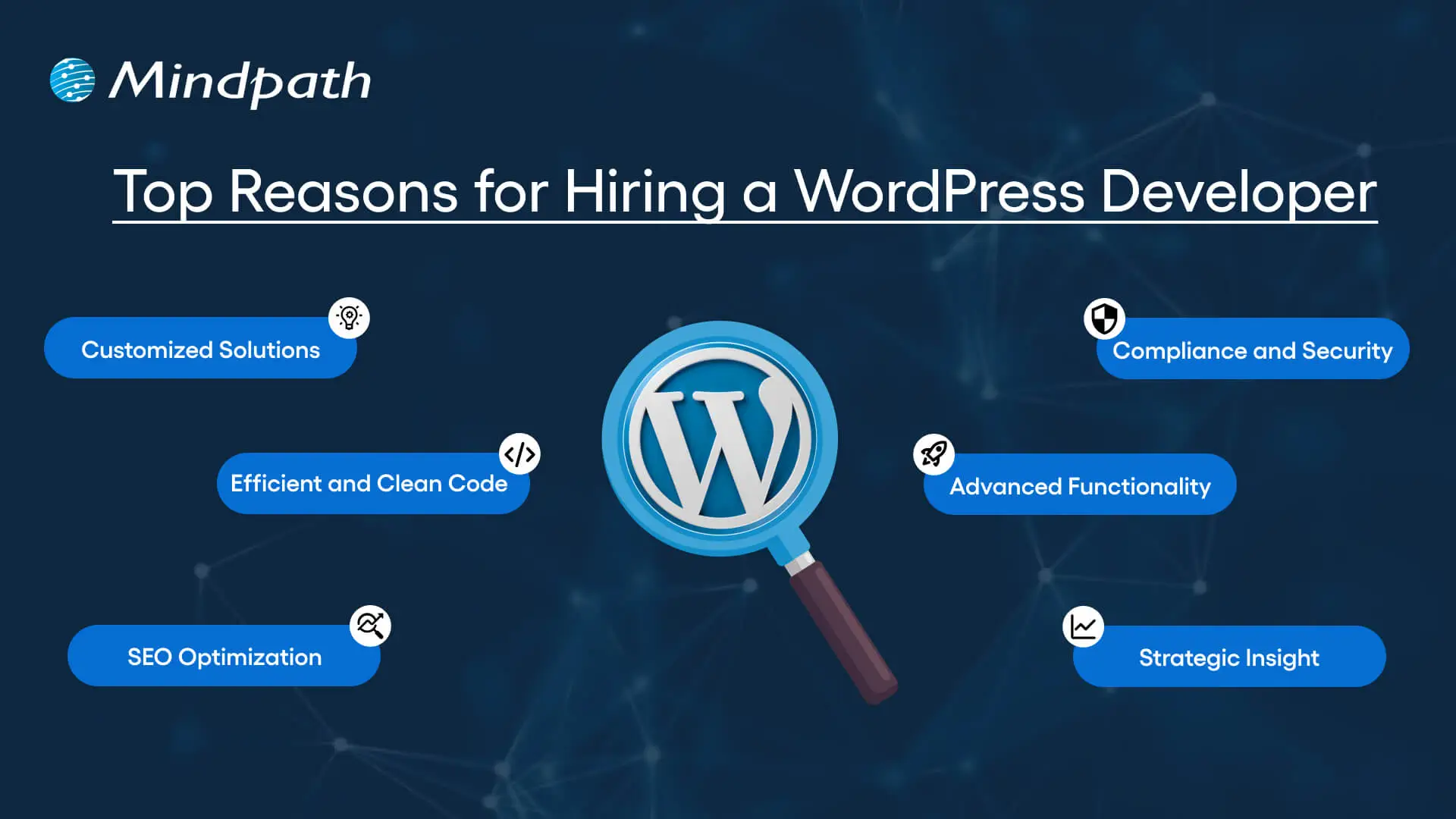
Top Reasons for Hiring a WordPress Developer

Before diving into the WordPress developer checklist to ensure a successful hiring, let’s understand why you should hire expert WordPress developer.

Top Reasons for Hiring a WordPress Developer

1. Customized Solutions

A professional WordPress developer can provide custom WordPress development for the site to match your unique brand identity, functional requirements, and user experience goals. Pre-built themes or plugins won’t offer you such flexibility.

2. Efficient and Clean Code

Skilled developers always prioritize writing scalable, secure, and optimized code. This ensures better SEO scores, fewer compatibility issues, and faster load times.

3. SEO Optimization

Developers know how to develop a website for search engines. For example, they use schema markup, semantic HTML, image optimization tools, and caching techniques that boost visibility and improve rankings.

4. Compliance and Security

From database protection to SSL configuration and plugin installation, professional WordPress developers deploy best security practices to protect your site from data breaches and malware. Besides, they ensure that all the plugins and elements are updated to the latest versions.

5. Advanced Functionality

Do you need a custom API integration or booking system? Well, a skilled WordPress developer knows how to integrate complex features that align with your user needs and business goals. They can also create custom plugins to expand the features of your site.

6. Strategic Insight

Apart from coding, WordPress developers help businesses to get detailed insight into conversion optimization, user behavior, latest trends, and more. All these things will help businesses in making smarter decisions.

Want to make sure your WordPress site is accessible to everyone? Check out our post on improve WordPress web accessibility to learn practical steps for making your site more inclusive and user-friendly.

Types of WordPress Experts- Which One Should You Hire

Understanding the benefits and value a developer can bring is just the beginning. To make the right decision on hiring a WordPress Developer, it is crucial to learn about the different types of WordPress developers you can hire. Remember that each brings a unique focus area and skill set.

1. Front-End WordPress Developers

These experts specialize in interactive and visual aspects of websites. They manage styling, layouts, and user experience and responsiveness using JavaScript, CSS, page builders, and HTML.

2. Back-End WordPress Developers

They focus on database management, server-side functionality, custom theme development, and plugin development. They work with WordPress core functions, MySQL, PHP, and more to create scalable websites.

3. Full-Stack WordPress Developers

Such experts handle back-end and front-end development tasks. They can create a website from scratch while ensuring seamless integration.

While hiring dedicated WordPress developer, you should choose the right type of developer to ensure your project aligns with the design goals, technical needs, and vision.

Curious about which developer’s role best suits your project? Dive into our article on Front-End vs Back-End vs Full-Stack to understand each role and decide which path aligns with your website’s needs.

WordPress Developer Checklist- Skills to Consider

Your hiring WordPress developer checklist should cover the key skills of WordPress developers. HTML, CSS, PHP, MySQL, and JavaScript rank among the key languages for WordPress development. Most developers are familiar with these languages, but knowledge of these technologies is not enough. Here are some skills that matter the most.

Hard Skills or Technical Capabilities

  • Knowledge of using core languages such as jQuery, JS, HTML5, CSS3, PHP, MySQL, React.js, and other languages.
  • Clear understanding of plugin architecture and WordPress core.
  • Building and customizing themes from scratch, and experience with various page builders like Beaver Builder, Gutenberg, Thrive Architect, Elementor, and Themify Builder.
  • Familiarity with REST API.
  • Knowledge of various optimization methods like scheme markup, image compression, caching, Core Web Vitals, minifying CSS, use of CDN, and more.
  • Understating security issues and applying fixes

Soft Skills

  • Ability to explain technical concepts in practical and simple terms.
  • Habit of making clear documentation.
  • Clarity and responsiveness in replies.
  • Ability to collaborate with backend teams and designers.
  • Familiarity with various management tools such as Jira, Trello, and Slack.
  • Willingness to accept feedback and incorporate it quickly.

Some Bonus Skills that Add Value

These skills are not that important for every project, but they can make a developer more valuable. These skills can include:

  • Experience in handling WooCommerce.
  • Knowledge about Headless WordPress configurations.
  • Use of Git or similar tools to manage collaborative workflows and code.
  • Experience in creating responsive and accessible designs to help websites meet the legal requirements of ADA.gov, etc.
  • A better understanding of the business’s goals, like lead generation, conversions, etc.

Want a more flexible and user-friendly website than a static HTML page can offer? Explore our blog on converting HTML to WordPress to see how shifting to WordPress can simplify maintenance and boost performance.

Hiring A WordPress Developer: Best Practices

Hiring a skilled WordPress developer can be a challenging process. That’s why utilizing a structured hiring a WordPress developer checklist is vital. A well-defined hiring checklist can help you save time, and you can hire the best talent for your projects. Here is how to begin your process to hire expert WordPress developer using a proven checklist.

1. Understand your Project Requirements and Goals

Before starting to search for a WordPress developer, it would be better for you to understand your project requirements. Do you want to create a new WordPress site from scratch or optimize an existing site? Are you creating a blog site, business website, or eCommerce platform?

Understanding these things will help narrow down the skills required. For instance, if you want to integrate APIs or advanced features into your site, then hiring a developer with skills in JavaScript or PHP would be a great choice.

Avoiding this step can lead to mismatched expectations. The more precise your needs, the easier your hiring a WordPress developer would be.

2. Selecting the Right Hiring Model

While hiring a WordPress developer, selecting the right engagement model is vital to aligning your development project budget, timeline, and scope. In general, WordPress developers come under three key categories these are:

  • Freelancers: Ideal for short-term and small projects due to their cost-effectiveness and flexibility.
  • Agencies: Offer complete solutions, including website design, development, SEO optimization, and maintenance. Agencies are ideal for large-scale and complex projects.
  • In-House Web Developers: They are best for organizations with ongoing development requirements. Businesses will enjoy faster turnaround and full control. However, this model requires businesses to invest in salaries, management overhead, and benefits.

Consider your budget, long-term objectives, and project size to choose the right model.

3. Developer’s Industry Experience

When using a hiring WordPress developer checklist, an important factor to consider is the developer’s industry-specific experience.

Working with a WordPress developer familiar with your business niche can significantly improve the outcomes while reducing costly trial and error. For instance, for creating an eCommerce website, hiring a developer with WooCommerce expertise will be the best option.

On the other hand, for a blog site, you should prefer to hire an expert with deep SEO and performance optimization knowledge.

This approach will accelerate development and boost functionality. And always ask developers whether they have built websites like yours.

4. Check References and Review Portfolios

Start by examining developers’ portfolios for design consistency, quality, and diversity of development projects that match your business niche. Also, check the custom developer tasks completed by developers to get an idea about their technical skills as well as problem-solving skills.

If possible, assess site performance, usability, and responsiveness to understand the developer’s attention to detail. Also, go through client references to confirm the developer’s support quality, professionalism, and reliability.

5. Conduct Technical Tests and Interviews

Don’t just rely on resumes. Conduct thorough practical tests and interviews. Start by creating targeted interview questions. For instance, you can ask, “How do you solve plugin conflicts”? Or “How do you check a site’s responsiveness?”

Practical tests can include fixing a site speed problem or creating a custom feature or post type. Such tests show developers’ technical skills, efficiency, and creativity. Besides, it helps you to know whether they can work under pressure. This step is pivotal for confident hiring decisions.

Stuck deciding whether WordPress or Drupal is a better match for your business? Our WordPress vs Drupal guide breaks down key differences to help you pick the perfect solution.

Common Mistakes to Avoid

Even with a solid WordPress checklist, mistakes can happen. Here are some common mistakes that you should avoid during the hiring process.

1. Don’t hire an expert based on just low rates. Focusing on the cost factor over quality can lead to poor site performance, missed deadlines, and you may end up with a site that may not meet your business goals.

2. Avoid developers who don’t want to sign confidential agreements. After all, keeping your business data, personal information, and intellectual property safe is important, especially when sharing sensitive details and backend access.

3. Don’t overlook maintenance service and ongoing support offered by the developer. Without this, your site may become vulnerable to bugs and security issues, affecting user experience, speed, and scalability.

4. Don’t ignore red flags such as lack of references, unclear communication, or vague answers.

5. Don’t make your hiring process long and complicated. Excessive interview rounds and lengthy assessments can frustrate candidates, and you may lose top talent.

6. Developers can only create and customize your site. They are not content strategist or designers. So, expecting them to handle everything would be a big mistake, leading to missed opportunities and misaligned results.

Hire Smart and Built Better with Mindpath

Hiring a WordPress developer is a major investment that you make in your business. This can greatly influence your business’s digital future. By following this detailed WordPress developer checklist, you can avoid common mistakes and find a WordPress developer who can create a website that will boost your online presence.

If you are searching for a trusted platform to hire an experienced WordPress developer, you may not find a better option than Mindpath. We specialize in providing the industry’s best WordPress developers, who combine creative design skills, deep technical knowledge, and commitment to quality to develop a perfect solution. Your website needs creative vision, thoughtful design, and expert attention that can bring your brand to life. And for this, you can always count on Mindpath.