Home

Top Benefits of Converting HTML to WordPress

Top Benefits of Converting HTML to WordPress

Join our Newsletter!

Html to Wordpress

Anyone who has a HTML website might feel left out in the era of websites that load within seconds. Did you know that HTML websites were a thing when there was not content management system in the market? The transition from HTML to WordPress is no longer an option in an extremely competitive digital market. With static HTML pages, you would have to struggle to get the top ranks in search engine results.

Key Takeaways

  • 01
    WordPress loads faster and ranks better than static HTML websites today.
  • 02
    Anyone can manage a WordPress site without needing advanced coding skills.
  • 03
    Regular security updates and plugins keep WordPress websites well protected.
  • 04
    Mobile responsive themes ensure websites perform well across all devices.
  • 05
    Plugins let businesses add new features without relying on developers.

The biggest problem with HTML websites is that they come with duplicate code on every page, thereby making them slow. On the other hand, WordPress is faster, more secure and offers more flexibility to build any type of website. As a matter of fact, more than 43% of websites in the world run on WordPress. Let us find out why you should ditch HTML and switch to WordPress now.

Want to convert your static HTML site into a fully functional WordPress site with enhanced features and performance? Mindpath offers WordPress development services to help you build a custom website according to your business demands.

The Rise of WordPress in Website Building

WordPress started off as a blogging platform and the open source nature empowered it to transform into a website builder. Before WordPress, you would need a technical team to create a website and manage it. The search for a HTML to WordPress converter tool has been growing because WordPress has made it easier to build websites. You can now install the WordPress software and use the desired themes or plugins to develop websites with sophisticated functionalities and updated designs.

If you have been wondering whether switching to WordPress is a good decision, then you must take a look at websites powered by WordPress. Big names in the world of business such as Disney, Times Magazine, Sony Music and many others use WordPress. The versatile mix of power and simplicity with WordPress has been one of the biggest reasons for its widespread adoption.      

Is WordPress a Reliable CMS for Website Building?

Giving up on HTML, which has been a trusted ally of website developers for a long time, can be difficult. However, the need to convert HTML to WordPress is growing as WordPress is the top content management system in the world right now. It works as an open-source ecosystem that offers benefits for beginners as well as experienced developers.

WordPress offers a user-friendly interface in its dashboard, which you can use to create websites from scratch. The best thing about the WordPress dashboard is that you don’t need advanced technical expertise to use it. In addition, you can also find thousands of themes and plugins in WordPress that help you customize your website the way you want.

Want to build a website that truly reflects your brand’s unique identity and goals? Explore our guide to custom WordPress development to discover how tailored solutions can enhance your site’s performance and impact.

Why Should You Choose WordPress Over HTML?

With so many powerful features, it is hard to ignore the urge to switch to WordPress right away. You should search for a HTML website to WordPress converter that makes it easier to embrace the benefits of WordPress. Don’t you know how WordPress will enhance your HTML website? An overview of the advantages of transitioning to WordPress can offer some help in finding the answer to such questions.
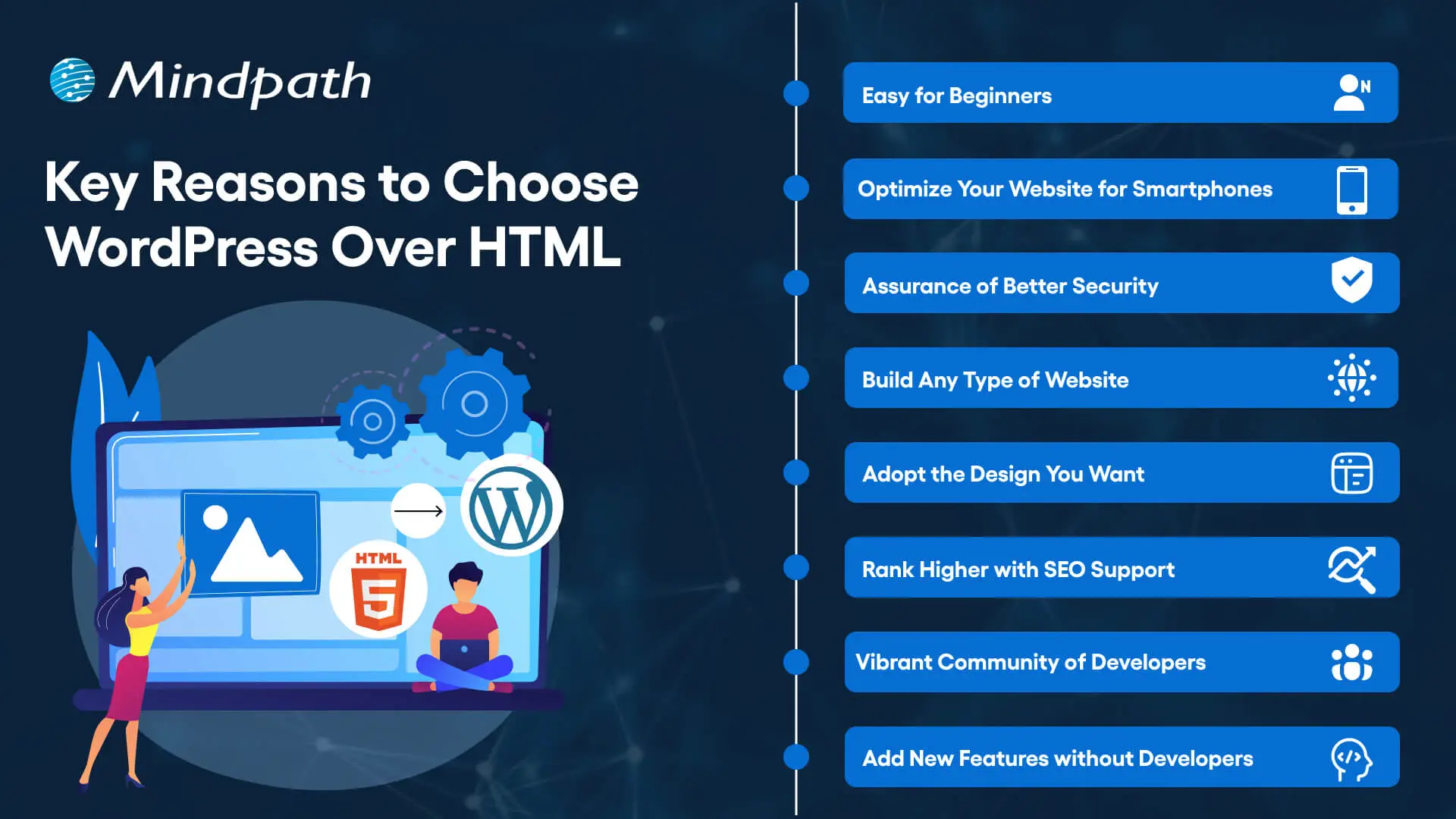
Key Reasons to Choose WordPress Over HTML

1. Easy for Beginners

The best thing about WordPress is that beginners will find it easy to use without any technical complexities. You don’t need coding skills to create your website and manage it on WordPress. The intuitive dashboard of WordPress allows you to create customized layouts, add more pages and update menus at one place. 

WordPress offers better flexibility than traditional website development approaches with more control over design, content management and functionality. Furthermore, the themes and plugins offered by WordPress help you add new features without waiting for developers. In other words, anyone can build a website without technical skills when they know how to use WordPress.   

2. Optimize Your Website for Smartphones

Do you know that most of the traffic to your business will come from mobile users? Many of you would need a HTML to WordPress converter online when you discover that WordPress offers mobile responsiveness. Most of the WordPress themes are tailored to function seamlessly on different screen sizes and device types. 

The interesting part of mobile responsiveness with WordPress is that your website will have the same aesthetic appeal on all devices. Apart from the consistent user experience on different devices, mobile responsiveness also makes your website rank higher on Google. With a few modifications to theme files and some new WordPress plugins, your static HTML website will run seamlessly on all mobile devices.

3. Assurance of Better Security

Businesses should also trust WordPress for its commitment to safeguarding any website hosted on the platform. You will get regular security updates on WordPress, which help in combating new security threats. On top of it, WordPress also offers additional security plugins and SSL certificates to enhance your website’s security. The biggest benefit of converting HTML to WordPress is visible in the efforts made by WordPress to address emerging vulnerabilities.

You must understand that modern approaches to website security need multiple layers of protection. For instance, you will need data encryption, backup systems and malware scanning to maintain the security of your website. WordPress offers the complete package to safeguard your website from hackers and unprecedented security breaches.

4. Build Any Type of Website

In its initial days, WordPress served as a useful tool for blogging alone. The transition of WordPress to a powerful driving force behind some of the biggest websites shows how it has evolved over the course of time. You should know how to add HTML to WordPress for switching from an outdated format to a versatile toolset. You can use WordPress for any type of website, whether it is for a small business or a large corporation.

WordPress is capable of hosting e-commerce websites, communities or social media networks. Businesses can always find WordPress plugins that will make their website better. Most important of all, you don’t have to worry about adaptability when your website needs to grow alongside your business. It is definitely a huge advantage for websites in an extremely competitive business landscape.

Unsure whether your WordPress project is following the right development standards and best practices? Check out our WordPress developer checklist to make sure every essential step is covered for a smooth and successful build.

5. Adopt the Design You Want

The problem with a static HTML website is that you don’t have any control over the design once it’s published. WordPress does not let you worry about changing the design of your website according to emerging trends. When you convert a website to WordPress, you get the advantage of capitalizing on its extensive theme library. You can have a business site, blog or an ecommerce site and still ensure that their design matches with your needs and style. 

The theme library of WordPress offers free and premium themes that you can choose for your website. You can also find additional themes from third-party developers and design marketplaces that bring unique features and layouts. The live previews of each theme help you check each design without affecting website functionality or content.  

6. Rank Higher with SEO Support

WordPress stands out as the most popular option to create websites now because of its SEO support. What will you gain from a website that never shows up on the first page of search results? You can download WordPress and capitalize on its strong SEO foundation to ensure a higher rank on search engines. The advantages of WordPress for SEO revolve around its strict coding guidelines that call for clean and structured code.

The code is not the only thing that makes WordPress websites easier to rank on Google and other search engines. You will also find user-friendly URLs, meta-descriptions and titles to gain more visibility in search engines. On top of it, the SEO plugins on WordPress will provide a lot of support in optimizing your website.

7. Vibrant Community of Developers

The biggest strength of WordPress is its large and active community of developers. As an open-source platform, WordPress continues growing with the contributions of multiple users and developers. The community not only introduces updates to the source files but also makes WordPress more secure and updated along the lines of latest trends. 

Another promising reason to convert HTML to WordPress theme for your website is the accessibility to website creation tools offered by the community. It ensures that developers alone don’t have the exclusive rights to use WordPress tools. Even a blogger or business owner can be a part of the WordPress community and capitalize on its diverse offerings.

8. Add New Features without Developers

Websites have to evolve and add new features to accommodate the emerging requirements of users. WordPress allows you to add new features to your website without the intervention of developers. The collection of powerful plugins available with WordPress can help you introduced advanced features without code changes. 

Plugins are the ideal tools for adding shopping carts, contact forms and other features on WordPress websites. You can also explore custom WordPress plugins by third-party developers to enhance their websites. On top of it, you can activate or deactivate plugins as required, which offers the flexibility for customizing a website to your needs. 

Final Thoughts

The decision to convert your website from HTML to WordPress should not be a difficult one, considering the benefits of WordPress. It allows anyone to create a website without technical knowledge alongside offering the flexibility to add new features. In addition, you cannot ignore the benefits of regular security updates, a supportive community and control over website design. 

Mindpath specializes in converting HTML websites to WordPress for any type of website. We have years of experience in WordPress development that brings more credibility to our services. Our services for switching your website to WordPress also offer the assurance of an easy conversion procedure. If you want a website that is easier to update and maintain, then Mindpath is here to help you.


Frequently Asked Questions

1. How long does it usually take to convert an HTML website to WordPress?

The timeline depends on website size and complexity. Simple sites can be converted within a few days, while larger websites with custom features may take a few weeks to ensure everything transfers smoothly without losing existing content or functionality.

2. Will switching from HTML to WordPress affect existing search engine rankings?

A proper conversion process actually tends to improve rankings over time. WordPress offers stronger SEO support through clean code and optimization plugins. However, redirects and URL structures need careful handling during migration to avoid any temporary ranking drops.

3. Can an existing HTML website design be preserved after converting to WordPress?

Yes, the existing design can often be recreated or closely matched using custom WordPress themes. Developers can convert the original HTML layout into a WordPress theme, keeping the same look while adding the flexibility WordPress offers for future updates.

4. Is WordPress secure enough for businesses handling sensitive customer information?

WordPress provides solid security through regular updates, SSL support, and dedicated security plugins. Businesses handling sensitive data should still follow best practices like strong passwords, backups, and trusted plugins to maintain a secure and reliable website environment.

5. Does converting to WordPress require ongoing technical maintenance after launch?

Some maintenance is recommended, such as updating plugins, themes, and the WordPress core regularly. However, WordPress is designed to be manageable even for non-technical users, making routine upkeep far simpler compared to maintaining a static HTML website.

Support Is One Click Away

Featured Posts

Related Post

Infrastructure as Code

If you are into IT operations, you might have noticed that there is constant pressure to deploy faster and maintain reliability across complicated IT environments. But with traditional infrastructure management, you can’t keep up with the trends. Further, manual configuration might push you out of the competition. This is where Infrastructure as Code steps in as the game changer.

The market value of IaC is ready to reach USD 1582.04 million in 2026, and it can stretch up to USD 6939.73 million by 2034. In this blog, we will further explore the importance of IaC along with its practical values in modern IT operations.

Looking to simplify infrastructure management and scale your IT operations with speed and consistency? Mindpath delivers expert DevOps services, including Infrastructure as Code (IaC), to automate provisioning and accelerate delivery.

What does Infrastructure as Code mean?

Now you might be wondering about infrastructure as code meaning. So, it is the process of managing and provisioning your infrastructure through code instead of manual procedures. It allows your developers and IT teams to define servers, databases, and networks along with other resources through scripts and configuration files.

So, instead of setting up the whole infrastructure manually, you can get it done through code. Further, the process remains automatic and consistent. This approach ensures your infrastructure environments are repeatable and version-controlled.

Why is Infrastructure as Code Important for Modern IT Operations?

Today’s modern IT operations completely depend on speed, automation, and reliability. So, IaC can help you gain these capabilities with a lot of features.

  • It is capable of eliminating manual configuration errors from the beginning.
  • It supports quick deployment and rapid scaling for the company’s betterment.
  • You can be assured of better collaboration between your development and operations teams.
  • It can be integrated seamlessly with DevOps workflows.

IaC is also a strong pillar of infrastructure as code in DevOps. Additionally, it helps organizations in implementing CI/CD pipelines while delivering software quickly and efficiently.

Struggling to manage complex infrastructure and streamline your IT operations? Check out our blog on AI in DevOps to explore how intelligent automation is transforming modern workflows.

Infrastructure as Code Benefits for Quick Development Approaches

The IaC market has been growing effectively with a CAGR of 24.39%. Here are some evident infrastructure as code benefits that your company can leverage to win the interest of the market.

1. Standardization and Consistency

IaC can help you apply the same configurations across all system environments. So, it lowers the chances of any system failures because of any misconfigurations.

2. Speed and Efficiency

When you automate the management and provisioning of your infrastructure, the time taken to configure and set up the environment will be lessened.

3. Flexibility

IaC accesses your organization to scale resources up and down as per your requirements. Further, it doesn’t require any manual interventions.

4. Better Collaboration

Infrastructure as Code enables your team to use version control systems to handle the infrastructure. This enables better collaboration.

5. Cost Efficiency

Automation can easily reduce operational charges while minimizing the chances of resource wastage. This leads to better cost management.

Ready to simplify and automate your IT infrastructure with Infrastructure as Code (IaC)? Discover DevOps trends to stay ahead with the latest innovations in modern IT operations.

Popular Infrastructure as Code Tools and Platforms

To integrate IaC effectively, companies generally rely on a series of infrastructure-as-code tools and platforms. Further, each tool serves multiple purposes, like provisioning and configuration. Some of the most commonly used tools have been listed here.

1. AWS CloudFormation

It is used for Native IaC service for AWS environments.

2. Terraform

It ensures infrastructure provisioning across multiple cloud providers.

3. Azure Resource Manager

This is Microsoft’s IaC solution.

4. Puppet

It offers infrastructure configuration and management.

These infrastructure-as-code platforms can help you standardize processes and simplify complicated IT environments.

Want to improve scalability and efficiency through Infrastructure as Code (IaC)? Check out our blog on AI tools in DevOps to learn how automation is driving smarter IT operations.

Use Cases and Infrastructure as Code Examples

Infrastructure as Code has already become an integral part of modern IT operations. Further, it has offered a wide range of applications across multiple industries.

1. Cloud Deployment

This is the best infrastructure as code example you can think of. You can use IaC to set up and handle the whole cloud environment across multiple or single clouds. With IaC, you can codify your cloud infrastructure to ensure authentic resource allocation.

2. Automated Web App Deployment

This is also another impactful use case of IaC. You can define all important components for a web app, including databases, virtual machines, load balancers, and networking configurations.

3. Security and Automation

IaC includes security configurations and regulatory rules. Therefore, you can automatically apply security policies like firewall rules.

Planning to enhance your IT operations with more scalable and automated infrastructure? Explore our blog on DevOps best practices to discover proven strategies for efficient and reliable deployments.

What are Some Infrastructure as Code Best Practices?

To completely adopt the power of IaC, you should follow some proven infrastructure as code best practices.

1. Use Version Control

Store infrastructure code in repositories like Git to trace changes and enable collaboration.

2. Keep Your Codes Modular

Break your infrastructure into reusable components for better flexibility & scalability.

3. Ensure Testing & Validation

Always test your configurations before the deployment process to avoid errors in production.

4. Use Declaration Approach

Explain the desired state of infrastructure instead of step-by-step instructions.

5. Automate the Functions

You should integrate IaC with CI/CD pipelines for effective automation while getting rid of the manual workforce.

6. Ensure Security

Apply security verification and policies within your IaC workflows for better implementation.

What is the Role of Infrastructure as Code Software in the Future?

As businesses continue adopting cloud and automation, infrastructure-as-code software will be even more essential. Some of the evident trends include increased adoption of GitOps and AI-driven infrastructure automation. Further, it will encourage security and compliance tools while allowing you to use multi-cloud and hybrid cloud management.

IaC will continue to shape the future of modern IT operations while making the system more stable and flexible.

Challenges of Adopting Infrastructure as Code

While IaC offers a number of benefits, it still holds some challenges, as given here.

  • It offers a learning curve for teams that are not well aware of coding.
  • It might be difficult for you to manage complex configurations across a wide range.
  • You might expect risk of misconfigurations if you don’t test it properly.
  • Teams can expect security alerts if the scripts are poorly written.

However, with proper planning and best practices, you can easily avoid these challenges.

Want to streamline deployment processes with Infrastructure as Code (IaC)? Check out our blog on DevOps challenges and solutions to gain insights into solving modern IT issues effectively.

Final Words

Infrastructure as Code is not an option anymore. It’s essential for organizations that want to stay ahead of the competition in the current digital landscape. By automating infrastructure management and improving consistency, you can enable faster deployments while allowing you to innovate efficiently.

You can consider the efficiency of Mindpath, which can help your company adopt IaC and modern DevOps best practices. We can help you transform your IT operations while achieving long-term success. This way, your team can easily create, manage, and scale automation across your organization.

FAQs

What Does Infrastructure as Code Mean in Simple Terms?

IaC is a way to manage and set up your IT infrastructure using code instead of manual processing. It helps with automating tasks like making your deployments faster.

What are Some of the Most Adopted Infrastructure as Code Tools?

Some of the most widely used Infrastructure as Code tools include AWS CloudFormation, Azure Resource Manager, Terraform, etc.

How can Infrastructure as Code Improve My IT Operations?

IaC can improve your modern IT operations by automating the infrastructure provisioning while reducing the chances of human errors.

Is IaC Difficult to Learn for Beginners?

It might feel challenging in the initial days, especially for non-developers. But with basic knowledge of scripting, you can easily learn IaC.

When Should I Start Using IaC?

You should consider using IaC if you handle multiple environments or face frequent deployment challenges.

Devops vs devsecops

DevOps vs. DevSecOps is a topic that will often arise when companies look for better and faster software delivery. Businesses are looking to release applications and software faster than ever, but they are also mindful of the growing sophistication of security threats. So where can businesses find the balance of speed and safety? This is where the transition from DevOps to DevSecOps comes into play; the need for speed is balanced with more stringent security requirements.

In today’s fast-moving digital age, the speed of development plays an important role, but it’s hardly enough. In addition to wanting systems that develop software quickly, organizations want systems that will also withstand vulnerabilities at each stage. That is why there’s so much interest in DevSecOps. DevSecOps does not replace DevOps; it enhances it by using continuous security assessments and ongoing protection. A clear understanding of these differences allows businesses to make better choices that can balance innovation with resilience. So, keep reading further to know the difference between DevOps and DevSecOps in this blog.

Still unaware of how DevOps benefits your business? Get in touch with us to gain full insight into adopting DevOps services that makes your operations seamless.

What is DevOps?

DevOps is a collaborative software development methodology that unites an organisation’s Development (Dev) and IT Operations (Ops) teams to deliver software faster, more reliably, and at greater scale. Its foundation is automation, continuous integration (CI), and continuous delivery (CD), commonly combined as CI/CD. DevOps helps break down silos between teams, enabling shared goals while reducing risk. It simplifies processes, improves team efficiency, and aligns technology outcomes with both customer and business objectives.

Furthermore, it drives a cultural change that values accountability, empathy, and shared responsibility. With automation, fast iterations, and rapid feedback, businesses are able to deliver secure and reliable software. In addition to this, not only does the process encourage innovation and creativity, but it also gives businesses flexibility and resilience in a competitive marketplace.

Here are some of the benefits of DevOps: 

1. Faster Delivery

Development cycles can go a lot quicker with automation and simplified processes. This enhanced delivery allows more frequent releases and decreases time to market.

2. Collaborative Teamwork

Development teams, operations, and other teams are all working toward common goals. Good team collaboration eliminates silos and improves project quality.

3. Smarter Efficiency

Automation eliminates repetitive tasks and optimizes workflows. Teams have the ability to save time and focus on activity that produces value, instead of spending time on manual processes.

4. Continuous Integration and Delivery (CI/CD)

Continuous integration and continuous delivery allow for reliable and consistent deployments. Your users can get new features and fixes fast and seamlessly.

5. Real-Time Insights

Monitoring tools enable instant visibility across the ecosystem. Teams can identify problems early, troubleshoot quickly, and improve performance.

These points explain how DevOps speeds up collaboration and delivery when comparing DevOps vs. DevSecOps, while DevSecOps extends an approach that has been inherently faster approach by adding stronger security practices.

Curious how automation and modern practices can improve your DevOps pipeline? Visit our blog on DevOps Trends to discover actionable insights and emerging innovations.

What is DevSecOps?

DevSecOps (Development, Security, and Operations) is the practice of integrating automated security checks into every phase of the software development lifecycle. It unites development, security, and operations teams so they can plan, build, test, and release applications together, making security a shared responsibility from the start. In return, DevSecOps allows for faster, more reliable processes, ensuring that security is built in from the very beginning rather than added as an afterthought.

To better understand the three pillars of DevSecOps, simply think of collaboration, automation, and continuous security. Collaboration ensures that everyone is sharing the responsibility, automation introduces automated security checks into CI/CD pipelines, and continuous security ensures that monitoring is continuous. With the three pillars of DevSecOps, organizations are able to create dependable applications while implementing continuous security measures to defend them against constantly evolving threats.

Here are the benefits of DevSecOps:

Benefits of DevSecOps

1. Early Risk Detection

DevSecOps allows for the identification of vulnerabilities during the development phase rather than at the end of the development process. Finding and remediating risk early in this way saves time and expense and means that users receive secure applications.

2. Faster Release Cycles

As teams can impact security testing in their workflow, delays are prevented, human error is removed, and developers get new features into the hands of users sooner.

3. Stronger Compliance

DevSecOps processing can assist software teams in meeting compliance obligations with strict regulatory guidelines. Automated checks and secure development practices ensure that data continues to be protected, while developers can be assured that they meet industry standards.

4. Security-First Perspective

Treating security as a shared responsibility, teams practicing DevSecOps have developers, security professionals, and operations staff collaborating to manage risks actively and ensure they minimize incidents throughout the development period.

5. Safe Feature Delivery

With DevSecOps, teams can deliver new functionality faster while also guaranteeing that security practices are undertaken throughout the development period. This can be one of the key differences in terms of DevOps vs. DevSecOps: how features are delivered.

Aiming to enhance operational efficiency and reduce development risks? Check out our blog on DevOps Challenges and Solutions to discover proven approaches that improve performance, stability, and cross-team cooperation.

DevSecOps vs. DevOps: Key Differences

DevOps vs. DevSecOps reveals how software teams value speed, teamwork, and security. While DevOps emphasizes faster delivery, DevSecOps enhances that process, making security a priority at every step of the development process.

1. Security Focus

The primary distinction between DevOps vs DevSecOps is security. DevOps puts movement between development and operations to speed up the delivery of software, but its security processes are usually significant afterthoughts. DevSecOps has security processes established from start to finish and considers them a core capability. By treating security as a core capability, vulnerabilities are eliminated upstream, so they are remedied before deployment.

2. Collaboration Culture

DevOps emphasizes collaboration between development teams and operations teams to promote continuous integration and delivery. Security is often treated as an independent effort, which creates holes in the development process. DevSecOps emphasizes the work of the security team interacting directly with developers and operations teams in every phase of development. This develops a culture of security being everyone’s responsibility.

3. Timing of Security

Conventional DevOps teams often include security at the final phase of the development cycle. If bugs occur towards the end of the process, they can delay the project significantly. DevSecOps reinforces timing by introducing a shift-left strategy with security at the beginning of the development process to build secure and reliable applications.

4. Tools and Automation

In contrast, when discussing DevOps vs. DevSecOps tools, the distinction is clear. DevOps follows automated processes for build, test, and deploy; however, normally, the security tools are still standalone. With DevSecOps, you use drive-by automated security scans, code analysis, and continuous monitoring in the CI/CD pipeline. It allows teams to detect threats in real-time without having to slow their delivery pace.

5. Salary Comparison

There is a notable salary gap when looking at DevOps vs. DevSecOps salaries in the UK. DevOps Engineers generally earn from £65,000 to £92,500+ with a difference based on skills and location, while DevSecOps Engineers receive a greater salary, with salaries for senior roles exceeding £130,000+ a year, particularly for positions based in London.

Looking to optimize your CI/CD pipeline with smarter automation and streamlined processes? Visit our blog on DevOps Best Practices to discover the strategies high-performing teams use to achieve consistent, stable releases.

DevOps vs. DevSecOps: A Comparison Table

When exploring DevOps vs. DevSecOps, it’s clear that both approaches aim to improve software delivery but take different routes to get there. This table highlights the main distinctions, making it easier to see how DevSecOps builds on DevOps with an added focus on security.

Aspect DevOps DevSecOps
Core Goal Focused on speeding up development and deployment cycles. Balances speed with security to deliver safe, reliable software.
Team Culture Collaboration between development and operations teams. Shared responsibility among development, operations, and security teams.
Security Approach Security checks are introduced late in the release pipeline. Security is integrated into every stage of the development lifecycle.
Automation Uses CI/CD pipelines to automate builds, tests, and deployments. Extends CI/CD with automated security scanning and compliance checks.
Risk Handling Issues are often fixed after vulnerabilities are found in production. Risks are identified and mitigated early to prevent breaches.
Compliance Handled towards the end of development, often as a final step. Built into processes from the beginning, ensuring continuous compliance.
Toolset Relies on monitoring, deployment, and collaboration tools. Adds tools for code analysis, threat detection, and policy enforcement.
End Result Delivers applications quickly but may leave gaps in security. Produces faster releases that are also secure, compliant, and resilient.

Which approach will drive your business forward?

The comparison of DevOps vs. DevSecOps shows that while DevOps accelerates delivery, DevSecOps ensures that speed is not achieved at the cost of security. Businesses gain the ability to innovate quickly while reducing vulnerabilities. Choosing the right model depends on priorities, but integrating security early always results in stronger, more resilient software outcomes.

At Mindpath, we offer tailored DevOps services designed to improve speed, collaboration, and reliability across your software delivery cycle. By helping teams embrace automation, modern practices, and security-focused strategies, Mindpath ensures that businesses not only accelerate development but also deliver secure, high-performing applications that stand out in today’s competitive digital market.

Frequently Asked Questions

ReactJS for Progressive Web App development

Creating applications that are fast, dependable, and smooth on all devices is important for every company today, right? So, when you think of building something like that, ReactJS for Progressive Web App development may be a wise option for you. It allows you to create applications that give the experience of a native application without the cost or intricacy. There are many modern companies already using this approach to enhance performance and keep users invested with consistent user experiences.

ReactJS offers speed, flexibility, and user-centric features that are perfectly aligned with progressive web app goals. ReactJS has reusable components and fast rendering, making it easy for developers to build responsive and high-performance apps. PWAs built with ReactJS are responsive and load fast, work offline, and allow a smooth mobile experience that users will enjoy. In this blog, we will examine the top reasons why ReactJS is great for developing PWAs.

Looking to engage users with fast and seamless web applications? At Mindpath, we offer ReactJS development services where our experts help you create user-focused Progressive Web Apps that give users a smooth digital experience.

Understanding the Fundamentals of PWAs

Progressive Web Apps (PWAs) are modern web applications that function like mobile apps. With a PWA, you can open it in a web browser, but it behaves like a real app on your phone or computer. They are designed to function seamlessly across all devices (smartphones, tablets, or desktops), which is nicer than having separate mobile websites, apps, and desktop apps.

Progressive Web Apps are created using HTML, CSS, and JavaScript. They are fast to load; they work when users are offline and can send push notifications. They also allow access to certain phone functionality, such as the camera or location. PWAs can help businesses save time and money since they must build one app that can work everywhere.

Looking for specialists who can handle complex front-end challenges in your business? Learn why partnering with an expert React Development Company is a smart move.

Advantages of Using ReactJS for Progressive Web App development

Using ReactJS for PWA development is a great choice for creating secure and fast web applications. With the growing ReactJS trends, developers hope that they can deliver seamless and user-friendly experiences. Here is how ReactJS is perfect for your PWAs.

Advantages of Using ReactJS for Progressive Web App development

1. Faster Rendering with Virtual DOM

React uses a Virtual DOM to update only the parts of the page that change. This speeds up performance and ensures a smooth user experience. It’s ideal for building fast and responsive ReactJS PWA solutions.

2. Reusable Components

React’s component-based structure allows developers to reuse code across the app. This makes it easier to manage the app and scale it as it grows. It’s a key reason why teams choose ReactJS for progressive web app development.

3. Easy UI Management

React follows a declarative style for creating user interfaces. This makes it simple to manage and update interactive elements in the app. It helps deliver a smooth and engaging ReactJS progressive web app experience.

4. Active Developer Community

React has a strong global community that shares solutions, tools, and tutorials. This support helps developers solve problems faster and stay updated. It also contributes to the future of ReactJS in modern web development.

5. Strong Library Support

React has many libraries like React Router and Redux that simplify routing, data flow, and offline features. These tools help developers add advanced features to PWAs with less effort. They make building a PWA with React more efficient and reliable.

6. Smooth Third-Party Integration

React works well with tools needed for Progressive Web Apps, such as service workers and web app manifests. These tools help enable offline access, background syncing, and “Add to Home Screen” functionality. This makes it easier to implement full PWA capabilities when building with React.

Want to keep your large React app fast and responsive as it scales? Discover the best practices for optimizing React performance for large applications.

Steps to Set Up a React PWA

Getting started with React is a smart move when building modern web apps that work offline and feel like native apps. If you’re planning to use React for progressive web app development, here are the key steps to set it up properly.

Steps to Set Up a React PWA

1. Start with Create React App

The easiest way to begin is by using Create React App, which includes built-in support for PWAs. It sets up a basic structure with everything needed for ReactJS PWA development, including service workers and a manifest file. CRA also optimizes the build process, making your app production-ready. This setup ensures you have a strong foundation to build a scalable and responsive PWA.

2. Register the Service Worker

To activate offline support, register the service worker by calling ‘serviceWorkerRegistration.register()’. This enables background caching, which is key to building a progressive web app with React that works without an internet connection. A registered service worker allows the app to cache assets and serve them even when the network is unavailable. It also helps improve performance by reducing server requests, ensuring a better user experience in the future of web development.

3. Configure the Manifest File

Update the manifest.json file in the public folder to define your app’s name, icons, theme color, start URL, and display mode. These settings control how your app appears when installed on a device. A properly configured manifest ensures your PWA looks and feels like a native app. This also helps in enabling features like splash screens and full-screen display, supporting the growth of progressive web apps with React development.

4. Use HTTPS for Deployment

For security, PWAs must be served over HTTPS. Local development through CRA handles this, but for live deployment, ensure your server uses a valid HTTPS setup. A secure context is required for service workers and features like push notifications. Using HTTPS also improves user trust and SEO performance.

5. Test Using Chrome DevTools

Use Chrome DevTools to inspect and test your PWA setup. You can verify service worker status, cached files, and manifest settings. Lighthouse audits can also help you improve your app based on best practices for React for progressive web app development. Testing ensures your PWA meets performance, accessibility, and usability standards.

Seeking a development approach that reduces complexity while enhancing functionality? Read why React Web Development is ideal for modern projects.

Ready to Build a Powerful PWA with ReactJS?

ReactJS offers all the essential tools to build fast, reliable, and interactive web apps that feel like native experiences. Its reusable components, strong ecosystem, and smooth performance make it a top choice for modern applications. Choosing ReactJS for progressive web app development is a future-focused decision that brings real value to your business.

At Mindpath, we deliver expert ReactJS development services tailored to your goals. We build responsive, scalable, and feature-rich PWAs with smooth offline access and high performance. Our experienced team uses the latest tools and trends to create apps users love. Partner with Mindpath and bring your next ReactJS PWA to life with speed and quality.

Frequently Asked Questions

1. How do Progressive Web Apps compare to traditional mobile applications in terms of maintenance?

Progressive Web Apps are easier to maintain because they use a single codebase across devices. Updates are applied centrally and reflected instantly for all users, unlike native apps that require separate updates and approvals. This reduces long-term maintenance effort and ensures consistency.

2. What factors should be considered before choosing ReactJS for PWA development?

It is important to evaluate project complexity, performance requirements, and scalability needs. ReactJS works best when applications demand dynamic user interfaces and fast updates. Compatibility with existing tools and the availability of skilled developers also play a key role in the decision.

3. How does a PWA built with ReactJS handle poor or unstable network conditions?

PWAs use service workers to cache important assets and data, allowing the application to function even with limited or no internet connectivity. This ensures a stable experience, reduces loading time, and keeps essential features accessible during network interruptions.

4. Can ReactJS PWAs support advanced features like push notifications and device access?

Yes, ReactJS PWAs can support features such as push notifications, location tracking, and limited hardware access through browser APIs. These capabilities enhance user engagement and allow web applications to deliver experiences closer to native mobile applications.

5. How scalable are ReactJS-based PWAs for growing user demands?

ReactJS supports scalable architecture through component-based development and efficient state management. As user demand increases, applications can be expanded with minimal disruption. This makes it easier to handle higher traffic, add new features, and maintain performance over time.

Discover why ReactJS is perfect for Progressive Web App (PWA) development. Learn how Mindpath can help you build high-quality PWAs.