Home

The Complete Guide to Custom Software Development in 2026

The Complete Guide to Custom Software Development in 2026

Join our Newsletter!

custom software development

Custom software development is becoming the primary driver for businesses to get ahead of the curve in 2026. Businesses no longer rely on ready-made tools as existing tools fall short of meeting unique requirements. More recently, there is a higher need for tailored solutions that incorporate an organization’s goals and can scale as the firm grows. So, how will businesses ensure their software not just helps with their operations, but ultimately provides a legitimate competitive advantage?

In today’s fast-paced digital landscape, the right software is not only technology but also a strategy in practice. With custom software, businesses foster solutions that face specific challenges and ignite innovation. This guide walks through the core aspects of custom software development, including its definition, different types, benefits, key factors, and process. With a successful approach, adequately designed custom-built systems will enable progress and lead to long-term success.

At Mindpath, our custom software development services deliver secure and scalable services that  meet your business goals and enhance your business performance.

What is Custom Software Development?

Custom software development builds software solutions designed for a business’s specific needs. Instead of using generic tools developed for all businesses, many companies are developing their own custom software applications to support their unique company goals, internal workflows, and their customers. The custom software process includes planning, designing, developing custom software, and then ongoing software updates. This proactive approach might help a business increase efficiency, allow the business to expand, and create a steady stream of revenue.

The basis of this method is personalization. Developers create each feature with intention, supporting groups like marketing or sales, and enhancing customer brand participation through apps and platforms. These tailored solutions align and integrate smoothly into existing processes, improving productivity. When businesses select the right design and functionality, they receive a competitive advantage and increase their ability to outgrow the competition in a rapidly evolving digital landscape.

Must Read: Software Development Cost

Types of Custom Software Solutions

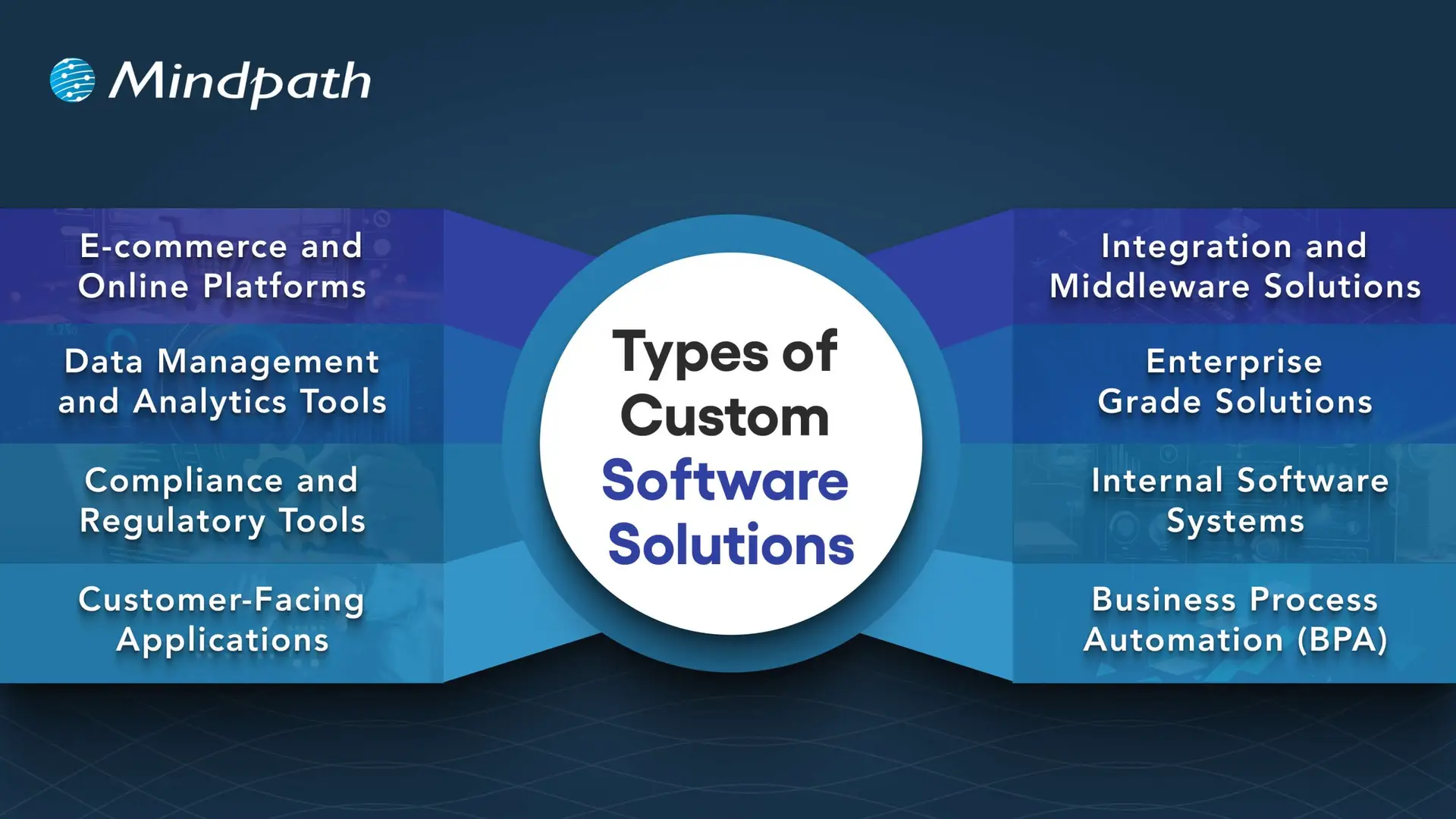
Businesses face unique challenges, so they will need specific solutions to meet their goals. When used effectively, there are many kinds of custom software development solutions that can take advantage of that to drive efficiency and growth.
Types of Custom Software Solutions

1. E-commerce and Online Platforms

Online businesses require more than a basic website. Custom platforms take care of payment, inventory, and customers quickly and accurately.

2. Data Management and Analytics Tools

Companies generate a never-ending amount of data every day. Analytics tools provide actionable insights from that data, which decision-makers can invest in, as there is confidence in the analytics.

3. Compliance and Regulatory Tools

The industries with strict rules continue to change at a breakneck speed. Compliance software can help you track, report, and reduce risks.

4. Customer-Facing Applications

Customers expect a seamless digital experience, and mobile apps, portals, or self-service tools can provide a simple and engaging interaction.

5. Integration and Middleware Solutions

It’s not very common for systems to connect themselves. Middleware acts as a bridge between those systems and allows for the free flow of information across platforms.

6. Enterprise Grade Solutions

Large organizations need powerful systems to maintain efficiency. ERP, CRM, and BI software all gather data into one controllable system.

7. Internal Software Systems

Day-to-day operations require intelligent systems. HR management platforms, scheduling software, and inventory solutions help maintain workflow efficiency.

8. Business Process Automation (BPA)

Manual tasks challenge the organization as a whole. Custom software development will provide a BPA solution that reduces repetitive, verifiably redundant work and frees up time.

Want to know the method behind building scalable and maintainable software? Learn how the software development life cycle helps you streamline development by providing a structured approach that improves efficiency and overall project outcomes.

Benefits of Custom Software Development

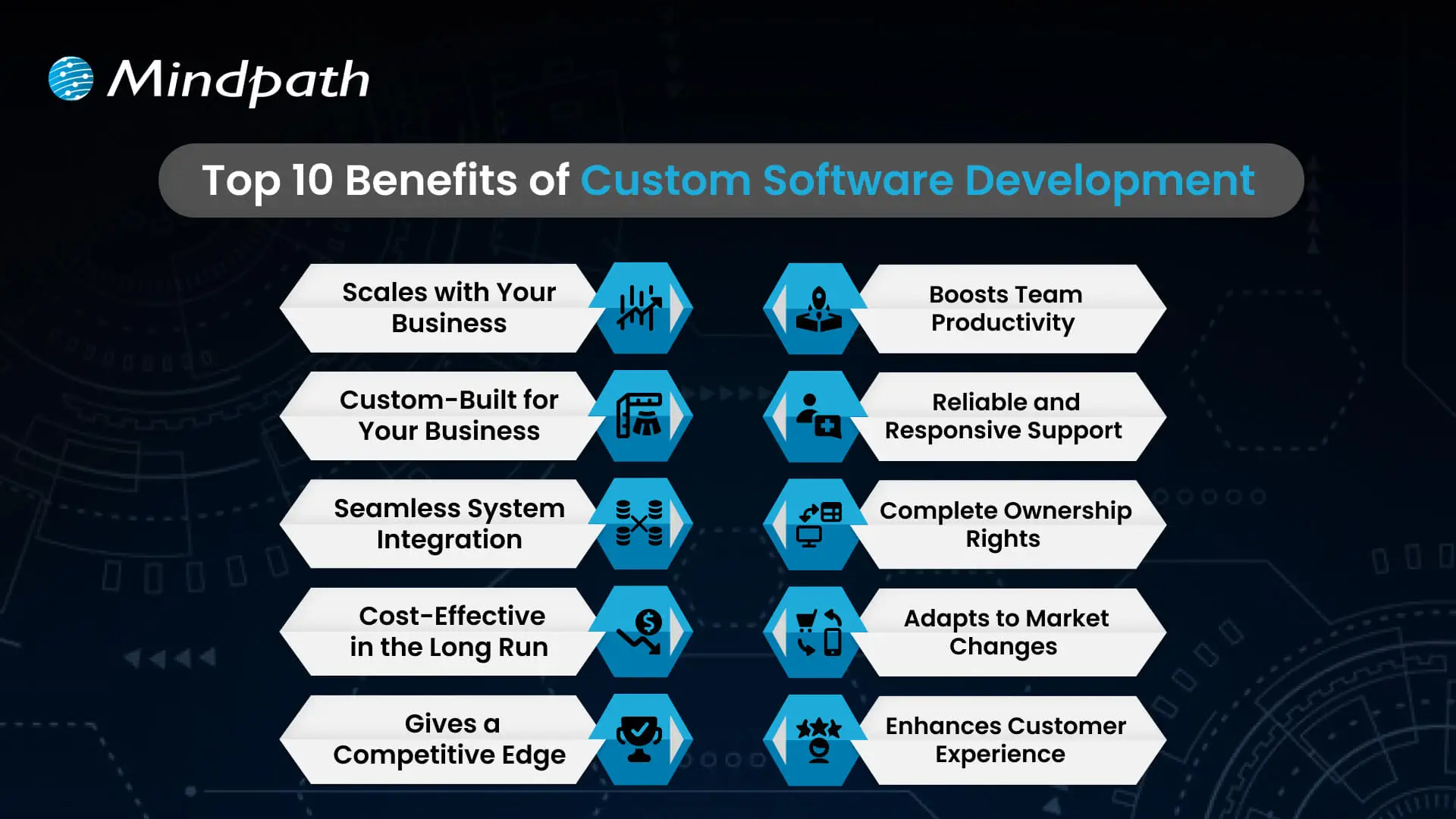
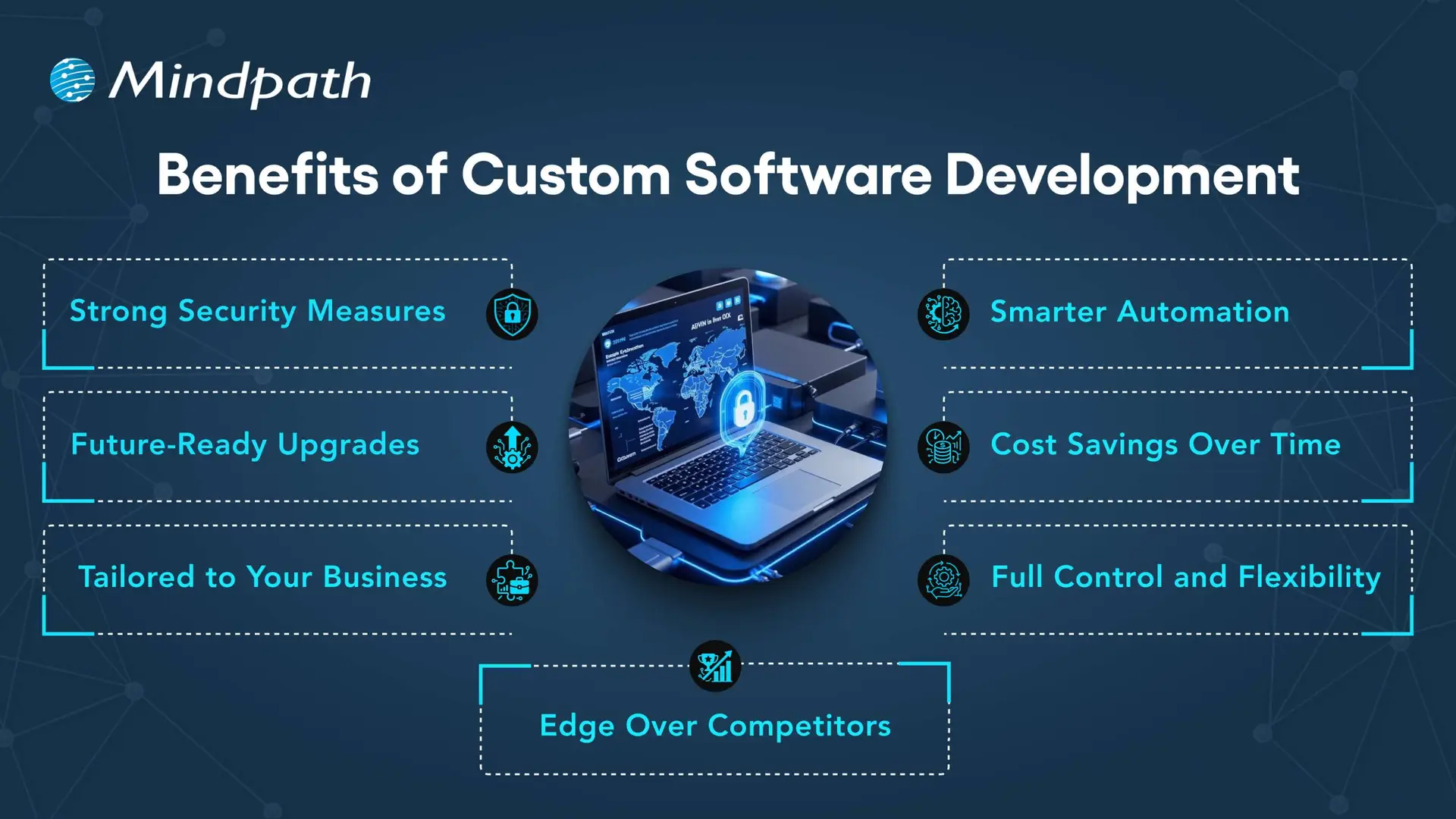
Each organization operates differently, so that’s why software customizations are very important. When you choose custom solutions, companies will have the tools that meet their needs and bring value over the long term.
Benefits of Custom Software Development

1. Strong Security Measures

Every day, businesses deal with the threat of crime, and good protection is necessary. With custom solutions, businesses can create the security features that fit their unique needs.

2. Smarter Automation

Repetitive work that wastes time is unnecessary. Automated workflows make everything more efficient, giving teams more time to focus on innovative opportunities.

3. Future-Ready Upgrades

Technology will continue to change, and existing systems are often outdated. A custom solution is easy to upgrade, so businesses can stay up to date.

4. Cost Savings Over Time

It’s common to think of generic tools as the less costly option, but they come with hidden costs. A custom-built system can expand with the business and reduce your long-term costs.

5. Tailored to Your Business

Every company has its own workflows, and off-the-shelf, one-size-fits-all tools rarely truly fit. Custom software design considers workflows and goals to create solutions tailored to specific needs.

6. Full Control and Flexibility

Companies have the decision on how their software evolves. From additional feature requests to maintenance, a company is in control of all aspects of software.

7. Edge Over Competitors

To be different, you need unique solutions. Custom software development allows companies to create custom tools that enhance their efficiency and develop stronger customer relationships.

Curious how businesses are building world-class software teams without geographical limits? Explore how our offshore software development can deliver skilled talent and cost-effective solutions.

Step-by-Step Custom Software Development Process

Custom software development has a well-defined process to deliver the best quality product. Using the proper methodology, a custom software development process business makes certain that everything is completed to specific objectives for each project. Here is the process:

1. Requirements and Planning

The process begins with identifying and researching the client’s needs to lay the right framework. The team documents goals, scope, and technology decisions in order to have a clear foundation. During this clarity stage, teams quickly put together custom-made software with a common understanding.

2. UX/UI & System Design

Once they define the requirements, designers and architects start creating wireframes, prototypes, and system architecture for the solution. They start defining the database structure, user experience (UX), and technical workflow in order to ensure everything flows and goes according to plan. Designers create all custom software to be easy to use, scalable, and low-risk.

3. Development Execution

Developers write code based on the approved design and requirements. They develop using agile and best practices and build the functional modules incrementally. Organizations will receive reliable solutions designed to promote their long-term success.

4. Testing & Quality Assurance

Testing validates both functional and performance on devices, platforms, and use cases. Testers perform unit, integration, and regression tests to detect any issues as soon as possible. This step guarantees quality standards in custom software development solutions before delivery.

5. Deployment & Continuous Support

Once testing verifies quality, the team deploys the software on-premises or in cloud environments. The team will continually provide updates, fixes, and improvements to help maintain the effectiveness of the system. We will perform a continuous improvement process to generate value and to prolong the entire application lifecycle.

Concerned about risks that could slow down your custom software build? Explore the major custom software development mistakes that can disrupt progress and find out how to avoid them.

Key Factors to Consider When Building Custom Software

When it comes to building a custom piece of software, it’s more than just writing the code. It’s important to pay attention to the factors that drive the success and make sure your software aligns with your vision of the future in your business.

1. Build vs Buy Decision

Evaluate if building from scratch or buying ready-made solutions best supports your custom software development goals.

2. In-House Team or Outsourcing

Choose between in-house development and outsourcing based on expertise, resources, and project scope.

3. Right Development Methodology

Select the right approach, like Agile or Waterfall, to match your project’s complexity and goals.

4. Focus on User Experience

Design software with intuitive navigation, usability, and efficiency to boost adoption

5. Scalability and Future Growth

Plan for growth by ensuring the custom software development solution can scale easily as your business expands and technology evolves.

Trying to understand the common pitfalls in creating custom software? Check out our blog to learn the essential custom software development dos and don’ts that every business should follow for a smooth process.

Ready to Transform Your Business with Custom Software?

Custom software development continues to be the core driver of innovation, growth, and competitive advantage. By focusing on tailored solutions, businesses overcome unique challenges, streamline operations, and stay prepared for the future. With the right approach, companies build systems that scale seamlessly, improve efficiency, and deliver long-term results in today’s fast-moving digital world.

Partnering with a trusted custom software development company gives you access to expert guidance, advanced technologies, and proven strategies. At Mindpath, our custom software development services empower businesses to create secure, scalable, and future-ready solutions. From strategy to execution, we ensure every step adds measurable value, helping organizations achieve their vision with confidence and clarity.


Frequently Asked Questions

1. How long does it usually take to develop custom software?

The timeline depends on the project size, features, and complexity. Small solutions may take a few months, while enterprise-level systems can take longer. Proper planning and regular communication help keep development on schedule and reduce unexpected delays.

2. Can custom software work with existing business systems?

Yes, custom software is designed to integrate with existing tools, databases, and platforms. This helps businesses avoid replacing everything at once while improving workflow efficiency and keeping operations connected across departments.

3. What happens if business requirements change during development?

Custom software projects are flexible, especially when using Agile development methods. Features and priorities can be adjusted during the process to match changing business needs without starting the project from scratch.

4. How do businesses maintain custom software after launch?

After deployment, businesses usually receive ongoing support, updates, bug fixes, and performance improvements. Regular maintenance keeps the software secure, efficient, and compatible with new technologies as the business grows.

5. Is custom software a good option for startups?

Yes, startups can benefit from custom software because it supports unique business ideas and future scalability. It helps create personalized customer experiences and gives startups more flexibility to adapt quickly in competitive markets.

Support Is One Click Away

Featured Posts

Related Post

full stack development

Software development has evolved beyond the traditional approaches that required separate frontend and backend development teams. The need for full-stack development is evident in the new digital landscape, where user requirements and business goals change in an instant. Full-stack software development offers a strategic option to develop user-friendly and robust applications without paying a fortune.

With the growing competition to establish a strong digital presence, business owners must pick a reliable development approach, like full-stack. However, it is also important to learn what full-stack software development entails before embracing it. Let us discover more about the full-stack approach and how businesses can use it to develop their software applications.

Thinking of adopting full-stack development for your next project? Mindpath’s full stack development services will help you with the integration of front-end and back-end expertise that your business needs.

Understanding Full Stack Fundamentals

Full-stack has emerged as the most valuable strategy for software development that allows businesses to meet the emerging user requirements and business goals. It follows an end-to-end approach for developing software applications, involving both the frontend and backend. The answers to “What is full-stack development?” also emphasize how it can enhance cost-effectiveness, agility, and efficiency. You can understand full-stack in a better way by breaking it down into the two primary components.

1. Frontend Development

The frontend development deals with the client-side aspect of the application, or the part of the application that users see. It includes everything a user sees of an application on their smartphones or web browsers. The important elements of the frontend of an application include the design, images, layout, navigation menus, buttons, text, and anything that users can interact with.

The most important technologies for frontend development in the full-stack approach include HTML, CSS, and JavaScript. In addition, full-stack developers must also have a strong command of frontend frameworks and libraries. HTML serves as the foundation for arranging web content, while CSS helps in styling the interface by controlling fonts, layout, responsiveness, and colors.

The search for answers to “what is full-stack web development” will also help you understand the significance of JavaScript. It is a popular programming language that helps developers add dynamic and interactive elements to web pages. Most important of all, frameworks and libraries like Angular, Vue, and React simplify frontend development while empowering developers to create complex user interfaces without sacrificing responsiveness.

Planning to use full-stack development for your next web project? Before that, read about the future of full-stack development for web projects

2. Backend Development

The backend of a software application focuses on the server-side aspects of the application, which drive its functionalities. Backend development deals with logic, communication, and data storage, which work in the background and are never visible to users. The full-stack development definition describes the backend as the “brains” behind the working of an application. The backend processes requests from the frontend, interacts with databases, and sends data back to the frontend.

Backend development for a software application requires fluency in programming, backend frameworks, server management, APIs, and database management. The notable programming languages used to create backend logic include Python, Java, Ruby, Node.js, and PHP. Developers should also know how to leverage the relevant backend frameworks for each programming language. For instance, Ruby on Rails is ideal for Ruby, while Express.js is for Node.js, and Django is the best backend framework for Python.

Also Read: Full-stack development with Node.js

Database management and server management are also integral requirements for full-stack developers. Backend development is incomplete without databases, as they help with the storage and management of application data. Database management may involve the use of relational databases like MySQL and SQL Server or NoSQL databases such as MongoDB. Backend development also requires an in-depth understanding of best practices for configuring and managing web servers. Another important requirement for backend development focuses on APIs that establish rules and protocols for communication between different software components.

The answer to such a question is quite obvious and points to any developer who knows frontend and backend development. One of the significant highlights in any full-stack developer definition is the proficiency in frontend and backend development technologies. On top of it, full-stack developers must be fluent in security practices and DevOps to offer productive end-to-end software development solutions. Full-stack developers know how every layer of an application works, thereby empowering them with a holistic view of the development process.

The versatility of full-stack developers makes them one of the most valuable resources for businesses in the new technological landscape. Full-stack developers can create responsive web layouts, implement database integration, manage testing and debugging, and write server-side logic. On top of it, they also work in collaboration with UI/UX designers and other teams to develop efficient applications.

Understanding the differences between front-end, back-end, and full-stack developers is key to building an effective development team. Learn more about the distinct responsibilities of each developer in our blog: Front-end vs Back-end vs Full-stack developer

Workflow of Full Stack Development

The definition of full-stack indicates that combining frontend and backend development can serve promising advantages for businesses. At the same time, it is also important to wonder about the workflow in full-stack projects. Where does full-stack begin, and how does it integrate frontend and backend development in a single workflow? You can find the answer by reflecting on the full stack definition once again, by focusing on the end-to-end aspect of the process.

Full-stack developers begin with the planning stage and end with the deployment and maintenance stage. The following steps in the full-stack workflow can help you understand how the holistic approach blends the traditionally different sides of software development.

1. Planning

The first step in the full-stack workflow involves planning and identifying essential features and technical specifications for the application. Full-stack developers collect information about essential requirements and understand the scope of the project. The developers also collaborate with different stakeholders to come up with an outline of the features desired in the application and its technical specifications.

2. Frontend Development

After finalizing the design, the next step in full-stack development focuses on the frontend of the application. The frontend development starts with a definition of the project structure and selecting the relevant technologies like HTML and CSS. The full-stack developer will implement the user interface in this step while ensuring accessibility and responsiveness.

At the same time, developers must ensure that the frontend complies with important design guidelines. The other crucial tasks in the frontend development stage include the creation of reusable components and the integration of backend APIs to fetch and display data.

Must Read: Full-stack Development Trends

3. Backend Development

The next step in the full-stack software development workflow focuses on backend development and integration of the backend logic with the frontend. Developers can create the backend of a full-stack application with server-side scripting languages like Python, Node.js, or Ruby. In addition, developers also employ the relevant database management system for the application according to its requirements.

Apart from creating and implementing the server-side logic, full-stack developers also create RESTful APIs and address data management needs. The backend development stage also calls for attention to the security and scalability of applications. Therefore, developers have to implement comprehensive authentication and authorization mechanisms and follow the best practices for data validation.

4. Testing

Before launching the application, full-stack developers will implement comprehensive testing plans to find errors and bugs. Developers have to define unit tests, end-to-end tests, functional tests, and integration tests to measure the utility of the application in different scenarios. Writing the tests in the early stages of development helps in creating applications that align with the desired goals and requirements of features. It also ensures that the application is easy to maintain, reliable, and adheres to the desired specifications.

Following the testing process, developers work to achieve seamless integration of frontend and backend components. The process involves establishing communication between the frontend and backend with uninterrupted data flow and error management. Full-stack developers rely on testing on a wide range of devices, scenarios, and browsers to identify and resolve performance issues. As a result, they can ensure easier integration of frontend and backend components without conflicts.

5. Deployment and Maintenance

The final stage in the full-stack workflow or deployment focuses on preparing the application for the production stage. The deployment stage involves the configuration of essential server environments and setting up continuous integration and continuous deployment pipelines with DevOps. Full-stack developers must also ensure that the application has been optimized for production in the deployment stage.

Some of the important requirements for deploying a full-stack web application include database migration, scaling to adapt to the user traffic, and server provisioning. Once the deployment is complete, developers monitor the application performance to identify any anomalies. If they find any issues, then developers will address them, followed by providing continuous maintenance and updates.

Hiring the right talent can make or break your MVP. Learn why hiring a Full-Stack Developer for MVP Success can make your product development faster and more efficient

Popular Technology Stacks for the Full Stack Developer

The doubts of a business owner before adopting the full-stack approach also focus on the choice of technology stack. Technology stacks refer to the combinations of technologies used by full-stack developers to create software applications. You must also know that the full-stack developer’s salary depends a lot on the candidate’s fluency in different stacks.

The most popular technology stack alternatives include MERN, MEAN, LAMP, LEMP, and Python-based stacks. Each stack features distinct technologies serving different roles in the development cycle.

1. MERN

The MERN stack represents the combination of MongoDB, Express.js, React.js, and Node.js. MongoDB serves as the NoSQL database while React.js offers the frontend development library. Node.js works as the JavaScript runtime for the backend, and Express.js is the relevant backend framework for it. Developers can work with a single programming language as all components in the MERN stack are JavaScript-based.

2. MEAN

The MEAN stack includes similar components to the MERN stack, albeit with the exception of the Angular framework for frontend development. It is a popular choice for full-stack web solutions due to Angular, which offers a more structured framework for frontend development. At the same time, developers can capitalize on the advantages of working with a complete JavaScript ecosystem in the MEAN stack.

3. LAMP and LEMP

The LAMP tech stack includes Linux as the operating system, Apache as the web server, PHP as the server-side programming language, and MySQL as the relational database. It is a traditional tech stack, implemented in content management systems such as WordPress. The LEMP stack is similar to LAMP, albeit with a different web server, Nginx, which offers high performance and efficient management of concurrent connections.

4. Python-based Stacks

Python is also one of the most popular server-side programming languages for its readability. The effectiveness of full-stack development with Python also depends on its comprehensive collection of libraries and strong community. Python-based stacks can use different Python web frameworks, frontend frameworks, and relational databases, depending on the project requirements. The common choices for Python web frameworks include Django and Flask, while frontend framework choices include React and Angular.

Looking to reduce time and costs, and take full advantage of full-stack expertise. Discover how Mastering Full-Stack Development with Node.js can help businesses in streamlining workflows as well as boost project ROI.

How Does Full Stack Help Your Business?

As a business owner, you might wonder if full-stack is an effective approach to software development. Businesses can capitalize on the full-stack development benefits to get best outcomes for their businesses.

1. Faster and Efficient Development

The most promising advantage of full-stack software development is the speed of development. It reduces the dependencies between isolated frontend and backend development teams as a single developer takes responsibility for multiple aspects of the project. Full-stack developers can achieve faster iterations, release features quickly, and ensure faster time to market for new products, services, and updates.

2. Cost Savings

The next notable highlight in full-stack developer skills is the ability to offer the services of frontend and backend developers, along with database specialists, in one package. Businesses don’t have to hire different professionals for these roles, which reduces the costs of recruitment, onboarding, and other operational costs.

3. Flexibility and Consistency

Another promising advantage of working with full-stack developers is the assurance of flexibility in agile environments that demand rapid changes. Full-stack developers will quickly adapt to address the requirement of urgent attention to specific areas of an application. On top of it, the unified and consistent architecture ensures easier integration between the frontend and backend components without compatibility issues.

Want to accelerate your development process? Explore how a freelance full-stack developer can create interactive user interfaces and oversee deployment and maintenance.

Ready to Build Smarter, Faster Applications With Full Stack Development?

The value of full-stack development for any business is about following a holistic approach to software development. The unique approach not only reduces costs but also provides a solution to avoid delays and deliver the best user experiences in applications. With the support of a full-stack developer, your business can navigate through the complexities of the digital landscape with ease.

We at Mindpath specialize in end-to-end software development and have helped clients create intuitive applications in different industries. Our commitment to deliver the best results stems from our ability to understand the client’s requirements and identify the best resources for their projects. Contact us to figure out the ideal course for your next software development project.

Frequently Asked Questions

1. What is full stack development and how does it actually differ from traditional development approaches?

Traditional development separates frontend and backend responsibilities across different specialists, creating dependency bottlenecks and communication gaps. Full stack development consolidates both into a single workflow, where one developer handles everything from user interface design to server-side logic and database management. This unified approach accelerates delivery timelines and reduces coordination overhead considerably.

2. When does hiring a full stack developer make more financial sense than building separate teams?

For startups, MVPs, and mid-sized projects where budget efficiency matters most. A single full stack developer replacing multiple specialists reduces recruitment, onboarding, and operational costs significantly. Larger enterprises with highly complex, specialized requirements may still benefit from dedicated teams, but most growing businesses find full stack development delivers stronger value for money.

3. Which technology stack should a business choose for a new web application in 2026?

It depends entirely on project requirements, team expertise, and scalability goals. MERN suits JavaScript-heavy, dynamic applications well. LAMP remains reliable for content management systems. Python-based stacks excel in data-driven or AI-integrated applications. Choosing a stack based purely on popularity rather than actual project fit frequently creates unnecessary technical complications later in development.

4. How does full stack development handle the testing and quality assurance process?

Full stack developers implement testing across all application layers, covering unit tests, integration tests, functional tests, and end-to-end tests simultaneously. Writing tests during early development stages rather than after completion ensures applications meet requirements consistently and remain maintainable. This comprehensive approach catches cross-layer compatibility issues that separate frontend and backend testing processes often miss entirely.

5. Does full stack development actually compromise quality by spreading one developer across too many responsibilities?

Not when the developer has genuine depth across both frontend and backend disciplines. The holistic perspective full stack developers bring often improves architectural consistency and reduces integration conflicts. For very large-scale applications requiring deep specialization in multiple areas simultaneously, dedicated specialists complement full stack developers effectively without abandoning the core efficiency benefits entirely.

ai app development playbook

Have you ever wondered how AI app development can take a basic idea and create something that is smart, user-friendly, and helpful? Imagine an app that learns, impacts your activities, and improves your life without cognitive load! By developing an appropriate strategy, businesses can build apps that make a difference. A well-thought-out strategy will position you to create something that adds real value to users every day.

That’s why an AI app development playbook is necessary. A good playbook maps out the process into actionable steps, so it doesn’t feel overwhelming. A playbook will guide you through the process of validating your idea, selecting the right tools, developing your app, testing it, and launching it. The playbook provides a roadmap to work from, which can save time, reduce risk, and set you apart from the competition. In this blog, you will learn more about how this playbook can help you succeed. So let’s dive in!

Looking for a way to adopt an AI-powered application? Our AI development services help businesses and teams to build intelligent apps that are secure, scalable, and relevant to the needs of the user.

What Does AI App Development Mean?

AI app development is the process of building software applications that integrate artificial intelligence to perform tasks that typically require human intelligence. Unlike traditional apps that follow fixed, pre-written rules, AI-powered applications use machine learning, data pipelines, and intelligent models to learn, adapt, and make decisions in real time. This includes understanding human language, recognizing images, making recommendations, or learning users’ preferences over time. By relying on sophisticated algorithms, machine learning models, and large data samples, developers can build applications that keep improving and deliver more relevant, valuable experiences the longer they’re used.

In contrast to traditional app development, which has fixed rules and stagnant workflows, AI app development allows apps to update, evolve, and respond in real time. AI development uses data processing, pattern recognition, and predictions to be presented in a flexible state and to solve more complex problems. With the right strategy, app development with AI can equip businesses with solutions that differentiate them from competitors and adapt to new user demands.

Must Read: Role of Gen AI in app development

What is an AI App Development Playbook?

An AI app development playbook is a structured guide that helps teams and businesses create applications powered by artificial intelligence. It brings together proven methods, industry best practices, and practical tips to manage the unique challenges of building AI solutions.

Instead of approaching development without direction, a playbook provides clarity and keeps everyone aligned with the same vision and goals. It helps you make better decisions, avoid common mistakes, and use resources more effectively. Having an AI app development playbook means you have a clear plan to turn an innovative idea into an intelligent, successful application.

Looking to leverage artificial intelligence to make your mobile apps smarter and more user-friendly? Discover how AI in mobile apps can enhance functionality, personalization, and overall user experience.

Benefits of Building AI App Development Playbook

A well-crafted playbook does more than just outline steps; it brings clarity to every decision you make during AI app development. It helps you build with confidence and turn innovative ideas into real, valuable solutions. Let’s dive into some of its benefits:

Benefits of Building AI App Development Playbook

1. Faster Development and Better Efficiency

A well-structured playbook helps teams work smarter and avoid wastage of time. By following proven steps and using the right AI development tools, you can speed up tasks like coding and testing. This leads to faster delivery and more efficient use of resources.

2. Enhanced User Experience

A clear plan helps you build apps that feel more personal and easier to use. Smart features like chatbots and recommendations keep users engaged and satisfied. With the right approach, your app becomes something people enjoy using every day.

3. Smarter Decisions and More Innovation

A playbook supports better choices by using data and clear workflows. Teams can experiment and improve quickly, turning ideas into working features faster. This creates an environment where new ideas thrive.

Also Read: AI in Business Strategy

4. Higher Quality and Fewer Mistakes

When you follow a playbook, your team knows when and how to test and debug. This helps catch issues early and maintain a higher standard. In the end, users get a stable app that works as expected.

5. Responsible and Safe AI Development

A strong guide ensures your team builds solutions that are fair, secure, and trustworthy. It helps address risks like bias or privacy concerns early on. This makes your AI software development more reliable and compliant with industry rules.

6. Clear Goals and Long-Term Growth

A playbook aligns your team with clear objectives that support your business goals. It helps you plan where AI fits best, including when to add features like AI chatbot development services that bring real value. This approach keeps you competitive and ready for steady growth.

Want to enhance user engagement and automate interactions in your AI applications? Discover how lead generation chatbot strategies can streamline customer interactions and boost conversions.

Steps to Build an AI App Development Playbook

Creating an AI app development Playbook gives your team a clear roadmap to build smarter, more reliable applications. It helps you plan each stage carefully, avoid common mistakes, and deliver real value to users. Use these practical steps to shape a playbook that keeps your AI projects focused and successful.

Steps to Build an AI App Development Playbook

1. Set a Clear Vision

Begin by defining exactly what your AI app should achieve and why it matters. Know the specific problem you’re solving and the audience it will help. Make sure your vision is realistic and tied to your broader business goals. A clear vision gives your team direction and purpose. It sets the tone for every decision you make during development.

2. Do Your Research

Spend time understanding your market, target users, and any competitors. Identify the data you’ll need and check if you can access it responsibly. Look into what AI features will add the most real value. Planning for data privacy and quality early helps you avoid problems later. Good research lays the groundwork for a stronger build.

3. Build a Strong Team

Bring together people with the right mix of skills in AI, design, development, and testing. Make sure everyone understands their role and how they’ll work together. Clear communication and teamwork keep the project on track. A well-prepared team can solve challenges faster. This creates a smoother workflow and better results.

4. Pick the Right Tools

Choose AI development tools, frameworks, and cloud platforms that fit your app’s goals and budget. Look for trusted solutions that make it easier to train, test, and update your AI models. Make sure your tech stack supports scaling as your app grows. Keep your tools flexible so you can adapt to new trends and needs. The right setup saves you time and keeps development efficient.

Want to stay ahead in the rapidly evolving world of artificial intelligence? Discover the latest AI trends that are shaping applications, development, and business strategies for the future.

5. Design for Real Users

Think about how people will actually use your app in daily life. Keep the design simple, clear, and focused on solving user problems. Test early designs with real users to spot areas that need improvement. A smooth experience builds trust in your AI features. The best AI apps feel helpful and natural, not confusing or intrusive.

6. Build, Train, and Test

Start with a minimum viable product that gets the basics right. Train your AI models using clean, reliable data to get accurate results. Test often to catch problems early, rather than fixing big issues later. Use real user feedback to improve your app’s performance. A strong cycle of training and testing keeps your app working well over time

7. Keep It Safe and Fair

Map out how you will securely and responsibly handle user data. You should address any possible biases in your AI models to ensure your app is fair to all users. Stay on top of current data protection practices and regulations. Establish guidelines for your team to follow for every engagement. Following these steps will help you establish trust and remain ethical with your AI solutions.

8. Launch and Improve

Prepare to launch by testing your app in a real-world environment. Observe the ways your app works and the way users will interact with it. Explore what aspects work well and what aspects need improvement. Record these notations for use very soon after launch. Consistent updates allow you to keep your AI app up to date and trustworthy.

9. Update Your Playbook Regularly

Treat your playbook as a living document that grows with every project. After each launch, review what went well and what you could do better. Add lessons learned, updated tools, and new best practices. This keeps your team ready for future AI projects. A well-maintained playbook is an investment in long-term success.

Looking to ensure that your AI applications are secure and reliable for users? Discover essential strategies for protecting your apps by exploring web application security guide.

Want to Turn Your Smart Ideas into a Powerful AI App?

Creating an AI app development playbook helps you move an idea forward with structure, focus, and confidence. It guides your team through clear steps that save time, reduce mistakes, and make the most of available resources. With a practical playbook, you can deliver apps that adapt, solve real problems, and keep users engaged. It’s the smartest way to stand out.

Mindpath is a renowned AI development company that helps businesses build solutions that work in the real world. Our AI development services cover everything you need to plan, develop, test, and grow your app responsibly. We bring trusted strategies and proven tools to your project. Let’s work together to turn your AI app vision into a successful story.

Saas tools

SaaS tools (Software as a Service tools) have become the backbone of modern businesses. These tools are empowering teams to achieve more with less and streamlining multiple operations. In fact, around 90 percent of companies believe SaaS solutions play a major role in assisting them to adopt new technologies more efficiently (Source: Artios)

But with thousands of tools available, how do you select the best SaaS tool for your business? Well, this comprehensive guide can help you simplify your search. In this guide, we have covered the 30 best SaaS tools that businesses can use to build a robust digital arsenal. Let’s have a look.

Want to offer seamless software experiences to your customers while optimizing internal processes? Mindpath’s SaaS development services deliver customized and robust applications to support your business goals.

What are SaaS Tools?

Before exploring the tools, let’s first understand the SaaS tools meaning. These tools are designed for flexibility and speed. You can use these tools through your browsers. That means you don’t have to worry about the download and configuration process. Just sign up, and you can start enjoying the benefits of these tools.

As everything is stored securely online, your team can effortlessly collaborate from anywhere. The best thing is that SaaS tools can scale easily as your organization grows. Check out the section below to explore the advantages these tools offer.

Want to stay ahead in a rapidly evolving digital landscape? Discover SaaS trends to learn how emerging innovations are reshaping the way businesses operate and scale.

Impressive Benefits of SaaS Tools

The strategic implementation of these tools can significantly transform your organization. With these tools, you will witness the following benefits:

1. Affordable Solutions

SaaS tools for small businesses offer scalable and affordable solutions to simplify operations, supporting growth.

2. Boost Productivity

A SaaS tool can automate repetitive processes, increasing the productivity of your team.

3. Scale Efficiently

These tools can adapt quickly based on your business requirements.

4. Enhance Custom Experience

They offer personalized and quick interaction through intuitive platforms.

Planning to invest in SaaS development but unsure where to start? Check out how to choose the right SaaS development services and learn the key factors that impact quality and scalability.

SaaS Development Process- A Quick Overview

Before we start exploring the SaaS tools list, it would be better to have knowledge of what is  SaaS development and how the process unfolds. In simple words, it is a comprehensive process of designing, developing, and employing a software solution in the cloud. The development process generally follows below mentioned stages:

1. Idea Generation

This is the initial phase of the process. It involves analyzing the business issues and market needs that can be fixed through a SaaS solution. It can be said that ideation creates a foundation for a successful development process.

2. Design

UX designers and developers work together to create user-friendly, intuitive interfaces that can enhance engagement and usability. They also prioritize responsiveness and accessibility of the solution.

3. Development

Next is development, the stage where developers create the actual SaaS tool using secure and scalable APIs and frameworks. This process includes database integration, frontend functionality, and backend logic.

4. Testing

This is a crucial stage as it ensures the tool functions smoothly, reliably, and securely. Developers validate the performance of the tool under different conditions through manual as well as automated tests.

5. Deployment

After thorough testing and necessary optimization, the product is then launched on platforms such as Google Cloud, Azure, and AWS. Once done, users can access the new product from anywhere.

6. Maintenance

The process doesn’t stop after the deployment. Ongoing maintenance of the tool is critical. Developers continuously monitor the tool and roll out bug fixes, updates, and new features regularly to keep the tool aligned with user requirements.

This development lifecycle ensures SaaS tools remain secure, flexible, user-centric, and scalable, offering a seamless experience.

Looking to improve productivity across your software ecosystem? Check out SaaS challenges for business and learn how to tackle adoption and integration problems.

Best SaaS Tools for Businesses

With countless SaaS tools available today, selecting the best SaaS tool can be challenging. Well, if you are in search of top tools that can help your business, then here is a curated list of the 30 best SaaS tools or  SaaS tools examples to consider.

For your convenience, we divided all these tools into different categories, such as sales, communication, HR, and more. Have a look.

Category 1: Communication and Collaboration

We all know that effective external and internal communication is crucial for constant business growth. These SaaS tools can be used to ensure seamless interaction.

While some consider this as a chat app, Slack is a robust team collaboration tool. It supports file sharing, real-time communication, and organizes multiple conversations into various channels. Besides, it seamlessly integrates with other SaaS platforms. Whether you have a remote or hybrid team, Slack can help you ensure seamless collaboration across departments as well as projects.

This is a comprehensive platform that combines conferencing, video calls, chat, Office 365 integration, and file sharing. Furthermore, this top SaaS platform also supports document co-editing and project collaboration. If your business is already using Microsoft products, this can be an ideal choice for you.

It offers an all-in-one platform for documents, databases, notes, and task management. Notion is highly customizable. It also comes with various AI features such as AI search, chatbot, writing assistant, research, and more to boost productivity. Notion is an excellent option for teams seeking knowledge sharing, streamlined workflows, and flexible collaboration.

It is a comprehensive suite that includes Docs, Slides, Sheets, Derive, and Gmail. Startups, small businesses, and large organization teams can use it to enable cloud-based productivity and collaboration.

It is a perfect option for quick video messages. You can also use it as a screen recording tool. Besides, it can help in giving quick updates and tutorials, lowering the frequency of live meetings.

Category 2: CRM or Customer Relationship Management SaaS Platforms

CRM tools are designed to help organizations to manage customer activities, track sales progress, and get detailed insight into customer needs and behavioral patterns. Some popular CRM SaaS tools you can opt for are:

This cloud-based CRM tool leverages AI to provide users with automated customer services, marketing, and sales automation solutions. Furthermore, it has many amazing features, like time awareness, flexible customization options, and powerful cloud infrastructure.

It provides businesses with a powerful free CRM option and also paid suites for marketing, sales, and customer service. If you are searching for the best SaaS tools for startups, this would be a perfect choice due to its integrated approach and user-friendly interface.

Well, Salesforce is a leader in CRM, offering powerful tools for managing sales pipelines, marketing, customer relationships, and support. This tool is ideal for growing and established businesses seeking enterprise-grade solutions.

This simple CRM SaaS tool focuses on building and improving customer relationships. With features like built-in SMS, emailing, and calling, Close ensures efficient and quick communication. Apart from these, you will find other useful features like task automation, reporting tools, sales insights, and more in this tool.

Category 3: Task and Project Tools

No matter the size, all businesses run on multiple projects, for example, running a marketing campaign or launching a new product. Managing numerous projects efficiently means keeping timelines clear, teams on track, and tasks organized.

This is where SaaS project management tools can help you ensure smooth management of projects.

It is a versatile project management tool designed to boost team collaboration and productivity. It provides users with built-in communication tools, a customizable dashboard, and Gnatt charts, simplifying resource planning and task tracking.

When talking about popular project management tools, we can’t ignore Trello. It utilizes visual boards and cards to efficiently organize multiple tasks, track progress, and assign responsibilities. It is an excellent option for creative projects, small businesses, and agile teams.

This SaaS project management tool comes with multiple useful tools like risk management, time sheets, Gantt charts, project dashboards, and time sheets. It can help businesses with resource allocation, project tracking, task management as well as financial management.

Asana assists teams in planning, organizing, and executing multiple projects with ease. It provides them with automation, reporting, dependencies, and timeline features to increase accountability and boost productivity.

This flexible work management tool streamlines team collaboration, project planning as well as team collaboration. With powerful integrations, ready-made templates, and interactive visual boards, it can support workflows for diverse industries.

Category 4: SaaS Sales Tools

Robust marketing and sales SaaS tools help organizations solidify their online presence and stay ahead of competitors. Whether you are managing leads or running multiple email campaigns, these tools can help you achieve desired results.

This CRM primarily focuses on sales pipelines. Using this platform, you can easily schedule follow-ups, track deals, automate tasks, and centralize sales data. It supports more than 500 integrations and comes with powerful built-in AI features.

ActiveCampaign facilitates marketing automation with accurate customer segmentation. It helps organizations create personalized customer journeys and optimize their campaigns through advanced analytics. ActiveCampaign is ideal for driving conversions and scaling engagement.

This platform combines all the functionalities of a CRM with built-in email, phone, and lead scoring. Using this, teams can streamline outreach, accurately track interactions, and close sales deals faster.

When it comes to choosing popular email marketing tools for your business, you can confidently go to Mailchimp. The platform offers features like audience segmentation, automation, analytics, and more. You can craft targeted campaigns, track performance, and automate emails, enhancing your customer relationships.

This all-in-one reporting automation tool can pull the latest data from multiple apps such as Google Analytics, Facebook Ads, and HubSpot. You can then access the data through spreadsheets or dashboards. Coupler.io is a perfect tool for marketing, sales performance analysis, campaign tracking, and detailed reporting.

Category 5: IT and Security Management

In this cloud-driven world, managing IT infrastructure and protecting digital assets is something that you can’t consider as optional. Whether you are an enterprise or a startup, these SaaS tools can help you safeguard data and streamline access control.

It is designed to provide users with a highly encrypted password storage system. Besides, it supports two-factor authentication and secure file sharing. With this, IT security teams enjoy centralized control and better visibility in access management. 1Password eliminates the “Access-Trust Gap”.

This password manager stores business and employee credentials, protects access, and enables encrypted file sharing across all devices. Businesses prioritizing user authentication, cybersecurity, and compliance can give it a try.

It is created for teams that need maximum visibility and quick fixes without any hassle. The tool offers compliance assistance, continuous vulnerability monitoring, manual pentest, and CI/CD integrations.

Cloudflare functions as a robust shield for the modern internet, creating a layer of security between the web and your application. It offers DDoS protection, advanced encryption, and a web application firewall.

Vicarius focuses on the vulnerability remediation process, making it quick and efficient. It can analyze assets, rank threats based on their exploitability, and protect applications while patching. Besides, you can integrate this with collaboration and ticketing platforms to automate task ownership and statuses.

Category 6: Design, Productivity, and Analytics Tools

Whether you are streamlining workflows, creating striking visuals, or tracking performance, this category covers some useful SaaS tools that can help your team work faster and smarter.

Using this, your team can get a complete picture of how visitors use your website. Besides, it helps to understand the source of traffic, what pages they visit, and the actions they take.

It is a drag-and-drop design platform that allows you to create everything from presentations, social media posts, to videos and logo creation. It is easy to use, fast, and offers AI-powered design functionalities.

Grammarly is popular for helping users write professionally and clearly. It can rewrite your sentences, resolve grammar issues, and keep the tone consistent. Furthermore, it helps you track time spent on a document.

Category 7: HR SaaS Tools

Undoubtedly, employees are the most important resource for every organization. If you can manage them effectively, ensuring long-term success will not be that challenging. And if you are looking for some powerful HR SaaS tools, here are some options to consider.

It is a simple-to-use, yet powerful HR platform for small to medium-sized organizations. It offers the necessary tools for hiring, onboarding, performance management, data management, and time tracking.

This modern HR tool is designed for fast-growing and dynamic companies. Using this, you can efficiently streamline core HR processes. It comes with a built-in recruitment module and robust reporting features.

This comprehensive HR suite offers payroll, talent management, benefits administration, compliance tools, and more. It also has robust integration and analytics capabilities.

The Future of SaaS Platforms

As SaaS development and adoption grow, we can expect to see:

1. Greater focus on responsive design for smooth remote access.

2. More ML and AI features in automation and analytics.

3. Enhanced compliance and security, especially for industries dealing with sensitive data.

4. Seamless integration with all SaaS tools.

Closing Thoughts

SaaS tools have become crucial for modern businesses as they can simplify multiple processes. With a top SaaS platform, it will be easier for you to boost collaboration, streamline operations, propel sales, and automate repetitive tasks. These SaaS tools are trusted and popular among industries.

If you want to create or harness the maximum potential of a cloud-based tool, then partner with Mindpath. We offer custom SaaS development services for small businesses and enterprises. Furthermore, our team ensures seamless integration of SaaS tools with your existing systems and other third-party tools. Let us help you unlock the true power of SaaS and transform your business’s efficiency and workflow.